Claude Code v2.1.261 Update: Skill Diagnostic Tool and Remote Control Improvements
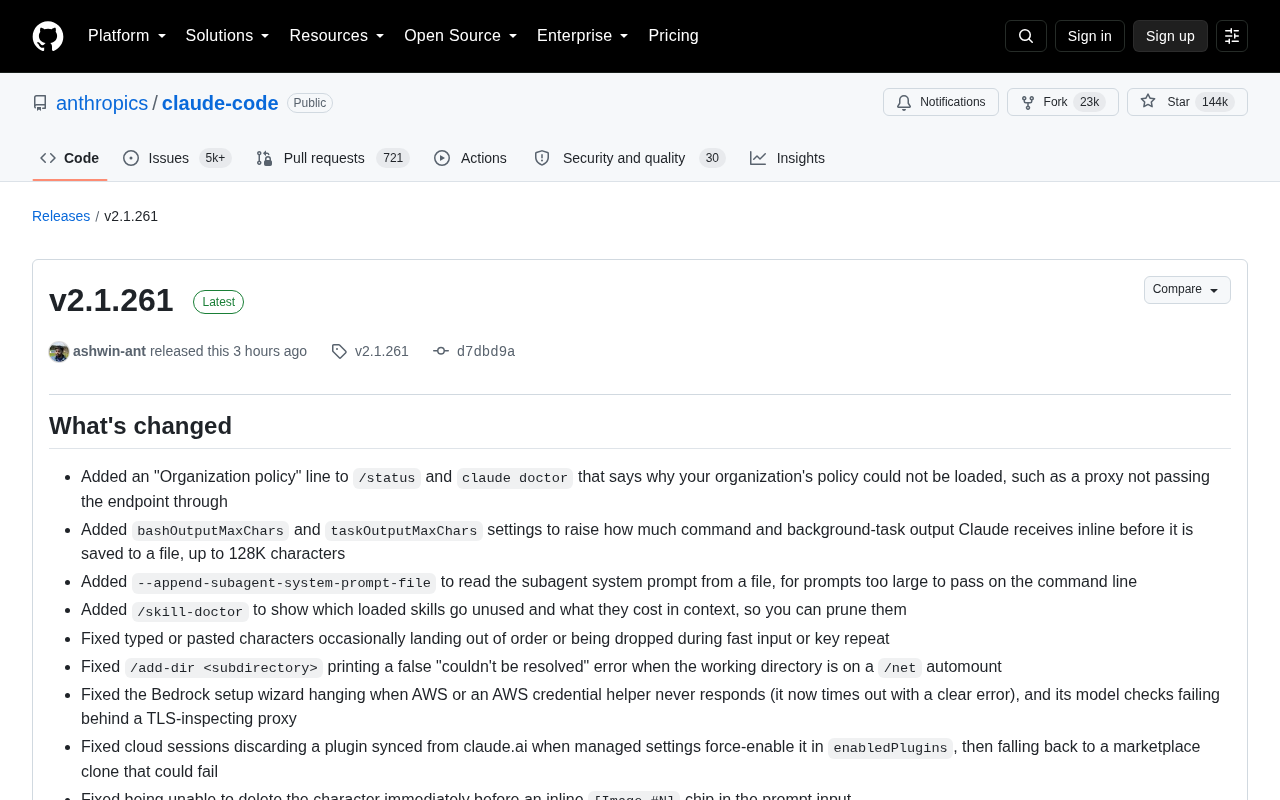
Claude Code v2.1.261 brings skill diagnostics, enhanced output handling, and Remote Control stability fixes.
Anthropic released Claude Code v2.1.261 with key additions including the /skill-doctor command for identifying unused skills and their context costs, organization policy visibility in diagnostics, and configurable 128K inline output limits. The update also delivers significant Remote Control stability fixes for enterprise environments, improved VS Code integration with MCP server management and custom styles, plus streaming rendering optimizations and better TLS inspection proxy support.
Anthropic has released Claude Code v2.1.261, bringing a series of practical features and important fixes. This update focuses on improving the development experience and system stability, particularly in the areas of organization policy management, output handling, and Remote Control functionality.
Core New Features
Organization Policy Visualization
The new version adds an "Organization policy" line to the /status and claude doctor commands, clearly displaying the reasons why organization policies failed to load. This is especially important for troubleshooting proxy configuration issues in enterprise environments—when a proxy doesn't properly forward requests to the endpoint, developers can quickly pinpoint the problem.
In enterprise deployments, Organization Policy is a set of centrally managed configuration rules that control Claude Code's behavior across an entire organization—such as restricting available models, constraining file access scope, or setting output review rules. These policies are typically distributed through the enterprise's API management platform, and Claude Code fetches the policy configuration from a designated endpoint at startup. However, in many enterprise network environments, outbound requests must pass through HTTP/HTTPS proxy servers. If the proxy is misconfigured (for example, the HTTPS_PROXY environment variable isn't set, or the proxy server intercepts but doesn't properly forward requests to the Anthropic API endpoint), policy fetching will silently fail. Previously, developers had difficulty determining whether policies were in effect and what specifically caused failures. The newly added diagnostic information now exposes the failure chain directly in the status output, significantly reducing troubleshooting costs for enterprise IT teams.
Enhanced Output Handling
This update introduces two new configuration options: bashOutputMaxChars and taskOutputMaxChars, allowing developers to increase the inline output limit for commands and background tasks up to 128K characters. Previously, output exceeding the limit was saved to a file. Now developers can adjust this threshold based on their actual needs, achieving a more seamless interactive experience.
What's meant by "inline output" is command execution results being directly embedded into Claude's conversation context, rather than referenced as an external file. This design is central to how the AI agent works: when Claude Code executes shell commands or background tasks, the output is fed back to the model as the basis for subsequent reasoning. If the output is truncated or saved to a file, the model can't directly "see" the complete results, potentially causing reasoning discontinuity or requiring additional file-reading steps. The 128K character limit translates to roughly 30,000–40,000 tokens, which is enough to accommodate the complete output of most build logs, test reports, or database query results. However, it's worth noting that larger inline output means more context window consumption, so developers need to balance information completeness against context budget. bashOutputMaxChars applies to interactive bash command output, while taskOutputMaxChars is for background subtasks launched via the Task tool.
Skill Management Diagnostic Tool
The brand-new /skill-doctor command is one of the highlights of this update. It identifies which loaded skills are not actually being used and calculates their context cost. This gives developers data-driven support for optimizing skill configurations, helping to streamline unnecessary skill loading and improve overall performance.
Claude Code's "Skills" are a structured knowledge injection mechanism. Developers can define project coding standards, architectural conventions, workflows, and other instructions through Markdown files, which are loaded into the model's system prompt at session startup to guide Claude to work according to specific patterns. Skill files are typically stored in the project's .claude/ directory and can also be referenced via the CLAUDE.md file. However, each loaded skill consumes precious context window space—this is the so-called "context cost." In large projects, accumulated skill files can number in the dozens, many of which may be outdated or irrelevant to the current task. /skill-doctor analyzes the actual reference patterns of skills in session history, quantifying each skill's token overhead and usage frequency, helping developers make data-driven optimization decisions and reserve the limited context window for what truly matters.
Remote Control Improvements
This update significantly improves Remote Control's stability and user experience:
- Fixed an issue where permission mode appeared stale when connecting to terminal sessions from a phone, browser, or the claude.ai app
- Resolved a bug where sessions still showed as running after stopping a task from a connected device
- Fixed inbound event stream failures caused by TLS inspection proxies in native Windows environments
- Improved session upload logic for
/teleport-pulled sessions, preventing duplicate content from appearing in the original session
Remote Control is Claude Code's core remote collaboration feature, allowing developers to connect from any device (phone, tablet, or another computer's browser) and control a Claude Code session running in a local terminal in real time. Under the hood, it establishes persistent connections via Server-Sent Events (SSE) or WebSocket, synchronizing terminal state changes to the remote device in real time. The main challenge this architecture faces in enterprise networks is TLS Inspection Proxies—many organizations deploy man-in-the-middle proxies at network egress points for security compliance, decrypting all HTTPS traffic for inspection before re-encrypting and forwarding it. These proxies can break the long-lived connection's event stream mechanism, preventing remote devices from receiving real-time status updates. This fix specifically addresses this scenario in Windows environments. The /teleport command is an advanced Remote Control feature that can "teleport" an ongoing session to another environment for continued execution. This fix ensures that no duplicate context content is generated during the transfer process.
VS Code Integration Enhancements
For VS Code users, this version brings several improvements:
- Added a "Build a custom style" guided workflow to help users create custom output style files
- The MCP server dialog now supports adding and removing servers directly without leaving the IDE
- Added hollow circle indicators in the session list to distinguish sessions opened in the terminal, other VS Code windows, or Claude Desktop
- Fixed an issue where session tab rename fields appeared empty after window restoration
MCP (Model Context Protocol) is an open standard introduced by Anthropic in late 2024, designed to provide AI models with a unified way to connect to external data sources and tools. In the context of Claude Code, MCP servers act as bridges between the model and external systems—they can be a service connecting to the GitHub API, an interface for querying databases, or a tool for managing Kubernetes clusters. Each MCP server exposes a set of standardized "tools" and "resources" that Claude can invoke on demand during conversations. Previously, configuring MCP servers required manually editing JSON configuration files, but this update integrates the process into VS Code's graphical interface, lowering the barrier to entry. The "Build a custom style" feature allows users to define their preferences for Claude's output format—such as code comment style, response detail level, Markdown structure, etc. These preferences are persisted as style configuration files and remain consistent across sessions.
Performance Optimizations and Bug Fixes
Beyond new features, v2.1.261 includes numerous performance optimizations and bug fixes:
- Improved streaming rendering performance—already rendered blocks no longer recheck layout on every update
- Optimized the Google Vertex AI startup flow, reducing unnecessary process creation
- Fixed character order scrambling or loss during rapid typing or key repeat
- Enhanced support for TLS inspection proxies, resolving multiple enterprise proxy-related connection issues
- Improved timeout handling in the Bedrock setup wizard
Streaming Rendering is a critical technical component of Claude Code's terminal interface. As the model generates responses token by token, the terminal needs to render this content in real time as formatted text—including code highlighting, Markdown tables, diff views, and more. In the previous implementation, every time a new token arrived, the entire rendered area would trigger a layout reflow, causing noticeable rendering stuttering during long responses. The optimized approach adopts an incremental rendering strategy, performing layout calculations only on newly added content, significantly improving fluidity in long-output scenarios.
Google Vertex AI and Amazon Bedrock are the two major cloud hosting platforms for Claude models, allowing enterprise customers to deploy and call Claude within their own cloud accounts to meet data residency and compliance requirements. Claude Code, as a client tool, needs to authenticate and communicate with these platforms. The Vertex AI startup optimization reduces unnecessary subprocess creation during the authentication handshake (previously, the gcloud CLI might be called repeatedly to fetch credentials), while the Bedrock setup wizard's timeout improvement ensures that the configuration flow won't be interrupted by AWS STS token acquisition timeouts in regions with high network latency.
Other Improvements
This update also includes several refinements:
- The model selector now displays recognizable model names instead of raw IDs
- Enhanced safety prompts for dangerous
rmcommands, covering more usage scenarios - Adjusted prompt editing shortcuts to match Bash conventions
- Improved
/contexttoken counting, using local estimation when the API is unavailable
Human-readable model name display is a seemingly minor but experience-enhancing improvement. In multi-model environments, developers may switch between different versions like Claude Sonnet 4 and Claude Opus 4. Previously, raw model IDs like claude-sonnet-4-20250514 were displayed; now they've been replaced with more intuitive readable names. The /context command is used to view the context usage of the current session, including the token count consumed by system prompts, skill files, conversation history, and other components. Precise token counting typically requires calling the model's tokenizer API, but in offline scenarios or when the API is unavailable, the new version uses local estimation methods based on open-source tokenizers like tiktoken, ensuring developers can always monitor their context budget usage.
The thoroughness of the changelog reflects the Anthropic team's strong commitment to user feedback. These improvements span everything from core functionality to edge cases, and the optimizations for enterprise environments and multi-device collaboration scenarios in particular show that Claude Code is evolving toward a more mature enterprise-grade development tool.
Related articles

Chain of Thought Isn't Just for AI: How Humans Can Use CoT to Improve Thinking Quality
Chain of Thought isn't just a prompt trick for large models. Starting from a Hacker News discussion, this article analyzes why CoT works for human thinking too, breaks down actionable ways to transfer it, and highlights the key differences between human CoT and machine CoT.
Cloudflare Teams Up with OpenAI: Closi…
Cloudflare Teams Up with OpenAI: Closing the Loop from Vulnerability Discovery to Defense with AI
Cloudflare uses OpenAI Daybreak to investigate security vulnerabilities and generate reviewable remediation plans, while developers use Codex to boost coding efficiency and quality.

Orca Multi-Agent Orchestration in Practice: A Guide to Parallel Collaboration with Claude and Codex
Orca is Stable AI's free open-source agent workbench supporting 34 agents like Claude Code and Codex in parallel. Learn its Git worktree isolation, multi-model orchestration, and mobile management.