Claude Code v2.1.275 Update Breakdown: Stability Overhaul and Account Sync Upgrades
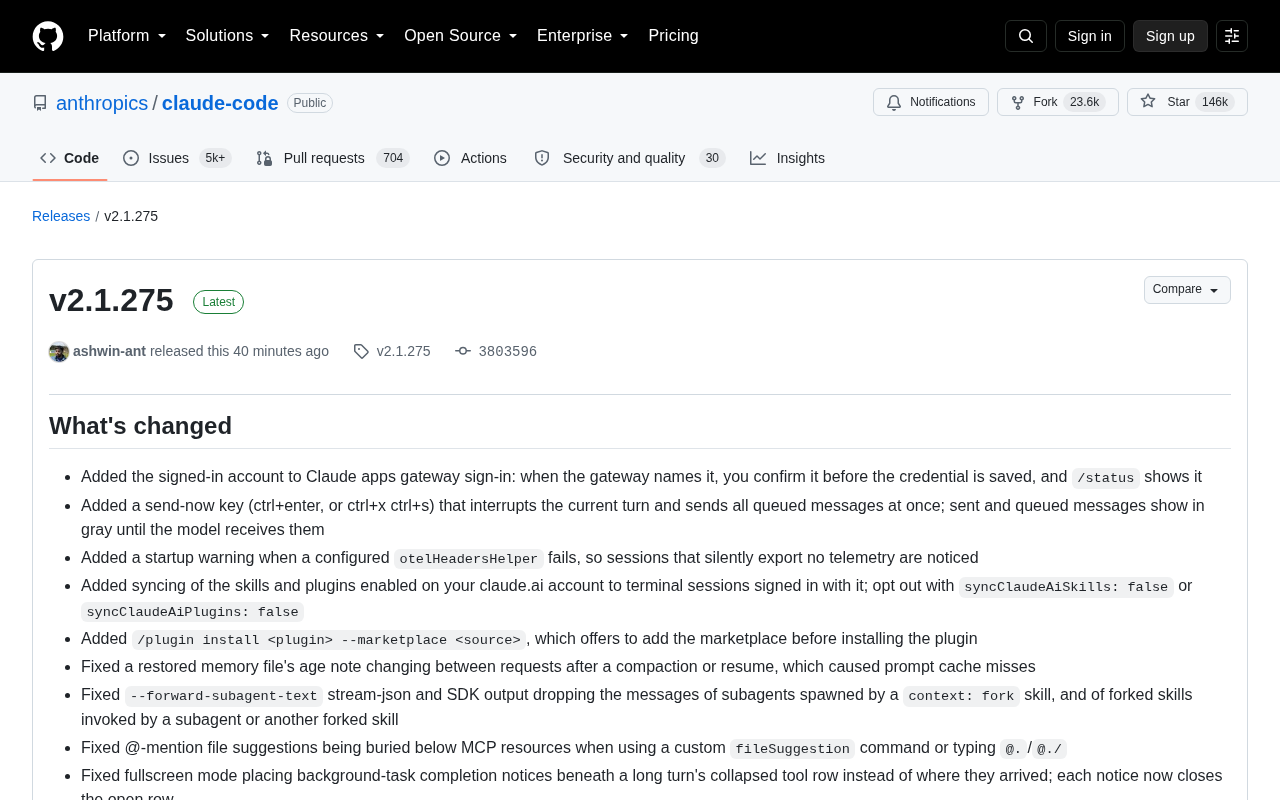
Claude Code v2.1.275 focuses on session reliability, plugin security, and VS Code integration polish.
Anthropic's Claude Code v2.1.275 is a stability-focused maintenance release. Key improvements include automatic sync of claude.ai skills and plugins to terminal sessions, npm plugin installation via `--ignore-scripts` with integrity verification to close supply chain attack risks, numerous crash fixes for session restoration (`--resume`/`--continue`) caused by malformed transcript files, and VS Code improvements including per-change diff review, a memory management panel, and scrolling experience fixes. The enterprise-facing Claude Tag (Slack integration) also expands access bundle applicability and fixes a silent model revert issue. Overall, this update's value lies in improving the tool's trustworthiness and smoothness rather than introducing new capabilities — a priority upgrade for developers who rely heavily on Claude Code.
Anthropic's terminal AI coding tool Claude Code has received a v2.1.275 update. This release doesn't introduce any headline-grabbing new features, but delivers substantial improvements across stability fixes, account synchronization, plugin security, and VS Code integration. For developers who rely on Claude Code in their daily workflow, this is a polish-focused release well worth upgrading to.
Account Sync and Session Experience Enhancements
The most noteworthy change in this update is the tighter integration between claude.ai accounts and terminal sessions. Skills and plugins you've enabled on your web account now automatically sync to your logged-in terminal sessions. If you don't need this, you can disable it via syncClaudeAiSkills: false or syncClaudeAiPlugins: false. This makes the experience more consistent across devices and environments.
On the interaction side, a new "Send Immediately" shortcut has been added (ctrl+enter, or ctrl+x ctrl+s) that interrupts the current turn and sends all queued messages at once. Sent and queued messages now appear grayed out before the model receives them, providing clearer visual feedback. Additionally, the Claude apps gateway login flow now includes an account confirmation step — when the gateway provides an account name, you must confirm before credentials are saved, and /status will display the logged-in account.
Large-Scale Crash and Recovery Fixes
If there's one central theme to this update, it's "session reliability." The development team has fixed a large number of crashes related to --resume, --continue, and session restoration:
- Resuming sessions containing malformed task-reminder or @-file attachment entries no longer fails;
- Restoring conversations with malformed message entries no longer crashes, and scrolling through such conversations in full-screen mode while receiving new messages no longer crashes either;
- Sessions with malformed message content blocks in saved records can now be properly resumed or started;
- A startup crash caused by a corrupted
mcpNeedsAuthNoticedvalue in~/.claude.jsonhas been fixed.
These fixes reflect a real-world challenge: as session histories grow longer and cross-machine usage becomes more frequent, the robustness of transcript files becomes critical to the tool's usability. The team also fixed issues where Grep, Glob, and @-file searches would hang or overflow memory when exceeding the 20MB output limit, as well as a bug where the Read tool would hang rather than report an error when decoding failed under memory pressure.
Transcripts are the core mechanism Claude Code uses to persist session history — typically stored locally as JSON files, recording message content blocks, tool call results, and metadata from each conversation turn. As sessions grow longer or are synced across machines, the likelihood of malformed entries appearing in these files increases — for example, missing fields, encoding anomalies, or incomplete structures. Previously, Claude Code lacked fault-tolerant logic when parsing such files, causing entire sessions to fail to restore or even crash on startup. The essence of this fix is adding more robust error handling at the deserialization layer: when an entry cannot be parsed, it is skipped or gracefully downgraded rather than throwing an uncaught exception. This is especially important for long-time users, since older sessions are more likely to trigger these crashes due to data format issues left behind by earlier versions.
Significant Plugin Security Improvements
Security hardening of the plugin ecosystem is another highlight of this update. Plugins installed from npm sources are now fetched using npm pack --ignore-scripts and undergo integrity verification — meaning a package's install scripts no longer run automatically. This closes a potential supply chain attack vector.
Several credential leakage issues have also been fixed: plugin messages, logs, claude plugin marketplace list output, and the VS Code plugin dialog previously could display passwords or tokens stored in git, ssh, or marketplace URLs — these are now hidden. A bug where claude plugin marketplace update would delete the local copy when a fetch failed and the marketplace was named after a repository has also been resolved.
A new /plugin install <plugin> --marketplace <source> command simplifies the installation flow by proactively prompting users to add the corresponding marketplace before installing.
npm pack --ignore-scripts is a packaging/fetching method provided by npm whose core function is to download package contents while skipping the execution of lifecycle scripts such as preinstall, postinstall, and prepare. These scripts run automatically during a normal installation and are a common vector for supply chain attacks — attackers can embed malicious postinstall scripts in open-source packages that execute arbitrary code on a user's machine the moment they install the package. The 2021 ua-parser-js incident and the 2022 node-ipc incident are both examples of this. By switching to --ignore-scripts combined with integrity verification (comparing package content hashes against registry records), Claude Code significantly narrows the attack surface of plugin installation — even if a plugin package itself has been maliciously tampered with, it cannot automatically execute code during the installation phase.
Extensive VS Code Integration Polish
This update amounts to a dedicated optimization sprint for the VS Code extension. New features include: viewing, editing, and deleting saved memories directly within the Memory dialog; sending attached images without needing to type any text; a retry link when the MCP server list fails to load; and individual accept/reject buttons for each change under the suggested diff tab, enabling line-by-line review.
Experience fixes densely cover pain points around scrolling, session restoration, and permission modes. For example, a new claudeCode.scrollToBottomOnSend setting lets you disable the automatic scroll-to-bottom behavior when sending a message; a fix addresses conversations being forcibly pulled back to the bottom as streamed replies arrive. The agent map has also been improved — running agents now show a count, pills turn red on failure, and agents are sorted by status and end time. A regression introduced in 2.1.269 where renaming a running session would revert to the generated name has also been fixed.
Claude Tag and Enterprise Integration
Claude Tag (the Slack integration) aimed at teams and enterprises also receives substantive updates. Access bundles now support additional conditions, allowing Owners to apply a bundle to channels containing guests or Slack Connect members, rather than only pure-member channels. Credential presets have been expanded to cover monitoring services including Amazon CloudWatch, SNS, and Google Cloud Monitoring, while Datadog gains new site presets (US3, AP1, AP2) with routing restricted to read-only queries.
On the reliability side, the team resolved an issue where a model switched within a Slack thread would silently revert to the channel default after a session restart, as well as a case where Claude would occasionally reply twice when @-mentioned by another bot. These details matter significantly for teams that make heavy use of Claude within Slack.
Slack Connect is Slack's cross-organization channel feature that allows members from different companies' workspaces to collaborate in a shared channel, while guest accounts refer to external users invited into a workspace who don't belong to that organization. Previously, Claude Tag's access bundles could only be applied to purely internal member channels, limiting their use in cross-company collaboration scenarios. This update allows Owners to extend bundles to channels containing guests or Slack Connect members, meaning enterprises can now uniformly manage Claude's permission scope and credential configuration even when collaborating with external partners — without needing to maintain a separate policy for external-facing channels.
Overall Assessment
v2.1.275 is a quintessential "internal cultivation" release. It doesn't showcase a flashy new model or capabilities, but instead focuses on session reliability, plugin security, and cross-environment consistency. For developers who have deeply embedded Claude Code into their workflows, these kinds of fixes often deliver more practical value than new features — because a tool's worth ultimately comes down to whether it's stable, trustworthy, and doesn't interrupt your train of thought. Existing users are encouraged to upgrade soon, especially those who frequently use session restore and plugin functionality.
Related articles

NVIDIA cuML Accelerates Spectral Clustering: 100x+ Speedup Over Scikit-Learn Benchmarked
NVIDIA cuML lets Scikit-Learn spectral clustering run on GPU without code changes, delivering 200x+ speedups on large datasets. Learn how it works and how to use it.

Google DeepMind Launches New Institute to Bring the AGI Debate into the Open
Google DeepMind has launched a new institute to bring AGI debate into the public sphere. We analyze what this signals about the shift from technical competition to AI governance.
How Cooley Is Reinventing IPO Legal Workflows with ChatGPT: A Look at the GO Public Tool
Cooley built GO Public on ChatGPT Work to accelerate IPO legal workflows, helping lawyers catch issues earlier and focus judgment where it matters most.