Claude Code v2.1.277 Update: AGENTS.md Support and Extensive Stability Fixes
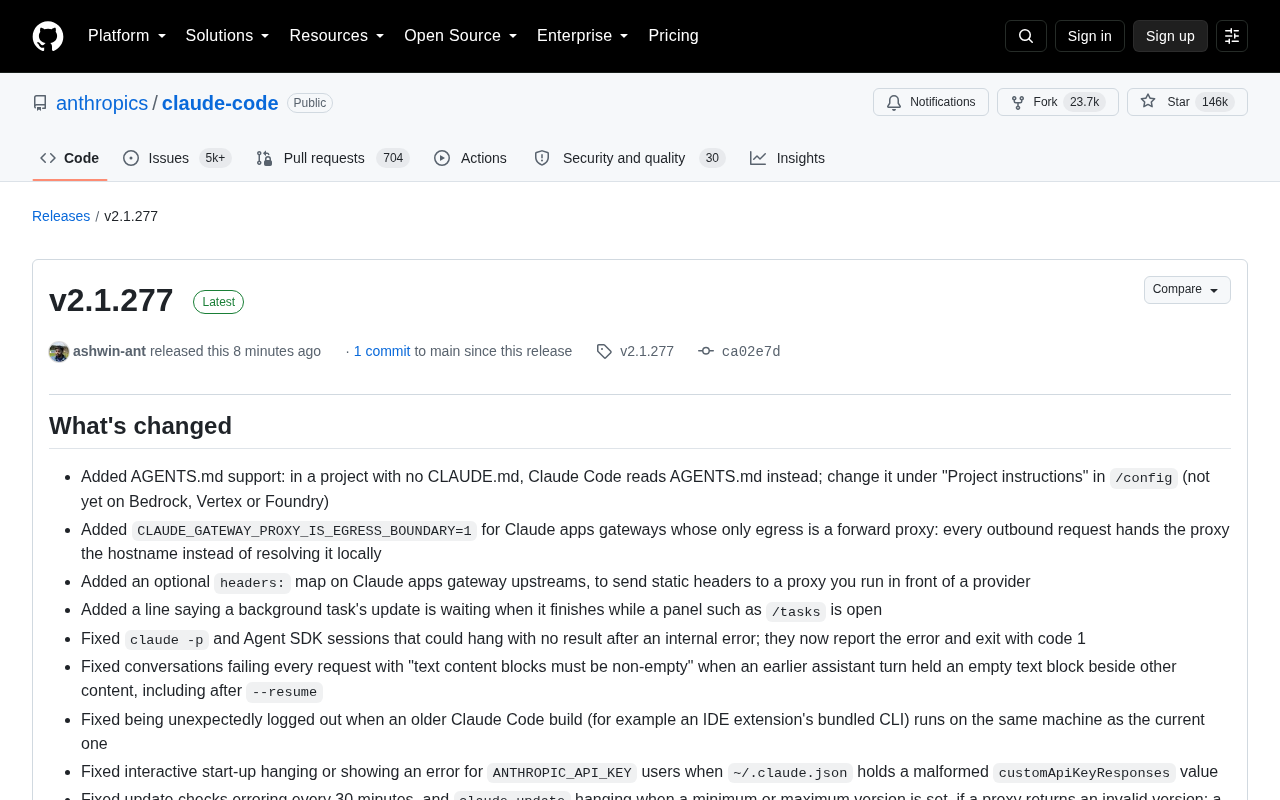
Claude Code v2.1.277 adds AGENTS.md support and fixes dozens of crashes, hangs, and security issues.
Anthropic's Claude Code v2.1.277 is a release centered on production reliability. The standout new feature is support for `AGENTS.md` — automatically reading this file in projects without `CLAUDE.md`, embracing the cross-tool Agent configuration convention gaining industry traction. The update also fixes dozens of crash and hang issues across malformed configs, terminal color codes, and slow-machine edge cases, adds source labeling for subagent output to narrow the Prompt injection attack surface, corrects behavior in Edit, Write, Grep, and Glob tools, and delivers VS Code and web experience upgrades alongside stronger enterprise gateway and cloud permission governance.
Anthropic's AI coding tool Claude Code has released version v2.1.277. The most notable functional addition in this update is support for the AGENTS.md configuration file, alongside a large number of stability fixes and experience improvements spanning CLI, VS Code extension, web interface, and enterprise Claude Tag scenarios. For developers who rely on Claude Code in daily workflows, this is an iteration centered on stability above all else.
Core New Feature: AGENTS.md as a Universal Convention
The most significant change in this update is that Claude Code now reads AGENTS.md files. The logic works as follows: in a project without a CLAUDE.md, Claude Code will fall back to reading AGENTS.md as the project instruction file, which can be modified under "Project instructions" in /config.
AGENTS.md is emerging as a universal configuration convention across AI coding tools, with Agent tools from multiple vendors converging on this standard. Claude Code's support for it means developers can maintain a single, shared Agent instruction file rather than writing separate configurations for each tool. Note that this feature is not yet available on Bedrock, Vertex, or Foundry platforms.
For enterprise network environments, this update introduces the CLAUDE_GATEWAY_PROXY_IS_EGRESS_BOUNDARY=1 environment variable, designed for gateway scenarios where the sole egress point is a forward proxy — each outbound request passes the hostname to the proxy for resolution instead of resolving it locally. A new headers: static header mapping capability has also been added for gateway upstreams, making it easier to pass fixed request headers to self-hosted proxies. These details signal Claude Code's continued investment in enterprise deployment and network compliance.
CLAUDE.mdis Claude Code's original project-level configuration file format, where developers can specify code style requirements, directory structure guidelines, and file operation restrictions. Claude Code automatically reads this file on startup and injects it into the model as context.AGENTS.mdis a more universal naming convention that has emerged organically within the AI coding tool ecosystem — OpenAI Codex, Cursor, and other tools recognize this file to varying degrees, with the core idea being "one config, shared across multiple tools." When a team uses multiple AI coding assistants simultaneously, maintaining multiple nearly-identical configuration files with different names creates unnecessary overhead.AGENTS.mdattempts to fill this gap, functioning as a cross-tool convention layer similar to.editorconfig. Claude Code's approach of "falling back toAGENTS.mdwhenCLAUDE.mdis absent" is a non-breaking, incremental integration — projects with existingCLAUDE.mdfiles are unaffected.
Dozens of Crash and Hang Issues Resolved
If the feature additions are the highlight reel, the true substance of this release is the extensive fix list spanning dozens of entries, many targeting severe issues like crashes and hangs.
Notable fixes include: claude -p and Agent SDK sessions that could hang indefinitely without output after an internal error will now report the error and exit with code 1; startup crashes caused by malformed values for theme, customApiKeyResponses, claudeAiMcpEverConnected, and other fields in ~/.claude.json are now handled gracefully; and an "unrecoverable interface error" crash triggered by terminal color codes in prompts (such as text loaded from history or an external editor) has been resolved.
Another class of fixes addresses slow or high-load machines: sessions occasionally exiting at the first spinner, screen updates stopping after a render error, and Windows showing "Out of memory" immediately after a response (leaving tool calls unexecuted). These edge-case fixes demonstrate that Claude Code is being polished to a level of reliability suitable for production environments.
Also noteworthy are several security-related improvements: subagent results now include a clearly labeled header identifying the content as "subagent output" and are presented with indentation, preventing text returned by subagents from being mistakenly interpreted as instructions for the current session. Similarly, agent() prompts computed by workflow scripts on Bedrock, Vertex, and Foundry are now framed as "text authored by the script writer," preventing security classifiers from misreading them as user input. This represents a meaningful reduction in the Prompt injection attack surface.
Prompt Injection is a security threat in AI Agent scenarios: attackers embed text disguised as system or user instructions within external content the model reads (such as web pages, files, or subtask return values), attempting to hijack model behavior. In multi-layer Agent architectures, subagent output is consumed as context by the parent agent. If subagent-returned text is trusted unconditionally, malicious content could be executed as legitimate instructions. This update's improvements to "source labeling" for subagent results and script-generated prompts fundamentally establish trust boundaries within the model's context window — clearly distinguishing who said what, so that both security classifiers and the model itself can properly assess content trustworthiness rather than treating all input equally.
Refined Tool and Editing Capabilities
The Edit, Write, Grep, and Glob tools that developers use frequently have also received targeted fixes.
The Edit tool previously had two easy-to-hit issues: it would misinterpret an escaped backslash followed by uXXXX text as a \uXXXX escape sequence, potentially corrupting non-ASCII character edits; and for oversized edits containing non-ASCII text that failed to match, it would report "regular expression too large" instead of the more accurate "String not found in file." Both issues are now fixed. The Write tool no longer silently ends the turn with a "permission denied" error when the target path is an existing directory — it now provides a clear error message.
Grep and Glob would previously report "no matches" when the system ran out of processes, memory, or file handles and couldn't launch a search process. They now return an explicit error message instead. These fixes may seem minor, but they directly affect how much developers can trust tool results — a false "no matches" could lead to entirely incorrect conclusions.
Prompt handling has also been enhanced: invisible Unicode formatting and tag characters are now stripped from prompts, and the cleaned prompt is displayed for user confirmation before sending. This serves as both a security measure and an improvement in predictability.
Unicode formatting characters (such as zero-width joiners U+200D, directional control characters U+202E, tag characters in the U+E0000 range, etc.) are another common vector for prompt injection: these characters are invisible in terminals and rich-text interfaces, but language models can "see" them and may have their parsing and behavior influenced. Attackers can embed hidden instructions in seemingly normal code comments, documentation, or clipboard content — when developers paste such content into prompts, the hidden characters enter the model's context. Claude Code's proactive cleaning and display of the cleaned result before sending, allowing developers to confirm what's actually being sent, is an effective engineering defense against this form of "steganographic injection."
Plugin, VS Code, and Web Experience Upgrades
On the plugin side, claude plugin install could previously fail and corrupt an installed copy when reinstalling a plugin version that was in use by a session or another process. It now leaves the unchanged copy intact. Issues with official marketplace plugins not recording commits, and stale commits persisting after updating pinned-commit plugins, have also been fixed.
The VS Code extension gains several useful additions: a "Sign out" entry in the panel menu, background shells and running tasks added to the agent map with individual stop controls, a "Copy response" button and /copy command added to responses, and a one-time notification with an "Unarchive all" action when inactive sessions are auto-archived. Bugs with effort slider levels and /fast default mode not persisting across sessions have also been fixed.
For the web interface (Claude Code on the web), Team and Enterprise plans now feature Personal and Organization sections in the environment selector, with admins able to share personal environments with their organization. Organization environments now open read-only from the Code tab, with editing moved to Admin settings. The "Web" tab in enterprise admin settings has been renamed to "Cloud sessions" for clarity.
Conclusion: An Iteration Built for Production Reliability
Looking at the v2.1.277 changelog as a whole, while the functional additions have their highlights (especially AGENTS.md support), the dominant theme is clearly stability and reliability. Dozens of crash fixes, tool behavior corrections, and security hardening for subagent and script prompts all point toward a single goal: making Claude Code more trustworthy in real, complex, long-running development environments.
For individual developers, AGENTS.md compatibility and the VS Code experience improvements are worth prioritizing. For enterprise users, the gateway proxy support, Claude Tag credential presets, and cloud environment permission governance updates are more directly valuable. This kind of "less storytelling, more bug-fixing" release cadence is precisely the mark of a productivity tool reaching maturity.
Related articles

CSS Anchor Positioning: A New UI Positioning Approach Without JavaScript
A deep dive into CSS Anchor Positioning: from anchor-name and position-anchor to the anchor() function, position-area shorthand, position-try-fallbacks, anchor-size, and upcoming anchor queries.

New AI Chart Interaction: Continuous Follow-up Questions and Visualization in Conversation
Explore a new AI interaction method for continuously generating charts in conversation. Use the /visualize command to ask follow-up questions and visualize answers in the same chat window, improving data analysis efficiency.

Cursor Merges Into X Subscription: Paid Plans Share Unified Usage Pool, Grok Model Coding Usage Doubled
Cursor joins The X Subscription with a unified usage pool and doubled Grok coding quota. Third-party models shift to API pricing. Existing users can keep or migrate plans.