Claude Code v2.1.288 Update Deep Dive: Comprehensive Stability and Security Improvements

Claude Code v2.1.288 is a maintenance release focused on session restore, security fixes, and plugin stability.
Claude Code v2.1.288 is a stability- and security-focused maintenance release. New additions include draft recovery, a customizable `/code-review` findings limit, and agents view shortcuts. More significantly, it fixes a core bug where long conversations errored instead of triggering auto-compact, multiple data-loss bugs in `--resume`, and a critical security issue where dangerous `rm` commands inside `bash -c` scripts ran silently in `bypassPermissions` mode. The plugin system, MCP protocol handling, and cloud collaboration scenarios each received dense stability fixes.
Anthropic's AI coding tool Claude Code recently released version v2.1.288. Unlike typical updates that lead with flashy new features, this release reads more like a thorough engineering polish — with limited new capabilities but a concentrated effort to fix a wide range of issues spanning session restoration, permission security, the plugin system, and cloud collaboration. For developers who rely on Claude Code in their daily workflows, this kind of update often delivers more practical value than headline-grabbing new features.
New Features: Quality-of-Life Improvements in the Details
The additions in this update are modest but targeted at real pain points. One of the most welcome improvements is draft recovery — after clearing a prompt with Ctrl+C, pressing the up arrow on an empty input box restores the previous draft, including any pasted text and images. It's a thoughtful touch for developers who've groaned after accidentally wiping a carefully crafted prompt.
On the command-line side, /code-review now accepts a --max-findings <n>|all parameter, letting users customize the maximum number of reported issues — either raising or lowering the default limit — with the setting persisting until manually reset. The agents view also gains Ctrl+F to search sessions by name and Alt+↑/↓ to jump between groups, both of which can be customized in keybindings.json.
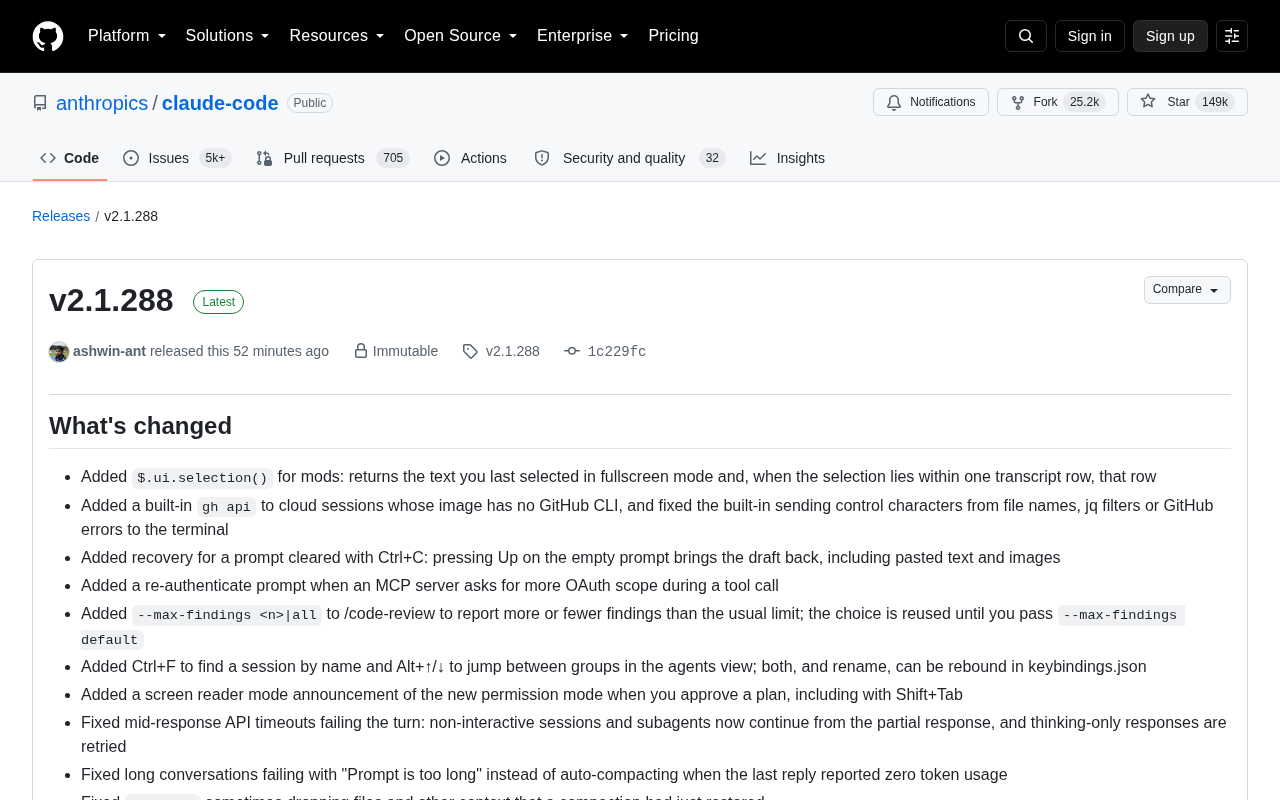
Accessibility (screen reader) support has also been strengthened: approving a plan now announces the new permission mode status, including scenarios triggered via Shift+Tab. When an MCP server requests additional OAuth permissions during a tool call, a re-authentication prompt now appears, preventing silent failures.
Session Restoration and Long Conversations: Addressing Core Pain Points
Session management is a critical capability in Claude Code, and this update delivers several targeted fixes. The most notable is handling of long conversation failures — previously, when the last reply reported zero token usage, a long conversation would error with "Prompt is too long" instead of triggering auto-compact. That logic has now been corrected.
The --resume feature also received fixes for several subtle bugs: occasional loss of files and context recovered by a compaction operation upon resuming; resumed sessions sometimes not saving the last reply, causing the prompt to appear unanswered; and script truncation when loading while rewriting files within the same session. A fix was also applied for conversations resumed from v2.1.286 or earlier losing the model's earlier thinking process.
In API timeout scenarios, a mid-response timeout no longer causes the entire turn to fail — non-interactive sessions and subagents now continue from a partial response, and responses containing only thinking content are retried. These improvements significantly increase the robustness of long-running tasks.
Permissions and Security: Closing Potential Vulnerabilities
Security-related fixes are among the most important changes in this release, with one standing out in particular: in bypassPermissions mode or under shell allow rules, dangerous rm commands inside bash -c or sh -c scripts — such as deletions targeting the root directory / or home directory ~ — previously ran silently without any prompt. This has been fixed so a confirmation prompt is now shown (issue #96300). Catching these potentially destructive operations is a meaningful safeguard for user data.
Permission validation logic has been tightened in several other areas: the Bash tool now prompts before BASHPID assignments are evaluated as arithmetic by the shell; PreToolUse and PermissionRequest hooks no longer silently skip when a match fails or tool input cannot be serialized to JSON — they now block the call outright, preventing permission checks from being inadvertently bypassed.
Auto mode also received fixes for several incorrect judgments, such as the entire session mistakenly switching to the local classifier after a request to an older model on Bedrock and Mantle. Additionally, when a conversation grows too long for the client-side safety classifier to review, the system now performs compaction rather than prompting or failing on every tool call — balancing safety with efficiency.
What is
bypassPermissionsmode?bypassPermissionsis a high-privilege execution mode in Claude Code that allows automated scripts or CI environments to skip interactive permission confirmations, enabling unattended continuous execution. While this improves automation efficiency, it also introduces security risks: operations that would normally require user confirmation — such as broad file deletions — are executed directly. The core issue fixed here is thatbash -corsh -claunches a shell as a subprocess, and commands inside it follow a different permission-checking path than direct tool calls. This allowedrm -rfcommands targeting/or~to bypass safety checks. After this fix, even inbypassPermissionsmode, destructive deletion operations trigger a confirmation prompt, guarding against data disasters caused by misconfiguration or prompt injection attacks.
Dense Fixes for Plugins, MCP, and Cloud Collaboration
The plugin system received a wave of fixes in this release, including: plugin LSP servers receiving unreplaced ${user_config.*} and ${CLAUDE_PLUGIN_ROOT} placeholders; the git-subdir plugin failing to install on older git versions (pre-2.39, such as the 2.34 shipped with Ubuntu 22.04); and background sessions unexpectedly terminating when a plugin was reloaded or disabled. claude plugin install now automatically falls back to HTTPS cloning on macOS/Linux machines that lack GitHub SSH keys.
On the MCP (Model Context Protocol) front, fixes were applied for tool calls being executed twice when a remote server result exceeded 16 MB or couldn't be parsed, and for user-configured MCP server tools named memory in Claude Desktop failing to be passed to subagents.
Cloud sessions and Cowork collaboration also saw numerous improvements: fixes for restoring organization-disabled models after a restart, WebFetch permission prompts leaving a session stuck in a waiting state, and prompt suggestions not appearing when a phone joins a Cowork session initiated from another device. VSCode integration and Claude Tag (Slack integration) each received several fixes for authentication, keyboard shortcuts, and thread tracking.
What is MCP (Model Context Protocol)? MCP is an open protocol standard introduced by Anthropic to unify how AI models interact with external tools and data sources. The core idea is similar to an "interface" in programming: any tool or service that implements the MCP spec can be called directly by compatible AI clients like Claude Code, without needing custom adapters for each tool. MCP servers can run locally or be hosted remotely, exposing tool capabilities, resource access, and prompt templates to models via a standardized message format. The "tool call being executed twice when a remote server result exceeds 16 MB" bug fixed here is a protocol-handling defect under edge conditions — when the client failed to parse an oversized response, it didn't correctly mark the call state, triggering retry logic and potentially causing side effects to execute twice.
Behavior Changes: Worth Noting
Beyond fixes, a few behavior changes warrant attention. The claude project purge command has been renamed to claude purge; the old name still works but will print a deprecation notice. Background command time limits now apply only to unattended sessions (-p, Agent SDK, CI, cloud) — terminal, desktop app, and VS Code sessions are no longer affected.
/autocompact now saves the auto-compact window per model, so each model retains its own setting when you switch. The client-side auto mode classifier now ignores ANTHROPIC_DEFAULT_SONNET_MODEL values pinned to Claude Sonnet 5.5 or Opus 5.5, defaulting to Claude Sonnet 5 instead.
Summary
v2.1.288 is a textbook maintenance release — no groundbreaking new features, but a substantial amount of careful work on stability, security, and edge case handling. The dangerous rm command interception, long-conversation auto-compact logic, and session restoration data integrity fixes in particular have a direct impact on daily usability and data safety. For developers who use Claude Code heavily, upgrading promptly is recommended to benefit from a more reliable workflow.
Related articles

JobRunner MCP Server: AI Agents Can Now Fix Failed Java Jobs
JobRunner launches an open-source MCP server enabling AI agents to view cluster status, diagnose failures, and recover Java jobs—incident response from any cloud coding environment or existing agent.

MLAI Digital Launches 9 Security Agents: MCP Server Safeguards the Full Lifecycle of Agentic AI
MLAI Digital launches Security MCP Server with nine built-in specialized security agents covering vulnerability discovery, attack simulation, prompt injection detection, API and infrastructure assessment, and accelerated remediation—embedding security validation across the full Agentic AI lifecycle from development to production.

Running Isaac Lab on H100 GPUs: Exploring Better Approaches
Exploring optimization methods for running Isaac Lab on NVIDIA H100 GPUs, including MIG configuration, mixed precision, TensorRT acceleration, and community experience to improve robotics simulation and reinforcement learning efficiency.