Claude Code v2.1.330 Update Explained: Organization Login, Built-in Charts, and a Massive Batch of Fixes

Claude Code v2.1.330 focuses on enterprise login, a built-in charting tool, and many stability fixes.
Claude Code v2.1.330 is a stability-focused update with enterprise organization login, the built-in charting tool easel, and self-hosted runner metrics. It fixes compaction freezes, WebFetch stalls, multi-process settings loss, worktree deletion, and empty --continue/--resume sessions, while improving Windows and Linux performance and extending scheduled task runtime to 30 days.
Version Overview
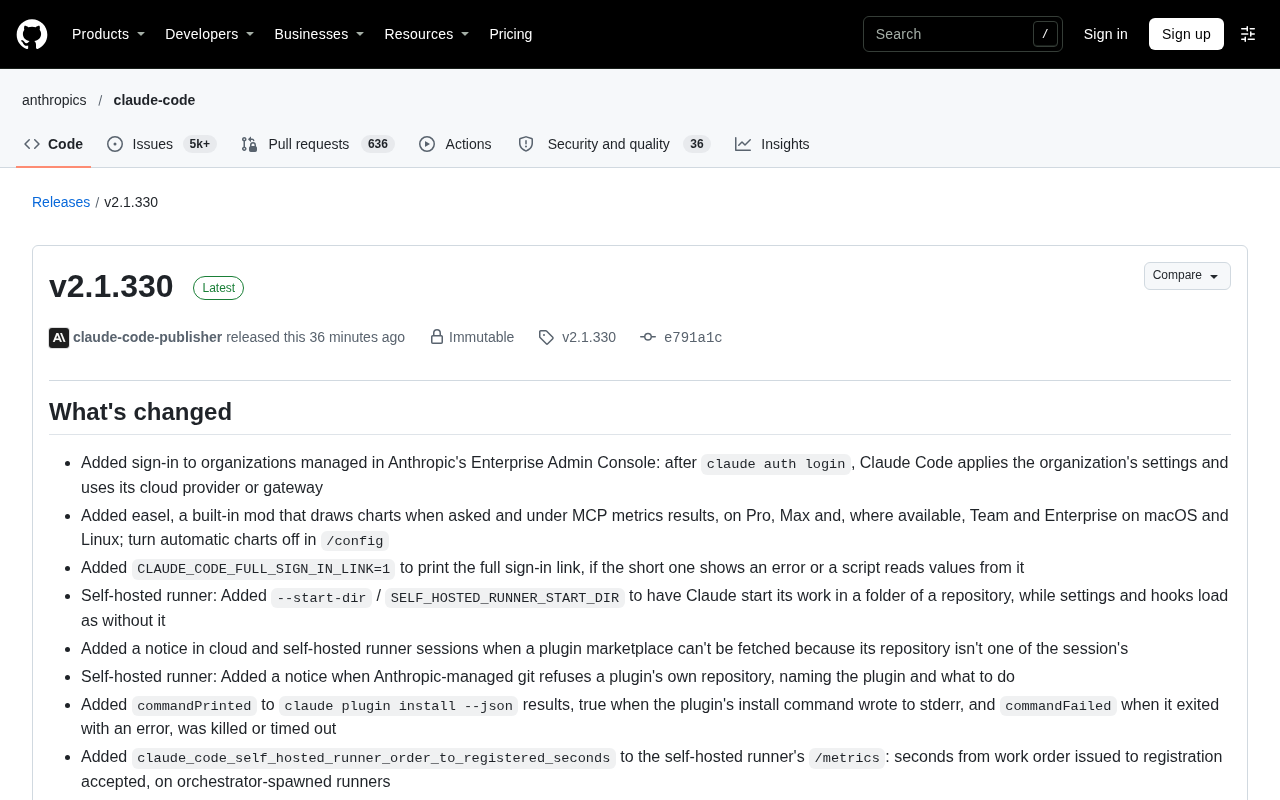
Claude Code has released v2.1.330, a fairly large-scale update focused primarily on stability. According to the GitHub Release changelog, this update includes a large number of bug fixes while introducing enterprise-grade login management, a built-in charting tool (easel), and several enhancements to self-hosted runners. For developers who use Claude Code day to day, this version noticeably improves long sessions, MCP integration, and the cross-platform experience.
Enterprise Organization Login and Permission Management
The new version adds the ability to sign in to organizations managed by the Anthropic enterprise admin console. After running claude auth login, Claude Code applies that organization's settings and uses the organization-configured cloud provider or gateway. This is a key addition for teams that need centralized management of AI tool access in enterprise environments.
A new CLAUDE_CODE_FULL_SIGN_IN_LINK=1 environment variable has also been added to print the full login link, solving the problem of short links being unusable in certain scripts or error scenarios. In addition, the login links shown by /login and claude setup-token are now significantly shorter, improving the experience.
easel: Built-in Charts and MCP Metrics Visualization
This update introduces a built-in mod called easel that can draw charts when asked, and can display charts beneath MCP metrics results. The feature is available on Pro, Max, and, where applicable, Team and Enterprise plans, and supports macOS and Linux. Users can disable automatic charts in /config.
Interestingly, if the MCP allowlist or denylist excludes this built-in charting tool, a warning will no longer pop up repeatedly at startup, but the tool remains blocked.
MCP (Model Context Protocol) is an open protocol launched by Anthropic in late 2024 to standardize how AI models connect to external data sources and tools. Developers can expose capabilities such as databases, file systems, and third-party APIs to Claude through MCP servers, and Claude calls them on demand during a conversation. In ops and observability scenarios, MCP servers are often used to pull metric data (such as Prometheus query results), and easel is precisely what lets these structured metric results be presented directly as charts, without users having to manually move data into a charting tool. The "MCP allowlist/denylist" mentioned in the article is an enterprise control mechanism: administrators can declare which MCP servers or tools are allowed to be called, and tools not on the allowlist are blocked to prevent sensitive data leakage or unauthorized operations.
Self-Hosted Runner and Metrics Enhancements
Self-hosted runners received several targeted improvements. A new --start-dir parameter and SELF_HOSTED_RUNNER_START_DIR environment variable allow Claude to start working in a subfolder of the repository while keeping settings and hooks loaded the same way.
The /metrics endpoint adds two new metrics: claude_code_self_hosted_runner_order_to_registered_seconds (the time from an order being issued to registration being accepted) and claude_code_self_hosted_runner_order_to_first_session_seconds (the time from an order to the first session handoff). These metrics give ops teams finer-grained visibility into scheduling latency.
In addition, several self-hosted runner scenarios have been fixed, including sessions being ignored after a failure report was lost, prompt cache being lost after a restart, and permission-prompt tool calls disappearing.
Self-hosted runner refers to an execution environment deployed by users on their own infrastructure to handle Claude Code session tasks, commonly found in enterprises with strict requirements for data residency and network isolation. It typically receives an "order" from a control plane, and after the runner registers, it receives sessions. Of the two new metrics mentioned in the article, order_to_registered_seconds measures the latency between an order being issued and the runner's registration being accepted, while order_to_first_session_seconds measures the latency from the order to the start of the first session handoff. Together they characterize the two segments of the scheduling pipeline, making it easier to pinpoint whether the registration step or the session allocation step is slowing down responses. The --start-dir parameter addresses a real pain point: in large monorepos, Claude by default starts from the repository root, which loads a lot of context and produces long paths; specifying a subdirectory as the starting point can significantly improve efficiency without changing how settings and hooks are loaded.
Key Fixes: From Freezes to Data Loss
This is a version with a fairly long fix list, covering multiple pain points that affect daily use. The most notable include:
- Fixed an issue where Claude Code could freeze for several minutes after compacting an overly long conversation;
- Fixed an issue where WebFetch caused sessions to freeze for several minutes on some pages and returned empty results on others;
- Fixed an issue where
ExitWorktreeand the worktree exit dialog deleted the worktree used by another running Claude Code session; - Fixed an issue where changes were lost when multiple Claude Code processes saved user settings at the same time;
- Fixed an issue where
--continueand--resumeopened an empty session or failed when the timestamp of the last saved message was missing or invalid; - Fixed an issue on Linux and WSL where, after two minutes of sleep, the first prompt waited three minutes on a dead connection.
Windows and Linux also received specific optimizations: on Windows, Grep and Glob are faster and no longer spawn a console host for each built-in ripgrep search of local paths; on Linux, fixed an issue in slow repositories containing large ignored folders such as node_modules where Bash commands waited several seconds and the remaining session time did not show file diffs.
Worktree refers to Git's git worktree mechanism, which allows multiple working directories to be checked out simultaneously on the same repository, each corresponding to a different branch. Claude Code uses it to provide isolated file environments for parallel sessions, and ExitWorktree is the command that exits and cleans up that worktree. The previous defect was that the cleanup logic did not verify whether the worktree was in use by another session, potentially deleting the directory of another running session and causing uncommitted changes to be lost—this is also one of the high-severity fixes categorized as "data loss" in this update. In addition, "compacting an overly long conversation" refers to summarizing and compressing historical messages when context approaches the window limit. The compaction process involves a large amount of text processing, and if executed synchronously on the main thread it would cause the interface to freeze for several minutes. This fix likely moves that process off the critical path or changes it to incremental processing.
Code Mode and MCP Ecosystem Improvements
Code Mode received several enhancements in this update: Claude now knows how to view images and PDFs; after pressing Esc, "Interrupted" is shown below the stopped command instead of a red error; and terminal freeze time after subagent scripts make thousands of tool calls is greatly reduced.
MCP-related fixes are equally dense, including: @-mentioned claude.ai connectors and plugin server resources not being attached, MCP servers declared by subagents being shut down when one of them completes, and /mcp incorrectly listing plugin servers as built-in servers. Now plugin servers in /mcp are grouped under "Plugin MCPs", while --mcp-config and built-in servers are grouped under "Other MCPs", and the server page notes which plugin it belongs to.
Code Mode is a runtime mode in Claude Code that lets the model complete complex tasks by writing and executing scripts. Compared with individual tool calls, it can loop through a large number of operations within a single script, making it suitable for scenarios such as batch file processing and data transformation. Because scripts may initiate thousands of tool calls, there is heavy pressure on terminal output and event stream processing, which previously tended to cause interface freezes; this update optimizes this path. Subagents are execution units spawned by the main agent to handle independent subtasks, and each can declare the MCP servers it needs; when multiple subagents run in parallel, one finishing should not close MCP connections still in use by other subagents, which is one of the key fixes in this update.
Other Notable Changes
The runtime duration for scheduled tasks and /loop has been extended from 7 days to 30 days (provided the session stays running); newly created tasks take effect, while old tasks remain at 7 days. More rm commands targeting the root directory, home directory, top-level folders, or working folders now require approval and are rejected outright when no one is available to respond, improving the safety of dangerous operations.
/config search has also been improved: settings whose names begin with the input are shown first, typing "effort" finds Model, and typing "dark" or "light" finds Theme. /resume no longer lists sessions that only opened interfaces such as /model and then left.
Summary
Claude Code v2.1.330 does not win with a single killer feature; instead, through enterprise login, built-in charts, and a large number of stability fixes, it continues to polish this AI coding tool for professional developers. For self-hosted deployments and heavy MCP users, the upgrade value of this version is especially clear.
One-line Summary
Claude Code v2.1.330 focuses on enterprise login, a built-in charting tool, and a large number of stability fixes.
Paragraph Summary
Claude Code has released v2.1.330, a fairly large-scale update centered on stability. The new version supports signing in to organizations managed by the Anthropic enterprise admin console, automatically applying organization settings and cloud provider configuration, and adds an environment variable to print the full login link. On the feature side, it introduces the built-in charting tool easel, which can draw charts on Pro, Max, and some Team/Enterprise plans and visualize MCP metrics. Self-hosted runners gain a --start-dir parameter and two scheduling latency metrics, improving operational observability. The fix list covers pain points such as freezing for several minutes after compacting long conversations, WebFetch stalls and empty results, lost settings when saved by multiple processes, accidental worktree deletion, and --continue/--resume opening empty sessions, and improves search and command performance on Windows and Linux. In addition, the runtime duration for scheduled tasks and /loop is extended from 7 days to 30 days, and more dangerous rm commands require approval.
Related articles

Michael Nielsen Takes Down His Classic Neural Network Textbook, Sparking Community Discussion
Michael Nielsen's classic free textbook Neural Networks and Deep Learning has been taken offline, sparking discussion on Hacker News about the reasons and impact.

Inside the AI Training Data Market: The Trade-off Between Exclusivity and Discounts
G2i founder Gabe Greenberg reveals the dual-track pricing of the AI training data market: labs pay a premium for exclusive data or accept discounts that allow others to buy it.

SessionGraph: Unifying All Coding Agent Sessions in One Interactive Graph
SessionGraph aggregates coding agent sessions into an interactive graph, helping developers review, debug, and manage AI coding workflows across sessions. This article examines its positioning, value, and open questions.