Claude Context Window and Prompt Caching: A Practical Guide to Cost Optimization

Context optimization is an architectural decision: caching changes price, not capacity, and levers must target the token source.
This article systematically unpacks the cost logic of Claude's context window and prompt caching. Caching only changes how you pay, not window capacity. Cache invalidation stems from prefix order (tools → system → messages). TTL must be chosen against real request gap distributions, not averages. It presents a context management toolbox—deferred tool loading, clearing stale results, compaction, memory persistence, subagents, retrieval—emphasizing that levers must target where tokens actually live, plus skill progressive disclosure and anti-patterns to abandon.
Claude Context Window and Prompt Caching: A Practical Guide to Cost Optimization
Imagine a team that enables prompt caching for their assistant, with prompts that are large and stable. Finance reviews the bill expecting a 90% drop, but instead it rises by about a quarter. Nothing is broken, and the cache works exactly as documented—traffic arrives every six minutes, while the default cache only lives for five, so every request pays the write premium with no request ever hitting the cache.
The core issue this case reveals isn't "knowing whether caching exists"—it's "being able to calculate the real-world effect of caching for a specific workload." Optimizing the context window goes far beyond a single cache toggle; it's an entire toolbox: what counts toward the window, what should be cleared, what should be compressed, what loads only when needed, and what gets packaged once and reused everywhere. Drawing on publicly available material from Claude's official platform docs and engineering blog, this article unpacks the cost logic behind these mechanisms.
The Context Window: Caching Changes the Price, Not the Capacity
A common misconception is that enabling caching helps with window overflow. The opposite is true: caching only changes how much you pay, not how much content you can fit. The system prompt, all message history (including tool results, images, and documents), tool definitions, and the output generated in the current turn (including thinking tokens) all count toward the window. All three usage counters—input_tokens, cache_read_input_tokens, and cache_creation_input_tokens—are counted.
There's another easily overlooked detail: thinking tokens fall under the max_tokens limit you set and are billed as output; on current models, prior thinking blocks are retained by default in subsequent requests and counted as ordinary input.
A larger window also doesn't mean you should fill it. As token count grows, accuracy and recall degrade—what the docs call "context rot." The Anthropic engineering blog frames this as an "attention budget"—context is a finite resource with diminishing marginal returns. The goal isn't to minimize tokens at all costs, but to find the smallest set of high-signal tokens that lets the model complete the task.
Prefix Caching is the foundational mechanism for understanding this article. It slices the prompt into contiguous prefixes in a fixed order (tool definitions → system prompt → message history) and reuses the computed results for identical prefixes: on a hit, you only pay for the newly added tail tokens. Because of this, a hit requires the prefix to be byte-for-byte identical—inserting volatile content (timestamps, user IDs) anywhere invalidates all caching after that point. This is also why the article repeatedly stresses "stable content first, volatile content last"—cache optimization is fundamentally a prompt layout problem, not a simple cost toggle.
Measurement Tools: Token Counting and the Usage Object
You can't optimize what you can't measure. The platform provides two tools.
The first is the token counting endpoint, which counts tokens in messages (including tools, images, and documents) before sending. It's free to use and has a per-minute request limit separate from message creation. Two caveats: the result is an estimate that may deviate slightly from actual usage, and counting doesn't trigger caching—caching only happens on real message creation. Also, starting with Claude Opus 4.7, models use a different tokenizer, so don't reuse old counts when migrating across models.
The second is the usage object on every response. If both creation and read are zero, the prompt isn't being cached at all—which is itself a diagnostic signal, for example when the prefix is shorter than the minimum cacheable length. The professional habit is: log these three numbers per request and per route, compute the cache hit rate (reads divided by total input), and set alerts on changes.
The Context Management Toolbox: Aim the Lever at the Token Source
There's no single context fix; the key is matching the lever to where the tokens actually live.
- Tool definitions consuming the window → tool search and deferred loading. Send a small set of always-on tools plus a search tool, and let Claude discover the rest on demand. Recommended when the toolset exceeds roughly 20 tools; the cost is an extra round-trip the first time a tool is needed.
- Tool-call chains producing intermediate results → programmatic tool calling. Claude writes a script that invokes functions in a sandbox, and only the final output enters the conversation.
- Old tool results piling up → context editing, which clears tool results by rule except the most recent few—predictable, with no summarization.
- The entire conversation approaching the limit → compaction, where the server summarizes earlier turns into a compressed block.
- Memory across sessions or across compactions → the memory tool or a self-built notes file.
- Subtasks producing lots of irrelevant output → subagents, working in a clean window and returning only a condensed summary. The cost is that multi-agent systems consume several times more tokens overall.
- Large, mostly static data where you only need slices → retrieval, loading relevant fragments on demand.
- The task itself doesn't need the strongest model → model selection and effort settings.
There's also a rule that precedes all levers: write less. Concise system prompts, tool results that return only identifiers and summaries, and hooks that filter tens of thousands of log lines down to error lines before Claude ever sees them—the Claude Code Costs page gives exactly this example, where tens of thousands of tokens are compressed to hundreds.
The decision rule can be reduced to three sentences: if tokens live in definitions, defer loading; if tokens live in stale tool results, clear them; if tokens live in still-meaningful conversation history, summarize, and write anything that must be preserved exactly into memory. The wrong answers on an exam usually involve applying the right lever to the wrong token source.
Prompt Caching: Mechanics, Invalidation, and Cost Arithmetic
Caching is the most testable topic in this section and needs to be mastered precisely.
How to Enable It and Breakpoint Behavior
Automatic caching: add a single cache_control field at the top level of the request, and the system places a breakpoint on the last cacheable block, moving it forward as the conversation grows. Explicit breakpoints: place cache_control on individual content blocks, up to four breakpoints per request (automatic caching uses one of them).
Breakpoints only determine where writes happen; the system looks back up to 20 positions from each breakpoint to find a matching earlier entry. In long agent loops, if the prefix has grown by more than 20 blocks since the last write, it will miss—which is exactly why long loops need intermediate breakpoints.
A cache breakpoint is an anchor for explicitly writing to the cache, up to four of them. The key to understanding it is the "lookback window": from each breakpoint, the system looks back up to 20 content blocks to find a matching cached entry—not an unlimited lookback. In long agent loops, each turn appends several tool-call and result blocks; when the prefix has grown by more than 20 blocks since the last write, the original breakpoint can no longer "reach" the old entry and must rewrite. The fix is to add intermediate breakpoints mid-loop, slicing the long prefix into segments each anchored separately—this is also the common cause of sudden hit-rate drops in long sessions.
What Invalidates the Cache
Caching is prefix caching, in the order tools → system → messages. A hit requires 100% identical segments, and a change at one layer invalidates that layer and everything after it. Modifying tool definitions invalidates everything; toggling web search or citations invalidates the system and message caches; changing tool_choice, parallel tool settings, or whether images are present invalidates the message cache. That's why placing timestamps, request IDs, or per-user greetings at the top of the system prompt silently destroys the cache on every request.
Lifetime, Minimum Length, and Concurrency
The default entry lives for 5 minutes, refreshed for free on each use. The 5 minutes start from when the request is written or read, not from when the response ends. There's also a 1-hour option; when mixing them, 1-hour entries must come before 5-minute entries.
If the prefix is shorter than the model's minimum length, it's silently treated as uncached with no error. Minimums vary by model, from 512 to 4096 tokens. The symptom is both counters being 0.
On concurrency: a cache entry is only available after the first response begins. If you fire 100 parallel requests with the same prefix simultaneously, they may all write and each pay the write price. The correct approach is to send one, wait for the response to begin, then send the rest. A warmup request (with max_tokens set to 0) can also write to the cache and return empty content, but it can't be combined with streaming, thinking, structured outputs, forced tool choice, or the batch API.
The Cost Formula and Break-Even
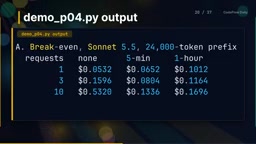
A 5-minute write costs 1.25× base input, and a 1-hour write costs 2×. Reads cost one-tenth of base on most models, and less on some newer models. Take Sonnet 5.5 as an example: an uncached request costs 1 unit; with caching, a write of 1.25 plus a read of 0.05 equals 1.3, so the second request within the lifetime already breaks even. A 1-hour cache write of 2 units needs at least three requests within the hour window to win—its real purpose is bridging gaps longer than 5 minutes.
This brings us back to the opening case: 100 requests, one every 6 minutes. The 5-minute entry always expires before the next request, so every call rewrites. The result is that 5-minute caching costs about a quarter more than no caching, while 1-hour caching survives every gap and delivers substantial savings. The lesson is clear: TTL must be chosen against the real distribution of request gaps, not the average; a hit rate near zero with a creation on every call is the typical signature of expiry, prefix changes, or a too-short prefix.
Context Editing and Compaction: Dividing Labor Between Rules and Summaries
The context editing strategy is called clear_tool_uses and requires a beta header. The parameters are worth memorizing verbatim: trigger (when to start clearing, default 100K input tokens), keep (how many recent tool-call-and-result pairs to retain, default 3), clear_at_least (the minimum number of tokens to free, otherwise the strategy doesn't apply at all), exclude_tools (tools that are never cleared), and clear_tool_inputs (default false, removing only results so the model can still see which calls it made).
Why does clear_at_least exist? Because clearing edits the middle of the prompt, invalidating the cached prefix after the edit point. Clearing 500 tokens while destroying a 100K-token cache only makes the bill worse. The sensible setting is to free one large chunk at a time, then let the cache rebuild and carry subsequent turns.
Compaction, by contrast, is a summary written by Claude. You can compact on demand (controlling timing yourself and preserving recent turns verbatim), or set a token threshold on ordinary requests to trigger it (default 150K input tokens, minimum 50K). If you set pause_after_compaction to true, the API pauses with a compaction stop reason after writing the summary, making it easy to reinsert recent turns. Custom summarization instructions completely replace the default prompt rather than appending to it, so you must state everything that needs to be preserved. In terms of billing, compaction requires an extra sampling step that the top-level usage field doesn't include—you must sum the usage_iterations array to get the true total. A cost model that only reads top-level fields will underestimate compaction-heavy workloads.
The selection principle: if old tool output is the bulk and is no longer needed, use clearing; if the conversation itself (goals, decisions, progress) is too long, use compaction and accept that summaries are lossy. Both should be paired with memory to preserve what must be exact—identifiers, decisions, unfinished tasks, file paths. And finally, an architect-level reminder: compaction is not a security or compliance boundary. Regulated data should not rely on summarization to be discarded; it should never enter the context in the first place.
The compaction stop reason (stop_reason: compaction) is a control point in the compaction mechanism. By default, the server continues generating an answer after writing the summary; when pause_after_compaction is set to true, the API pauses immediately after the summary completes and returns this stop reason, handing control back to the caller. This lets you manually insert recent raw turns, key identifiers, or tool state between the compressed block and the new round of input, preventing lossy summaries from swallowing content that must be preserved exactly. The cost is an extra round-trip per turn, which suits long tasks with high continuity requirements.
Modular Prompts and Skills: Package Once, Reuse Everywhere
Modular prompts are assembled from named, versioned parts: identity and role, policies, tool-use rules, output format contracts, examples, and task slots. This isn't a product feature but a general architectural practice. The reasons given in the official docs include: stable modules concatenated in a fixed order form a stable prefix, which is good for caching; it's easy to start from a minimal prompt and add gradually based on observed failures; XML tags separate modules to avoid ambiguity; and each module has an owner, version, and tests, making regressions attributable. Anti-patterns include the giant prompt everyone edits, snippets pasted into a dozen apps that gradually drift, and system prompt instructions that duplicate tool descriptions.
Skills are the platform's answer to "how do you give Claude a large amount of reusable procedural knowledge without paying for it every time," and the core design principle is progressive disclosure, in three layers. The first layer is metadata: the name and description in the front matter load into the system prompt at startup, at roughly 100 tokens per skill, so you can install many skills without context burden. The second layer is the main file body, loaded only when a request matches the description, which the docs recommend keeping under 5000 tokens. The third layer is the other files bundled with the skill—additional markdown, reference data, templates, and scripts—which cost nothing until Claude opens them. Scripts are even better: Claude runs them, and only the output enters the context; the code itself doesn't.
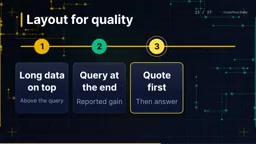
The authoring guidelines are worth following point by point: add only what Claude doesn't already know; keep the main file body under 500 lines; keep referenced files one level deep, since Claude may only preview nested files; add a table of contents to longer reference files; prefer scripts for deterministic work; avoid time-sensitive phrasing; and build at least three evaluations before writing extensive documentation.
There are several key points about where skills run: on the API, custom skills are shared within the workspace; on Claude AI, custom skills are personal, uploaded as a zip, with no organization-level distribution; custom skills don't sync across services—uploading to one doesn't automatically make it appear in the other. On security, treat skills like installing software: use only trusted sources, audit every bundled file, and look for network calls and data access that don't match the stated purpose.
Progressive disclosure originates in human-computer interaction design and refers to exposing information on demand and in layers, avoiding one-shot dumping. In skills it's implemented in three layers: metadata always resident (~100 tokens/skill), body loaded on description match (recommended <5000 tokens), and bundled files counted only when opened. The cost implication is "zero cost for idle knowledge": the skill library can be large, but as long as descriptions are well written and matching is precise, only skills actually used consume the window. The prerequisite is that descriptions accurately reflect trigger scenarios—otherwise you either load by mistake or never trigger at all.
Decision Framework and Common Anti-Patterns
Translating the mechanics into architectural decisions yields a few judgment lines: short global rules that are always needed go in the project config file; procedural knowledge needed by some tasks becomes skills, loaded on demand; factual corpora of large, unrelated documents go to retrieval; real-time data and operations go through tools; fixed knowledge needed on every request goes into the cached prefix. The distinguishing dimensions are "how often is it needed" and "how big is it."
Claude Code itself is a good case, automatically applying these principles: requests are ordered stable-first—system prompt and tool definitions, project context, conversation. Conversation changes don't affect caching of the first two layers; system prompt changes invalidate everything after. Switching models, changing effort, toggling fast mode, connecting or removing a non-deferred MCP server, compacting the conversation, accumulating many images, and upgrading Claude Code all invalidate the cache; editing files, switching permission modes, invoking skills and commands, spawning subagents, and rewinding keep the cache valid. A common trap: editing Claude.md mid-session keeps the cache valid but doesn't take effect until clearing, compacting, or restarting, because the file was cached at the start of the session.

The anti-pattern list to abandon: enabling caching without measuring the hit rate; placing volatile values at the top of the prompt; using the default lifetime for traffic with gaps longer than 5 minutes; sending parallel requests before the first request fills the cache; casually editing tool descriptions in production; substituting the maximum window for content governance; clearing without clear_at_least (trading tiny savings for destroying the entire cache); relying on summaries to preserve exact identifiers; and copying the same procedure into multiple prompts instead of making it a single evaluated skill.
Context optimization is fundamentally an architectural decision, not a configuration toggle. The cheapest token is the one that's never generated at all.
One-line Summary
Context optimization is an architectural decision: caching changes the price, not the capacity, and levers must be aimed at the token source.
Paragraph Summary
This article systematically unpacks the cost logic of Claude's context window and prompt caching. The core point: caching only changes how you pay, not the window's capacity, and a larger window doesn't mean you should fill it, because context has an attention budget with diminishing returns. The root cause of cache invalidation is prefix order (tools → system → messages), and any change at one layer invalidates everything after it; TTL must be chosen against the real distribution of request gaps, not the average—traffic arriving every 6 minutes with a 5-minute cache causes a rewrite every time, costing more than no caching. The article further provides a context management toolbox: deferred tool loading, clearing stale tool results, compacting long histories, persisting memory, isolating subagents, and retrieval on demand, emphasizing that levers must target where tokens actually live. Finally, it introduces modular prompts and the progressive disclosure of skills, along with common anti-patterns to abandon.
Related articles
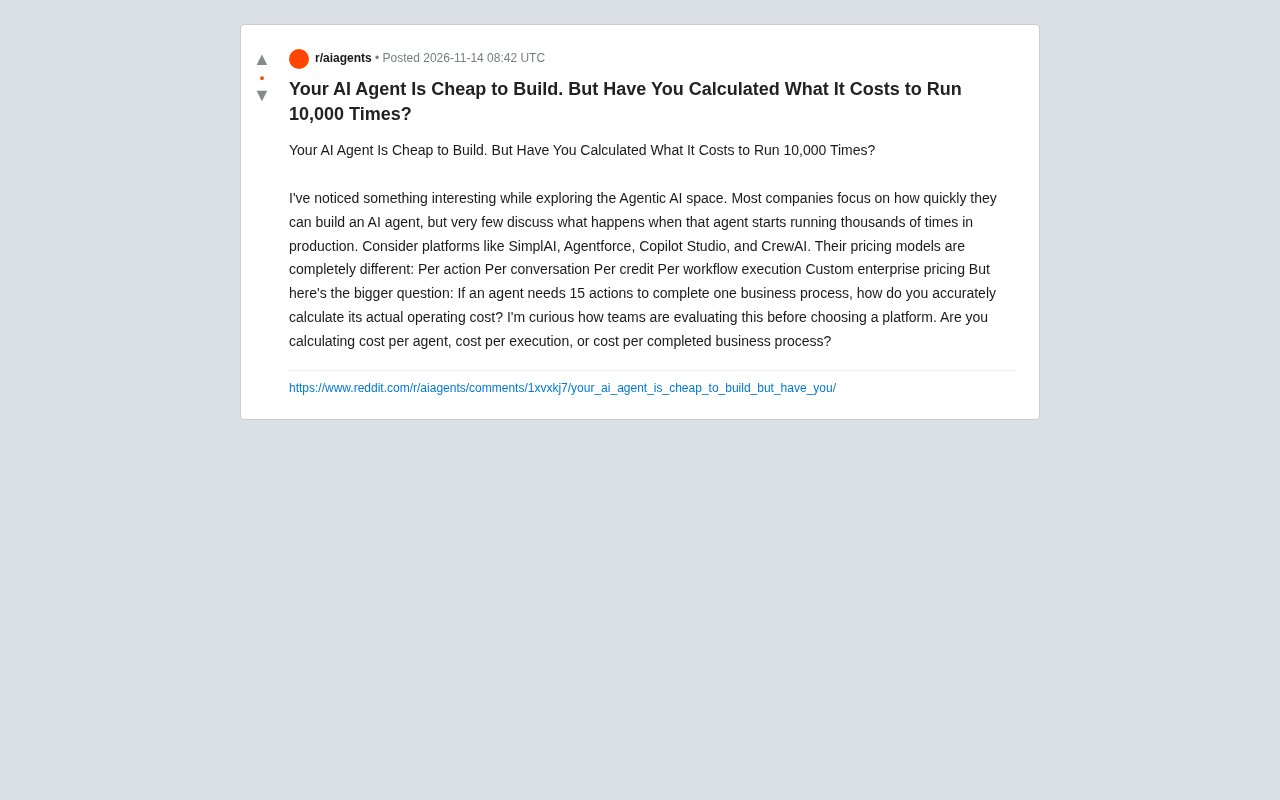
Building an AI Agent Is Cheap — But Have You Calculated the Cost of Running It 10,000 Times?
AI agents are cheap to build but costly to run at scale. This analysis of SimplAI, Agentforce, Copilot Studio, and CrewAI pricing reveals three dimensions for evaluating true agent costs.

Rejecting AI Slop: A "No AI Slop" Manifesto
AIE speakers jointly propose a "No AI Slop Manifesto," calling for resistance against the flood of low-quality AI-generated content. This article explains what AI slop is, the sources of industry anxiety, and what it means for content creators.

English Version of 'Thank You for Your Love' Gains Traction on Bilibili: A Cross-Cultural Rendition of a Classic Love Song
The English version of 'Thank You for Your Love,' titled 'I'll give you all my love,' trends on Bilibili with rewritten lyrics about giving all your love. This article analyzes its emotional expression, cross-cultural adaptation strategy, and differences from the Chinese original.