Claude Cowork Deep Dive: Three Key Features That Turn AI Into Your Personal Agent

Three overlooked Claude Cowork features that transform it from a chatbot into a personalized AI agent.
Claude Cowork differs from regular Claude Chat in three critical ways: it works directly inside your local folders, creates files on your machine without upload/download loops, and supports a Claude.md configuration file that acts as a persistent system prompt. Together with memory.md, these features let you build a fully customized AI agent that remembers your preferences and workflow.
Many people open Claude Cowork for the first time and immediately wonder: how is this any different from a regular Claude chat window? After months of intensive use, one content creator shared their "aha moment" — the three features that most users overlook are exactly what transforms Cowork from an ordinary tool into something far more powerful. This guide breaks down all three, so you can upgrade Cowork from a "conversation tool" to a true "personal AI agent."
Note: The original video was sponsored by Anthropic, but the creator emphasized this is a tool they genuinely use long-term and personally recommend.
Difference #1: Cowork Works Directly Inside Your Folders
Regular Claude Chat follows a "bring your work to Claude" logic: you manually attach each file to the conversation window, and only then can Claude read it. As the number of files grows, this process becomes incredibly tedious.
Cowork completely flips that workflow — it can directly access files and folders on your computer. You no longer need to upload anything one by one. Just point it at a folder that already contains your files, and it can read everything inside.
This ability to directly access local folders relies on OS-level file permission authorization. Once a user grants access, Cowork interacts with the local file system through something like a "sandboxed file proxy" — without uploading files to a cloud server. This is fundamentally different from traditional web apps, which are restricted by browser same-origin policies and can only access file content through active user uploads. This Local-First design philosophy has become increasingly popular in developer tooling, centered on a core principle: data sovereignty belongs to the user, and tools should fit into your workflow — not the other way around.
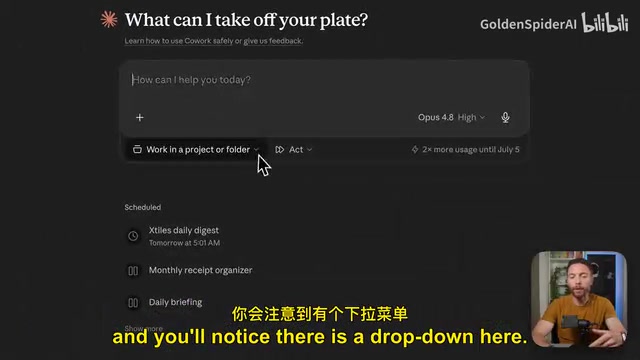
As the creator puts it: Chat is "bringing your work to Claude," while Cowork "works where you are." This reversal in direction seems subtle, but it's the starting point for the entire difference in experience.
Difference #2: Generate Files Locally — No More Upload/Download Loops
Cowork's second core capability is creating files directly on your computer.
For example: if you ask Claude Chat to organize a bunch of information into an Excel file, it generates that file inside the chat window, and you still have to manually download it and drag it to the right folder. In Cowork, the same instruction creates the file directly in the folder you're working in. You can then edit it manually or have Cowork continue iterating on it.
The creator demonstrated this with a "teacher grading exams" scenario: they created a "graded exams" subfolder inside a central folder, dragged in all the graded tests, then issued a single voice command — "Look at these exams, tell me the average score, the median, and the types of questions students consistently got wrong, and generate an HTML report."
Minutes later, Cowork not only provided analytical conclusions in the chat (average score around 72%, lowest 30, highest 100, with the weakest knowledge areas highlighted) — it also generated a visual HTML report saved permanently in the folder for easy future reference. The entire process required just one prompt and zero file uploads.
Difference #3: Claude.md — The Core Configuration That Makes Cowork Click
Most people can grasp the first two points. But the creator emphasizes: Cowork's real power isn't that it "can access and create local files" — it's what it does with that information. And the key to all of it is a file called Claude.md.
What Is Claude.md?
Claude.md is a set of "persistent instructions." Every time Cowork starts a task in that folder, the very first thing it does is automatically read this file. At its core, it's just a plain text file — no code, no special formatting, completely human-readable. Write it once, and Claude reads it before every task from that point on.
Technically speaking, Claude.md is essentially a user-side implementation of a Persistent System Prompt. In standard LLM interaction architecture, system prompts are instruction sets injected into the model's context at the start of each conversation, defining the model's role, behavioral boundaries, and task rules. In traditional chat interfaces, this is usually controlled by the platform, with no direct user input. Claude.md returns that control to the user — through a readable, writable plain text file, you're essentially writing your own "custom system prompt." This also explains why the format requirements are so minimal: the model reads natural language semantics, not structured code.

Taking a history teacher's Claude.md as an example, the file typically includes several sections:
- Identity: Who is using this folder (a high school history teacher using Cowork for lesson planning and grading).
- Behavioral guidelines: AI should act like a "helpful colleague" rather than a "corporate robot," keep responses concise, tailor lesson plans to student age, always ask clarifying questions, and grading is advisory only — the final decision rests with the teacher. This last point is especially important, keeping humans firmly in the decision loop (human-in-the-loop).
- Folder structure: A list of subfolders and their purposes, so AI can navigate quickly.
- Rules and Skills: For example, "put all outputs in the reports folder in HTML format," and "use the exam report skill when analyzing tests, use the parent update skill when writing parent notification emails."
It's worth noting that Human-in-the-Loop is an important safety principle in AI system design — for high-stakes or irreversible decisions, AI only provides suggestions and support, while final execution authority always remains with humans. This concept originated in automated control systems and has since been widely adopted in AI ethics and governance discussions. Explicitly writing "the decision rests with the teacher" into Claude.md encodes this principle directly into the workflow — not only preventing AI from overstepping, but also establishing clear accountability boundaries for the user.
The Division of Labor: Claude.md vs. Skills
The creator draws a clear distinction between the two: Claude.md contains what Claude "should always know," while Skills are "step-by-step workflows for recurring tasks." Skills aren't all loaded at once — they're called on demand as needed.
This on-demand context loading mechanism in Skills is an engineering solution to the limited context window of large language models. Research shows that model attention to content in the middle of the context is significantly lower than at the beginning or end — the so-called "lost in the middle" problem. Stuffing all instructions in at once not only wastes tokens but can also reduce the model's accuracy in responding to key instructions. Skills break complex workflows into independent modules, loading relevant instructions only when needed. This keeps the main context lean while giving different task types their own finely tuned execution logic — a best practice in prompt engineering for agent-oriented scenarios.
Why Claude.md Is the Real Game-Changer
By default, every new Cowork task starts from scratch. Without a system in place, you have to re-explain who you are, what project you're working on, what your workflow looks like, and how you like things presented — every single time.
With Claude.md, you're essentially embedding those instructions into the folder itself, not into each individual prompt. Going back to the exam scenario: if this file had already been configured, the creator wouldn't need to explain a single detail in the prompt — just say "analyze these new exams," and Claude already knows where to look, what report to generate, how to format it, and where to save it.
The creator puts it plainly: the real transformation isn't "you never have to repeat yourself again" — it's "you can customize exactly how Claude works for you, down to every last word."
Advanced: Use memory.md So Your Assistant Gets Smarter Over Time
If Claude.md stores instructions, then memory.md is where Claude records what it gradually learns about you.

For example, if you tell it "remember I like reports sorted by class period," it will write that into memory.md. Whether you come back next week or next month, it remembers.
Compared to the memory features in ordinary AI chat, the key difference here is: it's not a black box. Most mainstream AI products (like ChatGPT's Memory feature) operate their memory mechanisms as a black box: users don't know what was remembered, in what form it was stored, or when it will be retrieved. This opacity creates two problems: first, a trust issue — users can't verify whether the AI "remembered wrong"; second, a control issue — users find it difficult to precisely delete or correct specific memory entries. memory.md's plain-text design is a fundamental response to both of these problems: memory is a file, transparent and auditable, editable by simply opening it. This interpretable memory design philosophy aligns closely with the growing emphasis in AI on explainability and controllability. With both files working together, your assistant genuinely gets smarter and more tailored to your needs the more you use it.
How to Quickly Build Your Own Cowork System
The good news is you don't have to write these files from scratch. The creator recommends the following steps:
- Create a central folder on your computer (you can put it in iCloud Drive for backup), named something like
Cowork OS. - Select that folder from Cowork's dropdown menu and set it to "always allow access."
- Use a guided prompt to have Claude interview you — it will ask questions one at a time and automatically generate both
Claude.mdandmemory.mdbased on your answers. - Answer each question honestly and thoroughly. When you're done, both files will be sitting quietly in your folder.
Whenever your information changes, you can either edit the files manually or simply tell Claude to update them. And as it learns more about you, it will automatically keep those files up to date.
Summary: From Chatbot to Personal AI Agent
Put all three points together and you understand the complete logic behind Cowork:
- Cowork works inside folders on your computer rather than moving your work to the cloud — this is the Local-First design philosophy applied to AI agents.
- It can create files directly on your local machine, eliminating the upload–download–organize cycle entirely.
- Once you configure
Claude.mdandmemory.md, you never have to repeat yourself — and more importantly, you get to precisely dictate Claude's workflow, memory, and output format. You're essentially writing a persistent system prompt from scratch.
At that point, it's no longer a chatbot you have to keep talking to — it's an AI agent you've personally calibrated to work your way. That's what the creator calls "the real transformation." Cowork is currently available on any paid Claude plan, and it's worth taking the time to build out your own system if you're a serious AI user.
Key Takeaways
Related articles
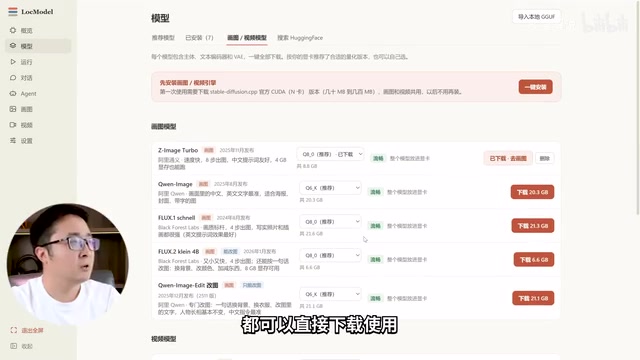
LocModel: The Local AI Deployment Powerhouse — Run Open-Source Models and AI Generation with One Click
LocModel is a local AI deployment tool that auto-adapts to hardware, downloads open-source models with one click, and supports image/video generation, uncensored LLMs, and Agents — completely free.
Antigravity CLI: Free Access to Top Gemini and Claude Models in the Terminal
Antigravity CLI (agy) claims to offer free access to top models like Gemini 3.1 Flash and Claude Sonnet in the VS Code terminal, with installation in seconds. This article breaks down its workflow, the value of in-terminal model calls, and the security and sustainability questions behind the free claim.
Chatbots vs. AI Agents: Key Differences and How to Choose
Chatbot vs. AI agent: how do they differ? We break down the three dimensions—tools, memory, workflow—compare four real scenarios, and offer risk-control advice and selection criteria.