Claude Haiku 5.5 Launches on OpenDocRouter: A Low-Cost Document Parsing Option

OpenDocRouter adds Claude Haiku 5.5 at ~$1.20/1K pages — strong on tables and text, weak on charts and layout precision.
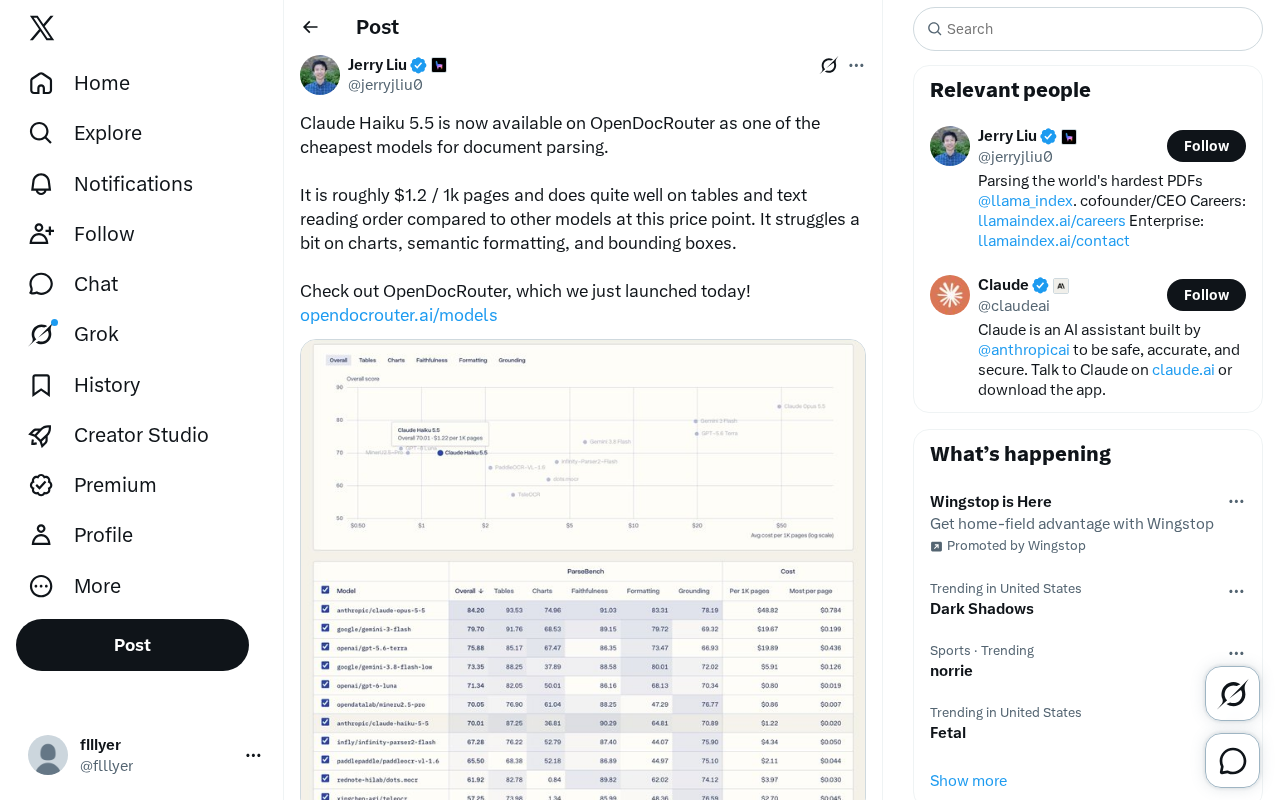
OpenDocRouter has launched Claude Haiku 5.5 as one of the market's most affordable document parsing models, priced at approximately $1.20 per 1,000 pages. The model outperforms similarly priced competitors on table recognition and text reading order, making it well-suited for large-scale, text-focused batch processing. However, it has notable gaps in chart data extraction, semantic formatting (heading hierarchies, list structures), and bounding box coordinate precision — limiting its suitability for spatially demanding tasks. As a model routing platform, OpenDocRouter lets users switch models based on task needs, with Haiku 5.5 delivering strong value for teams with budget constraints and high-volume text-and-table parsing needs.
OpenDocRouter Introduces a Budget-Friendly Document Parsing Model
OpenDocRouter has officially launched with Claude Haiku 5.5 as part of its model lineup, positioning it as one of the most cost-effective document parsing options currently available. According to official figures, Claude Haiku 5.5 costs approximately $1.20 per 1,000 pages — a compelling price-to-performance ratio among models in the same tier.
For teams that need to process PDFs, scanned documents, reports, and other files at scale, parsing costs are an unavoidable ongoing expense. At roughly $1.20 per thousand pages, the total cost of processing hundreds of thousands of pages becomes far more manageable — which is precisely why OpenDocRouter is positioning Haiku 5.5 as one of its flagship offerings.
Strengths: Table Recognition and Reading Order
In real-world document parsing tasks, Claude Haiku 5.5 stands out in two key areas: table recognition and text reading order.
Tables have always been one of the hardest challenges in document parsing. Many models can extract the text within a table but fail to preserve row-column relationships, causing downstream data to become garbled. According to official benchmarks, Haiku 5.5 handles tables better than comparable models at the same price point — a critical advantage for use cases that require extracting structured data from financial reports, invoices, or statistical spreadsheets.
Text reading order determines how well a model can reconstruct the logical flow of complex layouts — multi-column pages, headers and footers, sidebars, and callout boxes. If a model can't correctly identify the logical sequence of content, the extracted text will appear jumbled. Haiku 5.5's consistent performance in this dimension makes it well-suited for standard documents with relatively clean formatting.
Weaknesses: Charts, Semantic Formatting, and Bounding Boxes
The official documentation doesn't shy away from the model's limitations, noting that Claude Haiku 5.5 underperforms in three areas:
- Chart parsing: Extracting data from visual elements such as bar charts and line graphs remains a challenge;
- Semantic formatting: Reconstructing document structure — heading hierarchies, emphasis, lists — is not reliably reproduced;
- Bounding boxes: The model has limited capability in pinpointing the precise coordinates of elements on the page.
These weaknesses mean that if your document parsing workflow depends heavily on chart data extraction, or requires precise layout coordinates (for annotation, cropping, or visual overlay tasks), Haiku 5.5 alone may not be sufficient. You may need to pair it with a more specialized model.
Bounding Box is a fundamental concept in document parsing. When a model identifies elements on a page — text blocks, tables, images — it annotates each element with a rectangular coordinate (typically the x/y pixel values of the top-left and bottom-right corners) indicating its precise location. This capability is critical for downstream tasks that require spatial awareness: highlighting key clauses in legal documents, automatically cropping invoice fields, or overlaying AI recognition results onto original scans for visual verification. Without reliable bounding box output, users get the content but not where the content is, making spatially-aware automation workflows impossible.
Semantic Formatting refers to whether a model can recognize and reconstruct the implicit logical structure of a document — for example, distinguishing "this is a top-level heading" from "this is just enlarged, bolded body text," identifying the hierarchy of ordered and unordered lists, or flagging emphasized text. This information is essential when generating structured output (such as Markdown, HTML, or a JSON schema). Without it, document retrieval accuracy, section navigation, and content indexing all suffer.
Understanding This "Trade-Off" Positioning
Claude Haiku 5.5's role on OpenDocRouter is a classic cost-capability trade-off. Rather than competing on every dimension, it offers an extremely low per-page price in exchange for reliable performance on the two most common parsing needs: text and tables.
For document batch-processing workflows where text is the primary content and tables are secondary, this positioning is highly pragmatic — users can accomplish core tasks at a fraction of the cost. For chart-heavy documents or use cases that demand precise layout coordinates, it's better used as one stage in a larger pipeline, or swapped out for a more capable (and more expensive) model.
This is where OpenDocRouter's value as a model routing platform becomes clear: it allows users to flexibly switch between models based on task requirements, rather than being locked into a single model for every job.
Summary
The addition of Claude Haiku 5.5 brings a practical, low-cost option to the document parsing market. At approximately $1.20 per 1,000 pages, combined with solid performance on table recognition and reading order, it's a strong fit for large-scale, text-centric parsing workflows. Its shortcomings in chart parsing, semantic formatting, and bounding boxes are important signals for teams to evaluate based on what their documents actually contain. For budget-conscious teams with high document processing volumes, this is a model worth adding to the evaluation shortlist.
Background: Model Routing
Model Routing is the core mechanism behind platforms like OpenDocRouter: the system automatically or rule-based dispatches tasks to the most appropriate model based on input document characteristics (page count, layout complexity, presence of charts, etc.) — rather than applying the same model to every task. The advantage of this architecture is that cheap models handle the "simple majority" of tasks, while high-cost models are only invoked when truly necessary, dramatically reducing average cost while maintaining overall quality. For teams with diverse document types, designing the routing strategy — defining the thresholds between "simple" and "complex" — itself becomes a key variable that shapes both cost and accuracy.
Related articles

WorkBuddy Full Tutorial: Build an AI Office Automation Agent from Scratch
A complete WorkBuddy tutorial: installation, three working modes, multimodal picture book video practice, expert team agent building, and workflow configuration for low-cost AI office automation.

WorkBuddy Agent Complete Guide: From Beginner to Automation in 7 Days
Based on Bilibili's 256-episode WorkBuddy masterclass, this systematically breaks down Tencent's AI office workbench core capabilities: Agent principles, Skill encapsulation, cross-platform connectors, scheduled automation, knowledge bases, and zero-code development, with learning path recommendations.

8 AI Accounts, 7 Failed: An Honest Review of Using AI to Get Work Done
Only 1 of 8 AI-run Bilibili accounts succeeded. We break down the real difference between "performing AI" and "using AI to get work done."