Claude n8n Integration Tutorial: Build AI Automation Workflows from Scratch
A complete walkthrough for beginners to configure Claude API in n8n and run a minimal automation workflow.
This guide is for complete beginners and shows how to connect Claude API in n8n and run your first automation workflow. The process includes creating and saving an API Key in the Claude console, creating a workflow in n8n with a Manual Trigger connected to the Anthropic node, configuring credentials and selecting the Text type Message a Model operation, choosing a Claude model, filling in a User Message prompt, and verifying the output. The article emphasizes that Claude API and chat subscriptions are billed separately and that API Keys must never be shared publicly.
Want Claude to answer questions directly inside your n8n workflow? This setup guide is designed for complete beginners—from getting an API Key to running your first automated task, the whole process takes just a few minutes.
Preparation: Get Your Claude API Key
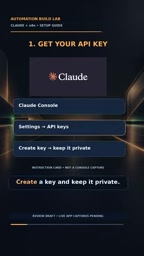
First, open the Claude Console, go to the Settings page, find the API Keys option, and create a new key. This key will only be displayed once, so save it securely immediately after creation.
There's only one core principle: never expose your API Key in public. Whether it's a screenshot you share, a code repository, or a chat log, a leaked key can lead to your account being abused.
Note that Claude API billing is separate from your Claude chat subscription. Before you start testing, confirm that you have sufficient credits in the console to avoid the workflow failing halfway through due to insufficient balance.
What is an API Key: An API Key is a string token generated by the service provider to prove that a request actually comes from your account. Think of it as the "key" your program uses to access Claude—every time n8n sends a request to Anthropic's servers, it includes this key, and the server uses it to identify you, calculate usage, and bill accordingly. Unlike account passwords, API Keys typically only grant programmatic access. If leaked, an attacker can call the API directly without logging into the web interface, making the risk higher. For security reasons, Anthropic only displays the full key once at creation and never again afterward. If a key is lost or you suspect it's been compromised, the right move is to immediately delete it in the console and generate a new one.
How Billing and Credits Work: Claude API uses usage-based billing, typically charging by the number of input and output tokens, completely independent of a monthly Claude chat subscription. This means that even if you're already a Pro or Max subscriber, API calls are still billed separately. When running workflows in batches in n8n, a large number of requests can be generated in a short time, so it's recommended to set a spending cap in the Billing or Usage page of the console in advance to avoid unexpected overspending.
Configure the Anthropic Node in n8n
Back in the n8n editor, create a new workflow. The first step is to add a Manual Trigger node—this is the most basic trigger, ideal for manually testing the entire flow.
Next, connect the Anthropic node. In the node configuration, select the Text type with the Message a Model operation. This step determines that the workflow will send a text request to Claude and receive a reply.
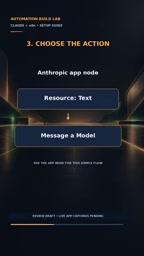
When creating the Anthropic credential, paste in the API Key you saved earlier and save. n8n will automatically handle the rest of the authentication flow—no need to configure request headers or signatures manually.
About n8n's Node and Credential System: n8n is an open-source visual workflow automation tool that connects "nodes" with different functions via lines to accomplish data processing. Nodes execute specific actions—such as triggering a flow, calling an API, or transforming data—while "Credentials" are sensitive pieces of information stored separately, such as API Keys and database passwords. Storing keys in credentials rather than writing them directly into node parameters has two advantages: first, keys are encrypted and stored within n8n and won't leak when the workflow is exported; second, the same credential can be reused across multiple nodes.
The Role of Manual Trigger: Manual Trigger is the simplest trigger node—it doesn't run automatically, only starting the flow when you manually click the execute button. This is very useful during the debugging phase because it lets you precisely control when each run happens, making it easy to inspect each node's output step by step without worrying about scheduled tasks firing repeatedly in the background.
Choose a Model and Write Your Prompt
Once the credential is configured, select a Claude model from the available list. Different models vary in speed and capability—during testing, just pick one with faster response times.
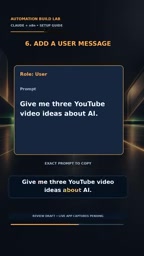
Then add a User Message in the node. The content can be any instruction you need. The example used in the video is:
Give me three YouTube video ideas about AI
This message is sent to Claude as user input, and the model's response appears in the node's output. How you write your prompt directly determines output quality—be as specific as possible and include clear formatting requirements.
Model Selection and Prompt Tips: Claude offers multiple models at different tiers, generally divided into smaller models that emphasize speed and cost, and larger models that emphasize reasoning and long-text capabilities. Response speed, maximum context length, and cost all vary by model. For initial testing, a lighter model gives you faster feedback and costs less; switch to a more capable version when your task involves complex analysis or long documents.
How to Write a Prompt: A prompt is the instruction text sent to the model, and it directly determines output quality. In n8n's Anthropic node, the User Message field is where you write your prompt. To get more usable results, do three things: clearly state the task objective, specify the expected output format (e.g., "return three items as a Markdown list"), and provide one or two examples when needed. The example Give me three YouTube video ideas about AI works well precisely because it simultaneously specifies the quantity, topic, and general direction.
Run the Workflow and Verify Results
Click the execute button and wait for the workflow to finish. Check Claude's response in the output panel to confirm the format and content meet your expectations.
If the output is empty or you get an error, check these three things first: whether the API Key is valid, whether the account has sufficient credits, and whether the model name is available. Most configuration problems stem from the credential step.
Once you've got this minimal example working, you can plug it into more complex flows—such as automatically generating content, batch processing data, or serving as a reply engine for a customer service bot.
Common Pitfalls and Security Reminders
Two details are easy to overlook. First, Claude API and Claude chat subscriptions are two independent billing systems—having a Pro subscription doesn't mean you get free API credits. Second, once an API Key is leaked, anyone can use your credits to make requests, so don't write it into public code or screenshots.
If you want to go deeper, start from this minimal workflow and gradually add conditional logic, loops, and external data sources to build truly useful automation projects.
One-line Summary
A complete walkthrough for beginners to configure Claude API in n8n and run their first minimal automation workflow.
Paragraph Summary
This guide is for complete beginners and shows how to connect Claude API in n8n and run your first automation workflow. The process includes: creating and saving a Claude API Key in the console (it's only shown once), then creating a new workflow in n8n, using a Manual Trigger to connect to the Anthropic node, configuring credentials, and selecting the Message a Model operation with the Text type. Next, choose an appropriate Claude model, fill in the User Message prompt, click execute, and verify the results in the output panel. The article highlights two things: Claude API and chat subscriptions are billed separately, so confirm your credits before testing; and the API Key must never be shared publicly or written into screenshots. Once the minimal example works, you can extend it with conditional logic, loops, and other nodes into practical projects.
Related articles

CSS Anchor Positioning: A New UI Positioning Approach Without JavaScript
A deep dive into CSS Anchor Positioning: from anchor-name and position-anchor to the anchor() function, position-area shorthand, position-try-fallbacks, anchor-size, and upcoming anchor queries.

New AI Chart Interaction: Continuous Follow-up Questions and Visualization in Conversation
Explore a new AI interaction method for continuously generating charts in conversation. Use the /visualize command to ask follow-up questions and visualize answers in the same chat window, improving data analysis efficiency.

Cursor Merges Into X Subscription: Paid Plans Share Unified Usage Pool, Grok Model Coding Usage Doubled
Cursor joins The X Subscription with a unified usage pool and doubled Grok coding quota. Third-party models shift to API pricing. Existing users can keep or migrate plans.