Claude Orchestrating an AI Coding Team: A Practical Analysis of Agent Orchestrator
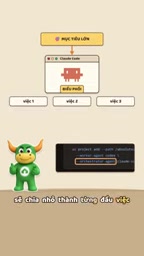
Agent Orchestrator uses multi-AI parallel collaboration and Git Worktree isolation to turn developers into project managers.
This article introduces the open-source project Agent Orchestrator, which transforms AI coding from solo work into team collaboration by having an orchestrator AI decompose tasks and executor AIs work in parallel. Core designs include Git Worktree isolation to prevent code conflicts, PR-triggered CI for automated error correction routed back to the responsible AI, and a unified dashboard with mobile notifications for key decision points. The tool itself is free, but AI services are billed per account, and parallelism accelerates quota consumption, making it best suited for medium-to-large parallel tasks. It concludes by predicting multi-agent collaboration as the future standard paradigm.
From Solo Work to Team Collaboration: A Paradigm Shift in AI Coding
In the past, when we used Claude Code or Codex, it was basically a "one task, one AI" model—write a function, fix a bug, open the terminal, enter a prompt, wait for the result. This solo approach works well for small tasks, but when facing a complete project, the bottlenecks quickly surface: limited context windows, serial task execution, and high manual switching costs.
The open-source project Agent Orchestrator offers a new way of thinking: rather than having one AI shoulder all the work, let multiple AIs work in parallel while the human steps back into the role of "project manager." According to a tech share by the YouTube channel Tino, this project has surpassed 14,400 stars on GitHub, supports more than 35 AI coding tools, offers Windows, macOS, and Linux clients, and the local version is free to run.
Its core logic isn't complicated: you provide a high-level goal, an "orchestrator AI" (such as Claude Code) breaks the goal down into concrete tasks and then dispatches them to "executor AIs" (such as Codex, Gemini, Cursor, etc.) to complete in parallel. Throughout the process, you don't need to watch each AI's terminal output—you only make decisions at key checkpoints.
Git Worktree: The Key Design That Lets Multiple AIs Work in Parallel Without Conflict
What's the biggest technical challenge in multi-AI collaboration? Code conflicts. If two AIs modify the same file at the same time, the result will inevitably be mutual overwrites. Agent Orchestrator's solution leverages the Git Worktree mechanism—assigning each AI an independent working directory and an independent code branch.
This means each AI works in its own "sandbox," physically isolated and non-interfering. AI A refactors a module on branch feature-a, AI B writes test cases on branch feature-b, and both proceed in parallel with no conflicts before merging. This design looks simple, but it's actually the infrastructure that makes the entire multi-agent collaboration possible.
From an engineering perspective, Git Worktree is not a new concept, but using it as the isolation layer for multi-AI collaboration is a quite pragmatic choice. It reuses Git's own version control capabilities, requires no reinventing the wheel, and naturally supports subsequent code review and merge workflows.
What Is Git Worktree
Git Worktree is a built-in Git feature since version 2.5 (2015) that allows the same repository to check out multiple working directories simultaneously, each associated with a different branch. The traditional approach has one working directory per repository, and switching branches requires stashing or committing current changes; Worktree lets developers open multiple directories at once, each corresponding to a different branch, without interference.
For example, running git worktree add ../feature-a feature-a creates a new working directory in the parent directory and automatically checks out the feature-a branch. This directory shares the same .git object store with the main working directory, so disk usage and clone overhead are minimal. However, the same branch cannot be checked out in multiple Worktrees simultaneously—this is a hard Git limitation.
In Agent Orchestrator, each AI agent is assigned an independent Worktree, which essentially gives each AI a code view that is "logically independent, physically shared." This ensures isolation while avoiding the storage and synchronization burden of copying the entire repository for each AI.
Automated Error-Correction Loop: Letting AI Fix Its Own Bugs
The most noteworthy design of this tool is its automated error-correction workflow. After an AI completes a task, it automatically opens a Pull Request to trigger CI checks. If CI fails, code review has comments, or a merge conflict arises, the system doesn't dump the problem on humans—it routes the feedback precisely back to the AI responsible for that branch, letting it continue revising until it passes.
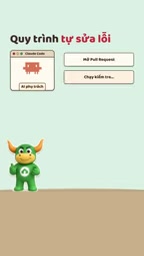
The value of this loop is that it automates the cycle of "discover problem → identify responsible party → fix → re-verify." In the traditional model, after CI fails you need to manually determine which step went wrong and who should fix it; now the system automatically dispatches based on branch ownership, reducing a great deal of coordination overhead.
Of course, this mechanism has boundaries. If an AI repeatedly fails to fix the same problem, or if a fix introduces new problems, human intervention is still needed. The project retains a terminal entry point for each AI, so you can open any AI's session to intervene directly at any time—this is important when debugging complex issues.
The Role of PRs and CI in Multi-Agent Collaboration
A Pull Request (PR) is a merge request mechanism on code hosting platforms (such as GitHub, GitLab): after a developer completes changes on a branch, they open a PR requesting to merge the branch into the target branch, triggering code review and automated checks in the process. CI (Continuous Integration) is a pipeline that runs automatically when a PR is created or updated, typically including compilation, static checks, unit tests, and other steps to verify code quality.
In Agent Orchestrator's automated error-correction loop, PRs and CI serve as quality gates: each AI automatically opens a PR after completing a task, and CI runs immediately. If CI fails or review doesn't pass, the system routes feedback back to the corresponding AI based on branch ownership, letting it continue revising and push new commits, thereby updating the same PR. This "commit → check → feedback → fix" cycle can repeat multiple times until the PR passes all checks.
It's worth noting that this design depends on strict binding between branches and AI instances—only by knowing which branch corresponds to which AI can errors be precisely sent back to the "responsible party." This is also an additional benefit brought by the Git Worktree isolation approach.
Unified Dashboard and Mobile Response: A Solution for Fragmented Management
Another problem brought by multi-AI parallelism is "information overload"—you can't watch five terminals' output simultaneously. Agent Orchestrator's approach is to provide a unified dashboard that aggregates the status of all tasks in one interface: which tasks are running, which are waiting for your decision, which are ready to merge—all at a glance.

Even more practical is mobile support. When an AI needs human input—for example, encountering an architectural choice or needing to confirm requirement boundaries—your phone receives a notification, you reply directly on your phone, and the whole team keeps running. This design addresses the "not at the computer" scenario, making asynchronous collaboration possible. You don't have to sit in front of the screen waiting for AI questions; instead, the AI comes to you.
From a product design perspective, this is actually mimicking how real R&D teams are managed: a project manager doesn't need to watch everyone's screen, only to provide direction when key decision points arise. Agent Orchestrator brings this model into the human-AI collaboration scenario.
Cost Structure and Applicable Boundaries
Regarding cost, one point needs to be made clear: Agent Orchestrator itself is open source and free, and the local version is not charged, but the AI services it calls—Claude, Codex, Gemini, etc.—are still billed according to your respective accounts. In other words, what this tool saves is "coordination cost" and "management time," not "API call fees." If your AI subscription quota is limited, multi-AI parallelism will actually accelerate consumption.

So who is it suitable for? Based on current feedback, the most beneficial scenarios are parallel decomposition of medium-to-large tasks—for example, simultaneously advancing frontend refactoring, backend API development, and test case writing. If you're just fixing a typo or writing a single-file script, using a single AI is actually more straightforward. The tool's value scales up with task complexity and degree of parallelism.
Additionally, according to Tino, the project team has prepared step-by-step guides for installation and role assignment, which viewers can obtain by commenting a keyword. For developers who want to try it out, this is an entry point that lowers the barrier to getting started.
API Billing and Subscription Quotas
The "per-account billing" mentioned in the article refers to the charging models of various AI service providers. Taking OpenAI's Codex series and Anthropic's Claude as examples, there are usually two billing methods: one is API billing by token usage (input and output priced separately), and the other is subscription-based (such as ChatGPT Plus, Claude Pro) providing a fixed quota, with throttling or extra charges after exceeding it. Multi-AI parallelism means multiple agents calling APIs simultaneously, and token consumption speed increases multiplicatively.
For developers using pay-as-you-go API billing, costs will be directly reflected in the bill; for users on subscription plans, they may hit the quota ceiling faster, leading to service degradation or the need to upgrade plans. Therefore, when deciding whether to adopt multi-agent parallelism, in addition to considering the improvement in coordination efficiency, you also need to assess whether your AI service budget and quota are sufficient to support parallel consumption.
The Next Step for Multi-Agent Collaboration
The emergence of Agent Orchestrator reflects a larger trend: AI coding is moving from "augmenting individual developers" toward "orchestrating AI teams." Once a single AI's capabilities are strong enough, the bottleneck is no longer "can AI write code" but "how to organize multiple AIs to collaborate efficiently and how to let humans intervene at key points." Git Worktree for isolation, PR + CI for quality gates, a unified dashboard for status aggregation, mobile for asynchronous response—this combination's approach is likely to become the standard paradigm for subsequent multi-agent tools.
As for whether it suits your workflow, it's recommended to start with a medium-scale task to get a feel for the difference between "being a project manager" and "being a programmer."
One-line Summary
Agent Orchestrator uses multi-AI parallel collaboration and Git Worktree isolation to help developers transition into project managers.
Paragraph Summary
This article introduces the open-source project Agent Orchestrator, which transforms AI coding from solo work into team collaboration by having an orchestrator AI decompose tasks and executor AIs work in parallel. Core designs include: using Git Worktree to assign each AI an independent directory and branch to avoid code conflicts; triggering CI through PRs to implement an automated error-correction loop that routes error feedback back to the corresponding AI for fixing; and providing a unified dashboard and mobile notifications so developers don't have to sit at the terminal and only need to intervene at key decision points. The article notes that the tool itself is free, but AI services are billed per account, and multi-AI parallelism accelerates quota consumption, making it more suitable for parallel decomposition of medium-to-large tasks. Finally, it looks ahead to the trend of multi-agent collaboration potentially becoming the standard paradigm of the future.
Related articles
Hands-On with Shopify AI Toolkit: Official Validation for AI-Generated Shopify Code
Hands-on with Shopify's official AI Toolkit: connect Shopify docs, API schemas, and code validation to Claude Code and other coding assistants to intercept AI-fabricated fields. Installation steps, offline validation, and telemetry-on-by-default warnings.

Google's New AI Coding Model Beats Claude at One-Third the Cost
Google's Gemini 4 Carbon edges past Claude Fable 5.2 Max on CursorBench 4.0 at 60.4% vs 60%, costing just $9.22 per task versus $32.79—about one-third.
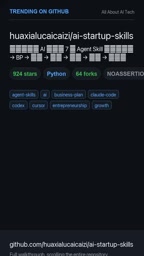
GitHub Trending: 7-Step Agent Skill Pack for AI Startups
GitHub trending project ai-startup-skills offers 7 Python Agent Skills for one-person AI startups, with a router linking validation to registration. 900 stars in 20 days—design and limits analyzed.