Hands-On with Shopify AI Toolkit: Official Validation for AI-Generated Shopify Code

Shopify's official AI Toolkit catches AI code field errors via built-in schema validation, but telemetry is on by default and must be disabled manually.
Shopify AI Toolkit is an official MIT-licensed plugin that connects Shopify docs, API schemas, and code validation to coding assistants like Claude Code. In testing, it successfully generated Admin GraphQL mutations and Liquid snippets and caught common AI field errors (e.g., product.price should be priceRangeV2), with validation running offline. However, docs search couldn't be tested due to sandbox domain blocking, and real store operations weren't verified. Telemetry is on by default, potentially sending search queries, validated code, and the latest prompt to Shopify, requiring manual creation of an empty file to disable. The tool is positioned to assist developers writing code, not to manage stores via chat.
Why Shopify Developers Need This Tool
The most common problem when letting AI write Shopify code isn't faulty logic—it's inventing fields that don't exist at all. You often don't find out until the store throws an error. According to a hands-on test on a YouTube channel, Shopify's official AI Toolkit was built precisely to solve this pain point—it connects Shopify's documentation, API schema, and code validation capabilities directly into your coding assistant.
This is an officially maintained MIT-licensed repository with roughly 600 stars on GitHub. The author installed it in Claude Code, had it write real Shopify code, and tried to "break" the validator. Here's the full test log.
What It Actually Is
This is a plugin whose core is an extremely broad Shopify skill pack. According to the test video, it covers Admin API, Storefront, Liquid themes, Functions, Polaris extensions, Shopify Queues, and more. Each task follows a fixed workflow: read the topic guide first, then search the documentation, then write code, and finally run validation before delivery.
Installation is flexible, supporting mainstream environments like Claude Code, Codex, Cursor, and VS Code. Store management operations are handled through the Shopify CLI.
Test 1: Writing Real Admin GraphQL Code
The tester asked Claude to write an Admin GraphQL mutation creating a product called Mazala Chai with two variants—250g and 500g—priced at 180 and 340 rupees respectively. After loading the Shopify skill and reading the Admin guide, Claude wrote a product set mutation and ran the validator.
It passed, with validation targeting API version 202610. The validator also proactively flagged easily overlooked details: the required product scope, and that prices use the store's currency.

Next, the tester tried a Liquid product card snippet containing a title, a price formatted with money, and a variant list. The theme checker passed as well.
Admin GraphQL API vs. REST: Shopify's Admin API offers both REST and GraphQL interfaces. GraphQL lets clients specify exactly which fields they need in a single request, avoiding over-fetching, but it also requires field names to strictly match the schema. AI models often fabricate fields (like product.price) due to mixed training data, and GraphQL's strong type validation rejects invalid fields before the query is even sent. The productSet mutation tested in this article is a batch product operation interface introduced in 2024, supporting simultaneous product and variant creation—more efficient than the older productCreate. The API version 202610 targeted by the validator follows Shopify's version naming convention (year+month), ensuring code compatibility with the store backend version.
Test 2: Deliberately Introducing Errors to See If the Validator Catches Them
This is the most convincing part of the whole tool. The tester deliberately asked to use a price field on the product—a mistake AI models frequently make. The validator rejected it outright, suggested using priceRangeV2 instead, and explicitly stated that the read products permission is required.
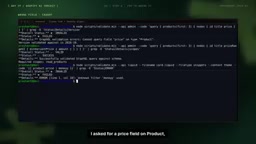
In the Liquid scenario, the tester deliberately misspelled the filter name (writing money with two y's), and the validator pinpointed the exact line and column of the error. Notably, these schemas ship with the plugin, so validation can run entirely offline.

Liquid Templates and Filters: Liquid is Shopify's theme templating language, using {{ }} to output variables and {% %} to execute logic. Filters are invoked via the pipe character |, e.g., {{ product.price | money }} formats the price as currency. Spelling mistakes AI often makes (like writing money as mony) don't trigger syntax errors in Liquid—they fail silently or output empty values, causing display anomalies on the page. Through its built-in Liquid syntax tree and filter whitelist, the validator can pinpoint the exact line and column, catching such errors before code deployment. Additionally, priceRangeV2 is the new field for Shopify product pricing, replacing the deprecated price, and the validator can suggest migration paths.
What Couldn't Be Tested
The tester also honestly explained the limitations. The documentation search feature needs to call Shopify's domain, but his sandbox blocked that domain, so every search failed. Claude candidly explained the situation and fell back to the guides bundled with the skill pack.
Additionally, the tester didn't connect a real store, so the Shopify CLI's store commands couldn't be verified. This means the "manage your store via chat" path has yet to be tested in practice.
A Few Pitfalls Worth Noting
Telemetry is on by default. According to the video, the script sends search queries, the code being validated, and even the most recent prompt to Shopify by default. Turning it off just requires creating an empty file, but you must do so proactively before use. The tester disabled it before testing.
It's aimed at developers writing code, not chatting to manage stores. This is a positioning issue, not a defect. If you're expecting to run a store directly using natural language, this tool doesn't address those needs.
Offline validation is a highlight. Built-in schemas mean core validation still works under network restrictions, which is especially important for corporate intranets or restricted environments.
Telemetry and Privacy: Telemetry refers to tools automatically collecting usage data and sending it to developers. Shopify AI Toolkit enables telemetry by default, uploading search queries, validated code snippets, and the most recent prompt to Shopify servers. For enterprise developers, this could leak business logic or sensitive information. Disabling it usually involves creating an empty file (such as .shopify-ai-toolkit-telemetry-disabled) or setting an environment variable, but this must be done before first use. The MIT license allows free modification and distribution, but telemetry behavior is independent of the license, and users must assess compliance risks themselves.
Overall Assessment
The advantages are clear: validation based on real schemas is exactly what's missing when AI writes Shopify code—invalid fields are caught before reaching the store; it's officially produced, free, and broadly covering. The cost is that telemetry is on by default and may include prompts, requiring manual opt-out; documentation search and real store operations weren't covered in this round of testing.
The recommendation is simple: install the plugin, disable telemetry first, then let AI write Shopify code, running every snippet through the validator.
Related articles
Claude Orchestrating an AI Coding Team: A Practical Analysis of Agent Orchestrator
The open-source Agent Orchestrator lets Claude Code dispatch Codex, Gemini, Cursor and more for parallel AI coding, with Git Worktree isolation, CI auto-correction, and mobile notifications for AI team collaboration. This article analyzes its core mechanisms, cost structure, and use cases.

Google's New AI Coding Model Beats Claude at One-Third the Cost
Google's Gemini 4 Carbon edges past Claude Fable 5.2 Max on CursorBench 4.0 at 60.4% vs 60%, costing just $9.22 per task versus $32.79—about one-third.
GitHub Trending: 7-Step Agent Skill Pack for AI Startups
GitHub trending project ai-startup-skills offers 7 Python Agent Skills for one-person AI startups, with a router linking validation to registration. 900 stars in 20 days—design and limits analyzed.