ClawBench Multi-threaded Parallel Development: Three Layers That Keep AI from Stepping on Each Other

ClawBench uses sessions, projects, and branches as three layers of parallelism, letting one person push multiple AI tasks simultaneously without conflict.
ClawBench demonstrates how three dimensions of parallel design—sessions, projects, and branches—let one person push multiple AI tasks simultaneously without fighting. Each session independently binds a different AI backend and tracks context, switching projects swaps the entire workspace, and Worktree gives different branches of the same repository physically isolated file directories. Server-side execution architecture detaches sessions from local devices—open tasks on your phone, view output on your computer, with state synced across devices. With all three layers stacked, users can add task lines anytime without interrupting existing work, greatly reducing switching costs and enabling efficient parallel development.
A single person pushing forward a project with 750,000 lines of code and over 20,000 unit tests sounds like a fantasy. But Bilibili creator Long Ze demonstrated another possibility with ClawBench: running six sessions simultaneously, each running a different AI backend—tweaking notifications, filling in tests, and investigating production issues without interfering with each other. The key behind this isn't fast hands—it's the parallel mechanism ClawBench designs across three dimensions: sessions, projects, and branches.
Parallelism Isn't the Goal—Not Fighting Is
Long Ze points out the pain point right at the start of the video: writing such a large project alone, doing one thing at a time isn't realistic. Today you modify the notification module, tomorrow you fix an issue, the day after you want to touch the homepage—every task needs the AI to know the context, and the context window is limited.
Parallelism itself isn't hard; what's hard is not fighting after going parallel. ClawBench's solution is to break parallelism into three stackable dimensions, from smallest to largest granularity: sessions, projects, and branches.
Layer One: Sessions—Each AI Task Tracks Its Own Context
In ClawBench, a project can open any number of sessions, each running its own AI backend and recording its own context independently. Long Ze's current project has three sessions open: one modifying notifications, one filling in tests, one investigating production issues. All three run simultaneously, unaware of each other's existence.
When you switch back, you don't need to re-explain "what we're doing"—each session remembers its own business. When a session produces something new, a dot lights up directly in the sidebar—no need to click into each one.
More importantly, the three sessions can run three different backends—one using CodeBuddy to modify code, one using Claude Code to fill in tests, and the third using Codex to investigate issues. You know which backend excels at what, so you dispatch accordingly. The window is just the interface; underneath are three independent task lines, each carrying complete context.
Context window is the upper limit of tokens a large language model (LLM) can process in a single conversation, including user input, model output, and historical conversation records. Context window sizes vary greatly across models, from early 4K tokens to the commonly seen 128K, 200K, or even larger today. When conversation length exceeds the window limit, the model forgets earlier content, leading to degraded response quality or drifting off-topic. In AI-assisted programming, the context window is especially critical: a task may involve multiple files, multiple modifications, and large amounts of error information. If all tasks share the same context, the window quickly fills up and the model can't remember key details. ClawBench gives each session an independent context, letting each AI task focus only on its own part, thereby maintaining higher focus and accuracy within the limited window. This also explains why parallel sessions need independent context tracking—they are essentially multiple independent conversation threads, each maintaining its own memory.
Layer Two: Projects—Switching the Entire Work Site
One level up is projects. In ClawBench, a project is an associated directory. If frontend and backend are split into two repositories, you create two projects and open sessions for each. Frontend runs page redesign, backend runs API refactoring—both proceed simultaneously.
When switching projects, you click on a workspace and everything changes: the session list, file tree, and terminal all become that project's tabs—switching over keeps the same interface.
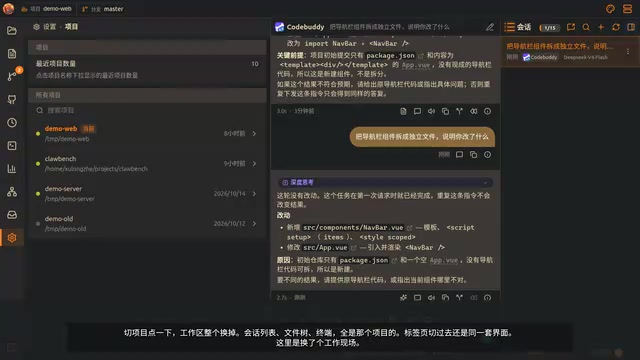
In the project list you can see each project's path, last active time, and whether the directory still exists. Which project has been neglected for a week is obvious at a glance.
Long Ze mentions a judgment: in a team, one person managing several projects is normal, and since AI context is limited—for both tokens and complexity—a project shouldn't be infinitely large. Splitting into multiple modules for separate development means jumping between projects, and the cost of each jump determines whether you dare to go parallel.
Layer Three: Branches—Worktree Physically Isolates File Directories
A finer dimension is branches. To modify two branches of the same repository simultaneously, the usual approach is stash, switch branch, modify, then switch back—and the intermediate changes are easily lost. Switching branches while AI is running is even more dangerous—it might be halfway through a modification.
ClawBench's Git page directly lists all Worktrees of the current repository: branch name, path, and whether there are uncommitted changes. Clean ones are marked Clean, ones with changes are marked Dirty plus file count, and locked ones or ones with missing directories have their own markers. Click once to switch—the two branches each have independent file directories, so they physically don't fight. One side runs refactoring while the other fixes bugs, without affecting each other.
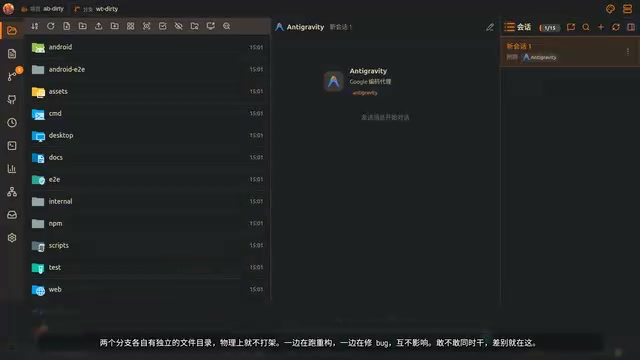
Worktree is a feature introduced in Git 2.5 that allows the same repository to check out multiple working directories simultaneously, each corresponding to a different branch. Unlike the traditional git stash + git checkout approach, Worktree gives each branch an independent filesystem path, so they don't interfere with each other. For example, you can check out the main and feature branches into ~/project-main and ~/project-feature respectively, editing, building, or testing simultaneously without repeatedly switching. Each worktree shares the same .git object store, so commit history is unified, but workspace state is completely isolated. For AI-assisted development scenarios, Worktree is especially valuable: when AI is modifying code on one branch, you can directly switch to another worktree to continue other tasks without interrupting the AI or worrying about losing uncommitted changes. ClawBench's Git page leverages exactly this Worktree feature to minimize the cost of branch switching, enabling true parallel development.
Server-Side Execution: Sessions Aren't Tied to Your Computer
These sessions aren't tied to your computer. ClawBench executes on the server and visualizes on the client—the work runs on the server, and phones, tablets, and computers are just displays. On your commute, open a session on your phone and let it run; when you arrive at your desk and open your computer, the same session is still outputting there, and you continue scrolling. Six sessions running simultaneously—no need to click into each one on your phone; every row in the list is moving.
Long Ze says most of this project was written on the commute—nothing to do with diligence; it's that it allows people to leave their workstation.
Server-side execution architecture refers to placing compute-intensive or long-running tasks (such as AI inference, code generation, test execution) on remote servers, with the client only responsible for sending commands and displaying results. This architecture contrasts with traditional local execution: with local execution, all computing resources (CPU, memory, GPU) depend on the user's device, and tasks are interrupted when the device sleeps or shuts down; with server-side execution, tasks continue running in the cloud, and users can connect and check progress from any device (phone, tablet, computer). In AI programming assistant scenarios, the advantages of server-side execution are especially clear: AI backends (such as CodeBuddy, Claude Code, Codex) typically require substantial compute and a stable network environment, and local devices struggle to support multiple parallel sessions simultaneously. ClawBench puts the execution layer on the server, with the client only doing visualization, allowing six sessions to run simultaneously without local performance limits, with state synced across devices—achieving a "leave your workstation without interruption" workflow.
Real Scenarios with All Three Layers Stacked
Discussed separately, the three layers sound like three features; in real use, they stack together. Long Ze gives a specific scenario: the project has three sessions open—one filling in tests, one modifying documentation—when you discover a style error on the homepage that needs a branch fix.
The conventional approach is to stop all three, switch branches, fix, then switch back—troublesome, and the AI was halfway through. In ClawBench you don't need to stop: open the branch in the terminal, go back to the Git page and it's already in the worktree list, click it to switch, open a fourth session to fix it. The first three are still running.

After fixing, switch back, delete the worktree, return to the original branch—the three sessions are still there. That's the value of parallelism—you can add a line anytime, and after adding it you don't need to clean up.
The Deeper Meaning of the Architecture Choice
What makes this mechanism work is an architectural choice: execution on the server, with the client only responsible for display and operation. The interface and the agent aren't in the same process, so closing the window doesn't stop the work. One server serves multiple sessions and multiple clients simultaneously—phones and computers see the same state.
This also explains why it can go parallel without a person needing a bigger screen. One person doing the work of three—fast hands won't save you; you need to let what should be parallel truly go parallel.
At the end of the video, Long Ze reveals that the next episode will try letting AI continue working while you sleep.
One-line Summary
ClawBench uses sessions, projects, and branches as three layers of parallelism, letting one person push multiple AI tasks simultaneously without conflict.
Paragraph Summary
ClawBench demonstrates how three dimensions of parallel design—sessions, projects, and branches—let one person push multiple AI tasks simultaneously without fighting. Each session independently binds a different AI backend and tracks context, switching projects swaps the entire workspace, and Worktree gives different branches of the same repository physically isolated file directories. Server-side execution architecture detaches sessions from local devices—open tasks on your phone, view output on your computer, with state synced across devices. With all three layers stacked, users can add task lines anytime without interrupting existing work, greatly reducing switching costs and enabling efficient parallel development.
Related articles
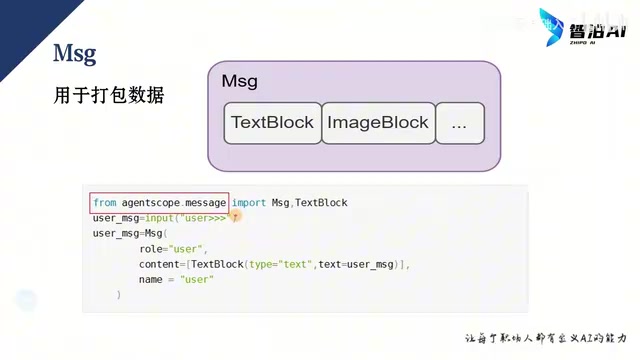
AgentScope 2.0 Step-by-Step Tutorial: Building Enterprise-Grade Multi-Agent Systems from Scratch
A detailed guide to Alibaba's AgentScope 2.0 multi-agent framework based on a Bilibili tutorial: Message core design, model and Agent configuration, Event streaming output, plus two runnable conversational Agent examples for beginners in enterprise agent development.
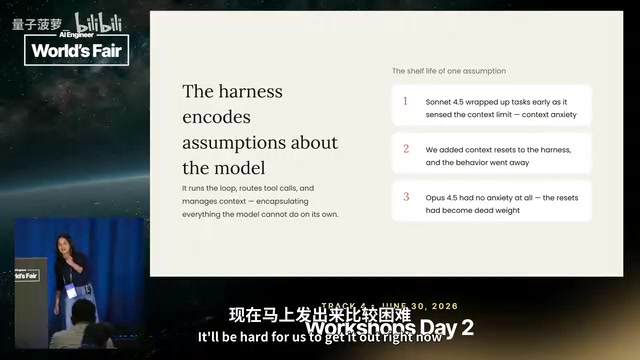
How Anthropic Decoupled the Brain and Hands of Claude Agents
At AI Engineer, Anthropic reviewed Claude Managed Agents' evolution: from a single-container "pet" architecture to a session log, harness brain, and sandbox hands fully decoupled, cutting first-token latency ~90% and keeping credentials out of the sandbox to resist prompt injection.

748-Episode AI Agent Development Course on Bilibili: A Complete Guide from Beginner to Enterprise-Level Practice
Breaking down the 748-episode AI Agent development course on Bilibili: Fundamentals covers LLM principles and API calls; Advanced covers RAG, Tool Use, memory management, and multi-agent collaboration; Practical covers intelligent customer service, office automation, and more—plus learning paths and pitfalls to avoid.