CleanShot 5.0 Deep Dive: Studio Mode and Its Screen Recording Enhancement Features

CleanShot 5.0's Studio Mode lets Mac users polish screen recordings without leaving the app.
CleanShot 5.0's headline feature is Studio Mode, which integrates background customization, device frames, focus tracking, and camera picture-in-picture directly into the recording workflow — no Final Cut Pro or ScreenFlow required. Compared to rivals like Loom and Screen Studio, CleanShot's advantage is unifying screenshot annotation, GIF recording, and video recording in one workflow. Its Mac-native development and one-time purchase pricing further differentiate it in a subscription-heavy market. This major version signals a clear evolution from utility tool to platform, targeting developers, designers, and technical content creators.
From Screenshot Tool to Content Creation Platform
The Mac screenshot and screen recording space is competitive, but CleanShot has always held its ground with a polished, native experience. With the release of version 5.0, the tool's identity has quietly shifted — it's no longer just a "screenshot powerhouse" but has taken a meaningful step toward becoming a professional content creation tool.
At the heart of this update is the all-new Studio Mode. It addresses a pain point shared by developers, designers, and tech bloggers alike: recording your screen is easy, but turning raw footage into a polished, professional-looking demo video usually requires heavy tools like Final Cut Pro or ScreenFlow — complex workflows with steep learning curves. CleanShot 5.0 aims to solve this problem at the recording stage itself.
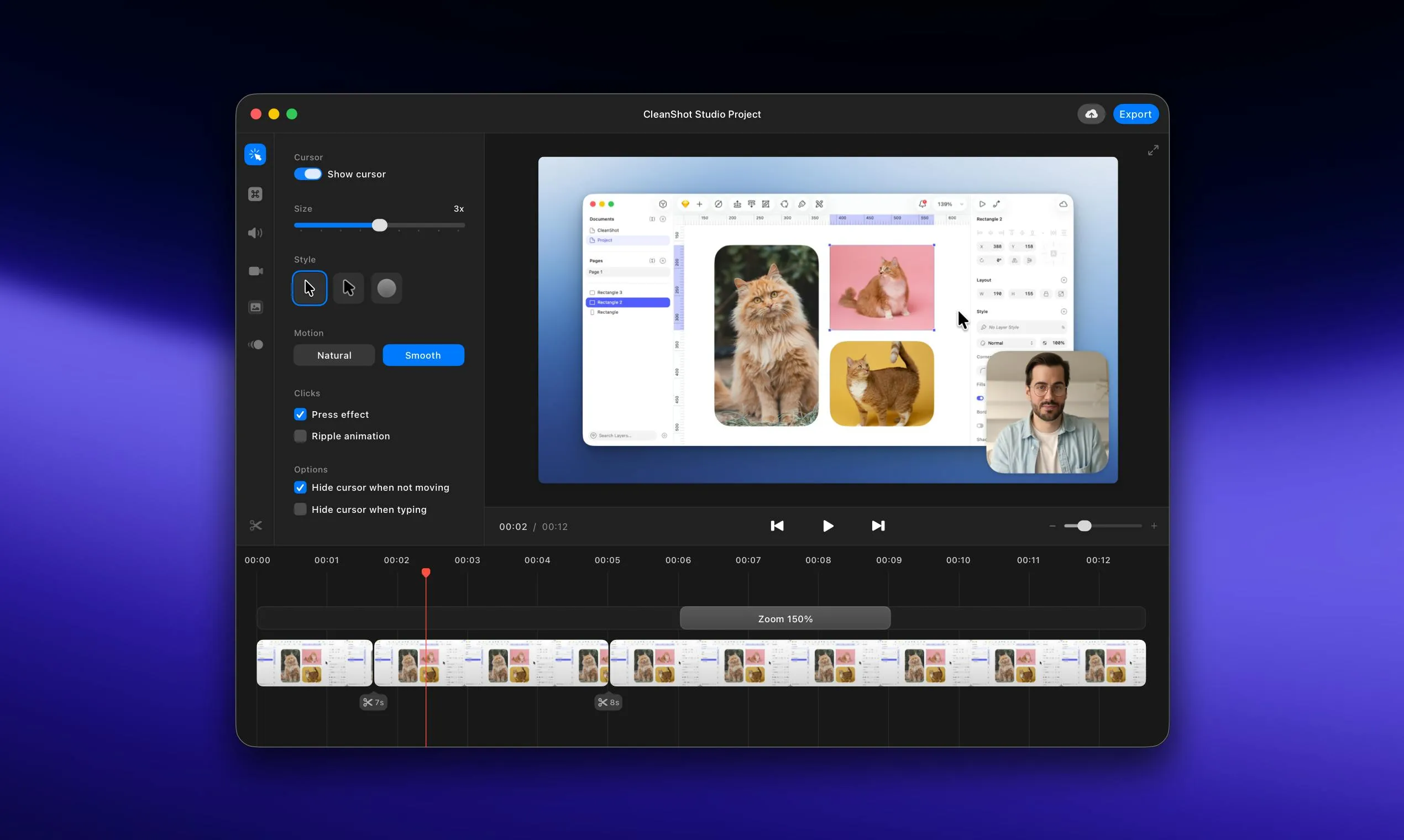
Studio Mode: A Low-Barrier Entry to Professional Video
Core Features Breakdown
Studio Mode is built around the idea of "record and you're done." Without ever leaving the CleanShot workflow, users can visually enhance and polish their recordings — eliminating the repetitive post-production work that usually follows. It offers capabilities across several dimensions:
- Backgrounds and device frames: Add gradient backgrounds and device mockups like MacBook frames to give your demos a branded, professional look.
- Focus and highlight tracking: Automatically or manually track focal areas in the frame, drawing attention to key actions — especially useful for tutorial-style content.
- Camera picture-in-picture: Overlay your webcam feed onto the screen recording for on-camera narration, with no need for separate video mixing software.
- Mouse click effects: Visual feedback like click highlights and cursor magnification helps viewers keep up with fast-moving technical demos.
How CleanShot Differentiates from Competitors
Tools like Loom and Screen Studio also offer "one-click beautified screen recording," but CleanShot's edge lies in its deep integration of screenshots, annotations, GIF export, and video recording into a single unified workflow. You never have to context-switch between apps. Studio Mode is a natural extension of that existing workflow — not a standalone add-on bolted on from the outside.
Screen Studio has been the fastest-growing Mac screen recording beautifier in recent years, focusing on auto-zoom mouse tracking and rounded window aesthetics, with a one-time purchase model similar to CleanShot's. Loom takes the opposite direction — emphasizing cloud storage, team collaboration, and shareable video links, positioning itself more as a lightweight async communication platform than a local creation tool. CleanShot's core moat is that it's the only tool combining static screenshot annotation, GIF recording, and video recording under a single, unified shortcut system. For users who have already internalized CleanShot as muscle memory, Studio Mode's value isn't just a new feature — it's avoiding the migration cost of learning yet another tool.
Mac-Native Experience: An Underrated Competitive Barrier
CleanShot has long committed to Mac-native development — a differentiator in a world dominated by cross-platform tools. Native apps mean lower system resource usage, smoother animation response, and seamless integration with macOS's permission model. For developers who screenshot and record constantly, these details have a direct impact on daily efficiency.
Version 5.0 maintains that native experience while bundling Studio Mode into all existing plans, explicitly marked as "no subscription required." This pricing strategy is worth noting: at a time when SaaS subscriptions have become the default for productivity tools, CleanShot's one-time purchase model builds user trust and lowers the decision threshold for new users.
Mac-native development typically means building with Apple's official frameworks — AppKit or SwiftUI — rather than wrapping web or mobile code via cross-platform runtimes like Electron or Flutter. Native apps can directly call macOS system APIs like Screen Recording and Accessibility, which matters enormously for screenshot and recording tools: lower-latency screen capture, more precise window boundary detection, and more stable behavior within macOS's permission sandbox all depend on native integration. Electron-based apps are cheaper to develop and cross-platform consistent, but they typically show a noticeable gap in memory usage and system event responsiveness. The core use case of a screenshot tool — "trigger instantly, respond immediately" — is exactly where native development's advantages shine.
Use Case Analysis
Developers and Technical Evangelists
For developers recording API demos, feature walkthroughs, or bug reproduction videos, Studio Mode offers a "good enough without overdoing it" post-processing solution. No need to learn professional editing software — you can produce clean, polished video assets that look sharp in GitHub Issues, technical blog posts, or internal documentation.
Designers and Product Teams
Designers conducting design reviews or presenting interactive prototypes to clients often want their recordings to highlight key interactions — not expose a messy desktop. Studio Mode's background replacement and device frame features are genuinely useful here.
Technical Content Creators
For creators producing software tutorials or product walkthroughs, CleanShot 5.0 can handle the full pipeline from recording to initial polish — freeing up more time for scripting and narrative design rather than repeatedly tweaking video style parameters.
A Signal of Product Maturity
CleanShot has maintained steady traction on Product Hunt, and the 5.0 major version bump sends a clear signal: this product is transitioning from a utility tool to a platform-level tool.
From screenshot annotation, to GIF recording, to Studio Mode video enhancement — each iteration of CleanShot has expanded the contextual boundaries around the core act of "screen capture." This incremental approach to feature growth avoids the user churn that disruptive redesigns can cause, while steadily raising the tool's indispensability.
For Mac users whose daily work regularly involves capturing and sharing screen content, CleanShot 5.0 is one of the most compelling all-in-one options available right now. Studio Mode won't make your recordings rival professionally edited productions, but it will take footage that's "barely passable" and bring it up to "confidently shareable" — and that's exactly what most technical professionals actually need.
Related articles

LLM Application Development: A High-Paying Career Guide for Ordinary People
LLM application development offers fresh graduates up to 35K/month, with SP offers reaching 600K. This article explains the core skills, how to break in, and how ordinary people can seize AI opportunities through learning by doing.

Say Goodbye to AI Influencer Faces: A Complete Guide to Creating Visual Assets for AI Comic Dramas from Scratch
Bilibili creator shares a full workflow for zero-basics AI comic drama visual assets: use Doubao Work skills with script-first, visual references, and real-person texture to escape AI influencer faces, then lock character and scene consistency with asset sheet layouts, weapon detail images, scene nine-grids, and cinematic color palettes.

The AI Production Pipeline Behind Great Videos: From Research to Agent Validation
AI video production isn't just a model race. This article breaks down a transferable four-step pipeline: researching professional workflows, organizing a skill checklist, configuring agents, and experimental validation—and explains how general-purpose LLMs like DeepSeek can replace paid tools to run the entire process.