Cline Desktop v0.0.41 Update Breakdown: Improved Cloud Sessions and Connector Experience

Cline Desktop v0.0.41 focuses on cloud session stability, draft preservation, connector management, and multi-agent performance.
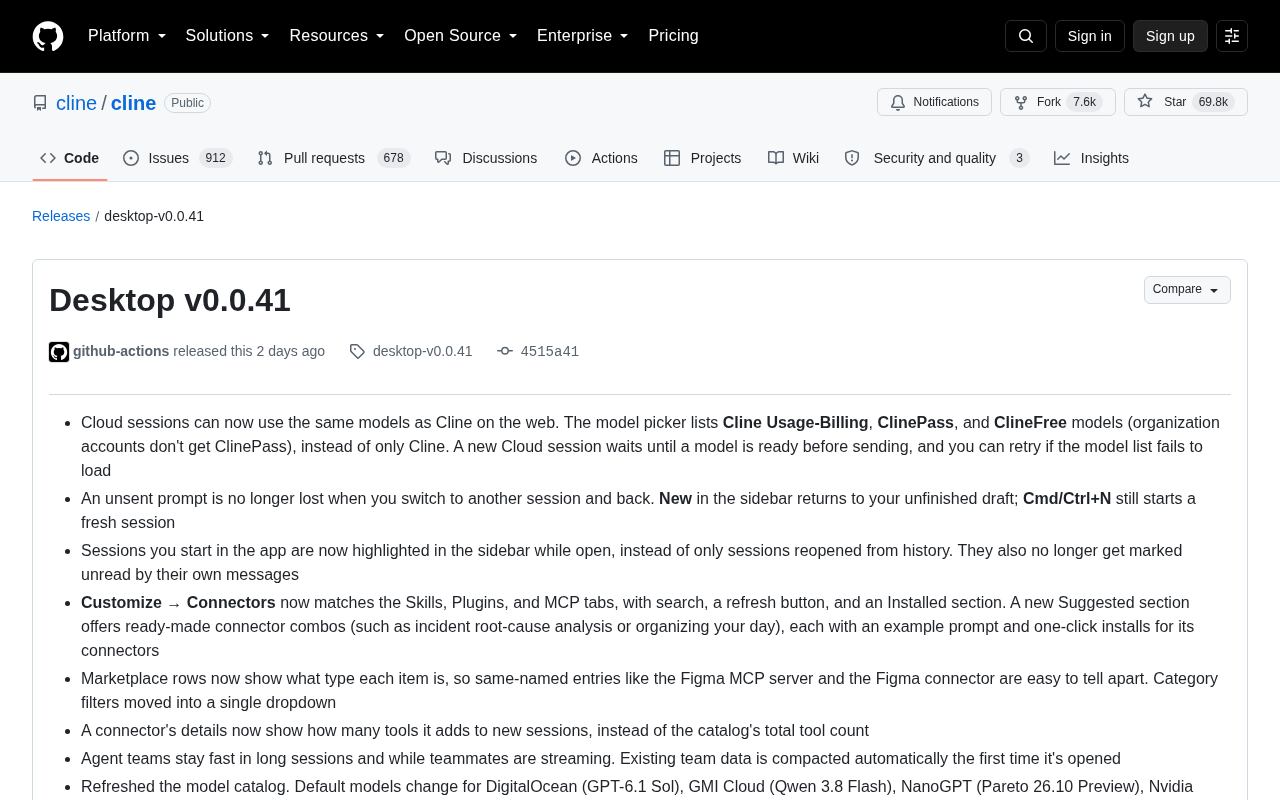
Cline Desktop v0.0.41 is a workflow-focused update. Cloud sessions now support the same range of models as the web version and wait for models to be ready before sending requests. Unsent prompts are preserved across session switches, and sidebar session highlighting is more accurate. The connector panel has been redesigned with search, an Installed section, and scenario-based suggested bundles. Agent teams use auto-compaction to stay responsive in long sessions, and default models across several cloud providers have been refreshed.
Cline, the open-source AI coding assistant, has accumulated nearly 70,000 stars on GitHub. The latest Desktop v0.0.41 release brings a series of improvements focused on cloud sessions, connector management, and Agent team collaboration. While these changes may seem incremental, they reflect Cline's ongoing investment in refining the desktop workflow experience. Below is a detailed breakdown of each key change based on the official changelog.
Unified Model Selection for Cloud Sessions
The most notable change in this update is that cloud sessions can now use the same model collection available in Cline's web version. The model selector now includes three new categories — Cline Usage-Billing, ClinePass, and ClineFree — moving beyond a single Cline model option. Note that organization accounts cannot access ClinePass models, reflecting a differentiated permission design across account types.
On the interaction side, newly created cloud sessions now wait for the model to be ready before sending requests, preventing errors caused by models not being fully loaded. If the model list fails to load, users can manually retry. These subtle robustness improvements can significantly reduce interruptions for developers who rely on cloud compute.
Drafts Are No Longer Lost
Another practical UX improvement: unsent prompts are no longer lost when you switch to another session and come back. The New button in the sidebar will return you to your unfinished draft, while Cmd/Ctrl+N still opens a brand-new session. This draft state preservation caters to the real-world need of developers who frequently switch contexts while juggling multiple tasks.
Session Status and Sidebar Management
v0.0.41 also introduces clearer session state indicators in the sidebar. Previously, only sessions reopened from history were highlighted. Now, any session you launch directly within the app will be highlighted in the sidebar as long as it remains open. Additionally, sessions will no longer be incorrectly marked as unread due to messages they themselves generated.
These two changes address a common pain point: developers often manage multiple sessions simultaneously, and clear status indicators make it easier to quickly locate the active context and avoid accidental interactions.
A Revamped Connector Experience
The Customize → Connectors panel received a significant overhaul in this update, aligning its interaction patterns with other tabs like Skills, Plugins, and MCP — including search functionality, a refresh button, and a dedicated "Installed" section.
Even more interesting is the new "Suggested" section, which offers ready-made connector bundle scenarios such as "Event Root Cause Analysis" or "Plan Your Day." Each bundle includes example prompts and supports one-click installation of all required connectors. This out-of-the-box, template-driven design lowers the barrier for new users setting up complex workflows.
Clearer Marketplace Entries
Marketplace list items now display the type of each entry, making it easy to distinguish between items with the same name — for example, the Figma MCP server versus the Figma connector. Category filters have also been consolidated into a single dropdown menu for a cleaner interface.
Connector detail pages have been improved as well: they now show the number of tools a connector adds to a new session, rather than the total tool count across the entire catalog, giving users a more accurate sense of each connector's actual impact.
Connectors in Cline's architecture serve as "capability extension plugins," similar to MCP (Model Context Protocol) servers but more focused on bridging specific SaaS services or data sources into AI sessions. MCP is an open protocol led by Anthropic that allows AI models to invoke external tools and data through standardized interfaces; Cline's connector system builds on top of this with pre-configured, user-facing solutions. Skills and Plugins are two other forms of capability extensions in the Cline ecosystem — together with connectors, they form Cline's "tool layer." Aligning the connector panel's interaction logic with other tabs means users no longer need to learn different interaction patterns for different extension types, reducing cognitive friction.
Agent Teams and Model Catalog Refresh
On the multi-agent collaboration front, Agent teams now maintain responsiveness during long sessions and when teammates are streaming output in real time. Existing team data will be automatically compacted on first open, meaning accumulated history won't slow down ongoing collaboration.
The model catalog has also been refreshed, with default model changes across several cloud providers:
- DigitalOcean → GPT-6.1 Sol
- GMI Cloud → Qwen 3.8 Flash
- NanoGPT → Pareto 26.10 Preview
- Nvidia → DeepSeekAd V4.1 Flash
- Ofox → GPT-6.1 Sol
These model names reflect the diverse model ecosystem Cline integrates with, making it easier for users to choose the right default configuration based on each provider's capabilities.
Agent teams is Cline's multi-agent collaboration feature, allowing multiple AI agents to divide and handle a complex task together, with each agent taking on different roles (e.g., planner, executor, reviewer) and coordinating via message streams. In long-session scenarios, accumulating conversation history increases token overhead, causing higher inference latency or exceeding context window limits. "Auto-compaction" is therefore a key engineering optimization — it summarizes earlier conversation history, retaining only essential context to significantly reduce per-request token costs without losing critical information. Streaming output refers to models returning tokens as they are generated rather than waiting until the full response is complete; in multi-agent concurrent collaboration, streaming responses noticeably reduce perceived wait times.
Conclusion
Cline Desktop v0.0.41 is not a sweeping major release, but rather a series of pragmatic refinements centered on cloud session stability, session state management, connector discoverability, and multi-agent performance. For users who have already integrated Cline into their daily development workflow, improvements like draft preservation, session highlighting, and suggested connector bundles offer real, tangible productivity gains. As an open-source project, this high-frequency, fine-grained iteration cadence is also a key reason Cline maintains an active and engaged community.
Related articles

ChatGPT Space Launches: Team Collaboration and New Pages Features Explained
ChatGPT Space is OpenAI's new team collaboration feature with Pages, real-time collaboration, and Slack/Google Drive sync. We break down its privacy design, multi-platform integration, and the full workflow from conversation to document.

Migrating Apache Spark UDFs to GPU Acceleration with AI Agents
NVIDIA developer blog explains how AI Agents rewrite Apache Spark UDFs for GPU acceleration, covering migration criteria, agent rewriting and verification workflows, plus pitfalls like result consistency and CPU-GPU transfer overhead.

Zed Editor v0.40.4-rc2 Released: Usage Credits Now Available Without Upgrading
Zed editor releases v0.40.4-rc2, allowing users to use usage credits for AI features without upgrading to a paid plan, lowering the trial barrier.