Cline Desktop v0.0.42 Update: /compact Command and a Redesigned Connector Hub

Cline v0.0.42 adds /compact for context compression and revamps the Connector discovery experience.
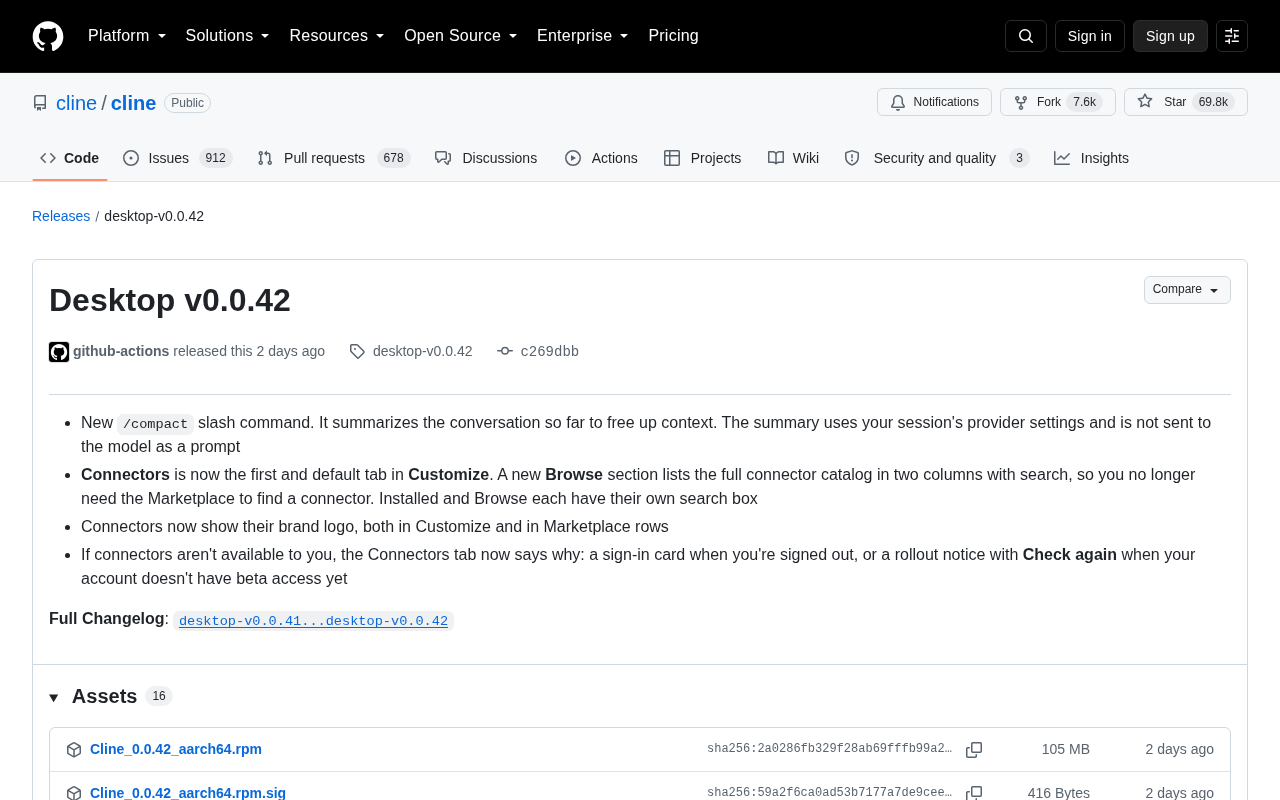
Cline Desktop v0.0.42 tackles two everyday pain points with focused refinements. The new `/compact` slash command summarizes the current conversation to free up context window space without injecting the summary as a prompt, keeping the conversation flow clean — especially useful for long, multi-turn coding sessions. On the Connectors side, the update promotes the feature to the first default tab in the Customize panel, adds a two-column Browse directory with independent search, introduces brand logos for visual recognition, and provides clear status messages for users who are logged out or lack beta access. Overall, this is a classic polish-focused release where every change maps to a real use case, reflecting Cline's sustained commitment to context management and external capability integration.
The desktop version of Cline, the open-source AI coding assistant, has received its v0.0.42 update. With nearly 70,000 stars on GitHub, Cline is one of the most widely used coding agent tools available. This update focuses on context management and the Connectors experience — a few seemingly minor changes that actually address two core pain points in everyday AI coding workflows.
/compact Command: A Smarter Way to Manage Conversation Context
The most notable new feature in this update is the /compact slash command. It summarizes the conversation history in your current session, freeing up occupied context space.
Long conversations continuously accumulate token usage, and as you approach a model's context window limit, both costs and model performance suffer. /compact compresses the conversation history by generating a summary, allowing the agent to continue working while retaining essential information.
One notable design detail: the summary is generated using the provider settings configured for your session, and the summary is not sent to the model as a prompt. This means the compression action runs independently without polluting the current conversation flow, giving users clearer and more precise control over context. For developers working on long, multi-turn coding tasks, this is a genuinely practical efficiency boost.
Context Window refers to the maximum number of tokens a large language model can process in a single pass — limits range from tens of thousands to hundreds of thousands of tokens depending on the model. In agent-based coding tools, each conversation turn concatenates the full history, tool call results, code snippets, and more into the prompt. As turns accumulate, token consumption grows linearly or even exponentially. Approaching the limit causes the model to either truncate early information or throw an error outright, while API costs spike due to the inflating input token count. Starting a new conversation avoids the problem but sacrifices task context.
/compactoffers a middle path: replace raw history with a summary to reclaim available space without interrupting your workflow.
A Fully Redesigned Connector Experience
The other set of changes centers on the Connectors feature, covering four areas: entry point, browsing, visual identity, and permission feedback.
Smoother Discovery and Installation Flow
Connectors are now the first default tab in the Customize panel. More importantly, a new Browse section displays the full connector catalog in a two-column layout with search support. Users no longer need to navigate to the Marketplace to find connectors — the Installed list and Browse list each have their own independent search boxes, making it faster and easier to find and manage connectors.
Embedding the discovery flow directly into the main interface lowers the barrier to using connectors, and reflects Cline's intent to make connectors a natural part of daily workflows rather than a niche feature that requires extra exploration.
Visual and Permission Feedback Improvements
Connectors now display their respective brand logos — both in the Customize panel and in the Marketplace listing — improving visual recognition. In information-dense lists, logos help users quickly locate the service they're looking for.
For cases where a connector is unavailable, the new version also provides clear explanations: if you're not logged in, you'll see a card prompting you to sign in; if your account doesn't yet have beta access, a rollout notice is shown along with a Check again button. This transparent status feedback eliminates the confusion of staring at a blank screen with no idea what went wrong.
The Product Philosophy Behind a Minor Version Bump
Looking at the full changelog from v0.0.41 to v0.0.42, this is a classic "polish" iteration. There's no sweeping new feature, but every change addresses a real-world usage scenario: /compact tackles context bloat, and the connector redesign reduces the cognitive cost of discovery and status awareness.
In the fiercely competitive AI coding tools space, this kind of detail-oriented refinement often retains users more effectively than piling on new features. Context management is a universal challenge for all agent-based tools, while connectors — essentially the gateway to MCP integrations and external capabilities — determine how much of the outside world a tool can tap into. Cline's continued investment in both directions signals that the team has a clear understanding of the product's core value.
As an open-source project, every Cline release is publicly accessible. Developers can follow the complete changelog and provide feedback via the GitHub releases page.
MCP (Model Context Protocol) is an open protocol introduced by Anthropic in late 2024, designed to define a standardized interaction interface between AI models and external tools and data sources. The core idea behind MCP is to unify "tool connectivity" — moving away from proprietary, vendor-specific integrations toward an interoperable standard format, much like USB is to hardware peripherals. Cline's Connectors feature is fundamentally built on MCP or a similar mechanism, enabling the agent to call upon external capabilities such as file systems, browsers, databases, and third-party APIs. The richness of the connector ecosystem directly defines the boundaries of what a coding agent can automate — making it one of the key competitive dimensions among AI coding tools today.
Related articles

Chain of Thought Isn't Just for AI: How Humans Can Use CoT to Improve Thinking Quality
Chain of Thought isn't just a prompt trick for large models. Starting from a Hacker News discussion, this article analyzes why CoT works for human thinking too, breaks down actionable ways to transfer it, and highlights the key differences between human CoT and machine CoT.
Cloudflare Teams Up with OpenAI: Closi…
Cloudflare Teams Up with OpenAI: Closing the Loop from Vulnerability Discovery to Defense with AI
Cloudflare uses OpenAI Daybreak to investigate security vulnerabilities and generate reviewable remediation plans, while developers use Codex to boost coding efficiency and quality.

Orca Multi-Agent Orchestration in Practice: A Guide to Parallel Collaboration with Claude and Codex
Orca is Stable AI's free open-source agent workbench supporting 34 agents like Claude Code and Codex in parallel. Learn its Git worktree isolation, multi-model orchestration, and mobile management.