Cluinn: A Real-Time AI Assistant for Mac Calls That Answers Questions Mid-Meeting

Cluinn listens to calls in real time locally on Mac and answers questions on the spot rather than generating summaries afterward.
Cluinn is a Mac-resident meeting AI assistant whose core selling point is real-time answers during calls rather than post-meeting summaries. It requires no bot account to join meetings, listening to audio locally and avoiding the exposure and compliance friction of bot participation. It features Smart Cards for flagging unanswered questions, Coach for reviewing call performance against goals, and AI dictation into any Mac app. It supports only Apple silicon Macs, offers a 14-day trial and 30% off for 12 months, and suits salespeople, consultants, support staff, and founders.
Real-Time Q&A During Calls, Not Post-Meeting Catch-Up
Getting put on the spot during a video call and frantically scrambling through documents or chat history is practically a daily occurrence for knowledge workers. Cluinn, a new product on Product Hunt, aims to solve exactly this pain point: it runs on your Mac, listens in real time during calls, and answers questions as they come up—rather than waiting until the meeting ends to generate a summary.
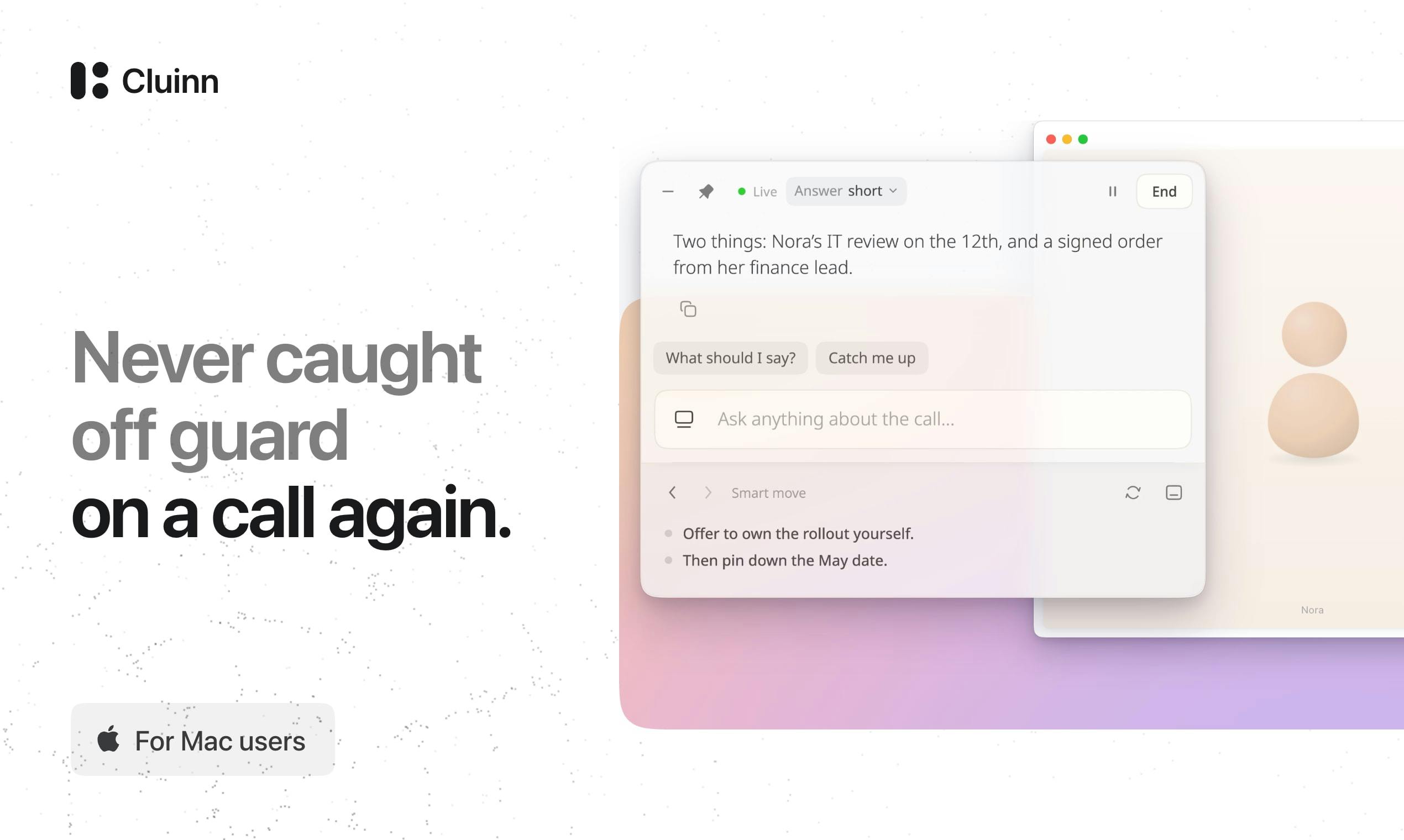
Cluinn's core selling point is straightforward—answers are delivered during the call, not after. When someone raises a question in a meeting you're attending, Cluinn responds in real time based on the conversation that just happened, all without a bot account joining the meeting. This clearly sets it apart from the many "meeting notes + post-meeting summary" tools on the market: the latter solve "remembering what was said," while Cluinn tries to solve "how to respond right now."
From a product positioning standpoint, it's more of an invisible meeting co-pilot than yet another meeting recorder.
Three Core Feature Modules: Smart Cards, Coach, and AI Dictation
Smart Cards: Identifying Questions Nobody Answered
The things most easily missed in meetings are often the questions that get raised but go unanswered. Cluinn's Smart Cards feature flags these "dangling questions," reminding you which topics actually received no response. The value of this design is that it turns AI from a passive responder into an active observer—even if you didn't realize at the time that an answer was needed, the tool keeps an eye out for you.
Coach: Measuring Call Performance Against Goals
After a call ends, Cluinn outputs action items, and the Coach feature shows how the call performed relative to the goals you set. This essentially transforms meeting effectiveness evaluation from subjective impressions into comparable feedback—well suited for users who need to review sales calls, client communications, or interview performance.
AI Dictation: Speech to Clean Text
Beyond meeting scenarios, Cluinn also offers AI dictation: after you speak, the cleaned-up text can be dropped directly into any Mac application. This means it isn't limited to calls—it can also serve as a system-level voice input layer for everyday tasks like writing, note-taking, and email.
No Bot Joining Meetings: A Differentiated Local-Listening Approach
Cluinn emphasizes that "no bot joins the meeting." Behind this statement is a real product trade-off. Most meeting AI tools rely on bot accounts entering the meeting platform to capture audio and video streams—an approach that easily exposes itself in the participant list and may trigger enterprise security policies. Cluinn instead listens locally on the Mac, sidestepping the awkwardness and compliance friction of bot participation.
The cost is that it's tied to the Mac—officially, it only supports Apple silicon Macs. For Windows-centric teams, this isn't an option for now. But for individual users who are heavy Mac users, this "system-level always-on assistant" form factor is actually more convenient: no extra setup before each meeting, and no dependence on a specific meeting platform.
A meeting bot is a type of automated program that joins video meetings as a virtual participant, automatically records audio and video, and generates summaries. They typically require authorization from the meeting host and appear in the participant list. This approach is heavily platform-dependent and may be restricted in enterprise environments due to data leakage or compliance auditing concerns. Cluinn's local-listening approach performs audio capture and inference entirely on the user's device—data never leaves the machine—avoiding both the social awkwardness of bot participation and the risk of triggering enterprise security policies. However, local solutions impose hard requirements on device compute and operating system, which is the fundamental reason it currently only supports Apple silicon Macs.
Pricing and Target Audience
Cluinn offers a 14-day trial, and using the promo code LAUNCH30 gives you 30% off for 12 months. At launch it received 79 upvotes on Product Hunt, ranking 13th for the day—a niche but precisely positioned tool.
Its target audience is fairly clear: salespeople, consultants, support staff, and founders who frequently get asked questions during calls and need to pull up information on the spot. If what you want is comprehensive meeting recording archives and team collaboration notes, Cluinn may not be your first choice; but if you want "someone to help you catch questions in the moment during a call," it fills a gap that has been overlooked until now.
The combination of real-time AI assistants and meeting tools is shifting from "post-meeting summarization" to "in-meeting augmentation," and Cluinn is a noteworthy attempt in this direction. Whether it succeeds depends on the accuracy of its real-time answers—which is precisely where the original information provides no data yet, and the one thing users should verify most when trying it out.
One-line Summary
Cluinn listens to calls in real time locally on Mac and answers questions on the spot rather than generating summaries afterward.
Paragraph Summary
Cluinn is a meeting AI assistant that runs on Mac, with its core selling point being real-time answers during calls rather than post-meeting summaries. It requires no bot account to join meetings, listening to audio locally and avoiding the exposure and compliance friction of bot participation. The product includes three modules: Smart Cards flags dangling questions nobody answered, Coach reviews call performance against preset goals, and AI Dictation inputs cleaned-up text into any Mac app. Cluinn only supports Apple silicon Macs, offers a 14-day trial and 30% off for 12 months, and suits salespeople, consultants, support staff, and founders—roles that frequently get asked questions during calls. Its success hinges on real-time answer accuracy, for which the original text provides no data.
Related articles

LLM Application Development: A High-Paying Career Guide for Ordinary People
LLM application development offers fresh graduates up to 35K/month, with SP offers reaching 600K. This article explains the core skills, how to break in, and how ordinary people can seize AI opportunities through learning by doing.

Say Goodbye to AI Influencer Faces: A Complete Guide to Creating Visual Assets for AI Comic Dramas from Scratch
Bilibili creator shares a full workflow for zero-basics AI comic drama visual assets: use Doubao Work skills with script-first, visual references, and real-person texture to escape AI influencer faces, then lock character and scene consistency with asset sheet layouts, weapon detail images, scene nine-grids, and cinematic color palettes.

The AI Production Pipeline Behind Great Videos: From Research to Agent Validation
AI video production isn't just a model race. This article breaks down a transferable four-step pipeline: researching professional workflows, organizing a skill checklist, configuring agents, and experimental validation—and explains how general-purpose LLMs like DeepSeek can replace paid tools to run the entire process.