CodeBuddy: Install Claude Code Automatically with a Single Command — A Zero-Barrier Tutorial

CodeBuddy lets you install Claude Code with one sentence — no technical skills required.
This tutorial explains how CodeBuddy (WorkerBuddy) automates the entire Claude Code installation process with a single natural language command. By leveraging an AI Agent, it eliminates the need for manual NPM setup, API Key configuration, and config file editing. The guide also covers why DeepSeek is used as the default model for its low cost and Chinese language support, and discusses who this approach is best suited for.
The Pain Point: How Many People Has Claude Code's Installation Scared Away?
Claude Code, the AI programming terminal tool from Anthropic, is undeniably powerful — it can organize documents, write reports, and perform data analysis, making it a true productivity powerhouse. Anthropic is an AI safety company founded in 2021 by former core members of OpenAI. Its Claude series of models excel in code generation and long-text comprehension, and Claude Code brings these capabilities directly into the command-line terminal. Unlike IDE plugins such as GitHub Copilot, Claude Code adopts a "terminal-native" design philosophy — users can write code, manipulate files, and even manage systems simply by chatting with the AI in natural language. This design extends its use cases far beyond traditional code completion tools.
But the installation process has been a dealbreaker for many non-technical users: installing NPM, registering for an API account, manually configuring API Keys, editing config files… Online tutorials often run over a dozen steps, each one a potential pitfall.
Recently, a content creator shared an ultra-simple solution: use CodeBuddy (WorkerBuddy) to fully automate the installation with a single sentence, reducing Claude Code's setup barrier to "as easy as installing WeChat." But does this approach actually work? Let's break it down in detail.
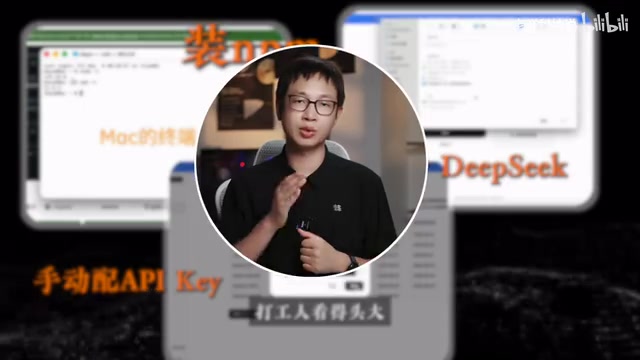
Traditional Installation vs. the CodeBuddy Approach
Traditional Installation Process (At Least 5 Steps)
To install Claude Code the conventional way, you need to complete at least the following steps:
- Install the Node.js environment: Download the correct version for your operating system from the official website and configure environment variables. Node.js is a platform that allows JavaScript to run outside the browser — think of it as the essential "underlying engine" that Claude Code needs to run. Without it, Claude Code is like a computer without an operating system — it simply won't start. Configuring environment variables tells your computer "where Node.js is installed," and this step is especially error-prone on Windows.
- Install Claude Code via NPM: Open a terminal and enter a command. NPM (Node Package Manager) is the package management tool bundled with Node.js — similar to an app store on your phone, you use it to download and install various Node.js-based software packages. The installation command is typically
npm install -g @anthropic-ai/claude-code. It looks simple, but network issues, permission settings, and version compatibility problems can all cause the installation to fail. - Register for a model service like DeepSeekAd: Obtain an API Key. An API Key is essentially a unique identity credential assigned by the service provider — like a "digital pass." When Claude Code sends requests to the model service, the API Key verifies your identity and tracks usage for billing. Every time you ask the AI to process text or code, the system calculates the cost based on the volume of input and output text (measured in Tokens — roughly 1–2 Tokens per Chinese character), which is the so-called "pay-as-you-go" model.
- Manually edit configuration files: Write the API Key and model parameters into the config. This typically involves locating hidden system folders, opening JSON-formatted config files with a text editor, and filling in parameters in a specific format — a single missing quotation mark or comma will cause the configuration to fail.
- Debug and run: Troubleshoot various potential errors.
For developers, these steps aren't complicated. But for the average office worker, just "opening a terminal" is already outside their comfort zone.
CodeBuddy's One-Sentence Auto-Installation
CodeBuddy's approach is straightforward — use an AI Agent to automate the entire installation process. It takes just three steps:
- Go to CodeBuddy.cn and download the WorkerBuddy desktop app (supports Mac and Windows)
- Open the app and type a single sentence: "Help me install Claude Code, use DeepSeek as the model"
- Press Enter and wait for the progress bar to finish
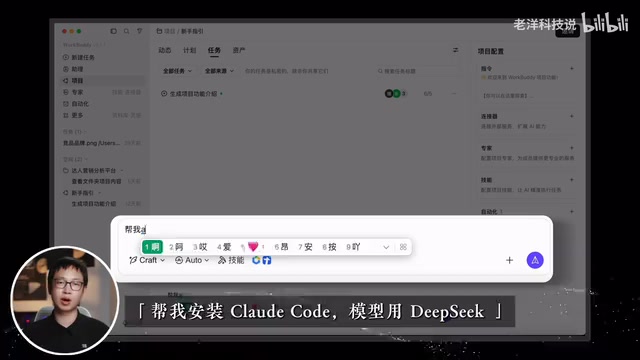
WorkerBuddy automatically plans and executes each step: Install Node.js → Install Claude Code → Configure the DeepSeek model → Write the config file — all without any manual intervention.
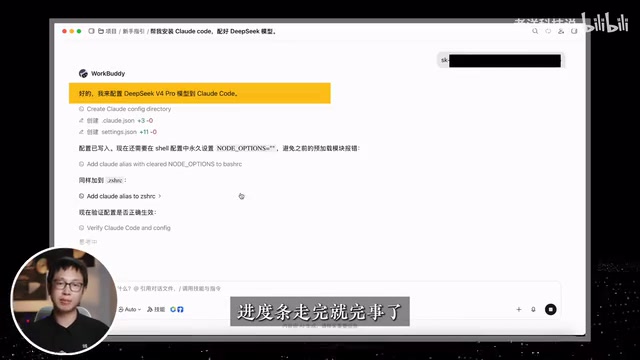
The Core Logic Behind CodeBuddy's Auto-Installation
From a technical perspective, CodeBuddy is essentially an AI Agent with system-level operation capabilities.
An AI Agent represents a significant evolution beyond ordinary chatbots. A regular AI chat tool can only "talk," while an Agent can "act." It follows a "Perceive → Plan → Execute → Feedback" work cycle: first it understands the user's natural language instruction (perceive), then breaks complex tasks into ordered sub-steps (plan), executes them by invoking system commands, file operations, and other tools step by step (execute), and finally dynamically adjusts subsequent strategies based on the results of each step (feedback). This capability allows an Agent to autonomously complete complex multi-step tasks like software installation and environment configuration — much like an experienced technician. When an error occurs at any step, the Agent can even automatically analyze the cause and attempt alternative solutions, a flexibility that traditional automation scripts lack.
What it does isn't mysterious — it packages the command-line operations, file editing, and environment configuration that users would otherwise perform manually into an automated Agent task flow.
This idea of "using AI to install AI tools" reflects a current trend in the AI tool ecosystem: the biggest barrier to AI applications is often not insufficient functionality, but an excessively high barrier to entry. CodeBuddy targets precisely this gap — helping non-technical users cross the "last mile" of configuration hurdles.
Why DeepSeek as the Default Model?
You might not have noticed, but this solution defaults to configuring the DeepSeek model rather than Anthropic's official Claude model. Claude Code supports swapping out the underlying model — this is because Claude Code's architecture decouples the "interaction interface" from the "reasoning engine," allowing users to specify any model service compatible with the OpenAI API format as the backend via configuration files.
DeepSeek is an AI company founded in 2023 by the quantitative hedge fund High-Flyer. Its models, including DeepSeek-V3 and DeepSeek-R1, have attracted global attention for their exceptional cost-effectiveness. DeepSeek employs a MoE (Mixture of Experts) architecture that activates only a subset of parameters during inference, dramatically reducing computational costs. This technical approach enables DeepSeek to offer services at prices far below those of comparable models. DeepSeek's advantages include:
- Extremely low cost: Pay-as-you-go pricing — reportedly just a few yuan per month for normal usage. By comparison, using Anthropic's official Claude API directly could cost tens to hundreds of yuan per month for equivalent usage, and requires payment via an international credit card. DeepSeek's pricing strategy reduces AI tool costs to a nearly negligible level.
- Supports domestic payment methods: Top up directly via WeChat Pay or Alipay, eliminating the hassle of overseas payments.
- Excellent Chinese language capabilities: More friendly for domestic users' office scenarios. DeepSeek's significant investment in Chinese-language training data gives it strong performance in Chinese document processing, report generation, and similar tasks — a practical advantage for users who primarily work in Chinese.
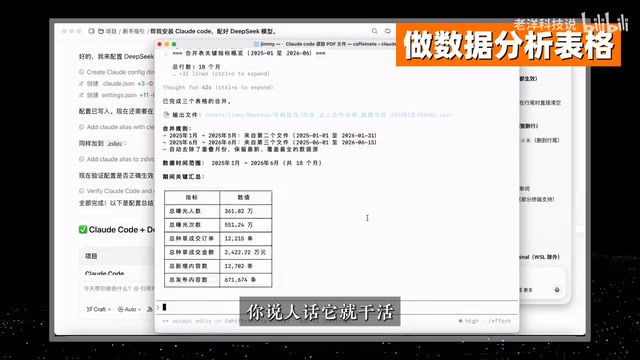
Who Is This For? What Should You Watch Out For?
Recommended Users
- Non-technical office workers: Don't want to wrestle with the command line but want to experience Claude Code's document processing and data analysis capabilities.
- Early adopters eager to try AI programming tools: Get it running first, then dive deeper later.
- Cost-conscious individual users: DeepSeek is significantly cheaper than using the Claude API directly.
Things to Keep in Mind
- Model capability differences: While DeepSeek offers great value, it still lags behind Claude's original models on complex programming tasks — it's best suited for light-use scenarios. Specifically, Claude 3.5 Sonnet and the Claude 4 series still lead in multi-step code reasoning, large-scale project refactoring, and complex bug localization. If your primary needs are document organization, simple script writing, and data analysis, DeepSeek is more than sufficient. But for complex architectural design or multi-file coordinated modifications, you may notice a clear capability gap.
- Third-party tool dependency: CodeBuddy is a commercial product developed by a team under Tencent Cloud. The installation process involves granting system permissions, so it's advisable to review their privacy policy. Since the Agent needs to execute system commands and file operations, it will request elevated system permissions — users should understand what these permissions are used for and make sure they're comfortable with them.
- Ongoing maintenance: While automated installation is convenient, switching models or adjusting configurations later still requires some basic knowledge. After installation, it's worth spending a few minutes learning where the config files are located and understanding their basic structure, so you're not completely lost when adjustments are needed.
Conclusion: A Microcosm of AI Tool Democratization
"Using AI to install AI" sounds a bit absurd, but it genuinely solves a real pain point. This phenomenon is not uncommon in the history of technology — just as graphical operating systems freed ordinary people from memorizing DOS commands, and search engines eliminated the need to remember URLs, AI Agents are becoming the next-generation "technology translation layer," converting complex technical operations into natural language interactions.
Claude Code's capabilities are well-established — document organization, report generation, and data analysis all deliver real productivity gains. True effectiveness = Model capability × Tool usability — a powerful model alone isn't enough; ordinary people need to be able to actually use it.
The emergence of products like CodeBuddy signals that the AI tool ecosystem is evolving toward "zero-configuration, plain-language" experiences. This echoes the industry trend of "AI infrastructure democratization" — when AI capability itself is no longer the bottleneck, whoever can minimize the barriers to deployment and usage will win the broadest user base. For ordinary users, it's worth getting started with these low-barrier approaches first, gradually understanding AI's capability boundaries through actual use — that's far more efficient than struggling through installation tutorials.
Related articles

Vibe Coding Full-Stack in Practice: AI Programming from Beginner to Enterprise Deployment
From Cursor to Claude Code, this Bilibili AI programming course uses four progressive projects to cover full-stack development, open-source secondary development, and team collaboration. The article analyzes the shock to frontend roles, the efficiency shift from 50 people to 5, and the methodology required for enterprise-grade projects.

David Blaine's Global Quest for Real Magic: From South Africa to Japan and India
David Blaine travels to South Africa, Japan, and India in his Do Not Attempt special, documenting Spinning drivers, black mamba rescuers, iaijutsu masters, and ascetics—exploring the boundary between magic and real human极限 challenges.

Is a Touchscreen MacBook Coming? Vergecast Reveals Apple Executive's Response
Vergecast podcast reveals a conversation between a reporter and Apple executive John Ternus about a touchscreen MacBook and Apple Pencil support. Ternus says iPad is the best device for a stylus, while the reporter bets MacBook will eventually support Apple Pencil.