CodeGraph in Practice: How a Local Code Graph Saves 47% on Token Costs

CodeGraph pre-indexes code into a local graph, cutting AI coding token costs by 47% in real-world tests.
CodeGraph reduces AI coding assistant costs by pre-building a local code graph that maps function calls, class hierarchies, and module dependencies. Instead of blindly searching files each time, the AI queries the graph directly. Real benchmarks across 7 open-source projects show a 47% reduction in token consumption and 58% fewer tool requests. It's most effective for medium-to-large codebases and legacy projects, though it's not a substitute for business logic understanding or testing.
The Biggest Hidden Cost of AI Coding: Tokens Wasted on "Finding the Way"
Many people assume the most expensive part of AI-assisted programming is the model API fees. In reality, what truly burns through your budget is the AI having to re-read your code every single time. When you ask a coding assistant an architecture question, it might spend a dozen tool calls just "finding its way" — searching files, opening source code, tracing function relationships. Tokens silently drain away in the process.
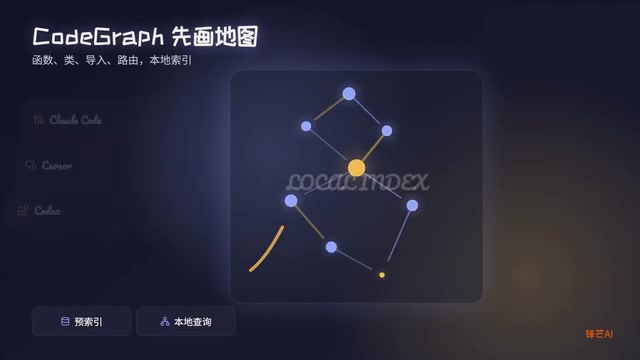
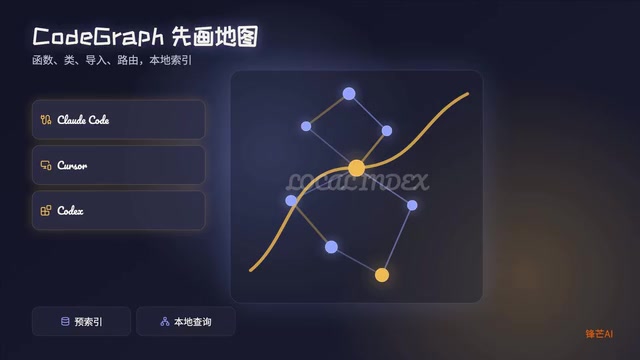
CodeGraph takes a counterintuitive approach: pre-index your project into a local code graph so the AI stops blindly digging through files and instead directly "queries the graph."
CodeGraph's Core Principle: From "File-by-File Searching" to "Graph Querying"
The Token Waste Pattern of Traditional Coding Assistants
When a typical coding assistant encounters a large project, the workflow looks like this: search files → open source code → trace function relationships → search again → open again… This process is especially pronounced in medium-to-large projects. You ask a simple question like "who calls this function?" and the assistant might need to traverse multiple files before giving an answer — each step consuming tokens and tool call quotas.
CodeGraph's Local Indexing Approach
CodeGraph parses your project locally and stores the following information as a local index:
- Function definitions and call relationships
- Class inheritance and composition
- Module import dependencies
- Route mappings
Once the index is built, the coding assistant no longer needs to search file by file. Instead, it queries the graph directly: "Who references this function?" "Which modules would be affected by changes here?" These questions get answered in milliseconds.
Real-World Results: 47% Fewer Tokens, 58% Fewer Tool Requests
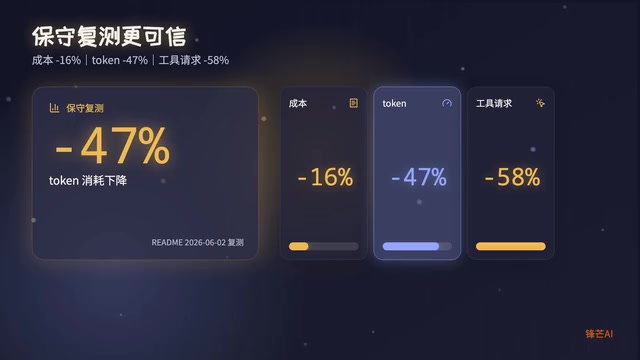
Compared to the marketing hype that often claims "10x efficiency gains," CodeGraph's official benchmarks present notably conservative numbers. Based on median statistics across 7 real open-source projects:
| Metric | Improvement |
|---|---|
| Cost savings | ~16% |
| Token consumption reduction | 47% |
| Tool request reduction | 58% |
These aren't miracle numbers, but they do meaningfully cut down "pathfinding costs." The 58% reduction in tool requests is particularly noteworthy — it means the AI's reasoning process becomes more direct, eliminating a large number of wasteful exploration steps.
Use Case Analysis: Who Should Use CodeGraph, and Who Can Wait
Scenarios Where It's Not Necessary
Small projects: If your project has a limited number of files and a clear structure, native search is already fast enough. Introducing an extra indexing tool just adds configuration overhead — not worth the trade-off.
Scenarios Where It Truly Shines
- Medium-to-large codebases: Hundreds or thousands of files with complex call chains
- Unfamiliar legacy projects: Old code you've just inherited where you need to quickly understand the architecture
- Outsourced code reviews: Projects with missing documentation and chaotic naming conventions
- Repeated queries on the same project: When you're continuously conversing with AI about one project, the graph's reuse value is maximized
CodeGraph's Limitations: It's Not a Silver Bullet
To be fair, CodeGraph has clear capability boundaries:
- It can't understand business logic for you — it solves code-structure navigation problems, not business comprehension problems
- It can't replace testing — knowing the blast radius of a change doesn't mean the change has been verified as correct
- Index quality depends on project standards — if the code itself is utterly chaotic, the graph will faithfully reflect that chaos
The right mindset is to treat it as a local map, not an all-knowing butler. The map helps you find the way, but which path to take and how to walk it — those decisions are still yours.
Conclusion: A Rational View of CodeGraph's Token Optimization Value
CodeGraph's value proposition is clear: by pre-building a local code index, it transforms the AI coding assistant from "re-exploring everything each time" to "directly querying known structures," thereby saving tokens, reducing tool calls, and speeding up responses. For medium-to-large projects and repeated interaction scenarios, this approach delivers meaningful efficiency gains.
But it's not a silver bullet. Small projects don't need it, complex business understanding is beyond its scope, and it can't replace test validation. Rationally evaluating your own use case before deciding whether to adopt it — that's the engineering mindset.
Related articles
DeepSeek Open-Sources DeepInfer: What Is an Inference Framework Actually For?
DeepSeek open-sources its inference framework DeepInfer under Apache 2.0, supporting DeepSeek V4.1 Flash offline inference. This article explains its request scheduling, FlashMLA/DeepGEMM compute optimization, DSPark speculative verification acceleration, and what it means for developers and ordinary users.
Open-Source AI Learning Agent: A Full Workflow Experience from Topology Graphs to Exam Generation
Explore an open-source AI learning agent: built on DeepSeek API, it constructs knowledge systems via topology graphs, with automatic document generation, notes, super documents, and exams. Learn about its Agent workflow and design highlights.

DeepSeek Whale Girl Open-Source MV Meme: AI Industry Coded Slang About Pivoting to Closed Source
Bilibili's DeepSeek Whale Girl rap MV uses fictional memes to tease the AI open-source vs. closed-source debate, with lyrics full of industry slang. This article explains the meme culture, the Whale Girl symbol, and the open/closed tension.