Codex Complete Beginner's Guide: Zero-Basics AI Programming Tutorial

A Bilibili creator shares a zero-basics Codex tutorial, comparing Cursor and Claude Code and recommending beginners start with the APP form.
Based on a Bilibili creator's share, the article discusses how zero-basics developers can integrate Codex into daily development. Codex has four forms: terminal, web, IDE plugin, and APP; the creator considers the APP the most capable and easiest to learn for beginners. Compared with Claude Code, Codex's APP is cheaper and, per the creator, has no rate limiting or bans; in capability, Claude Code leans toward logical correctness and code structure, favored by backend developers, while Codex emphasizes UI details and frontend experience, better for frontend and APP developers. The article also advises learning all three tools—Cursor, Claude Code, and Codex—to handle different companies' account and tool requirements, and stresses that natural language operation has no barrier—the key is stating requirements clearly and first getting the loop of 'describe requirements—get code—verify results' running.
AI programming assistants are shifting from "optional tools" to everyday developer essentials. In a recent Bilibili video, the creator offers an intuitive take: Codex's barrier to entry is almost no different from a conversational product like Doubao—you type natural language, and it understands and executes. This tutorial tries to answer a more practical question: with Cursor, Claude Code, and Codex as the three dominant players, how can zero-basics developers get Codex running smoothly in their daily development workflow?
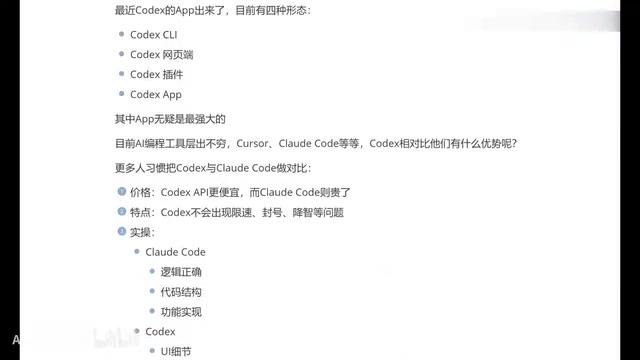
Codex's Four Forms: Why the APP Is Now Recommended
Codex currently comes in four forms: terminal (CLI), web, IDE plugin, and APP. The creator observes that in the past most developers integrated Codex as a plugin across various development tools, but now the APP is recommended instead—among the four forms, the APP has the strongest overall capability.
This judgment matters especially for beginners. The terminal form requires familiarity with command-line operations, the plugin form is limited by the host IDE's capabilities, while the APP consolidates configuration, conversation, and project context management into a single interface, with a noticeably gentler learning curve. The creator himself mentions he "doesn't really like the terminal CLI form," and the APP's arrival is one reason he switched to Codex.
Note
CLI (Command-Line Interface) is an interface form for interacting with programs by typing text commands, as opposed to a graphical user interface (GUI). In AI programming tools, the CLI form usually means calling models, executing code generation, or file operations directly in the terminal; its advantages are being lightweight, scriptable, and easy to integrate with Git and other toolchains, but for users unfamiliar with the command line it brings extra burdens like memorizing commands, understanding errors, and managing paths. IDE plugins embed AI capabilities inside editors like VS Code and JetBrains, able to read the current project context directly, but functionality is limited by the host editor's extension API, and the interface and interaction depend on the host. The APP form is a standalone application that centralizes model calls, project file management, conversation history, and configuration in a dedicated interface, so it typically outperforms plugins in feature completeness and interaction consistency, and is also better suited as a beginner's first entry point.
Choosing Between Codex and Claude Code: Pricing, Stability, and Feel
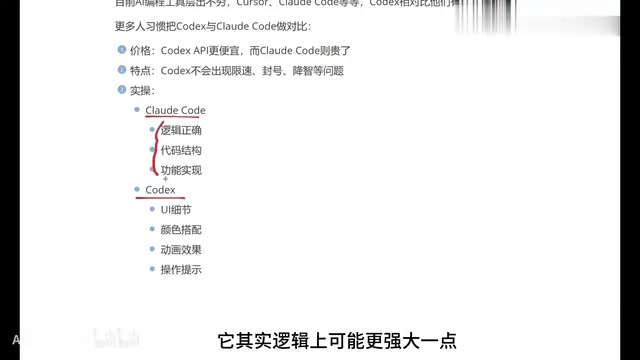
Many people habitually compare Codex and Claude Code, and the creator contrasts them along several dimensions.
Pricing and Stability
On price alone, Codex's APP is cheaper and Claude Code is more expensive, so budget-sensitive users will lean toward Codex. On stability, the creator points out that Claude Code has issues like rate limiting and account bans, while Codex doesn't have rate limiting or bans, and quality degradation is "yet to be investigated"—some users have reported encountering degradation, but he hasn't felt it in his own use cases. It's worth noting that ban and rate-limit experiences depend on account source and usage intensity; these are subjective observations from a single source and shouldn't be taken as absolute conclusions.
Note
"Rate limiting" in AI programming tools generally refers to the server setting a cap on request count or token usage per unit time, beyond which responses are queued or downgraded; "account bans" are mostly related to account registration source, shared use, abnormal payment methods, or triggering risk-control rules. Risk-control strategies and quota policies vary greatly across vendors and adjust with operational stages, so community claims about whether a tool "rate-limits or bans" often carry time-window and account-type qualifiers. So-called "quality degradation" usually means the model is routed to a smaller or lower-precision version during peak hours, showing up as shorter answers, shallower reasoning, or lower code quality. Such experiences depend heavily on usage time, account tier, and specific task type; a single user's observation is only a reference, and a more reliable approach to selection is to combine official documentation's quota explanations with small-scale validation against your own actual load.
Logical Capability vs. UI Details
This is the most informative comparison in the whole piece. The creator's summary: Claude Code leans toward logical correctness, code structure, and feature implementation, so many backend developers prefer it; Codex focuses more on UI details, color schemes, animations, and interaction prompts, so frontend and APP developers find it more handy.

The creator is himself a frontend developer and explicitly says Codex suits him better experientially, while acknowledging Claude Code may be stronger at the logical level. This distinction needn't be taken as a hard rule, but it suggests one thing: before choosing a tool, figure out what layer of code you mainly write.
Note
The difference between "logical correctness" and "UI details" essentially reflects the model's emphasis in training data and post-training preferences. Logic-leaning models usually perform more steadily on algorithm problems, backend business code, refactoring, and debugging tasks, emphasizing type correctness, boundary condition coverage, and architectural soundness; interface-leaning models are more sensitive to CSS layout, component library usage, color schemes, animations, and interaction copy, generating frontend code closer to directly previewable results. This difference isn't an absolute ranking of model capability but a result of different optimization goals. In actual development, backend tasks rely more on reasoning about business constraints and exception paths, while frontend tasks rely more on familiarity with visual specifications and the component ecosystem, so choosing tools by code layer has some rationality. But the same model varies greatly under different prompts, and simplifying "which model is stronger" into a fixed conclusion isn't reliable; a more practical strategy is A/B comparison for specific tasks.
You Should Know All Three Giants, Not Bet on Just One
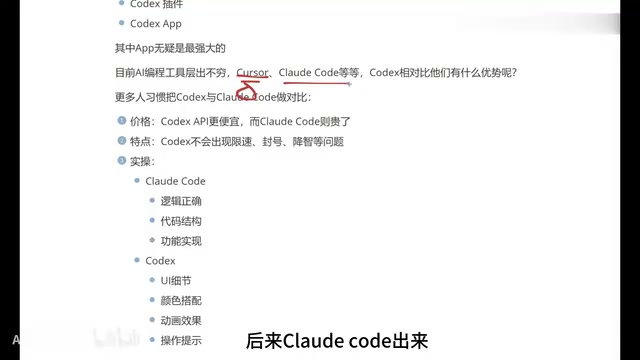
Cursor, Claude Code, and Codex are the three main choices in AI programming tools today. The creator's advice is to know all three, for a very realistic reason: different companies may provide different accounts or require different AI tools, and knowing only one puts you at a disadvantage in collaborative settings.
He shares his own tool migration path: he used Cursor for a long time at first (about half a year or more) but found it "really expensive," wincing at every renewal; after Claude Code came out he tried it too, hooking up domestic models, which lowered costs but wasn't a great experience; eventually he switched to Codex because of the APP form. This experience shows that tool choice is often not a pure technical contest—price, account availability, and interaction habits all play a role.
A Few Practical Suggestions on the Learning Path
For zero-basics users, the direction given in this piece can be summarized in a few points. First, set correct expectations: natural language is just every sentence you say—no "prompt metaphysics" needed, just state your requirements clearly. Then start with the APP form, skip the friction of command lines and plugin configuration, and first get the loop of "describe requirements—get code—verify results" running smoothly. Finally, stay open to multiple tools; Codex can work alongside traditional development tools like VS Code—the APP isn't meant to replace the IDE but to fill in the conversational development piece.
The tutorial itself is labeled "complete beginner's guide," covering the full process from installation and configuration to hands-on case practice, but the original summary only expands on the tool selection part; specific project analysis, code generation, and test debugging steps require following along with the video itself. For frontend-oriented developers, this content will be more directly valuable.
Related articles

ChatGPT Plus Subscription Pitfall Guide: Go/Plus/Pro Tier Comparison and Quick Activation
A complete ChatGPT Plus subscription guide based on a Bilibili tutorial: from registering an account, comparing Go/Plus/Pro tiers, to the practical steps for quickly completing your subscription.

GPT-6.2 Sol/Astra Released! A Step-by-Step ChatGPT Plus Subscription Guide and Tier Comparison
GPT-6.2 Sol/Astra is out—here's a ChatGPT Plus subscription guide: register an account, compare Go/Plus/Pro tiers, and subscribe in a minute.
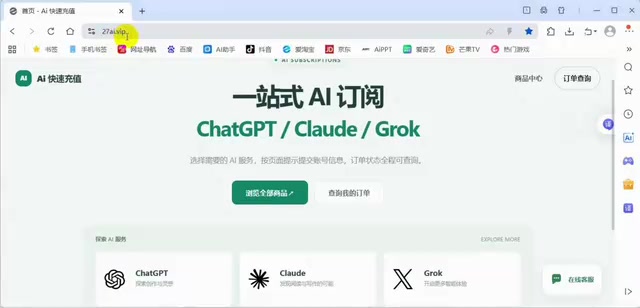
Comparing Three Channels for Subscribing to GPT Plus in China: Is Website Top-Up the Easiest?
How to subscribe to GPT Plus in China? This article compares website top-up, credit card, and mobile top-up channels—process, cost, and risk—with steps and tips to help you choose wisely.