Codex in Action: From a One-Sentence Idea to a Playable 3D City Shooter — The Full Process

Building a playable 3D city shooter from a single idea using OpenAI Codex, step by step.
This article documents the complete process of using OpenAI Codex to build a first-person 3D shooter from a vague one-sentence concept. It covers project scoping and vertical slice planning, prototyping with game feel as the priority, modular city scene construction, enemy AI design with zone-based activation for performance, and the iterative refinement loop that turns rough ideas into a playable experience with objectives, pacing, and feedback.
From a One-Sentence Idea to a Playable Game: The Complete Codex Experiment
This isn't a pre-planned commercial game. It started with a vague idea and was built step by step using OpenAI Codex into a first-person 3D shooter. The player enters a locked-down city block alone, with ten buildings lining the streets. Enemies patrol, pursue, and spawn in waves. You need to push through the streets, clear key buildings, retrieve intel, and extract.
OpenAI Codex is a code generation system built on GPT's large language model architecture. The agent version released in 2025 can execute multi-step programming tasks in an isolated cloud sandbox environment — including reading existing codebases, writing new features, running tests, and fixing bugs. It's no longer simple code completion; it functions like a remote developer, going from understanding natural language requirements to delivering runnable code in a complete workflow.
The core question behind this project: Can an ordinary creator use Codex to turn a rough game concept in their head into a playable 3D project?

Project Planning: The First Step Isn't Writing Code — It's Cutting Scope
Most people's first instinct with AI tools is to go big — open world, every building enterable, realistic animations, complex weapon systems. But projects like that almost always end up abandoned.
Codex's first role here wasn't programmer — it was project planning partner. It helped compress the vision into a manageable version:
- The city is just one locked-down block with 10 buildings
- Only a few key buildings carry actual combat encounters
- Total enemy count is 100, but they activate by zone and spawn in waves
- The player objective is clear: enter the city → clear threats → retrieve intel → extract
The benefit of this design: players experience a complete mission with real tension, but from a development standpoint, it's still a "vertical slice" that can be built in a short timeframe. A vertical slice is an important methodology in game development — creating a small but complete playable segment that covers the full game experience early in the project. Unlike horizontally laying out the skeleton of every system, a vertical slice requires making gameplay, level design, and feedback all feel close to the final experience within a small scope. Its core value is risk reduction: if a small slice can't feel fun, scaling it up tenfold won't make it fun either.
Prototyping Phase: Feel First, Visuals Second
Building the Minimum Playable Version
Once in the prototyping phase, the first priority was building the minimum playable version: first-person movement, mouse look, shooting, enemy health, and hit feedback. At this stage, visuals don't matter — game feel does.
"Game feel" in FPS games is a comprehensive experience metric involving input latency, view acceleration curves, weapon recoil feedback, hit detection methods, screen shake, audio sync, and many other dimensions. Industry benchmarks like the Call of Duty series dedicate a significant portion of their development cycle to tuning game feel. The nonlinear mapping of mouse sensitivity determines whether turning feels "floaty." The visual feedback during shooting (muzzle flash, shell ejection, crosshair contraction) combined with audio feedback together create the "impact feel." Each of these details seems small on its own, but together they determine whether a player wants to keep playing.
The core questions that needed validation:
- Does pressing W feel like natural forward movement?
- Does mouse turning feel floaty?
- Is there feedback when shooting?
- Do enemies show a state change when hit?
If these don't work from the start, no amount of map expansion will save the game — it'll just be an empty shell.

Codex as a Real-Time Debugging Partner
The first version is usually ugly and full of problems: enemies stuck in corners, inaccurate bullet detection, collision boxes blocking doorways. This is where Codex is most useful — not for writing perfect code in one shot, but because you can throw problems directly at it:
- "I'm stuck here, help me locate the issue"
- "The enemy won't pursue, help me check the state machine"
- "Frame rate dropped, help me find potential bottlenecks"
It's like having an engineering partner sitting next to you at all times, ready to respond to your debugging needs.
City Scene Construction: Modular Design Thinking
Scene expansion only began after the prototype was running. The visual direction was set as dark cinematic — cold-toned nighttime streets, red alert lights, a bit of fog in the distance, clean building exteriors with clear silhouettes.
This style has two advantages:
- Strong visual impact: In dark environments, muzzle flashes, alert lights, and doorway shadows all become dramatic
- Resource-efficient: You don't need hyper-realistic materials to create an oppressive atmosphere
For building design, the 10 structures weren't given equal attention. Perimeter buildings form the block's outline and provide cover, while the central buildings carry the combat encounters. Players move from streets into interiors and back out to streets, creating small gameplay loops.

What Codex did at this stage was break the city into reusable modules: walls, doors, stairs, rooms, corridors, cover objects, light points, and enemy spawn points. The game isn't built all at once — it's assembled from these modules. This modular thinking is known in professional game development as "Kit-bashing" or "Modular Level Design" — by prefabricating a set of standardized building components (such as 2-meter wall segments, 90-degree corners, standard door frames), designers can quickly combine different spatial layouts like building blocks while ensuring visual style consistency and collision accuracy.
Enemy System Design: Large Total Count, Controlled Active Count
Balancing Performance and Experience
The easiest thing to lose control of is enemy count. You want the scale of 100 enemies, but if all 100 are simultaneously pathfinding, shooting, and checking line of sight, the computer will choke quickly.
The key design philosophy is "large total count, controlled concurrency":
- Enemies in distant zones stay in low-cost standby mode
- A zone only activates when the player approaches it
- Inside buildings, enemies appear in waves
- Active enemies at any given moment are kept between 12 and 20
This Zone Activation approach is a common performance optimization technique in game development. The core idea is to only run full logic calculations on game objects near the player. Distant enemies can be downgraded to simple position data or put to sleep entirely, only instantiating full AI behavior when the player enters a trigger zone. This is similar to the LOD (Level of Detail) concept in graphics rendering — distant objects use low-poly models, while high-resolution meshes are only loaded up close. On consumer-grade hardware, this layered activation strategy is practically mandatory for achieving large-scale combat experiences.
Players will feel like the city is full of threats, but the actual runtime load stays manageable.
Enemy AI Behavior Design
Enemy AI doesn't aim for realistic tactical simulation — it aims for good gameplay: patrol → hear gunfire and enter alert state → spot the player and pursue → pause near cover → create pressure for the player. This isn't a military simulation; it's a game system that's playable, filmable, and easy to understand.
From a technical implementation perspective, this behavior set is typically built using a Finite State Machine (FSM) or Behavior Tree. An FSM divides enemy behavior into discrete states, each with clear entry and exit conditions. For example, the "patrol" state switches to "alert" upon detecting a gunshot sound source, and the "alert" state switches to "pursue" when the player is spotted within the field of view. This design doesn't pursue military-grade tactical AI (like squad coordination or flanking maneuvers). Instead, it uses predictable but rhythmic behavior patterns to create "readable" pressure — players can observe enemy intentions and make tactical decisions accordingly, which is the core of what makes it fun.
Iterative Refinement: Where the Real Time Goes
With a project like this, the real time sink isn't generating the first version — it's iteration. Continuously feeding problems back to Codex:
- "This stretch of road is too empty, there's no pressure when the player walks through"
- "Enemies are too concentrated inside this building — you die the moment you walk in"
- "The extraction point isn't obvious enough, players can't find their way"
- "Enemies are too accurate and the game becomes punishing; enemies are too dumb and there's no tension"
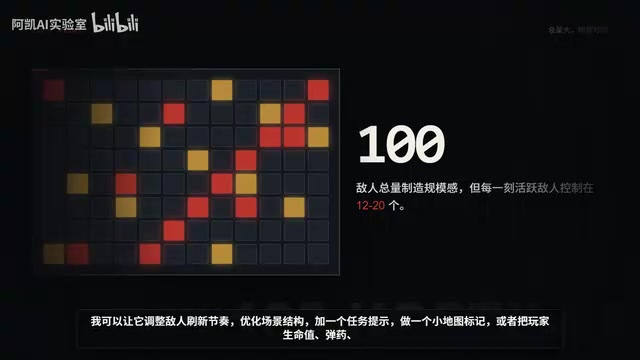
This is where Codex's value shines — it doesn't just help you write a specific function; it iterates on the design alongside you. Adjusting enemy spawn pacing, optimizing scene layouts, adding mission prompts, creating minimap markers, adding health and ammo UI... The creative process shifts from "I don't know how to code this" to "what effect do I want?"
This iterative approach essentially compresses the traditional game development "design → implement → test → feedback" loop from days down to minutes. In a traditional team, after a designer requests an adjustment, they'd need to wait for a programmer to schedule and implement it. Now, creators can describe a problem instantly, receive code changes instantly, and verify results instantly. This ultra-short feedback loop dramatically reduces the cost of experimentation, allowing creators to boldly try more approaches without worrying about wasting development resources.
Complete Game Flow Overview
The final product's complete flow:
- Entry Phase: The player enters from the block's edge and encounters the first wave of enemies on the streets
- Clearing Phase: After clearing external threats, the player enters the first key building — darker lighting, closer enemies, higher pressure
- Intel Phase: After retrieving the intel, the system triggers the second stage
- Extraction Phase: Enemies along the extraction route activate, and the player must use vehicles, wall corners, and building entrances for cover
- Complete: Reach the extraction point
This flow design follows classic game pacing theory — alternating between tension and relief. The entry phase is a medium-pressure warmup, the clearing phase escalates pressure, the intel phase provides a brief breathing window (the player completes a sub-objective and feels a sense of achievement), and the extraction phase is the highest-pressure climax. This "wave-like" emotional curve prevents players from burning out under sustained high pressure or getting bored under sustained low pressure.
This isn't a complete commercial game, but it's already more than a tech demo — it has objectives, pacing, risk, feedback, and room for further expansion.
Key Takeaway: Codex Changes the Barrier to Creation
The main point of this experiment isn't "Codex made a game for me." It's that when you have an idea, Codex can help you break it apart — first into rules, then into a prototype, then into scenes, enemies, missions, UI, and finally into something you can actually open and play.
It doesn't replace imagination — it makes imagination easier to realize. For creators without professional game development backgrounds, this might be the closest thing to a "whatever's in your head, you can build it" tool experience available today.
From a broader perspective, this represents a paradigm shift that's already underway: the core competitive advantage of creative tools is moving from "feature richness" to "intent understanding." Past game engines (like Unity and Unreal) were powerful but had steep learning curves — creators needed months or even years to master the tools before they could start expressing their ideas. AI-assisted programming tools are shifting this threshold from "what you need to know" to "what you need to think through clearly" — the bottleneck of creation is moving from technical ability to design thinking and aesthetic judgment.
Key Takeaways
Related articles

CSS Anchor Positioning: A New UI Positioning Approach Without JavaScript
A deep dive into CSS Anchor Positioning: from anchor-name and position-anchor to the anchor() function, position-area shorthand, position-try-fallbacks, anchor-size, and upcoming anchor queries.

New AI Chart Interaction: Continuous Follow-up Questions and Visualization in Conversation
Explore a new AI interaction method for continuously generating charts in conversation. Use the /visualize command to ask follow-up questions and visualize answers in the same chat window, improving data analysis efficiency.

Cursor Merges Into X Subscription: Paid Plans Share Unified Usage Pool, Grok Model Coding Usage Doubled
Cursor joins The X Subscription with a unified usage pool and doubled Grok coding quota. Third-party models shift to API pricing. Existing users can keep or migrate plans.