Codex + Playwright as a Skill: UI Automation Without Manual Commands
Wrap Playwright into a Codex Skill to turn AI-assisted UI testing from throwaway chats into reusable, version-controlled assets.
This article presents a UI automation testing approach that wraps Playwright into a Codex Skill, solving the pain points of bloated contexts and non-reusable test specs in traditional MCP setups. Unlike preloading all tools upfront, Skills use on-demand loading so the Agent only reads its manual when needed. Using Sauce Demo as a hands-on example, testers describe tasks in natural language and the Agent explores pages, fills forms, and outputs validated PO-pattern Python scripts — Pages and Tests layers — that are only saved after passing a self-run check, ensuring everything committed to version control is reliable and executable.
For software test engineers, UI automation regression testing often means repetitive grind: manually typing Open, Click, and Snapshot commands, debugging locators over and over, and hunting through snapshots for the right elements by hand. Even more frustrating — test specs written in a chat window vanish with the next conversation, leaving teams with nothing reusable to build on. This article introduces a solution that wraps Playwright into a Codex Skill, letting the Agent automatically match its manual, execute commands, and freeing testers to simply describe what they want to test in plain language.
Why Use a Skill Instead of Stuffing in MCP
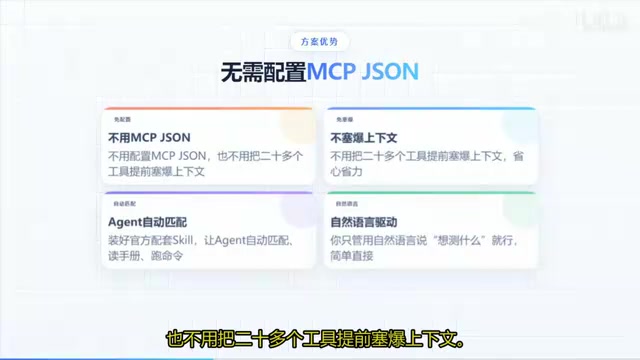
The traditional approach is to configure an MCP (Model Context Protocol) JSON file and preload twenty-plus tools into the context upfront — which quickly bloats the context window and devours tokens. The Skill approach is fundamentally different: it wraps Playwright into a callable capability package. The Agent reads its companion manual and invokes commands only when needed, rather than loading everything at once.
This delivers two immediate benefits: first, the context stays lean — no need to paste the entire DOM tree back into the chat; second, test specifications are solidified into reusable assets rather than throwaway chat logs. Test engineers focus on describing their goals in natural language; the Agent handles matching, execution, and validation.
MCP (Model Context Protocol) is an open protocol proposed by Anthropic that allows AI models to invoke external tools and data sources through a standard interface. The typical usage pattern is to declare a set of tools in a config file, which the model loads in full into its context window at the start of a conversation. This works fine with a small number of tools, but once the toolset grows beyond twenty — combined with page DOM structures and test instructions — the context quickly hits the model's token limit, slowing inference and directly inflating API costs. The Skill design philosophy is closer to "on-demand loading" — think dynamic linking rather than static compilation. The Agent only brings in the relevant operation manual and instruction set when it actually needs a particular capability; the context stays lean the rest of the time.
Installation and Loading: One Command Does It All
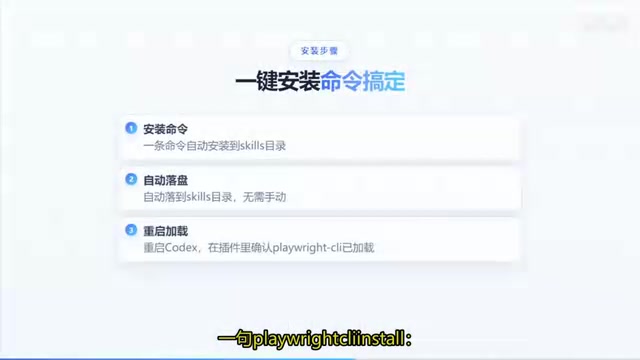
The entire installation process is remarkably lightweight. After running a single Playwright-related install command, the Skills files automatically land in the Agents' Skills directory. Restart Codex, confirm the Playwright-related Skill has loaded successfully in the plugin panel, and the AI can invoke it through the Skill.
Once loaded, the Agent can read YAML snapshots from the skill palette on demand. This is the key point — you no longer need to copy-paste the entire DOM tree back into the chat. The Agent automatically retrieves the necessary page structure information, dramatically lowering the barrier to entry and reducing context overhead.
In Practice: Running a Full Test Flow with Natural Language
Take Sauce Demo (a widely used e-commerce test site) as an example. You can give Codex a plain-language task: open the site in headed mode, log in with the standard_user account and its password, add two items to the cart, complete the full checkout flow, and finally generate a PO (Page Object) pattern Python script.
As the Agent executes, it automatically matches Skills: it starts with a Snapshot to get element Refs, then uses Fill and Click to complete form inputs and interactions. After the full exploration, it organizes the results into two sets of files — a Pages layer and a Tests layer. The core of the PO pattern is keeping page element definitions separate from test logic, so that future maintenance changes to one place don't ripple through everything else.

One critical point worth emphasizing: scripts must pass a self-run check before being saved — only validated scripts are written to disk. This means what gets preserved is executable, version-control-ready test assets, not potentially buggy chat logs. The reliability of the test assets is guaranteed by design.
The PO (Page Object) pattern is the mainstream architectural pattern in UI automation testing, originally popularized by the Selenium team. Its core idea is to separate "page element location and interaction" from "test business logic" into different classes or files: the Page layer is responsible only for encapsulating element locators (e.g., selectors for buttons and input fields) and their corresponding atomic action methods; the Test layer calls the methods provided by the Page layer to describe business flows, without directly touching underlying selectors. The benefit is clear: when the page UI changes, only the locators in the Page layer need updating — test cases that reference that page require no modifications. In this solution, the Agent automatically organizes exploration results into these two-layer structures, effectively building architectural best practices directly into the code generation step.
MCP vs. CLI+Skill: A Decision Framework
The two approaches aren't mutually exclusive — they suit different scenarios.
When to Use MCP
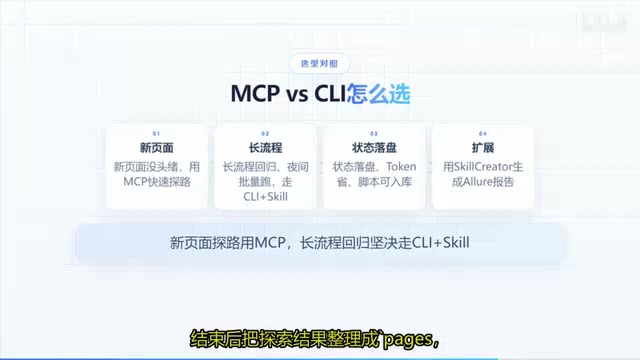
When facing a brand-new page with no prior knowledge, MCP is the better choice for rapid exploration. It offers real-time visibility into console output and network requests, making it ideal for interactive, exploratory debugging.
When to Use CLI+Skill
For long regression flows, nightly batch execution, and similar scenarios, go with CLI + Skill without hesitation. Its advantages are: state can be persisted to disk, token consumption is lower, and the generated scripts can be committed directly to version control. In short: use MCP to explore, use Skill to solidify.
Skill vs. Agents.md: Defining the Boundaries
Understanding the division of responsibility between the two is key to effective team collaboration. A Skill governs "how to perform this category of UI testing" — it's an operational manual at the execution layer. Agents.md governs "rules that apply to every task, no exceptions" — it's a set of global constraints.
Keeping the two separate prevents conflicts in team workflows. The same layered approach can be extended further — for example, using Skill Creator to chain together Excel-based test case execution and Allure report generation into a complete automated testing pipeline. This layered thinking gives the testing framework the capacity for sustainable evolution.
Agents.md is a configuration file in the Codex ecosystem used to define global behavioral rules for an Agent — it functions like a team "constitution": whatever specific task the Agent is executing, the constraints defined in Agents.md always apply, such as prohibiting direct operations on the production database, requiring output to conform to team standards, and mandating screenshots on assertion failures. Skill files, by contrast, are domain-specific operation manuals that are only read when the corresponding type of task is triggered, and they don't interfere with each other. This two-layer governance structure (global constraints + domain manuals) means teams can expand automation capabilities without repeatedly modifying core rules — adding a new testing domain only requires writing a corresponding Skill file to scale horizontally.
Summary
Wrapping Playwright into a Codex Skill is fundamentally about upgrading AI-assisted testing from "temporary conversation" to "reusable asset." Test engineers are freed from the repetitive grind of manually typing commands and hunting for locators. Instead, they describe their intent in natural language, and the Agent handles exploration, execution, and persistence. For testing teams looking to adopt AI-powered development capabilities without worrying about context bloat and runaway costs, this CLI + Skill approach offers a practical, grounded path forward.
Related articles

Qwen 3.8 Beats Opus at Coding—But Can Your Mac Run It?
Open-source Qwen 3.8 beats Opus 4.6 at coding at just 18GB, but how much Mac memory do you need? 24GB crashes; 32GB is the sweet spot. Full config guide inside.

Claude Code + Agent: Building a Fully Automated AI Testing Loop
Bilibili course breakdown: how test developers can use Claude Code terminal-based Agents to build a fully automated AI testing loop. Compares permission boundaries of terminal vs. device Agents, explains why enterprise projects choose Claude Code over Open Claude-type tools, and outlines the Node.js environment setup and DeepSeek model integration path.

Working with AI Agents Requires Nerves of Steel
The more autonomous AI agents become, the heavier the user's psychological burden. Drawing from a Hacker News discussion, this article analyzes black-box anxiety, behavior drift, and monitoring fatigue in agent collaboration, and offers practical approaches like sandbox isolation, permission control, and task granularity management to reduce cognitive load.