Codex + Playwright Testing Skill: UI Automation Without Typing a Single Command

Package Playwright as an Agent Skill so natural language drives UI automation and produces maintainable PO scripts.
This article introduces a UI automation approach that packages Playwright CLI as a "testing Skill." Traditional workflows require testers to type every CLI command manually and hunt for REF element numbers, with no unified operations manual for AI Agents. A Skill codifies command selection and snapshot reading into a structured manual, letting Agents orchestrate and execute tests from a natural language description alone. Compared to Playwright MCP — which must load 20+ tool schemas into context upfront — the Skill reads YAML on demand, dramatically reducing token usage and making it far better suited for multi-step regression workflows. Setup takes just three steps, and results are distilled into maintainable, PO-layered test assets.
Why UI Automation Is Always Such a Headache
Anyone who has written Playwright automation scripts has probably been through this routine: you get a test scenario, then manually type out open, snapshot, click, fill line by line. When you need to interact with page elements, you have to dig through snapshot files to find REF numbers. As regression test cases pile up, scripts scatter everywhere and become a nightmare to maintain.
The root problem is that every Playwright CLI command depends on manual input. Test engineers aren't really writing test cases — they're typing commands. What makes it even more frustrating is that AI Agents have no operations manual. They don't know when to use open versus snapshot, which snapshot file to read REF numbers from, when to enable headed mode, or when to save screenshots to disk. The result: you have to personally direct the AI at every single step just to make the slightest progress.

As demonstrated in a hands-on showcase by a Bilibili content creator, the ideal scenario should be: you simply describe your testing goal in natural language — something like "Log into SauceDemo, add an item to cart, and complete checkout" — and the AI automatically orchestrates the CLI commands, executes the actions, and produces the script. This is exactly the core pain point that packaging Playwright as a "testing Skill" aims to solve.
CLI Alone Is Half the Story — CLI + Skill Is the Complete Picture
Many test engineers think being able to run Playwright CLI commands is already pretty good. But from this approach's perspective, CLI alone is only half the solution.
With CLI only, you have to type every command yourself, hunt for REFs manually in snapshot files, and any specs you document in chat disappear in the next conversation round. With a Skill added to the mix, you just describe your testing goal in natural language, and the Agent automatically selects the right commands, reads the YAML from the skill spec, and outputs the script.
In other words, a Skill is the Agent's operations manual. It codifies the implicit knowledge of "which command to use in which scenario," so the AI no longer needs you to micromanage every step. The significance of this shift is that testing input goes from "command language" back to "natural language," freeing people from the tedious work of command orchestration.
Building a Playwright Testing Skill in Three Steps
The entire setup process can be broken down into three steps — straightforward enough that there's almost no barrier to entry.
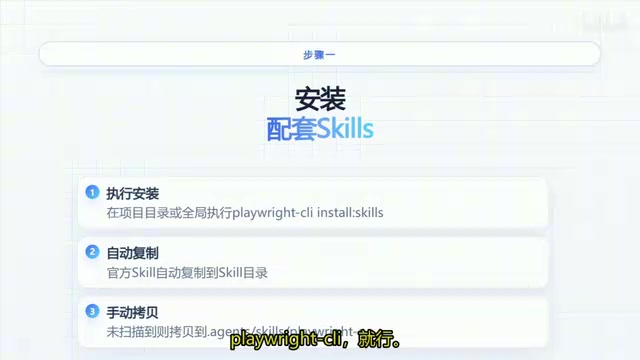
Step 1: Install the Companion Skills
Run the install command (playwright clean install skills) in your project directory or globally, and the official Skill will be automatically copied to the Skills directory. If it's not placed in the scan path, manually copy it to the agents/skills/playwright directory.
Step 2: Confirm It Loads
Restart Codex and confirm the Playwright Skill has loaded under Plugin Skills. One key point here: no MCP server configuration is needed — the AI operates the browser by executing Playwright CLI directly through Shell.
Step 3: Drive Tests with Natural Language
Once the Skill is in place, the execution chain works like this: the Agent matches the Description, reads the manual, runs commands through Shell, reads snapshots as needed, and finally produces the script. Test engineers just need to clearly state their goal — the rest of the orchestration, execution, and output is handled automatically by the Agent.
Why the Skill Approach Beats MCP for Long Workflows
When it comes to Playwright-based UI automation, many people's first instinct is Playwright MCP. So what's the actual difference between Skill and MCP?

The problem with MCP is that it requires loading the schemas for 20+ tools into context upfront. When running long regression workflows, the context simply can't hold up — tool definitions consume a massive amount of tokens, and as the chain grows longer, failures become increasingly likely.
The Skill approach, by contrast, lets the Agent read YAML files and snapshots on demand, without cramming all tool definitions into the context. This delivers two direct benefits: it doesn't burn through tokens, and the specs don't get lost across multiple conversation rounds. For regression test cases spanning dozens of steps, this "load on demand" design is clearly far more resilient.
MCP (Model Context Protocol) is an open protocol proposed by Anthropic, designed to let AI models call external tools through standardized interfaces. In the Playwright MCP implementation, each callable browser operation — such as clicking, typing, screenshotting, or navigation — must be declared as a tool definition in JSON Schema format and injected into the context all at once before the conversation begins. The official Playwright MCP server currently exposes more than 20 tools, and these schemas alone consume a significant number of tokens. For short, single-task workflows, this overhead is acceptable. But regression testing routinely requires dozens of rounds of actions, and the token budget gets heavily consumed by tool definitions, leaving less room for model reasoning and tracking intermediate states — significantly increasing the likelihood of long-chain task failures. The Skill approach sidesteps this protocol layer entirely, having the Agent call the Playwright CLI executable directly through Shell. Tool descriptions are stored in local YAML files and only read into context when needed, fundamentally avoiding the structural problem of "tool definitions pre-consuming tokens."
From One-Off Scripts to Maintainable Test Assets
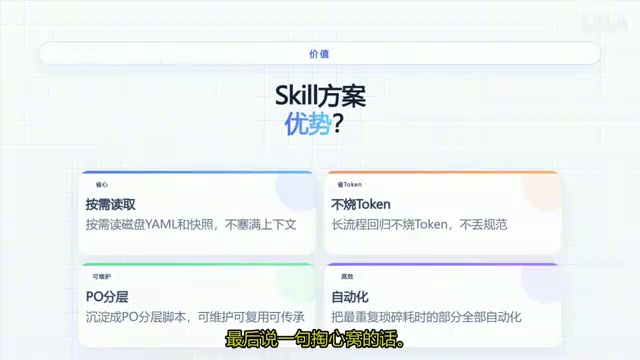
This approach has another easily overlooked benefit: it can distill test results into PO (Page Object) layered scripts rather than throwaway one-off scripts. This means the output is a maintainable, reusable, and inheritable testing asset.
As the original author put it, the most time-consuming part of UI automation was never execution — it's writing commands, finding elements, and maintaining scripts, all of which are repetitive and tedious. Once the Skill automates the most time-consuming parts, you no longer need to agonize over "should I use open or goto here" or "what's that REF number again" — you just speak naturally, and leave the rest to the Agent.
PO (Page Object) is a classic design pattern in UI automation. Its core idea is to encapsulate a page's element locators and interaction logic into independent "page object" classes. Test cases only call the methods provided by these objects rather than directly manipulating DOM selectors. When the page structure changes, you only need to update the corresponding Page Object class rather than modifying every individual test case. Compared to the "flat" style of writing all operations directly into test scripts, the PO layered structure offers significantly higher maintainability and reusability. When an AI Agent outputs scripts following the PO pattern, the auto-generated code is not just a temporary artifact to satisfy the current execution run — it's a proper test asset that meets engineering standards and can be maintained in a code repository long-term.
Closing Thoughts
From an engineering perspective, the idea of packaging Playwright as a Skill represents a pragmatic direction for AI-assisted testing: rather than pursuing broad, all-encompassing tool integration, it uses a structured "operations manual" to reduce the Agent's cognitive load and token consumption. For teams that regularly run long regression workflows, this lightweight, on-demand loading model is genuinely more practical than heavyweight MCP solutions.
One caveat worth noting: this article is based on a single content creator's demo. When implementing this in your own environment, you should still validate the stability of the installation path, Skill loading, and execution chain against your specific project setup.
Related articles

From Photons to Production: An Open-Source Computer Vision Engineering Reading Path
Reddit user open-sources a computer vision engineering reading path with 16 chapters from image formation to production deployment, emphasizing primary sources, dependency order, and reproducible benchmarks to help engineers understand why models fail and build reliable vision systems.

Prompt Failures? The Truth About Why AI Agents Struggle in Production—and How to Fix It
A Reddit developer built Agents with Copilot and Gemini but faced unstable behavior. This article analyzes three gaps in prompt engineering for Agent scenarios and offers three practical paths to reliable Agent deployment, including structured prompts, workflow-first approaches, and building an evaluation loop.

Tesla Robotaxi to Open Private Vehicle Access Next Year: Promise or Pipe Dream?
At its Q3 earnings call, Tesla said owners can add their cars to the Robotaxi fleet next year. We analyze the technical basis, Musk's missed deadlines, business logic, and competition.