Codex Practical Tutorial: From Installation to Multi-Agent Collaboration

A Bilibili Codex practical course covering the full engineering path from installation to multi-agent collaboration and enterprise plugins.
This article is based on a popular Codex practical course on Bilibili and outlines its core capabilities and engineering learning path. Codex differs from conversational AI such as Doubao and DeepSeek in that it can directly operate a computer to complete practical tasks such as organizing files, creating reports, writing weekly summaries, and even developing software, and it supports automatic background operation. The course is divided into ten major modules, covering quick installation and environment configuration, efficient CLI interaction, built-in slash commands, AGENTS.md architecture design and rule systems, MCP protocol configuration, enterprise-level application implementation, multi-agent collaboration and complex task distribution, as well as advanced plugin integration and R&D workflow connection. It ultimately uses a RAG intelligent customer service system as a comprehensive practical project, connecting the aforementioned capabilities and conducting a systematic review, providing developers and teams with a reference framework for implementing AI Agents.
Codex is becoming a popular tool in the AI Agent space, and its capabilities go far beyond those of traditional chatbots. There is a widely followed Codex practical course on Bilibili that claims to take you from zero to mastering Codex's complete workflow through real projects. Based on the content of that tutorial, this article outlines Codex's core capabilities, installation and configuration, CLI interaction, slash commands, AGENTS.md architecture, the MCP protocol, multi-agent collaboration, and enterprise-level plugin development, helping you understand Codex's positioning and usage in real development scenarios.
What Is Codex: From Conversation to Directly Operating the Computer
Unlike conversational AI such as Doubao and DeepSeekAd, Codex can not only talk with you but also directly operate your computer and complete actual tasks. It can organize files, create reports, read work content and write weekly summaries, and even create PPTs and operate a browser to build complex software. More advanced still, you can set a task to run automatically in the background and have it finished by the time you wake up.
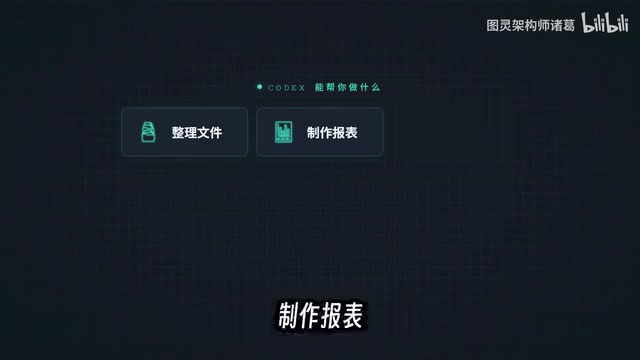
This leap from "chatting" to "execution" is the core reason Codex is called an AI Agent tool. The tutorial notes that Codex has surpassed Cloud Code to become the world's most popular AI Agent tool. It does not require you to have a deep technical background; as long as you can clearly describe your needs, Codex can help you complete various tasks in work and study.
AI Agent refers to an AI system capable of perceiving its environment, planning autonomously, and taking actions to achieve goals. Unlike chatbots that only respond to single-turn conversations, AI Agents typically have capabilities such as task decomposition, tool invocation, memory, and reflection, and can complete multi-step tasks with less human intervention. Codex is called an AI Agent tool precisely because it not only outputs text but also invokes external tools such as the file system, terminal, and browser, translating natural language instructions into actual operation sequences and thereby forming a closed loop of "understanding—execution—verification" in real development scenarios.
Course System: Ten Modules Covering the Full Engineering Chain
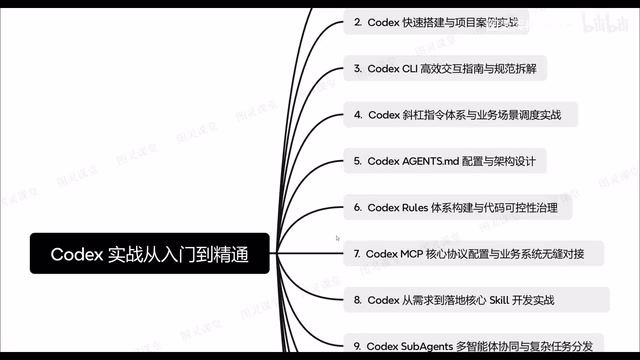
The tutorial breaks the content into multiple modules, forming a path from beginner to mastery. The first part explains Codex's core capabilities and engineering design philosophy, helping learners build an overall understanding. The second part covers quickly installing Codex and setting up an environment suitable for normal development, followed by a project case demonstrating how to build a project from zero to one.
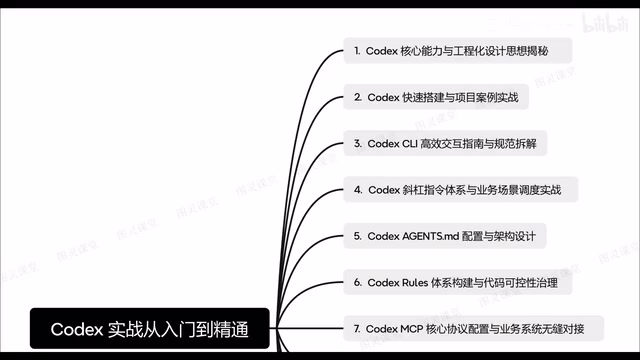
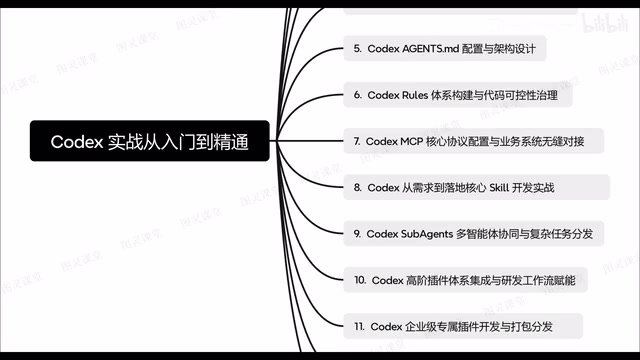
The third part focuses on an efficient interaction guide and usage conventions for Codex CLI, while the fourth part goes deep into the built-in slash command system and demonstrates how to integrate it with business scenarios. The fifth part explains how to configure agency based on Codex and how the AGENTS.md architecture should be written. The sixth part covers the construction of the Codex rule system and code nullability governance. Later modules also include MCP core protocol configuration, enterprise-level applications from requirements to implementation, multi-agent collaboration and complex task distribution, advanced plugin integration and R&D workflow connection, as well as the full-process development of enterprise-exclusive plugins including scheduled development, packaging and distribution, and a RAG intelligent customer service system.
Installation and Environment Configuration: Quickly Set Up a Development Environment
The second part of the course specifically demonstrates the quick installation process for Codex. After installation, the environment required for project development needs to be configured to ensure that Codex can properly participate in project development. The tutorial emphasizes that this step is the foundation for all subsequent practical work, and the standardization of environment configuration directly affects Codex's performance in projects.
Once the environment is ready, the course uses specific project cases to demonstrate the zero-to-one development process. The goal at this stage is not merely to run through examples, but to understand how Codex fits into the rhythm of real projects, forming a complete loop from requirement understanding to code generation and then debugging and correction.
CLI Interaction and Slash Commands: Improving Operational Efficiency
Codex CLI is the frequently used interaction entry point. The third part of the tutorial specifically explains efficient interaction guidelines and usage conventions for the CLI, helping learners avoid inefficient operations. The fourth part revolves around the built-in slash commands; this command system is an important part of operating Codex, and the course demonstrates how to integrate it with business scenarios through concrete practical exercises.
After mastering the CLI and slash commands, your collaboration with Codex becomes smoother. This part of the course emphasizes usage conventions so that operations are reproducible and maintainable rather than dependent on improvisation.
AGENTS.md and the Rule System: Making Collaboration Follow Clear Guidelines
The architecture design of AGENTS.md is one of the course's focal points. The fifth part of the tutorial explains how to configure agency and how AGENTS.md should be written. This file carries the constraints and guidance for Codex's behavior, and how well it is written directly affects collaboration quality. The sixth part further extends to the construction of the Codex rule system and involves code nullability governance, showing that the rule system serves not only generation but also control of code quality.
AGENTS.md is a convention-based configuration file for AI coding agents, usually placed in the project root directory, used to declare to tools such as Codex the project structure, coding standards, build and test commands, dependency constraints, and the behavioral boundaries the agent should follow. It is essentially a "project manual" for the AI agent, enabling the agent to maintain a consistent behavioral pattern across sessions and reducing the cost of repeatedly explaining context. The key to writing a good AGENTS.md is clarity: rules should be specific, executable, and aligned with the project's actual toolchain, avoiding vague descriptions that lead the agent to misjudge.
MCP Protocol and Enterprise Extensions: Connecting to Business Systems
The seventh part explains the core protocol configuration of Codex MCP and how to transform business systems for seamless integration. The value of the MCP protocol lies in enabling Codex to interact with external systems, thereby extending its capabilities into specific business scenarios. The eighth part then moves from requirements to implementation, explaining how to build enterprise-level applications and covering the complete chain from requirements analysis to actual deployment.
The ninth part moves into multi-agent collaboration, explaining how Codex Sub Agents distribute complex tasks. As task complexity increases, multi-agent collaboration becomes necessary. The tenth part explains the integration of advanced plugins and how to connect with R&D workflows to form complex workflows. The eleventh part focuses on enterprise-exclusive plugins, including scheduled development, packaging, and distribution for external use.
MCP (Model Context Protocol) is an open protocol used to standardize the way AI models connect to external data sources, tools, and services. It defines communication specifications between clients and servers, enabling models to discover and invoke resources such as databases, APIs, and file systems through a unified interface without writing a separate adapter layer for each system. In the Codex context, configuring an MCP server can expose business systems as tools callable by the model, thereby achieving seamless integration and improving extensibility and maintainability.
Project Practice and Review: RAG Intelligent Customer Service System
The later part of the course uses a RAG intelligent customer service system as a comprehensive practical project, developed from zero to one through the full process. This project connects the previously covered capabilities such as installation and configuration, CLI interaction, slash commands, AGENTS.md, the MCP protocol, and multi-agent collaboration, serving as a concentrated test of the entire course content. After development is complete, the course also systematically reviews the entire project practice and distills best practices.
From the course structure, it is clear that Codex's learning curve is not flat, but every step has a clear engineering goal. For developers and teams hoping to truly put AI Agents to use, this path from installation to multi-agent collaboration provides a reference framework.
RAG (Retrieval-Augmented Generation) is a technical architecture that combines information retrieval with text generation: the system first retrieves document snippets relevant to the user's question from a knowledge base, then provides these snippets as context to a large language model to generate an answer. Compared with pure generative models, RAG can significantly reduce hallucinations, improve the factual accuracy of answers, and support dynamic updates to the knowledge base. In intelligent customer service scenarios, RAG typically involves steps such as document splitting, vectorized indexing, similarity retrieval, and prompt assembly, and is a typical comprehensive application that connects multiple Codex capabilities.
One-line Summary
A Bilibili Codex practical course covering the complete engineering path from installation to multi-agent collaboration and enterprise-level plugins.
Paragraph Summary
Based on a popular Codex practical course on Bilibili, this article outlines its core capabilities and engineering learning path. Unlike conversational AI such as Doubao and DeepSeek, Codex can directly operate a computer to complete practical tasks such as organizing files, creating reports, writing weekly summaries, and even developing software, and it supports automatic background operation. The course is divided into ten major modules, covering quick installation and environment configuration, efficient CLI interaction, built-in slash commands, AGENTS.md architecture design and rule systems, MCP protocol configuration, enterprise-level application implementation, multi-agent collaboration and complex task distribution, as well as advanced plugin integration and R&D workflow connection. It ultimately uses a RAG intelligent customer service system as a comprehensive practical project, connecting the aforementioned capabilities and conducting a systematic review, providing developers and teams with a reference framework for implementing AI Agents.
Related articles

DeepSeek Harness Quick Start Guide: From Installation to 5 Real-World Cases
What is DeepSeek Harness? Based on a Bilibili tutorial, this article covers how this AI Agents software works, installation and setup, four working modes, and five real-world cases: a 3D racing game, official website, music player, science animation, and self-developed plugin—plus token money-saving tips.

Breaking Down DeepSeek's Super-agent Architecture: How Router+Worker Solves the Multi-Session Management Bottleneck
An analysis of DeepSeek's Super-agent paper: how the Router+Worker two-tier architecture uses Fast Pass, Chain of Recall, and storage-compute separation to solve multi-AI-session management bottlenecks, and how much it truly alleviates the human attention bottleneck and what engineering trade-offs it makes.

19K Stars in 5 Days: Why DeepSeek's Open-Source AI Programmer Went Viral
DeepSeek's open-source AI programmer hit 19K GitHub stars in 5 days. Why it went viral: the agent boom, AI writing its own code, and the shift from Q&A tools to AI employees.