Codex's Insane Logging Is Destroying Your SSD: 37TB Written in 21 Days

Codex's excessive background logging wrote 37TB to an SSD in 21 days; update now to fix it.
OpenAI's Codex tool had a critical bug causing excessive disk writes from verbose logging during streaming output. One user reported 37TB written in just 21 days — enough to destroy a consumer SSD within a year. The issue stemmed from logging every WebSocket token event. A patch was merged on June 22 that eliminates unnecessary writes. Users should immediately update Codex to the latest version to protect their hardware.
The Discovery: Codex Is Furiously Writing to Disk in the Background
If you're currently using OpenAI's Codex tool, check your hard drive health immediately. A large number of users have recently reported that Codex has a severe logging issue in the background that may be silently wearing down your SSD's lifespan.
The core problem isn't bad code — it's that Codex continuously writes logs to your hard drive in the background. Think of logs as a "ledger" — model outputs, tool executions, state changes — all these events get recorded. Normal logging is fine, but the scary part is that previously, extremely granular and frequent records were also being written.
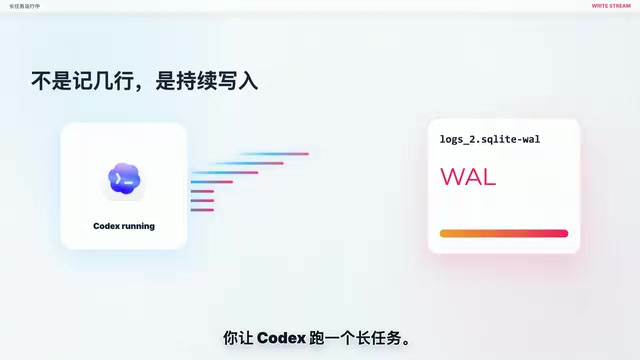
When you have Codex run a long task, it doesn't just jot down a few lines and call it done. Instead, it's like a faucet left running, continuously pouring data onto your hard drive. What makes it worse is that checking file sizes might not show any dramatic increase, and line counts may barely change — because it's writing new data while deleting old data simultaneously. On the surface nothing seems wrong, but your hard drive is running under heavy load the entire time. Behind this phenomenon is the Log Rotation mechanism at work: when a log file reaches a preset size threshold, the system automatically archives or deletes old logs and creates a new file to continue writing. Although disk space usage remains stable, every write operation still consumes the program/erase cycle count of SSD flash memory cells. Therefore, you simply cannot detect the anomaly by observing file sizes alone — only system-level I/O monitoring tools (such as Linux's iotop, iostat, or macOS Activity Monitor's Disk tab) can capture the true write load.
Real User Reports: Staggering Write Volumes
There are already numerous real cases online, with clear timelines:
In April, a Linux user caught through monitoring tools that Codex was writing approximately 5MB per second during streaming output, with peak values reaching 16MB/s. In the same report, for a very short response, the log ID jumped by approximately 5,000 lines, indicating massive meaningless write operations in between.

To understand this, you need to know how streaming output works: AI tools like Codex use a streaming mode when generating responses — the model doesn't return the complete result all at once, but pushes content to the client in real-time, token by token. This push is based on the WebSocket protocol — a full-duplex communication protocol that supports server-initiated data pushes to clients. During streaming output, the arrival of each token constitutes an independent WebSocket event. If the logging system performs a disk write for every event, then a response of just a few hundred words could generate hundreds or even thousands of independent I/O operations — this is the technical root cause of the write volume explosion.
In May, another user reported that Codex Desktop on macOS saw write volumes jump from 63MB to 146MB within just a few minutes of normal chatting, and the interface started lagging. On Reddit, someone also shared that their Mac's log file had already reached 4GB and was still being continuously written to, making their machine hot and slow.

The most extreme case appeared on GitHub: a user reported approximately 37TB written to their primary SSD in 21 days, which extrapolates to nearly 640TB per year. Keep in mind that typical consumer-grade SSDs have a total write lifespan (TBW) usually between 150-600TB — meaning the drive could be written to death within a year.
Regarding SSD lifespan, some explanation is warranted here: The fundamental difference between SSDs and traditional mechanical hard drives is that their NAND flash storage medium has a fixed limit on write/erase cycles. Each storage cell gradually degrades after a certain number of program/erase (P/E) cycles, eventually becoming unable to reliably store data. TBW (Total Bytes Written) is the core metric measuring this lifespan. Even more noteworthy is that SSDs also suffer from Write Amplification — due to internal mechanisms like garbage collection and wear leveling, the actual amount of data written to flash memory is often greater than the data sent by the host. This means the apparent 37TB of writes could actually cause even more damage to the flash memory chips.
Which Users Are at Highest Risk?
Users in the following scenarios should be especially vigilant:
- Users who leave Codex Desktop running without closing it: Continuous log writing in the background
- Users who frequently use the Codex Resume feature: Resuming tasks may trigger massive disk writes
- Users running single tasks for several hours: Extended runtime accumulates staggering write volumes
- Users with multiple Codex windows open simultaneously: Write volumes multiply accordingly
Official Fix: Patch Merged After June 22
The good news is that the Codex team has recognized this issue and implemented a fix. After June 22, the relevant fix was merged into the main branch.

The main changes include two aspects:
- No longer logging every successful Responses WebSocket event — this was one of the largest sources of write volume. After the fix, the system only logs WebSocket events when errors or anomalies occur; normal token pushes no longer trigger disk I/O.
- Filtering high-noise local logs — those fragmented records that didn't need to be constantly written to disk have now been eliminated. This effectively introduces a more reasonable log level strategy, removing large amounts of DEBUG-level detailed records from the default output.
What Should You Do Now?
Don't go researching a bunch of cleanup commands, and definitely don't let AI tools mess with your local log libraries. You only need to do one thing right now:
Upgrade Codex to the latest version.
Specific steps:
- Update Codex to the latest version
- Completely quit the Codex process (make sure nothing remains in the background)
- Reopen Codex
Once the upgrade is complete, the previous insane writing issue will be resolved. If you're concerned about your SSD's health, you can use built-in system tools or third-party software (such as CrystalDiskInfo, DriveDx, etc.) to check your drive's total write volume and health status. These tools assess hard drive status by reading S.M.A.R.T. (Self-Monitoring, Analysis and Reporting Technology) data provided by the SSD controller — just focus on the "Total Host Writes" and "Remaining Lifespan Percentage" indicators.
Reflection: The Hidden Hardware Costs of AI Development Tools
This incident reminds us that while AI development tools bring efficiency gains, they may also carry hidden hardware costs. Logging itself is a legitimate debugging need, but without proper rate limiting and filtering mechanisms, it becomes silent damage to hardware.
From a software engineering perspective, this incident reflects the unique challenges AI development tools face in Observability design. Observability is a core concept in modern software engineering, encompassing three pillars: Logs, Metrics, and Traces. AI tools naturally require richer logs to support debugging and troubleshooting due to complex processes involving model inference, tool invocation, and context management. But without proper log leveling (such as DEBUG/INFO/WARN/ERROR), sampling strategies, and asynchronous write buffering mechanisms, detailed recording transforms into hardware burden. Industry best practice is to retain detailed logs in development environments, record only critical events in production/user environments, and use memory-buffered batch writes to reduce I/O frequency.
As users, regularly monitoring system resource usage and promptly updating tool versions are fundamental habits for protecting your hardware.
Key Takeaways
Related articles

Poison-Resistant Concept Anchoring: A New Approach to Defending Against AI Data Poisoning
Deep dive into Poison-Resistant Concept Anchoring, defending against data poisoning via signed anchors and bounded updates. Experiments show 62% poison isolation with 0% false rejection rate.

Hungarian Algorithm Explained: Principles, Complexity, and Engineering Implementation Guide
In-depth explanation of the Hungarian Algorithm: core principles, O(N³) time complexity advantages, and engineering implementation. Covers assignment problem definition, step-by-step algorithm walkthrough, Python/C++ libraries, and applications in multi-object tracking and resource scheduling.
OpenAI's First Enterprise AI Report: H…
OpenAI's First Enterprise AI Report: How ChatGPT Is Changing the Way Organizations Work
OpenAI's first enterprise AI report reveals three key traits of ChatGPT Enterprise adoption: the shift from novelty to necessity, writing and coding as top use cases, and data governance as a core prerequisite.