Codex Ultimate Guide: From Installation to Advanced Usage

A step-by-step Codex guide covering installation, login, quota mechanics, and practical tips.
Based on a Bilibili creator's ultimate Codex guide, this article covers the full path from account registration and client installation to advanced usage, including phone verification and token exchange failures, the reconnect-5-times fix via a .env file, Plus's rolling quota explained with a points analogy, and the Pro upgrade. The creator advocates hands-on practice over paid tutorials.
Codex Ultimate Guide: From Installation to Advanced Usage
Recently, a Bilibili creator's video "The Most Detailed Codex App Ultimate Guide on All of Bilibili" attracted considerable attention. The video starts with registering a GPT account and covers downloading and installation, login troubles, quota mechanics, and practical tips—walking through nearly every pitfall a beginner might encounter. Based on that video and combined with recurring feedback from the community, this article lays out an actionable Codex usage guide.
Starting from Scratch: Account Registration and Client Installation
The first step in the video is basic but crucial: open the official GPT website, click Register for Free in the top-right corner, and use a 163 or QQ email to receive the verification code and complete account creation. The real sticking point is the client side. The creator notes that if the Codex desktop app won't open after downloading, first check whether it was installed to the C drive—installing to another drive letter may trigger errors. A more reliable approach is to open the Microsoft Store, search for ChatGPT, and install from there; the system will automatically install it to the system drive, and you're unlikely to encounter the won't-open problem.
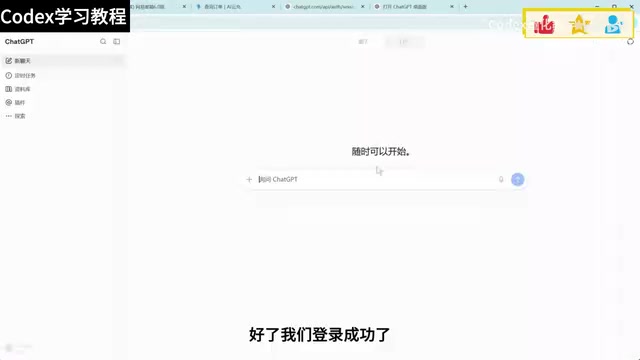
The value of this detail: many tutorials only tell you to download from the official website but overlook the installation path as a hidden landmine. For users unfamiliar with Windows permission mechanisms, the Microsoft Store channel is indeed the more worry-free choice.
Login Roadblocks: Phone Verification and Network Issues
The login section is where the video spends the most time. The first high-frequency issue is phone number verification: newly registered accounts will most likely still need verification when logging into Codex even after subscribing to a membership, while accounts registered longer ago have a much higher chance of skipping verification after subscribing. Another approach is to find a US-region phone number for SMS reception.
More common are network-related errors. The creator demonstrates the "token exchange failed" prompt and explains that a series of issues—403 region not supported, token exchange failure, login popups—are essentially mostly related to network and cache. The solution path is straightforward: optimize your network environment, clear the cache, and switch browsers to log in.
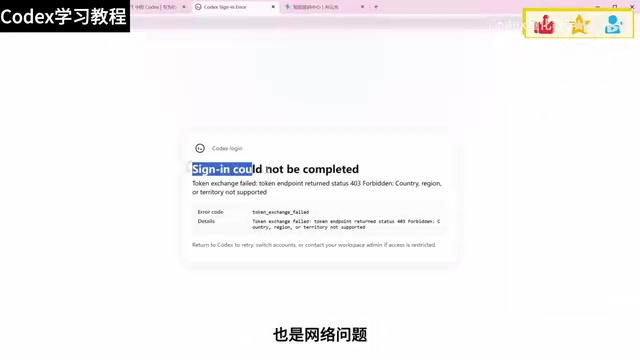
What's worth expanding on here: Codex's login state is sensitive to the network environment. Frequently switching nodes or using unstable proxies can easily cause token refresh failures. Keeping a stable network exit is more effective than repeatedly reinstalling the client.
Token Exchange Failure is a typical error in the OAuth authentication flow. When a user logs in through the client, the client first obtains a short-term authorization code, then requests the authentication server to exchange it for a long-term access token. This process is highly sensitive to the IP region of the network exit, DNS resolution, and TLS handshake stability. If the proxy node is judged to be in a high-risk region, or if switching nodes mid-process causes the request source to be inconsistent, the server will refuse the exchange and return 403. Therefore, maintaining a single stable node and turning off proxy software that switches frequently is often more effective than repeatedly reinstalling the client.
High-Frequency Fixes: Reconnect 5 Times and Environment Files
"Every conversation shows reconnect 5 times" is a problem that repeatedly appears in the comments. The creator's solution is to manually create an environment file: go to the administrator folder under the C drive user directory, find the .codex directory, create a new TXT file, paste the specified code, and change the port number at the end to the global or TUN mode port of your network proxy. If you can't find the port, you can directly ask Codex to help locate it, then have it help create the .env environment file, and restart Codex for it to take effect.

Another high-frequency issue is conversation errors after logging in, often rooted in using API login. The creator's attitude toward beginners is clear: first log in normally with an official GPT account, and only consider tools like CC Switch after you're proficient—otherwise it's easy to introduce various hard-to-diagnose problems. When encountering anomalies, logging out and back in via the avatar in the bottom-left corner is step one; if there's no logout button, have the web version of GPT teach you step by step how to restore the configuration. The most drastic option—deleting the Codex directory and reinstalling—the creator specifically warns may also delete local projects, so before doing so, be sure to have GPT guide you through backing up.
A .env file is a configuration file for storing environment variables, commonly used to inject runtime parameters such as proxy addresses and API keys into a program. When Codex starts, it reads the .env in the .codex folder under the user directory. If the proxy port is not declared there, the client cannot establish a connection through the local proxy, thereby repeatedly triggering "reconnect 5 times." TUN mode is a proxy operating mode that takes over global traffic through a virtual network card; its port number is usually different from a regular HTTP proxy, so users need to manually confirm the actual listening port before filling it into the configuration file.
Quota Mechanics: Plus's 5-Hour Limit and Pro Upgrade
Quota is the part Plus users care about most and most easily misunderstand. The creator uses an analogy to explain the rules clearly: the total weekly quota is like 100 points, while simultaneously limiting usage to only 20 points within 5 hours; after using up 20 points you must wait for the next 5 hours to recover, and if the weekly quota is exhausted you must wait until next week. The highest model consumes extremely fast—running it at full tilt may use it up in a few minutes, so Plus users need to use it cautiously.
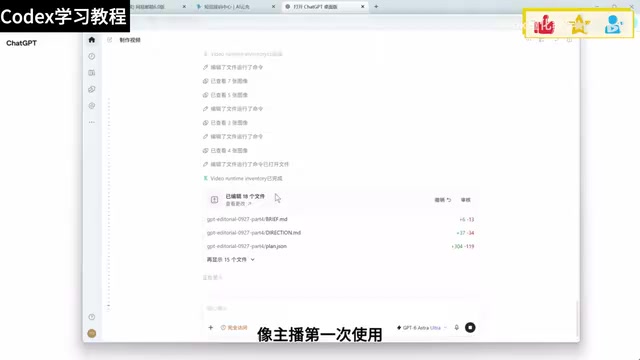
If demand is high, the creator suggests paying the difference in the store to upgrade. The way to determine whether a recharge is non-region: check the bill in the web settings; if the transaction record shows PHP, it's non-region, and even if you recharged in another store you can still come to pay the difference. After upgrading, the 5-hour limit disappears, the quota recovers to 5 times that of Plus, and the plan recalculates one month from the upgrade date. The creator admits that most of their motion graphics videos are completed with Codex and demand is high, so they chose to upgrade, but likewise reminds that the highest model should be used cautiously.
5-hour window quota is a rolling rate-limiting mechanism: the system does not reset at midnight each day but instead, starting from any request, counts the cumulative consumption within the previous 5 hours; once the threshold is exceeded, service is paused until the earliest portion of consumption slides out of the window and then gradually recovers. This design smooths resource usage during peak periods but also means users cannot fully restore all quota at once by "waiting until tomorrow." The weekly total quota is a coarser upper limit; with the two combined, high-intensity users can easily hit the ceiling within the window, which is why upgrading to Pro removes the 5-hour limit and retains only the weekly cap.
Settings and Practical Tips: Watch Fewer Tutorials, Just Get Started
For general settings, the creator suggests enabling full access permissions to avoid Codex repeatedly asking for permissions while working; configure permissions as high as possible, and choose web search and real-time reasoning intensity based on task complexity. In terms of reasoning intensity, Astra is higher than Ceo, and Ceo is higher than Luna, with quota consumption speed in the same order.
The last part of the video is quite controversial. The creator believes that most AI usage tutorials online, especially paid courses, are essentially fleecing people—today's large models are already very capable, and needs like building websites and editing videos can be accomplished by simply stating them clearly; much of the content demonstrating plugin installation and computer control is just for show. The core advice is: rather than burying yourself in tutorials, get started and use it first, look at finished skills and use them directly to create, and with enough use you'll naturally be able to realize your own ideas. This view represents only the creator's personal stance, but it points to a reality: the real barrier to tool-related content is often not the knowledge itself, but the willingness to take action.
Common Issues Quick Reference
- Client won't open: check whether it's installed on the C drive, or switch to Microsoft Store installation
- Login requires phone verification: subscribing to membership has a chance to skip it, or use a US-region number for SMS reception
- Token exchange failed/403: optimize network, clear cache, switch browser
- Reconnect 5 times: create
.envin the.codexdirectory and fill in the proxy port - Conversation error: log out of the official account and log back in, or restore configuration; back up projects before deleting the directory
- Insufficient quota: pay the difference to upgrade to Pro; note that if the bill currency is PHP it's non-region
One-line Summary
An ultimate step-by-step Codex guide covering installation, login, quota mechanics, and practical tips.
Paragraph Summary
Based on a Bilibili creator's ultimate Codex guide video, this article lays out the complete path from account registration and client installation to advanced usage. For installation, it recommends the C drive or Microsoft Store to avoid won't-open issues; the high-frequency login obstacles are phone verification and network-caused token exchange failures, requiring a stable network exit and cache clearing. For the "reconnect 5 times" issue, it provides a fix by creating .env in the .codex directory and filling in the proxy port. The quota section uses the "100 points and 20 points per 5 hours" analogy to explain Plus's rolling rate-limiting mechanism and explains that paying the difference to upgrade to Pro removes the 5-hour limit and grants 5x quota. Finally, the creator advocates watching fewer paid tutorials and getting hands-on directly—the real barrier to tools lies in the willingness to act, not the knowledge itself.
Related articles

A 19-Year-Old's Rental Horror Story: Ceiling Collapse, Bug Infestation, and the Lessons It Taught Me
At 19, my first off-campus rental brought bug infestations, no heat, a collapsed ceiling, and a ruined laptop with no renter's insurance. Here are the hard-won lessons for first-time student renters.

Veda Nurse's Cranial Nerve Exam: Why ASMR Role-Play Is Going Viral
Bilibili creator Veda's cranial nerve exam ASMR video goes viral, blending humor and sensory triggers through nurse role-play. This article analyzes its unique appeal and the audience psychology behind ASMR role-play.

LG Cinebeam AI Review: 120-Inch Giant Screen + 3000 Lumens, a New Choice for the Living Room Theater
LG Cinebeam AI projector review: 3000 ANSI lumens, 4K, 100 inches from about 8 cm and 120 inches from about 18 cm. Built-in webOS, AI Concierge voice recommendations, AI Sound Pro 11.1.2 virtual surround, and Game Optimizer—positioned for fixed living room installation, complementing the portable Cinebeam S.