Codex Web vs Local: How to Choose Between Desktop App, CLI, and Plugin
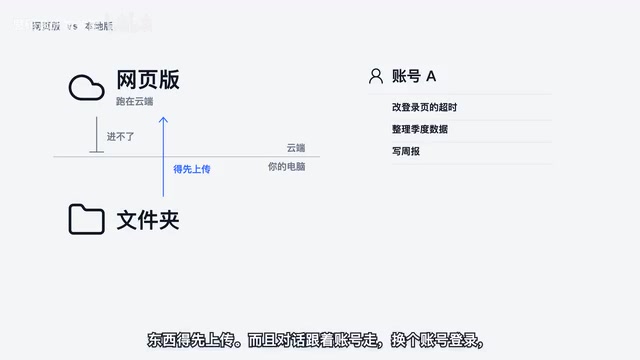
The same Codex has four entry points—the cloud web version can't reach local files or APIs, while the local version's three entry points are chosen by habit.
The article breaks down Codex's four usage forms: the web version runs in the cloud, can't access local folders, doesn't support APIs, and binds conversations to the account; the local version keeps files on your own computer and is the only choice for API access and multi-subscription switching. The local version has three entry points—desktop app, CLI, and VS Code plugin—functionally similar but differing by usage habits: desktop app for non-coders, CLI for programmers, plugin for heavy IDE users. The plugin and CLI share login configuration; multi-subscription switching can be handled by T-Sync.
Title
Codex Web vs Local: How to Choose Between Desktop App, CLI, and Plugin
Meta Description
What's the difference between Codex Web and Codex Local? This article breaks down the use cases for the Desktop App, CLI, and VS Code Plugin as three local entry points, clarifying the trade-offs around file access, API support, and multi-subscription switching.
Article Content
OpenAI's Codex is no longer a single entry point. Under the same Codex name, the web version runs in the cloud, while the desktop app, CLI, and VS Code plugin run locally—and the experience differs quite a bit. Choosing the wrong entry point can lead to repeated pain around file access and account switching. Below, we break down the differences among the four forms so you can match them to your own habits.
Web Version: Convenient, but Can't Reach Local Folders
The biggest feature of Codex Web is that it runs in the cloud. This means it can't reach folders on your computer—to have it process a file, you have to upload the file first. For scenarios where you're just asking a few questions occasionally and don't have a local codebase on hand, this is perfectly fine.
The limitations are also obvious. Conversations follow the account; if you log in with a different account, your previous conversations and projects are gone. The web version also doesn't support API calls. If you need to process local files or have several subscriptions to switch between, the web version won't cut it.
Local Version: Files Stay on Your Computer, Accounts Persist After Switching
The core advantage of the local version precisely fills the gaps of the web version: files always stay on your own computer, and switching accounts doesn't affect anything. For scenarios requiring API access or switching between multiple subscriptions, the local version is essentially the only option.
The local version has three entry points: the desktop app, the CLI, and the VS Code plugin. Functionally, the three are actually quite similar—the main differences lie in usage habits and operational overhead.

How to Choose Between the Three Entry Points
Don't write code, don't use the command line: choose the desktop app
If you don't habitually use the command line, the desktop app is the most hassle-free choice—click around with the mouse and you're good to go. According to a Bilibili creator, the official documentation's mention of "can use Codex" refers precisely to the desktop app, and it applies to both free and paid accounts. For non-developers or those just getting started with Codex, this is the lowest-barrier entry point.

Programmers: the CLI by default—lightweight and resource-efficient
Developers are better off using the CLI directly. Its advantages are being lightweight, low on resource usage, convenient for opening multiple sessions, and easy to view side by side. For those who work in the terminal daily, there's no need to switch windows—the call chain is the shortest.
Living in the IDE all day: install the VS Code plugin
If you spend most of your time writing code in VS Code or similar IDEs, the plugin is the handier option. Select a piece of code to bring it into the conversation, and changes appear right next to the code—keep whichever ones you want without copy-pasting back and forth between the editor and the browser.
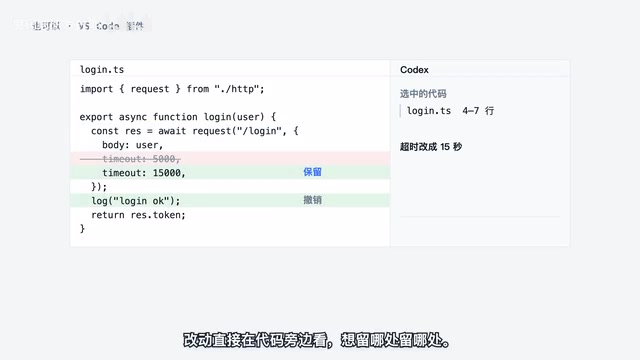
Plugin and CLI Can Be Mixed
An easily overlooked point: the plugin and the CLI share the same login configuration. That is, the two entry points can be used interchangeably without needing to reconfigure when switching between them.
If you have multiple subscriptions and also need to switch between APIs, this can be handled by T-Sync—switch once and both the CLI and plugin change together, with no need to operate on each entry point separately. For multi-account users, this saves a lot of repetitive work.
In a Nutshell
The web version suits lightweight Q&A but can't reach local files or APIs; the local version solves the file, account, and API issues, with three entry points to choose from based on habit: use the desktop app if you don't write code, the CLI by default for programmers, and the plugin for heavy IDE users. The plugin and CLI share configuration, and multi-subscription switching is handled uniformly by T-Sync.
One-line Summary
The same Codex has four entry points; the cloud-based web version can't reach local files or APIs, while the local version's three entry points are chosen based on usage habits.
Paragraph Summary
The article breaks down Codex's four usage forms: the web version runs in the cloud, can't access local folders, doesn't support APIs, and binds conversations to the account; the local version keeps files on your own computer, is unaffected by account switching, and is the only choice for API access and multi-subscription switching. The local version has three entry points—desktop app, CLI, and VS Code plugin—functionally similar but differing by usage habits: the desktop app is the easiest for those who don't write code, the CLI is the default for programmers, and the plugin is for heavy IDE users. The plugin and CLI share the same login configuration and can be mixed; multi-subscription and API switching can be handled uniformly by T-Sync, syncing both entry points in one operation.
Related articles
Three New Metapunk Skills: Building a Closed Loop for AI Software Development
Metapunk's new version adds Implement Spec, PR, and Retro skills to complete the AI software development loop. This article analyzes each skill's features and workflow to help improve AI Agent development efficiency and code quality.

6 Dark Tales of Terror: TED-Ed Uses Animation to Illustrate Fables of Human Nature
TED-Ed's six horror stories collection includes The Monkey's Paw, the Japanese tale of Oiwa, Death's Godfather, Beowulf, Poe's The Masque of the Red Death, and Hoichi the Earless. This article analyzes how these animated shorts use cross-cultural fables to explore desire, betrayal, and the price of death—and why they suit classroom discussion.
A Practical Guide to Calling Lightweight Ollama Models from Python
A complete hands-on guide to installing Ollama, pulling a 0.8B lightweight model, and calling it from Python—covering service startup, model name matching, first-load delays, and other pitfalls, with a measured 0.23s per call.