ComfyUI Bilingual Prompt Node Hands-On: No English Required to Master Tags
A Bilibili creator built a ComfyUI bilingual prompt node with GPT, making AI image prompts accessible without English knowledge.
This article introduces a ComfyUI bilingual prompt extension node built by a Bilibili creator, featuring bidirectional Chinese-English tag display so users without English knowledge can intuitively edit, delete, and adjust tag weights. The node includes 1,000+ built-in entries and supports on-demand access to a 300,000-tag community dictionary. Unknown tags can be batch-translated via external APIs like DeepSeek and saved to a personal dictionary for reuse. Currently tested only on the Anima model, with compatibility and cross-device stability yet to be confirmed.
For users just getting started with ComfyUI, the biggest barrier often isn't building workflows — it's staring at a wall of incomprehensible English tags inside the CLIP text encoding box. A Bilibili content creator spent several all-nighters and burned through the equivalent of one and a half reroll cards, using GPT to build a bilingual tag prompt extension node from scratch, aiming to completely eliminate that barrier. The extension reportedly went through 19 iterations and has currently only been tested on the anima locally deployed model.
A Bilingual Prompt Node Designed for Beginners
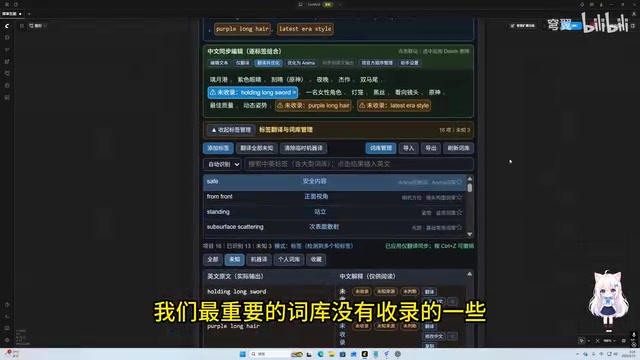
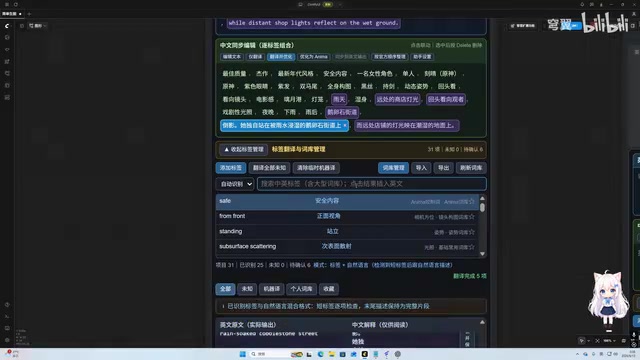
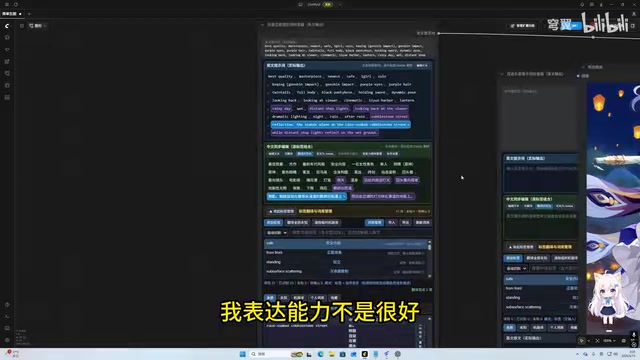
The core idea behind this extension node is straightforward: let people who don't know English freely edit, translate, and refine AI image generation prompts. The node consists of three parts — a standard English text input box, plus two special tag text boxes stacked vertically, with English tags on top and their Chinese counterparts below.
The two tag boxes are synchronized. Clicking any tag automatically selects its counterpart in the other box, and deletions are mirrored as well; double-clicking a tag lets you increase or decrease its weight. This bidirectional mapping design addresses the most frustrating problem for beginners: not knowing what individual English words mean when editing prompts. The author candidly admits that he used to get overwhelmed by a jumble of English tags, forced to ask an AI about them one by one — extremely inefficient — and that's exactly what motivated him to build this node.
ComfyUI is a node-based workflow interface for Stable Diffusion, where users build image generation pipelines by connecting different functional nodes. The CLIP Text Encode node is responsible for converting prompts into vector representations that the model can understand, making it one of the core components of the entire workflow. Stable Diffusion's prompt system inherits its conventions from English tag standards used by image databases like Danbooru. Many tags are specialized descriptors for art styles, actions, or character attributes — they're neither everyday English nor intuitively guessable, creating a real barrier for non-English speakers. Weight syntax (such as wrapping tags in brackets with numeric values) further steepens the learning curve.
Three Translation Modes and the Local Dictionary Mechanism
The node offers three function buttons: "Translate Only," "Translate and Optimize," and "Translate to Model Tags." Taking "Translate Only" as an example, it calls a configured external API for AI translation without modifying or expanding the original content; once translated, results can be synced to the English output box with one click.
The real centerpiece is the local dictionary. The author had GPT collect over 1,000 built-in vocabulary entries from various sources, and also integrated a large community-level dictionary that allegedly contains over 300,000 tags. When an input tag is already in the dictionary, it maps directly without needing re-translation; unrecognized tags are marked with an exclamation point and need to be translated individually.
Worth noting is how performance is handled: loading all 300,000 tags at once would "blow up" the system, so the node only queries the local database on demand during searches or translations. The search function supports keyword matching — for example, searching for a particular action returns a large number of related tags to choose from.
The "large community dictionary" mentioned here most likely originates from Danbooru tag datasets accumulated by open-source projects like a1111-sd-webui-tagcomplete or DanTagGen. Danbooru is one of the largest anime image annotation databases currently in existence, and its tag system is widely used to train anime-style Stable Diffusion models (such as NovelAI, the Anything series, and the Anima model mentioned in this article). Because these models are trained directly on Danbooru data, describing image content using its tag conventions tends to be more effective than using natural language — which is the fundamental reason why "tag-style writing" outperforms "sentence-style writing" in prompt engineering. A dictionary of 300,000 tags essentially covers the full Danbooru tag set, and loading on demand rather than keeping everything in memory is standard practice for handling local datasets of this scale.
Translating Unknown Tags and Building a Personal Dictionary
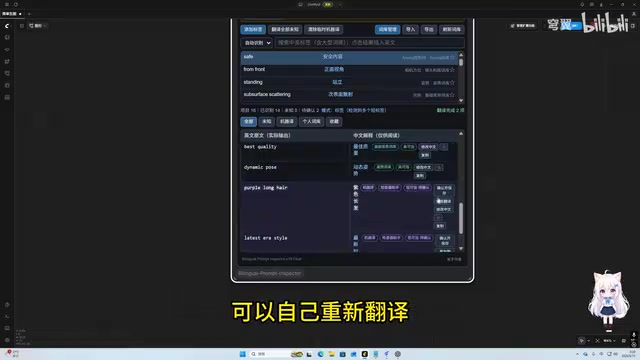
For "unknown tags" not covered by the dictionary, the node provides batch processing capability. After clicking "Translate All Unknown," the system translates these tags one by one. Results are marked in purple, indicating they are "machine-meaning tags" — temporary AI-generated translations.
Users can confirm, edit, or re-translate purple tags. Once satisfied, clicking "Confirm and Save" archives them to a local personal dictionary under a custom category. After saving, the tag no longer appears in purple and can be reused directly next time it's encountered. This "translate once, retain forever" mechanism essentially lets users gradually build their own bilingual dictionary through use — the more they use it, the smoother the experience becomes.
API Configuration and Workflow Integration
The translation capability depends on an external API, configurable in the node's "Assistant Settings." The author tested it with DeepSeekAd's API, though local models or other third-party APIs can also be used. He candidly notes that local models are "a bit dumb" and produce worse translations than cloud-based APIs — sometimes worse than doing it manually. Users can also choose to skip the API entirely and rely solely on the existing local dictionary.
Workflow integration is straightforward: simply connect the node's bottom text box directly to a standard CLIP Text Encode node. Both positive and negative prompts can be handled this way. The node also includes a "Sort by Official Order" function that rearranges tags according to the Anima model's expected tag sequence, ensuring output conforms to the model's format requirements.
DeepSeek is a large language model developed by the Chinese company DeepSeek, with API pricing that sits on the lower end among mainstream models — giving it a cost advantage in scenarios requiring bulk translation calls. The author's comment about local models being "a bit dumb" reflects a real gap that currently exists between small-parameter local models runnable on consumer hardware (roughly 7B parameters and below) and large cloud-based models on fine-grained translation tasks. This is especially true for specialized vocabulary like Danbooru tags, where small models tend to translate them literally rather than capturing their meaning in the context of image generation. For users prioritizing translation accuracy, using a cloud-based API with an OpenAI-compatible interface is the safer choice.
Notable Limitations and Positioning
This node has a very clear target audience: beginners who don't know English and are stuck at the prompt barrier. But it also has obvious limitations.
First, compatibility. The author explicitly states that it has only been tested on the Anima model, and cross-device installation stability has not been verified in a clean environment. He plans to test it on another computer that has never used the node before packaging and releasing it. Second, the "Translate and Optimize" function occasionally returns "punctuation that doesn't conform to model tag standards," requiring re-translation — indicating that AI translation reliability still has some variance.
Additionally, the entire extension was generated with GPT assistance, and the author admits he doesn't fully understand the underlying implementation. The large dictionary also comes from a third-party project that users need to download themselves following the instructions. This means ongoing maintenance and troubleshooting may be limited.
That said, from a barrier-lowering perspective, tools like this genuinely address a real pain point. While ComfyUI officially offers a prompt assistant with translation, optimization, and preset tag bookmarking, it lacks the key capability of bidirectional Chinese-English tag linking. For users with limited expressive ability and English proficiency, being able to immediately understand what each tag means and freely add, remove, or modify them is far more valuable than the technical complexity of the tool itself.
Summary
This is a classic case of "a user solving their own pain point": a beginner leveraged AI coding capabilities to create a genuinely useful auxiliary tool. Its bilingual linking, local dictionary accumulation, and on-demand loading design are all pragmatic choices. However, given single-model testing, the reliability uncertainties of AI-generated code, and dependency on a third-party dictionary, it's worth monitoring its compatibility performance and future updates before committing to regular use. Interested users can test it themselves once the author publishes the release.
Related articles
 Tech Frontiers
Google Omni 1.2 Flash: 15-Second AI Video at Just $0.07 per Second
Google DeepMind releases Gemini Omni 1.2 Flash: 15-second video, 720p at $0.07/sec (30% cheaper), multi-turn editing without regeneration, draft upscaling to 4K.
 Tech Frontiers
No AI Ghostwriting: Writer's Quarter Reinvents Novel Writing with a Visual Workbench
The Writer's Quarter is an AI-free novel writing and planning tool that unifies character building, story planning, and manuscript writing in one visual workbench. This article analyzes its positioning, target users, and differentiated value amid the rise of AI writing tools.
 Tech Frontiers
Fleeep: A Unified Inspiration Collection Notes App for Creatives
Fleeep is a notes app for creatives that unifies screenshots, bookmarks, saved posts, and inspiration into one calm, cross-device, offline-capable space. This article analyzes its positioning, differentiation, and target users.