commit-rewriter 0.1: An Open-Source Tool for Batch Rewriting Git Commit Messages
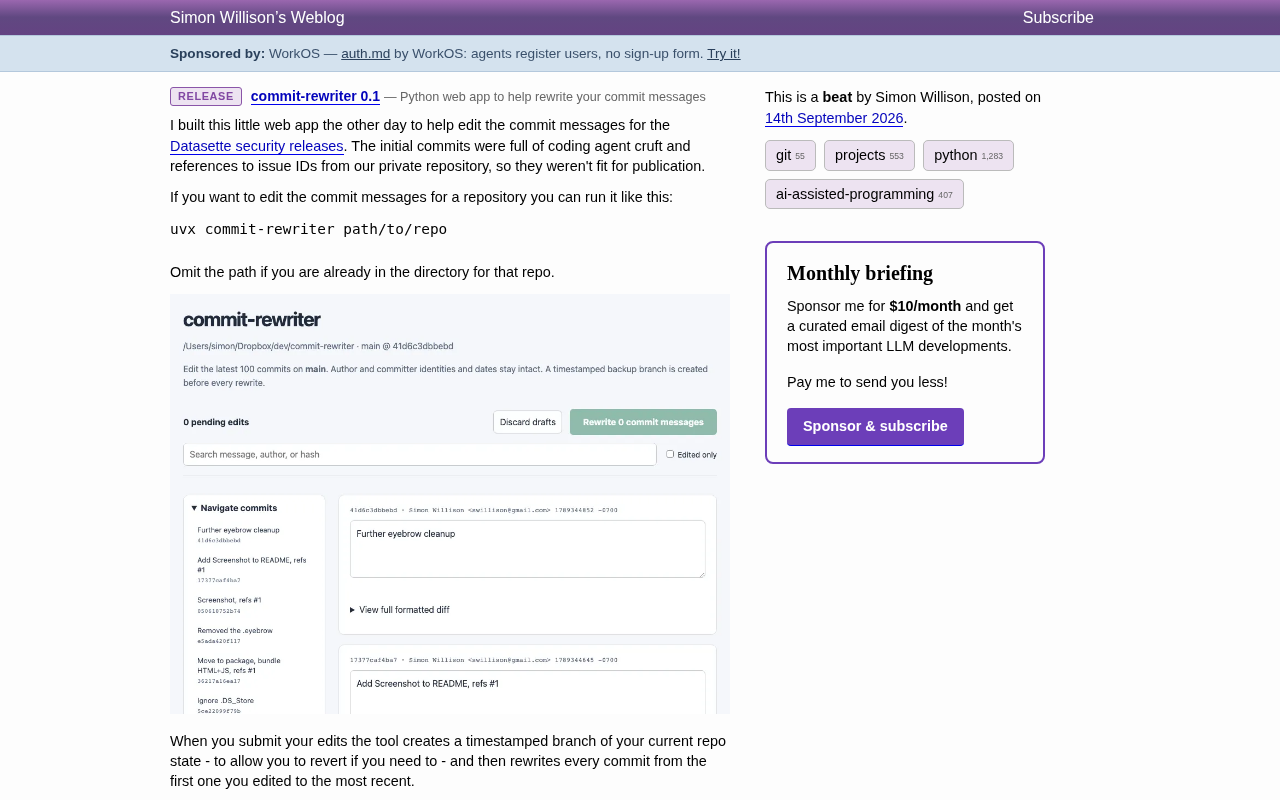
commit-rewriter is a lightweight Web tool for batch-editing Git commit messages, built to clean up AI coding agent output.
Simon Willison released commit-rewriter (v0.1), an open-source tool born from preparing a Datasette security release — where early commits were full of AI coding agent boilerplate and private issue references that needed cleaning. It runs instantly via `uvx`, launches a local Web UI for browsing, searching, and inline-editing commit messages with diff previews, and automatically creates a timestamped backup branch before rewriting history to guard against irreversible mistakes. It's a pragmatic, focused utility that reflects a new workflow need emerging from the rise of AI-assisted programming.
Simon Willison has released a lightweight Web tool called commit-rewriter (version 0.1) for batch editing commit messages in Git repositories. The project grew out of a real pain point: while preparing a public release of a Datasette security update, he found that early commits were packed with boilerplate generated by a coding agent and littered with private repository issue IDs — content that simply wasn't fit for public release.
The Problem It Solves
As AI-assisted programming becomes more widespread, many developers rely on coding agents to auto-generate commits. One side effect of this automation is commit messages filled with so-called "cruft" — machine-flavored template text, internal references, and links to private resources.
For open-source projects, all of this needs to be cleaned up before a public release. Manually editing each commit via interactive rebase is tedious and error-prone. commit-rewriter was built to fill this gap. The author openly admits the tool was thrown together "a few days ago" to handle the Datasette security release — it's a personal utility built for a specific workflow, not a comprehensive solution.
Getting Started Is Dead Simple
The tool runs without installation via uvx, launched with a single command:
uvx commit-rewriter path/to/repo
If you're already in the target repository directory, you can omit the path and just run uvx commit-rewriter. This starts a local Web interface.
From the official screenshot, the UI is clean and well-organized: the top bar shows the repository path, current branch, and commit hash; a toolbar displays the count of pending edits, buttons for Discard drafts and Rewrite commit messages, a search box for filtering by message, author, or hash, and a "Show edited only" checkbox. A left sidebar lets you navigate through commit history, while the main panel provides an editable text area for each commit along with an expandable view of the full formatted diff.
uvx is a command provided by the Python package manager uv — similar in concept to npx. It pulls the target package directly from PyPI and runs it in an isolated environment without requiring a pre-installed package or a manually created virtual environment. Once you're done, the environment is automatically cleaned up. uv itself is written in Rust and is known for blazing-fast dependency resolution, making it one of the fastest-growing tools in the Python ecosystem. For "use it and move on" scenarios, uvx dramatically lowers the barrier to trying new tools.
Safety Net: Timestamped Backup Branches
Rewriting Git history is a high-risk operation — a mistake can mean lost commits. commit-rewriter addresses this with a built-in safeguard: before applying any edits, the tool creates a timestamped branch based on the current state of the repository as a rollback backup, then rewrites history starting from the first edited commit through to the latest.
This "backup first, rewrite second" approach reduces the cost of mistakes. If the rewritten history isn't what you expected, you can always switch back to the timestamped branch to restore the original state. For scenarios where you need to modify history but are worried about irreversible consequences, this is a pragmatic trade-off.
Rewriting Git history essentially means regenerating commit objects — each commit's hash is determined by its content, timestamp, and parent commit hash, so changing a commit message produces an entirely new hash chain, with the original hashes no longer appearing in the current branch history. This is precisely why commands like git rebase -i or git filter-branch require care: if you modify commits that have already been pushed to a remote, every collaborator must force-sync or risk a history divergence. commit-rewriter's timestamped backup branch strategy is essentially a local reference pointing to the original commit chain, ensuring the original objects aren't garbage-collected by Git and can be recovered at any time.
Positioning and Use Cases
commit-rewriter is currently at version 0.1 — a quintessential "good enough" personal project. Its value lies not in a rich feature set, but in turning a frequent and annoying cleanup task into something visual and batch-friendly.
The most common use cases include:
- Removing internal issue references and sensitive links before open-sourcing a private repository;
- Cleaning up template-heavy commit messages auto-generated by AI coding agents;
- Tidying up commit history ahead of a release to make changelogs more readable.
For developers who rely on AI programming tools but also need to maintain public code quality, tools like this reflect an emerging need: how to establish a cleanup checkpoint between automated generation and human review. commit-rewriter offers its own minimalist answer to that question.
Related articles

Lightpanda: A Headless Browser Built for AI and Automation
Lightpanda is a headless browser built from scratch in Zig for AI and automation, with 37,852 GitHub stars. This analysis covers its technical approach, design choices, and use cases.

From Will Smith Eating Spaghetti to AI Short Films: The Astonishing Pace of AI Video Evolution
Tracing AI video's evolution: from Runway's 2019 short film *The Orange* to the Will Smith spaghetti video, a Twitter comparison reveals the astonishing pace of technological progress in just a few years.

Opus 4.6 Chat Experience: Why Do Older Models Feel More "Human"?
A Reddit user shares a late-night chat with Opus 4.6, noting older models feel more personable. We analyze the causes of model personality differences and the balance between capability and experience.