Complete Guide to Claude Code Desktop: No Account Required + Chinese Localization + DeepSeek Integration

Set up Claude Code Desktop with DeepSeek integration, no account required, plus Chinese localization and custom Skills.
This guide walks through the complete Claude Code Desktop configuration: enabling developer mode for account-free usage, integrating cost-effective DeepSeek models via CC Switch as a local API proxy, applying Chinese localization with a one-click script, and importing custom Skills as compressed packages for reusable prompt templates.
Introduction
As Anthropic's AI programming tool, Claude Code recently launched a Desktop version, making it accessible to users who aren't comfortable with command-line operations. However, the official model pricing isn't cheap, and many developers want to integrate domestic Chinese models to control costs. This article provides a detailed walkthrough of the complete Claude Code Desktop configuration process, covering installation, account-free usage, Chinese localization, DeepSeek model integration, and custom Skill usage.
Anthropic was founded in 2021 by former OpenAI Research VP Dario Amodei and Daniela Amodei as an AI safety company. Their core product, the Claude series of large language models, is known for its safety features and long-context processing capabilities. Claude Code was initially released as a command-line tool (CLI) targeting developers familiar with terminal operations, allowing users to interact with AI directly in the terminal for code writing, debugging, and refactoring. The Desktop version marks Anthropic's expansion of AI programming tools from hardcore developers to a broader user base, directly competing with GitHub Copilot, Cursor, Windsurf, and similar products.
Installing Claude Code Desktop
Download and Installation
First, visit the official Claude Code page and hover over the "Get Claude Code" button to see multiple usage options. Desktop is listed first. Click it to jump to the download page, which automatically matches the version for your operating system (Windows/Mac).
After downloading, double-click the installer. The process is straightforward—just click next through each step.
Account-Free Configuration
After installation, the interface will prompt you to log in with a Google account or other methods. If you don't want to register an account, you can enable account-free mode with these steps:
- Click the hamburger menu (three horizontal lines) in the top-left corner
- Select "Help"
- Find the third option, scroll down to find "Enable Developer Mode"
- Click to confirm, and wait for Claude Code to restart
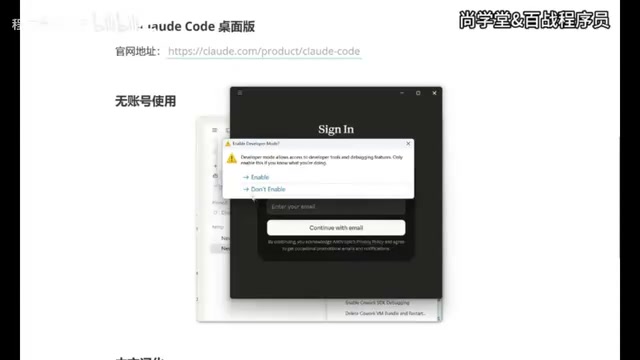
Developer mode is essentially an advanced configuration entry point built into Claude Code. Once enabled, it unlocks the ability to customize API endpoints. In normal mode, all Claude Code requests are sent to Anthropic's official API servers, but developer mode allows users to redirect requests to any compatible API address. This is the technical prerequisite for integrating DeepSeek and other third-party models—by modifying the API endpoint address, Claude Code's frontend interaction interface remains unchanged, but the backend model can be replaced with any service supporting the OpenAI-compatible format.
After the restart, you'll see a new interface. Don't worry about it for now—next, you need to install a crucial auxiliary tool.
Integrating DeepSeek Models via CC Switch
CC Switch Overview and Installation
CC Switch is a software tool for unified management of AI tool workflows. Simply put, it helps you freely switch between different models. Important: the version must be 3.15.0 or higher, as older versions don't support Claude Code Desktop configuration.
From a technical architecture perspective, CC Switch acts as a local API proxy. It starts a local HTTP service on your computer, listens for API requests from Claude Code, and forwards them to the corresponding model provider (such as DeepSeek, Tongyi Qianwen, Moonshot, etc.) based on your configured routing rules. The advantage of this architecture is that Claude Code only needs to know the local proxy address, while which model to call, how to authenticate, and how to handle request format differences are all handled by CC Switch at the middleware layer. This is why it's called a "router"—just like a network router distributes data packets, CC Switch distributes AI requests to the correct target service. Currently, most Chinese model providers follow the OpenAI-compatible API format (i.e., the /v1/chat/completions interface specification), which allows CC Switch to interface with multiple model services in a unified way.
After downloading the latest version from GitHub, installation is equally straightforward. Once installed and opened, you'll notice a "Desktop" option at the top with a small computer icon, indicating support for Claude Code Desktop.
Configuring the DeepSeek API Key
Configuration steps:
- Click the "Settings" button on the left
- Go to "Routing" options, find "Local Routing" and enable it
- Return to the main interface and select "Desktop"
- Click the "Add" button on the right and select the DeepSeek model
- Obtain and enter your API Key
How to get an API Key: Open the DeepSeek website → API Documentation → Key Management → Create New Key → Copy.

DeepSeek is a large language model series developed by DeepSeek AI. DeepSeek-V3 and DeepSeek-R1 have performed excellently across multiple benchmarks, particularly in code generation and mathematical reasoning, approaching or even surpassing some top international models. From a cost perspective, DeepSeek API pricing is extremely competitive: taking DeepSeek-V3 as an example, input costs approximately 1 RMB per million tokens and output approximately 2 RMB per million tokens. Compared to Claude 3.5 Sonnet's $3 per million input tokens and $15 per million output tokens, costs are reduced by dozens of times. For everyday programming assistance scenarios, this means monthly expenses of just a few to a few dozen RMB can meet most needs.
At the bottom of the configuration page, there's a checkbox option for context size. When checked, the context can expand to 1MB—it's recommended to enable this for a better conversation experience. The context window refers to the total amount of text a model can "see" and process in a single conversation. A 1MB context is roughly equivalent to 250,000 to 500,000 Chinese characters. This is significant for programming scenarios—it means the model can simultaneously understand multiple source code files, configuration files, and documentation from a medium-sized project, providing more accurate, globally-aware code suggestions rather than inferring based solely on the currently open file.
After configuration, click "Add", then make sure to start the service. Once started, you can minimize CC Switch (clicking the close button only minimizes it to the system tray without actually exiting).
Completing the Desktop Integration
Back in Claude Code Desktop:
- Click the hamburger menu in the top-left corner
- You'll now see a new "Developer" option
- Click "Configure Third-party"
- The information is auto-filled—just click "Update"
- Restart Claude Code
After restarting, you can enter the Claude Code main interface. The model list will include Flash and Pro versions, as well as the 1M context version. Select a model and start chatting.
Chinese Localization for Claude Code Desktop
The default interface is entirely in English, which isn't user-friendly for Chinese users. The localization process is very simple:
- Download the localization package (includes both Windows and Mac versions)
- After extracting, find the
.batfile and double-click to run it - Select option 1 "Install Simplified Chinese" and press Enter to confirm
- The program will automatically close Claude Code and perform the localization
- After completion, Claude Code will automatically restart
After restarting, the interface switches to Chinese, including menu items like "New Task," "Project Plan," "Task Customization," etc. Historical conversation records can also be viewed normally.
The localization script typically works by replacing language resource files in the application's installation directory. Claude Code Desktop is built on the Electron framework (the same technology used by VS Code, Slack, and other desktop apps), with interface text stored in JavaScript or JSON resource files. The localization script locates these files and replaces English strings with corresponding Chinese translations. Note that each time Claude Code updates, the localization may be overwritten, requiring you to re-run the script.
Using Custom Skills
How to Import Skills
The Desktop version handles Skills differently from the CLI version. The CLI version stores Skill files in the .claude/skills/ directory, while the Desktop version requires uploading them as compressed packages.
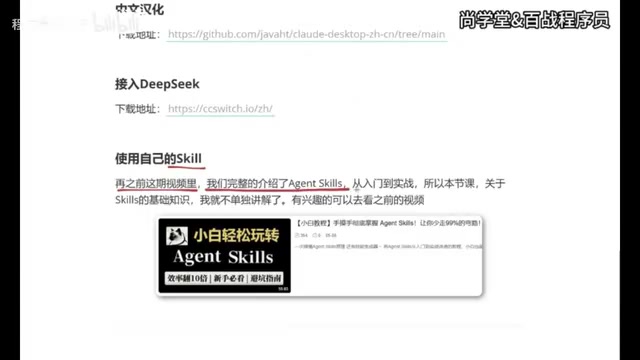
Skills are essentially structured prompt templates that encapsulate instructions, constraints, output format requirements, and other elements for specific tasks into reusable files. Compared to writing complex prompts directly in conversations, Skills offer the advantages of standardization and shareability—you can package your best practices into Skill files and distribute them within your team, ensuring everyone gets consistent AI output quality. Technically, Skill files are usually in Markdown format, containing task descriptions, execution steps, example inputs/outputs, etc. When a user invokes a Skill, this content is injected into the conversation context as a system prompt, guiding the model to complete tasks according to predefined workflows and standards. This differs from RAG (Retrieval-Augmented Generation)—RAG focuses on retrieving relevant information from external knowledge bases to enhance responses, while Skills focus on defining task execution workflows and standards.
Specific steps:
- Create a new task
- Click the plus icon → Skills → Manage Skills
- Click "Add Skill" → "Upload Skill"
- Supported file formats:
.mdfiles, compressed packages,.skillfiles - Compress your Skill folder and drag-and-drop to upload
Practical Usage Demo
After uploading, type a forward slash / in the chat box, select the corresponding skill, then enter your request. For example, select a creative generation Skill and input "Help me generate a creative idea for free beer on weekends," and the AI will generate content following the workflow defined in the Skill.
Summary
Through the five steps above, we've completed the full configuration of Claude Code Desktop:
- Install Desktop version: Download from the official site, straightforward installation
- Account-free usage: Enable developer mode to bypass login
- Integrate domestic models: Route through CC Switch, supporting DeepSeek and other models
- Chinese localization: One-click completion via localization script
- Custom Skills: Upload as compressed packages, invoke via slash commands
The biggest advantage of this setup is the significant cost reduction—DeepSeek's API pricing is far lower than Claude's official models, while retaining Claude Code Desktop's excellent interaction experience and project management capabilities. For developers with limited budgets who still want to experience AI programming tools, this is a highly worthwhile approach.
Of course, there are some considerations when using third-party models as replacements for Claude's native models: different models have varying strengths in code comprehension, multi-turn conversation coherence, and specific programming language support. DeepSeek excels in Chinese language understanding and cost-effectiveness, but for certain complex architectural designs or code generation for specific frameworks, Claude's native models may still have advantages. Developers are advised to flexibly choose models based on actual project needs—CC Switch's multi-model switching capability provides exactly the technical support for this flexibility.
Related articles

The Truth Behind Codex 'Build a Website in 5 Minutes': AI Isn't Creating Sites—It's Helping You Copy Them
Exposing the truth behind viral Codex 5-minute website videos: creators aren't building original sites with AI—they're copying shared prompts or scraping others' work. Learn AI coding tools' real limits.

Getting Started with AI Agent Development: A Complete Guide from Concept to Practice
A comprehensive guide to AI Agent architecture and development, covering automated marketing, intelligent customer service, and investment analysis scenarios with single and multi-agent collaboration.

The Truth Behind Codex 'Build a Website in 5 Minutes': AI Isn't Creating Sites — It's Helping You Copy Them
Exposing the truth behind viral Codex 5-minute website videos: creators aren't building original sites with AI — they're copying shared prompts or scraping others' work.