Complete Guide to Local DeepSeek Deployment: Internet Access + Knowledge Base + RAG Architecture Explained
Deploy DeepSeek locally with Ollama, add internet search and RAG knowledge base for private, offline AI
Learn to deploy DeepSeek models locally using Ollama for privacy-first AI. Configure ChatBot UI for better UX, add internet search with Page Assist browser extension, and build RAG-powered knowledge bases with AnythingLLM. Includes distillation concepts, embedding model selection, vector databases, and API integration for custom workflows—all running offline on consumer hardware.
Why Deploy Large Models Locally
While online AI services are convenient, concerns about data privacy, content moderation, usage costs, and network dependency remain unavoidable. Local deployment of large models fundamentally addresses these pain points: data stays on your machine, no paid subscriptions required, offline operation supported, low-latency responses, and custom knowledge base integration. This approach is especially valuable for handling enterprise internal materials or sensitive personal data.
However, local deployment has one objective limitation: consumer-grade hardware cannot run the full-scale DeepSeekAd model (the complete 671B parameter version). What's actually deployable are distilled versions, ranging from 1.5B to 70B parameters. Distillation refers to using knowledge distillation techniques to transfer a large model's capabilities to a smaller one, dramatically reducing hardware requirements while preserving high performance. Knowledge Distillation, first proposed by Geoffrey Hinton et al. in 2015, centers on having a small "student model" learn the output distribution of a large "teacher model" rather than learning directly from raw training data. The "soft labels" produced by the teacher model during inference contain rich inter-class relationship information; by learning this probability distribution, the student model captures substantial implicit knowledge. In large language models, distillation typically combines more refined techniques like intermediate layer feature alignment and attention pattern transfer, enabling student models with dozens of times fewer parameters to maintain considerable language understanding and reasoning capabilities. Take DeepSeek-R1-Distill-Qwen-32B as an example—benchmark results show it performs comparably to GPT-4o and DeepSeek V3 on most tasks, making it quite cost-effective for local operation.
Building a Local Model Runtime with Ollama
Ollama is currently the mainstream framework for running local large models, designed specifically for deploying and running large models on consumer hardware, with excellent compatibility across the local AI tool ecosystem. As of now, DeepSeek series models have nearly 13 million downloads on Ollama, making them among the platform's most popular models.
Ollama is built on the llama.cpp project, which reimplements Meta's LLaMA model in pure C/C++ as an inference engine that efficiently runs quantized large language models on CPUs. Quantization compresses model weights from 32-bit or 16-bit floating point to 4-bit or even 2-bit integer representation, dramatically reducing memory footprint and computation at the cost of slight precision loss. Ollama wraps this with model management, API services, GPU acceleration scheduling, and other features, eliminating the need for users to manually handle model format conversion, VRAM allocation, and other low-level details. Its local API service follows OpenAI-compatible format, meaning numerous third-party tools developed for the OpenAI API can switch to local models with virtually zero cost.
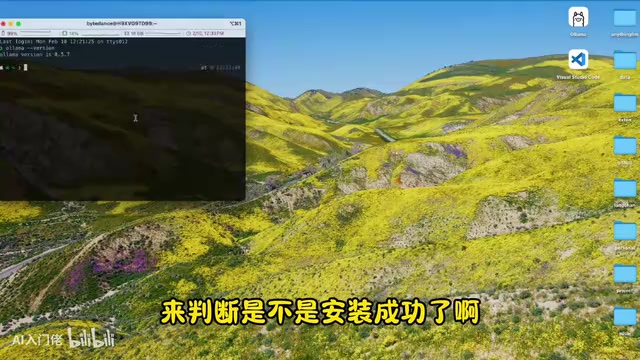
Installation is straightforward: visit the Ollama website to download the installer for your operating system, install it, then verify in terminal:
ollama --version
After successful installation, Ollama listens locally on port 11434. You can then download and run a model with a single command:
ollama run deepseek-r1:7b
The 7b in the model name represents 7 billion parameters, the recommended choice for entry-level hardware. Ollama's website model list page shows disk space requirements for each version—check against your storage capacity before selecting.
Enhancing Interaction Experience with ChatBot UI
Pure command-line interaction isn't user-friendly for daily use. Currently, one of the better local AI clients is ChatBot UI, an open-source frontend interface with over 29K stars on GitHub that supports connecting to locally deployed models and various cloud APIs, with good cross-platform compatibility.
Configuration: After downloading and installing, go to settings and select Ollama as the model provider, fill in the local address http://localhost:11434 for the API domain, and the tool will automatically recognize your installed model list. This gives you a local conversation interface comparable to ChatGPT.
Worth mentioning: through ChatBot UI combined with Groq's API, you can also conveniently experience the full-scale DeepSeek R1. Groq delivers extremely fast large model inference speeds thanks to its proprietary LPU (Language Processing Unit) chip architecture. Unlike GPUs' massive parallel computing, LPUs use a deterministic temporal instruction set computer architecture specifically optimized for the sequential token generation process in large language model inference, eliminating the memory bandwidth bottleneck of traditional GPU inference, achieving generation speeds of hundreds of tokens per second in single inference runs. Groq offers some free quota with paid options beyond that, suitable for scenarios occasionally needing full-version capabilities and serving as an effective supplement when local distilled models fall short.
Adding Internet Search Capability to Local Models
ChatBot UI has built-in internet functionality, but currently only supports certain models. To give local Ollama models stable internet search capability, the browser extension Page Assist is recommended.
Page Assist is an open-source browser extension originally designed to provide an interaction interface for local AI, but its biggest highlight is native support for internet search. All interactions occur locally without transmitting any data to external services, ensuring privacy and security.
After installation, click the extension icon and it will automatically detect running Ollama instances and installed models. There's a globe icon at the bottom of the dialog box—click it to enable internet search mode. Testing shows it works properly, retrieving real-time information and generating responses combined with the local model.
RAG Architecture and Core Principles of Local Knowledge Bases
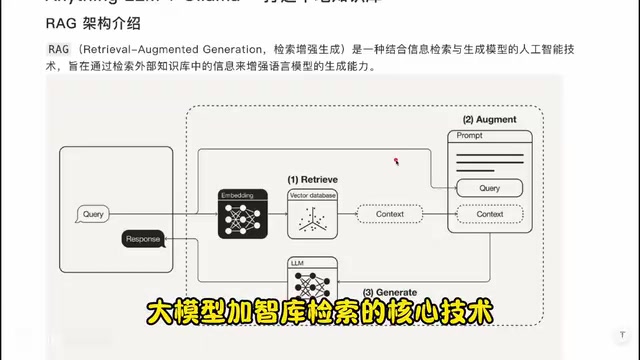
Before integrating a local knowledge base, it's important to understand the underlying technical architecture—RAG (Retrieval-Augmented Generation). This is the current mainstream approach for making AI accurately answer domain-specific questions.
The RAG workflow can be analogized as three steps: find materials → organize materials → answer questions.
- Retrieval: After a user asks a question, the system converts it to a vector using an Embedding model, then retrieves the most semantically similar document fragments from a vector database.
- Augmentation: The retrieved relevant document fragments are provided as context along with the original question to the large model.
- Generation: The large model generates accurate, coherent answers based on the integrated context.
Note that RAG doesn't make the large model "learn" new knowledge, but rather dynamically provides external information as reference context during inference. This fundamentally differs from another common approach—fine-tuning. Fine-tuning continues training the model on domain-specific data, "writing" knowledge into model weights. Its advantage is no additional retrieval step needed during inference; disadvantages are high training costs, difficult knowledge updates, and susceptibility to catastrophic forgetting. RAG's advantages are updatable knowledge bases, traceable sources, and no model retraining required, but it's limited by context window length, restricting the amount of reference information injectable per query. In production environments, both are often used together: fine-tuning gives the model domain-specific language style and foundational knowledge, while RAG supplements the latest, fine-grained factual information.
Two key concepts require deeper understanding:
Embedding models convert text into machine-understandable numerical vectors (semantically similar words are closer in vector space—for example, "apple" and "fruit" are closer than "apple" and "car"). The core task of Embedding models is mapping human language to high-dimensional vector space (typically 384 to 4096 dimensions), a process based on Transformer architecture encoders trained through contrastive learning on massive text pairs.
Vector databases efficiently store and retrieve these vectors, typically using approximate nearest neighbor (ANN) algorithms like HNSW (Hierarchical Navigable Small World) or IVF (Inverted File Index), finding the most similar results in millions or even billions of vectors at millisecond speeds. LanceDB, as an embedded vector database, stores data directly in local files without requiring a separate database service process, making it well-suited for local deployment scenarios.
Building a Local Knowledge Base System with AnythingLLM
AnythingLLM is a local knowledge base tool based on RAG architecture that supports combining data sources like documents and web pages with local large models to build personalized knowledge Q&A systems.
Initial Configuration
After downloading and installing from the official website, first-time startup requires sequential configuration:
- Select large model: Choose Ollama, and the tool will automatically read locally installed models.
- Select Embedding model: Embedding model quality directly determines knowledge base retrieval accuracy. OpenAI's text-embedding-3 series currently has the strongest overall performance, excelling in multilingual scenarios due to broad training corpus coverage and large model parameters, but requires internet and payment; free offline options include the default
all-minilmseries (like all-MiniLM-L6-v2, only about 80MB), which has decent retrieval capability in English scenarios—slightly less accurate but fully adequate for daily use. - Select vector database: The default LanceDB runs entirely locally and is free, making it the recommended option.
- Create Workspace: Each workspace has an independent knowledge base and settings, allowing separate maintenance for different projects or domains.
Knowledge Base Construction Recommendations
AnythingLLM supports multiple data formats: plain text (TXT, Markdown), formatted documents (PDF, Word), structured data (CSV, JSON), and direct URL pasting.
Knowledge base structural quality significantly affects final answer quality. Unstructured web content isn't conducive to model retrieval; it's recommended to first organize raw materials locally into clearly hierarchical, easily retrievable Markdown format before uploading to workspaces. Testing shows that after uploading structured Markdown knowledge bases, models can accurately retrieve and answer specific data within them (like field-level information such as product prices).
Agent Capability Extensions
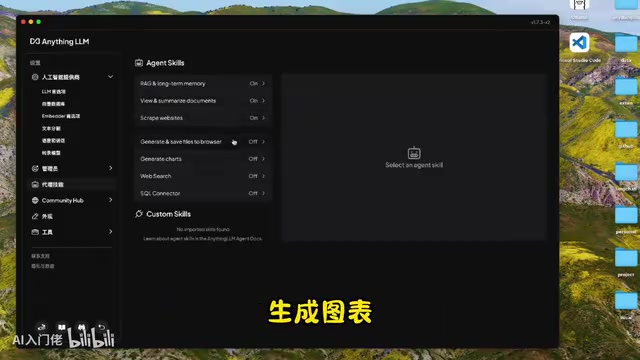
AnythingLLM also has a fairly complete built-in Agent system that can be enabled in settings: deep web scraping, chart analysis, database connections, and Web search Agents. For search engines, both DuckDuckGo and SearXNG are free and usable—not as effective as paid Google or Bing APIs but sufficient for testing. Type @ in the dialog box to invoke Agent capabilities.
Flexible Integration Through API
AnythingLLM provides a complete REST API, which is the key step for this solution to advance from "usable" to "extensible." Through the API, local knowledge base capabilities can be integrated into any business system, such as personal knowledge management tools, enterprise internal Q&A bots, automated document processing pipelines, etc.
In actual engineering, common integration patterns include: forwarding enterprise IM (like Feishu, Slack) messages to AnythingLLM's chat interface via Webhook to implement internal Q&A bots; using scheduled task scripts to batch-process documents and write results to databases; or embedding code review steps in CI/CD pipelines to have local models automatically analyze code changes.
API calls involve two core concepts:
- Workspace Slug: The unique identifier for a workspace, obtained through the
GET /api/v1/workspacesendpoint. - Thread Slug: The unique identifier for a specific conversation thread within a workspace.
The core chat endpoint is POST /api/v1/workspace/{slug}/thread/{threadSlug}/chat, with main parameters including message content and response mode (chat or query). The endpoint returns the model's complete answer, retrieved knowledge base context fragments (sources), and metadata for this call. The returned knowledge base context fragments are especially important, providing sourcing basis for answers—a hard requirement in enterprise scenarios with high compliance needs. Users not only see the AI's answer but can directly jump to original documents to verify information accuracy. Here's a basic cURL call example:
curl -X POST "http://localhost:3001/api/v1/workspace/{workspace-slug}/thread/{thread-slug}/chat" \\
  -H "Authorization: Bearer YOUR_API_KEY" \\
  -H "Content-Type: application/json" \\
  -d '{"message": "your question", "mode": "chat"}'
API documentation is built into AnythingLLM's settings panel with online call testing support for quick onboarding.
Summary
The complete chain of this local AI deployment solution is: Ollama provides model runtime → ChatBot UI or Page Assist handles interaction interface and internet capability → AnythingLLM implements RAG knowledge base retrieval → REST API supports custom integration development. The entire process requires no cloud services, with data flowing entirely locally.
For users with limited hardware, distilled models from 7B to 14B parameters are the most cost-effective starting point; if conditions allow, 32B models perform quite close to online services in most scenarios. Embedding model selection significantly impacts knowledge base retrieval quality—if accuracy requirements are high, OpenAI's Embedding API is worth integrating separately.
Related articles

AI Comic Drama with WorkBuddy from Scratch: A Step-by-Step Skill Pack Installation Guide
Learn how to create AI comic dramas with WorkBuddy from scratch. This guide covers installation, Skill pack import and invocation, plus a script generation demo with manual revision tips to get you through the first step from script to storyboard.

WorkBuddy Agent Runs the Entire GEO Database Mining Pipeline with a Single Prompt
WorkBuddy agent automates GEO database mining: from data search and curation to batch correction, differential analysis, co-expression networks, feature gene screening, and immune infiltration—a single prompt generates a complete bioinformatics report, greatly lowering the barrier to bioinformatics analysis.

PC Memory Wasted? Hacker News Debates Centralized Data Centers
Hacker News users argue that personal computer memory is wasted and should be centralized in data centers, sparking debate on centralized vs. distributed computing resource allocation. This article analyzes the logic behind the claim, the costs of centralization, and new tensions in memory resource allocation in the AI era.