Connecting Claude Code to Dawnwood via MCP: Running an AI Studio from Your Chat

Dawnwood lets Claude Code and other coding agents drive an AI content studio via MCP, with ~90-second onboarding—but approval rights stay with humans.
The article explains how to use coding agents like Claude Code to take over Dawnwood, an AI content studio platform, through the MCP protocol, with the entire onboarding flow taking about 90 seconds. It covers three steps: generating a single-display, 90-day, revocable API Token in the console; logging in from the terminal with owner-only credentials (Node 18+ required); and registering Dawnwood with the agent via a single `claude mcp add dawnwood` command, reused across Cursor and Claude Desktop. Once connected, the agent can invoke the same action set as the console, but is designed to pause at approval points like bible and script sign-off and hand back a review link. Agent access is included in all plans, and agent reasoning is not billed.
Take Over an AI Studio From Your Terminal
If you live in the terminal, you can now drive the entire Dawnwood Studio with Claude Code. According to a demo by a presenter named Ember on YouTube, the whole onboarding flow takes about 90 seconds. Dawnwood is an AI studio platform for serialized content production, covering episode planning, scripts, art rendering, covers, sign-off, and delivery—and through MCP (Model Context Protocol) it hands control over to your coding agent.
The significance of this path is that the agent is no longer just a window for writing code—it can invoke the same operations as the console to actually push content production forward.
MCP (Model Context Protocol) is an open protocol proposed and promoted by Anthropic, aimed at providing a unified communication standard between AI applications and external systems. Before MCP, every external tool or data source integration typically required writing and maintaining adapter code separately for each agent client. MCP abstracts this kind of integration into a "client–server" model: external systems implement an MCP server exposing a standardized set of tools, resources, and prompts; clients such as Claude Code, Cursor, and Claude Desktop can invoke these capabilities in the same way as long as they follow the protocol.
The value of this design lies in decoupling: tool providers only need to implement an MCP server once, and it can be reused by all MCP-compatible agents; agent users don't need to relearn a new configuration for every integration. In this article, Dawnwood packages episode planning, scripts, rendering, sign-off, and other operations as an MCP server—a textbook use of this model. The agent invokes the same set of actions as the console, rather than a parallel set of interfaces built separately.
Step 1: Generate an API Token in the Console
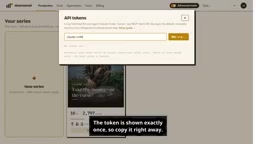
In the Dawnwood console, open the avatar menu and select API Tokens. Give the token a name that reflects the agent's purpose, such as claude-code, then click generate.
One key detail here: the token is shown only once, so you must copy it immediately. According to the demo, it's valid for 90 days and can be revoked at any time. Give the token a clear agent name to make later auditing and rotation easier—once an agent is no longer in use, simply revoke it without affecting other integrations.
Step 2: Log In From the Terminal
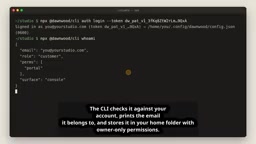
With the token in hand, run the login command in your terminal. The CLI validates it against your account, prints the associated email, and saves the credential to your home directory with owner-only read/write permissions. Afterwards, use whoami to confirm the login took effect.
On the environment side, the demo mentions Node 18 or newer is required—a prerequisite for running the Dawnwood CLI. Tightening permissions to owner-only is a design worth applauding: even if other users share the same machine, it's hard to read the credential file directly.
Step 3: Register Dawnwood With Your Agent
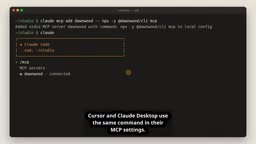
Next, register this MCP server in your agent. For Claude Code, it only takes one command: claude mcp add dawnwood, followed by an npx invocation of the Dawnwood CLI.
After registration, type /mcp in Claude Code and you'll see Dawnwood shown as connected. Cursor and Claude Desktop use the same command—just with the configuration written into their respective MCP settings. This "learn once, reuse across clients" configuration style lowers the cost of migrating between multiple agent clients.
npx is a package executor distributed alongside npm in the Node.js ecosystem. Its purpose is to temporarily download and run a command-line program provided by a package without global installation beforehand—npx <package> resolves, pulls the required version, and executes it directly. In this article, "an npx invocation of the Dawnwood CLI" refers to running Dawnwood's command-line tool this way: the agent pulls and invokes it on demand rather than relying on a fixed version pre-installed locally.
The advantage of this approach is a low barrier to entry and controllable versions—combined with the Node 18+ runtime requirement, it works out of the box; the cost is network download overhead on first execution and a degree of dependence on the network environment. When registering tools into MCP server configuration, npx-style commands are therefore often used as a cross-platform, cross-client universal launcher.
What the Agent Can Do—and What Still Stays in Your Hands
Once the connection is established, just ask in natural language. The agent invokes exactly the same set of actions as the console: run, bible, scripts, art and rendering, covers, sign-off, delivery.
A typical scenario from the demo: the agent inspects a series, reports that every episode has been signed off, then returns a console link for publishing. "The gate is still in your hands"—before approving a bible, script, or world pack, a well-behaved agent will hand you the review link and then stop to wait for your decision. Watching takes and pushing to your channel always remain inside the console.
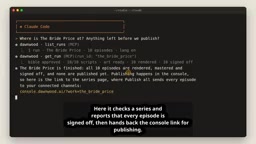
This division of labor—"the agent executes, the human approves"—points to a practical governance question: the degree of automation in content production can increase, but publishing decisions and control over account channels should not be delegated to agents.
In agentic workflows, a "gate" refers to a deliberately placed checkpoint in the process that requires human intervention to proceed. An agent without gates can execute all the way through—drafting, rendering, and publishing all automated—but that also means any deviation lands directly on the final output or even external channels. Dawnwood's approach is to have the agent stop at key nodes (approving the bible, script, world pack, etc.), hand the review link back to the user, and wait for a human decision before continuing.
The essence of this design is using product structure to constrain the agent's behavioral boundaries rather than relying solely on prompts to persuade it to "ask first." Explicit gates bring two benefits: first, they keep irreversible or high-cost decisions (such as external publishing) in human hands; second, they leave a traceable record for every approval, facilitating auditing and accountability. Complementing this are permission and credential designs—read-only or restricted tokens, per-agent naming and revocation—which together form a controllable boundary around the degree of automation.
Pricing and Scope
According to the demo, agent access is included in all plans, and the agent's own reasoning is not billed. This is worth noting for teams with heavy usage: the cost model is tied to platform capabilities, not to the agent's thinking volume.
A Few Judgments Worth Noting
Exposing a creative production tool to coding agents via MCP is a sample of the MCP ecosystem extending from "developer tool integrations" to "vertical business system integrations." It raises three points worth thinking about:
- Credential security is the entry barrier. A token shown only once, a 90-day validity, revocability at any time, and owner-only permissions—this combination shows the platform assumes from the start that agent credentials will be held long-term.
- Approval points must exist explicitly. The demo repeatedly emphasizes that the agent stops and hands back a review link—this is effectively using the product to constrain the agent's behavioral boundaries.
- Multi-client consistency. The same command set covers Claude Code, Cursor, and Claude Desktop, reducing the work of maintaining different integrations for different agents.
If your team already uses coding agents for daily engineering tasks, bringing the content pipeline into the same interaction surface can reduce the friction of tool switching. Of course, before formally onboarding, it's advisable to first confirm the token rotation process and permission ownership within the team.
Tip: For specific commands and configuration details, refer to the official setup guide. You can try it for free at www.donwood.ai.
One-line Summary
Dawnwood lets coding agents like Claude Code drive an AI content studio via MCP, with ~90-second onboarding—but approval stays with humans.
Paragraph Summary
The article explains how to use coding agents like Claude Code to take over Dawnwood, an AI content studio platform, through the MCP protocol, with the entire onboarding flow taking about 90 seconds. It has three steps: generate an API Token in the console that is shown only once, valid for 90 days, and revocable at any time; log in from the terminal with that token, saving credentials with owner-only permissions in the home directory (Node 18+ required); then register Dawnwood with the agent via a single claude mcp add dawnwood command, with Cursor and Claude Desktop reusing the same command. Once connected, the agent can invoke the same set of actions as the console, but is designed to stop at approval points like approving the bible or script and hand back a review link. Agent access is included in all plans, and agent reasoning is not billed.
Related articles

JobRunner MCP Server: AI Agents Can Now Fix Failed Java Jobs
JobRunner launches an open-source MCP server enabling AI agents to view cluster status, diagnose failures, and recover Java jobs—incident response from any cloud coding environment or existing agent.

MLAI Digital Launches 9 Security Agents: MCP Server Safeguards the Full Lifecycle of Agentic AI
MLAI Digital launches Security MCP Server with nine built-in specialized security agents covering vulnerability discovery, attack simulation, prompt injection detection, API and infrastructure assessment, and accelerated remediation—embedding security validation across the full Agentic AI lifecycle from development to production.

Running Isaac Lab on H100 GPUs: Exploring Better Approaches
Exploring optimization methods for running Isaac Lab on NVIDIA H100 GPUs, including MIG configuration, mixed precision, TensorRT acceleration, and community experience to improve robotics simulation and reinforcement learning efficiency.