Contral Exits Beta: An AI Agent That Self-Corrects and Teaches You to Code

Contral exits beta, entering the AI coding tools market with self-validation and teaching cards.
Contral has exited beta on Product Hunt as an AI coding agent that checks its own work and teaches. It lets users call multiple CLI agents like Claude Code, Codex, and Cursor with their own accounts, acting as an aggregation layer. It validates each round, sends specific corrections to smaller models, supports one-click round undo, and offers teaching cards, Scrimba videos, and a 5-language Learn mode. Defense Mode remains unclear.
Contral Exits Beta: An AI Agent That Self-Corrects and Teaches You to Code
The AI coding tools space has a new player. Contral announced on Product Hunt that it has exited beta, positioning itself as an AI coding agent that "checks its work and teaches you" — aiming to carve out a differentiated path amid established tools like Claude Code and Cursor.
Multi-model reuse: not tied to a single AI coding tool
Contral's most direct characteristic is that it "doesn't pick tools." It lets users use Claude Code, Codex, Cursor, OpenCode, Gemini CLI, and Copilot CLI inside Contral, all through their own accounts. This means developers don't have to give up existing subscriptions and habits — they can treat Contral as an extra workflow wrapper.
This approach is uncommon among AI coding tools. Most products tend to lock in their own models or bundle specific subscriptions, while Contral chooses to be an "aggregation layer," bringing different CLI agents into a unified interface. For developers already accustomed to a particular model, the migration cost is kept very low.
Contral currently offers editor plugins for VS Code, Cursor, and Windsurf, as well as a standalone Contral IDE, and you can get started for free.
CLI agents (command-line interface agents) are AI coding assistants that run in the command line, such as Claude Code, Codex CLI, and Gemini CLI. They typically read project files directly, execute terminal commands, and return code changes, making them suitable for local development environments. Compared with IDE plugins, CLI agents are lighter and more flexible but lack a unified graphical interface and cross-tool collaboration capabilities. By aggregating these CLI agents into a unified interface, Contral effectively adds a layer of workflow management and interaction on top of them.
Checks every round, gives specific correction suggestions when wrong
Contral's core selling point is that it "checks its work" — after each round of interaction, it checks whether the output meets the requirements against the user's original request. If it finds a deviation, it sends specific correction instructions to a smaller model rather than vaguely asking it to try again.
This design targets a common pain point in AI coding: small models tend to drift off course on complex tasks, and users often only discover the problem when the code fails. Contral tries to move validation forward to every round and replace vague "try again" requests with targeted feedback.
Paired with this is the ability to "undo an entire round of changes with one click." Compared with rolling back line by line, round-based undo better matches the actual rhythm of developers' conversations with AI — one conversation is one reversible unit of change.
Small models here refer to language models with fewer parameters and faster inference but relatively limited capability on complex tasks. In AI coding scenarios, small models are often used to execute specific code changes, while large models handle planning or validation. Contral's validation mechanism leverages the fast response of small models by passing correction instructions generated by large models or rule engines to small models for execution, thereby achieving per-round quality checks without significantly increasing latency.
Teaching cards and multilingual learning mode
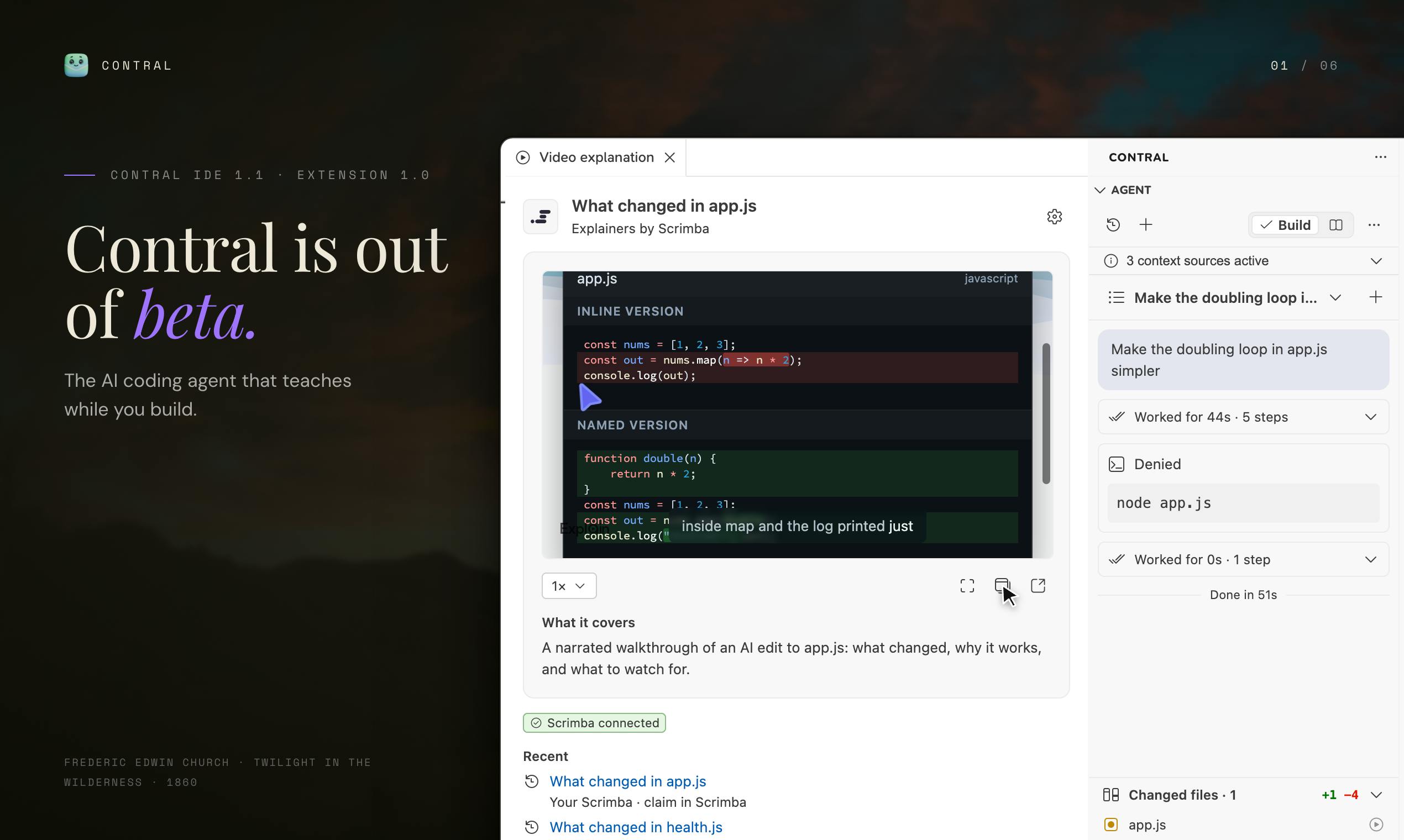
Contral makes "teaching" the other half of its differentiation. Each change comes with a teaching card that explains the reason and logic behind the modification. For people learning to code or just getting familiar with a codebase, this is more informative than simply looking at a diff.
In addition, Contral integrates video explanations provided by Scrimba and launches a Learn mode supporting 5 languages. The Product Hunt page categorizes it under Education and Developer Tools, indicating that the team intends to extend the product into "coding learning" scenarios rather than just being a productivity tool.
Scrimba is an interactive online coding learning platform known for "watch-and-code" video courses, where users can pause and edit code directly in the video player. Contral's integration of Scrimba video explanations means that, beyond teaching cards, it also connects to structured course content, enabling the learning mode not only to explain a single change but also to link it to broader knowledge points.
Defense Mode: for demos and security scenarios
The product also includes a mode called Defense Mode, though the official page does not elaborate on its specific mechanism. Judging from the name and context, it may be used for code review, presentation defenses, or security protection scenarios, but information on this part is limited in the available materials, and its actual capabilities remain to be further verified.
Market position and questions to watch
Contral received 112 votes and 25 comments on Product Hunt, ranking 3rd for the day, under the categories Education, Developer Tools, and Artificial Intelligence. This result shows that the combination of "self-validation + teaching" appeals to some developers.
But several questions remain to be observed. First, the stability and response speed after aggregating multiple CLI agents depend on the performance of each agent itself; second, whether the information density of teaching cards is sufficient, or whether they will become another form of annotation noise; third, the actual use of Defense Mode is still unclear. For those who want to balance efficiency and learning in AI coding, Contral is worth a try, but whether it can carve out a stable share against strong products like Cursor and Claude Code will depend on future iterations.
One-line Summary
Contral exits beta, entering the AI coding tools market with self-validation and teaching cards.
Paragraph Summary
Contral has exited beta on Product Hunt, positioning itself as an AI coding agent that checks its own work and teaches. It lets users call multiple CLI agents such as Claude Code, Codex, and Cursor with their own accounts, acting as an aggregation layer. After each interaction it automatically validates whether the output meets requirements and sends specific correction instructions to smaller models, supporting one-click undo of an entire round of changes. Teaching cards explain each modification, and it integrates Scrimba videos and a Learn mode in 5 languages. The mechanism of Defense Mode is unclear. The product received 112 votes and ranked 3rd for the day, but stability, teaching information density, and the purpose of Defense Mode remain to be observed.
Related articles

A 19-Year-Old's Rental Horror Story: Ceiling Collapse, Bug Infestation, and the Lessons It Taught Me
At 19, my first off-campus rental brought bug infestations, no heat, a collapsed ceiling, and a ruined laptop with no renter's insurance. Here are the hard-won lessons for first-time student renters.

Veda Nurse's Cranial Nerve Exam: Why ASMR Role-Play Is Going Viral
Bilibili creator Veda's cranial nerve exam ASMR video goes viral, blending humor and sensory triggers through nurse role-play. This article analyzes its unique appeal and the audience psychology behind ASMR role-play.

LG Cinebeam AI Review: 120-Inch Giant Screen + 3000 Lumens, a New Choice for the Living Room Theater
LG Cinebeam AI projector review: 3000 ANSI lumens, 4K, 100 inches from about 8 cm and 120 inches from about 18 cm. Built-in webOS, AI Concierge voice recommendations, AI Sound Pro 11.1.2 virtual surround, and Game Optimizer—positioned for fixed living room installation, complementing the portable Cinebeam S.