CoolDock: A Smart Second Dock for Mac with 160+ Widgets

CoolDock adds a second Dock beside the native Mac Dock with 160+ live widgets.
CoolDock is a Mac productivity tool on Product Hunt that adds a customizable second Dock beside the native Dock, hosting 160+ live widgets for weather, calendar, reminders, system status, search, quick actions, and folder access. It coexists with rather than replaces the native Dock, reducing context switching. Initial traction is limited (70 upvotes), and widget list, resource usage, and multi-monitor support still need testing; visual noise control is key.
The Mac Dock has long been the core entry point for productivity, but its information density is limited. Recently, a tool called CoolDock appeared on Product Hunt, attempting to reorganize your desktop workflow with the concept of a "second Dock."
What Is CoolDock
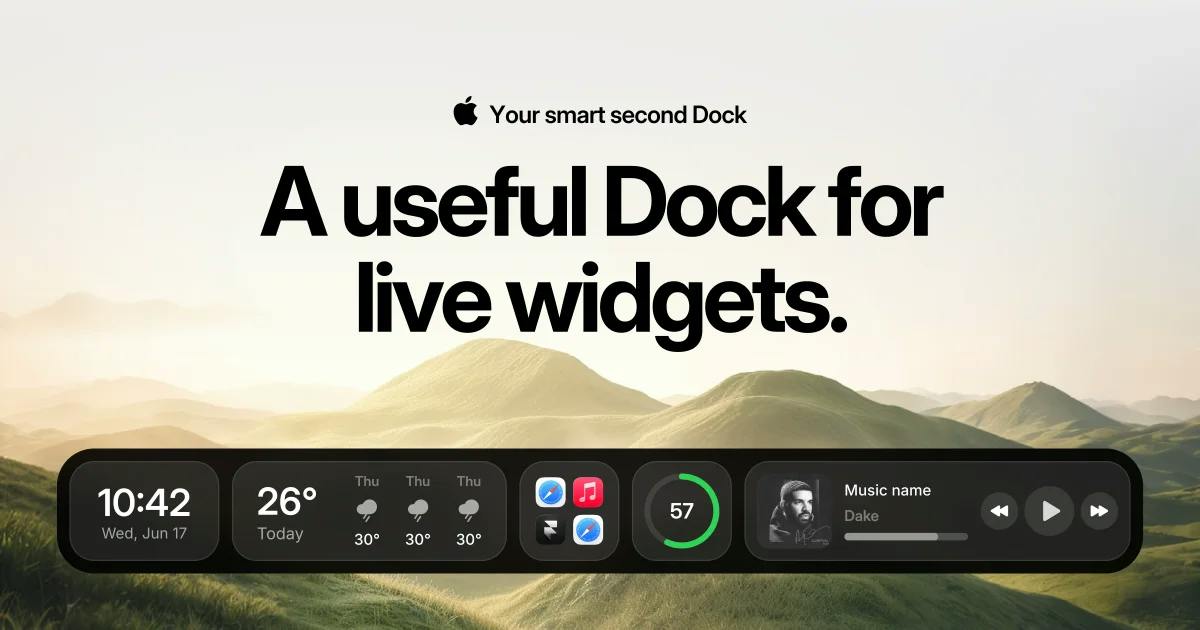
CoolDock's positioning is straightforward: add another Dock alongside your native Mac Dock, but this new Dock isn't just for app icons. It supports over 160 live widgets, bringing weather, calendar, reminders, system status, search, folder shortcuts, and other persistent information together into one customizable bar.
According to its Product Hunt page, the product received 70 upvotes, ranking 16th on the day's leaderboard, and is categorized under Productivity, User Experience, and Analytics. The maker is Asaf Mazuz. For a productivity tool, this initial traction suggests that the niche demand for "Dock enhancement" genuinely exists.
Core Features Breakdown
Live Widgets and Quick Actions
CoolDock's biggest selling point is "live widgets"—not static icons, but widgets that continuously update their content. For example, a weather widget shows the current temperature, a calendar widget surfaces your next event, and a stats widget reflects CPU or memory usage. This design is similar to macOS native Notification Center widgets, but CoolDock places them closer to where actions happen.
Complementing this are quick actions. This means you can trigger certain actions directly from the second Dock without first opening an app and clicking through menus. For high-frequency operations, every click eliminated adds up to meaningful efficiency gains over time.
Search and Information Aggregation
CoolDock also integrates a search entry point, app launching, folder access, and reminders. This is essentially an attempt to merge "launcher + information panel + quick actions" into a single bar. Similar approaches have been validated by tools like Alfred and Raycast, but CoolDock's differentiator is that it occupies the persistent Dock position rather than being a floating overlay summoned by a hotkey.
Positioning differences of launcher-type tools: Alfred and Raycast are "summon-style" launchers that rely on a global hotkey to bring up an overlay which disappears after use, with core strengths in keyboard-driven workflows and extension ecosystems; CoolDock, by contrast, takes the persistent Dock form as an "always-visible" information panel. The two do not conflict in interaction paradigm: summon-style suits command-type operations (opening apps, running scripts), while always-visible suits status-type information (weather, schedule, system load). Understanding this distinction helps clarify that CoolDock complements rather than replaces existing launchers.
Coexistence with the Native Dock
The product description emphasizes "beside your original Mac Dock," indicating it does not intend to replace the native Dock but to exist as a supplement. This design lowers the migration cost for users—you don't need to change existing muscle memory, you just gain an additional customizable information bar. For users who don't want to relearn a launcher logic, this entry point is relatively friendly.
macOS widget mechanism: Since Big Sur, macOS has introduced widgets in Notification Center, and Sonoma further supports placing widgets directly on the desktop. System widgets are built on the WidgetKit framework, with host apps refreshing content on demand via the Timeline mechanism rather than continuous polling; therefore, "real-time" at the system level usually means updates at preset intervals or event triggers, with frequency limited by system energy-saving policies. Third-party tools that want higher-frequency real-time data (such as CPU usage) often need to build their own refresh channels or persistent processes, which directly affects resource usage—a technical background worth noting when evaluating products like CoolDock.
What Problem Does This Product Solve
The core constraint of the native Mac Dock is "icon-first": it excels at showing running apps and frequently used launch items but is poor at carrying dynamic information. To glance at the weather or schedule, users typically have to open Notification Center or click into the Calendar app. CoolDock pulls this lightweight information to the edge of your vision, reducing context switching.
Another implicit need is desktop space utilization. Many Mac users have large empty areas on the sides or bottom of their screens, and a second Dock effectively turns this space into a configurable information panel.
Things to Note
Public information is currently limited. The specific list of 160+ widgets, the degree of customization, system resource usage, and multi-monitor support all require hands-on experience to judge. A common problem with Dock-type tools is that adding a persistent bar can actually increase visual noise if widgets are poorly configured. Whether CoolDock can strike a balance between "information richness" and "interface restraint" is key to whether it retains users.
Additionally, a sample of 5 comments on Product Hunt is still too small for community feedback to form a judgment on stability and long-term maintenance. For users planning to incorporate it into their daily workflow, it's advisable to observe its update cadence for a while first.
Visual noise and information density: In human-computer interaction research, persistent interface elements continuously compete for attention even when not actively viewed. If the second Dock displays too many dynamic widgets simultaneously, it may cause "information overload" and actually increase cognitive burden. Common mitigation approaches include: grouping by scenario, conditional display (e.g., appearing only when a specific app is running), reducing refresh frequency, and using low-contrast color schemes. When evaluating such tools, beyond feature count, pay more attention to whether they provide sufficient show/hide and noise-reduction controls.
Who It's For
CoolDock's target users are fairly clear: people who work on a Mac for long hours every day, want to reduce app switching, and are willing to spend time configuring their own workflow. If you already use Raycast or Alfred for launch management, CoolDock's value lies more in "persistent information display" than "quick launching." If you prioritize a clean desktop and dislike extra bars taking up screen space, it may not be for you.
One-line Summary
CoolDock adds a second Dock alongside the native Mac Dock that carries 160+ live widgets.
Paragraph Summary
CoolDock is a Mac productivity tool launched on Product Hunt whose core idea is to add a customizable second Dock beside the native Dock, hosting over 160 live widgets covering weather, calendar, reminders, system status, search, quick actions, and folder access. It chooses to coexist with rather than replace the native Dock, lowering migration costs, and mainly addresses the native Dock's bias toward icon launching and poor support for displaying dynamic information, reducing the context switching of opening Notification Center or apps to check information. The article notes that initial traction is limited (70 upvotes, 16th on the day), and that the widget list, resource usage, and multi-monitor support still need real-world testing, with visual noise control being key to whether it retains users.
Related articles

Run Claude Code for Free: DeepSeek V3 & Gemini API Integration Guide
Learn to use a one-click Windows installer to switch Claude Code's backend to DeepSeek V3, Gemini, or free OpenRouter APIs—zero-cost terminal AI coding, with full setup and limitations.

JetBrains Launches ThinkRail: A New Tool for Developer Productivity
JetBrains' new project ThinkRail surfaces on Hacker News, drawing developer community attention. Here's what we know, how the community reacted, and what it could mean for developer workflows.
Getting Started with Gemini 4 Argonne: A Hands-On Guide from Building Sites to Agents
Complete Gemini 4 Argonne tutorial: build a calorie tracker app with one prompt in Google AI Studio, review 10-page technical documents with long context, develop a browser game as a coding Agent in Anti-Gravity, plus API Key setup, pricing, and subscription requirements.