Copilot Studio Deep Dive: GitHub Copilot Harness, MCP, Skills, and More

Copilot Studio's new GitHub Copilot Harness brings agentic loop reasoning, parallel tool calls, and smarter error recovery to enterprise agents.
This article breaks down the latest evolution of Microsoft Copilot Studio. The centerpiece is the new GitHub Copilot Harness (unrelated to GitHub licensing), which replaces linear execution with an agentic loop supporting parallel tool calls, intelligent clarifying questions, and automatic error recovery. The article also covers component design decisions — instructions for universal rules, knowledge for facts, tools for system reads/writes, skills for domain-specific processes, and workflows for deterministic execution — alongside MCP's standardized integration layer, Sandbox for precise computation, and Memory for user personalization.
Microsoft Copilot Studio is no longer just a tool for building agents — it has evolved into a full-fledged agent platform. In a recent Captain's Training session, the presenter systematically broke down Copilot Studio's positioning, the brand-new GitHub Copilot Harness, MCP servers, Skills, Memory, and Sandbox capabilities. This article distills the most valuable technical insights and explains what they mean in practice.
Copilot Studio's Place in Microsoft's AI Toolbox
Microsoft now offers a large number of AI tools with overlapping capabilities, which can make choosing the right one difficult. The presenter's core principle is refreshingly direct: always start with the simplest tool that gets the job done. Just like you don't need a Boeing 737 to cross town — a small floatplane will do.
The tools fall into two broad categories: productivity tools you use directly (Microsoft 365 Copilot, Copilot Co-Work, Microsoft Scout), and tools for building agents (Agent Builder, Copilot Studio, and Foundry). Copilot Studio's sweet spot is when Agent Builder is no longer enough.
Its capability boundaries are also expanding — it now supports not only conversational agents but also workflows for deterministic processes, and even a newly launched app-building capability. You can mix and match based on your scenario: use an agent for a conversational interface, a workflow for predictable processes, and an app for viewing and manipulating data. It supports multi-channel deployment — embedded in Microsoft 365 Copilot, published to a public website, or deployed to an internal portal — with built-in enterprise governance and security.
What Is a Harness: The Agent's Runtime Core
Harness is the key concept in this session. It's not a leash — it refers to the runtime layer that sits between the model (the underlying brain) and the components you build for the agent (instructions, knowledge, tools, skills, workflows).
The Harness is responsible for several core things:
- Context management: deciding which instructions and tools the model should see
- Selection: determining which tool or skill to invoke for the current task
- Execution: deciding what work actually gets done
- Recovery: fallback strategies when a result can't be found
- Termination: knowing when a task is complete and what to do next
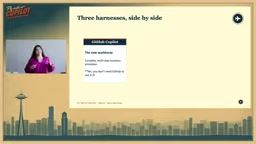
Copilot Studio currently has three Harnesses:
- Standard Harness — the original, based on topics (predefined paths), a rules-based and structured conversation model. Every agent you've built in the past ran on this.
- Copilot Chat Harness — for agents that extend Microsoft 365 Copilot's own capabilities.
- GitHub Copilot Harness (new) — the new go-to for complex, multi-step workflows. One important clarification: despite the name, it has absolutely nothing to do with a GitHub license.
What the GitHub Copilot Harness Fundamentally Changes
Switching from Standard to the GitHub Copilot Harness is a structural change:
- Smarter clarifying questions: The standard mode requires hardcoded, rigid prompts for every input type, executed in a fixed order. The new mode uses reasoning to ask fewer, smarter questions and automatically fills in missing information.
- Handling detours: In standard mode, an unplanned "side task" can derail the entire flow. For example, if an employee onboarding agent is asked "what should I have for lunch," the old mode would get stuck. The new mode can handle it and then get back on track.
- Parallel tool calls: The old mode used one tool at a time. The new mode can chain and run multiple independent tools in parallel (e.g., querying a SharePoint list and an internal database simultaneously), improving performance.
- Dynamic tool selection: The old mode heavily relied on precise tool descriptions. The new mode, given well-written instructions, can dynamically determine which tool to call.
- Error recovery: When encountering insufficient permissions or a 404, the old mode would typically error out. The new mode retries, tries alternative paths, and attempts to recover.
Agentic Loop: The Underlying Mechanism
The key difference lies in the execution model. The Standard Harness follows a linear flow: recognize intent → make a plan → execute → respond. The GitHub Copilot Harness uses an agentic loop: make a plan → act → observe (is the result satisfactory? are there errors?) → if unsatisfied, re-plan.
When it hits a 404, it asks itself: what tools do I still have available? Why did the 404 happen? Do I need more information from the user? It then generates a new plan and keeps looping until it gets a satisfactory result — or determines it can't proceed and escalates.
The agentic loop is the core paradigm behind today's mainstream "reasoning agent" architectures, often referred to in academic and engineering contexts as the ReAct (Reasoning + Acting) framework. The basic idea is that rather than generating a final answer in one shot, the model alternates between "Thought → Action → Observation" cycles. After each action, the result is fed back into the model as new input to drive the next reasoning step. This enables agents to handle scenarios where initial information is incomplete, intermediate steps may fail, or task goals need to be dynamically adjusted. In contrast, the Standard Harness's linear flow resembles a traditional "chain" approach — well-suited for tasks with fixed, enumerable steps. The agentic loop is closer to "autonomous decision-making," but at the cost of an unpredictable execution path. This makes it essential to design robust error recovery and termination conditions to avoid infinite loops or unintended side effects.
Hands-On Demo: IT Device Replacement Scenario
The presenter used the same scenario to compare both Harnesses — handling IT requests and device replacements.

With the Standard Harness, instructions had to be written in exhaustive detail — step-by-step troubleshooting guidance, a separate "device assistant workflow" for device replacements, and manually invoked topics (predefined paths, such as filtering devices with status "Available"). When a user asked "I dropped my laptop and cracked the screen — what do I do and what can I replace it with?" the agent immediately recognized the intent and returned a device list. The response was fast, but it only handled "replace device" and missed the "should I troubleshoot first?" layer.
Switching to the GitHub Copilot Harness, the interface is noticeably cleaner — no topics, no child flows. Instead, you have skills, tools, and knowledge. Given the same prompt, it automatically identified the dual intent of "troubleshoot first, then recommend a device" — without that logic being hardcoded in the instructions. It then:
- Called two specialist skills: a troubleshooting skill and an asset device management skill
- Searched the knowledge base for handling procedures
- Requested permission to pull the approved device list
- Returned a more complete response — first reporting the damage and opening a ticket, then providing replacement options
Even more notable is the reasoning capability: when a user vaguely said "I'm a developer, I run local AI models and do a lot of video work," the agent inferred on its own that this required high memory, large storage, and a powerful CPU, and populated the request accordingly. It then called a tool to write data to a SharePoint list and automatically sent a request email via a workflow. The entire reasoning chain is visible in debug mode; end users see a clean interaction interface.
Where Each Component Belongs: Instructions, Knowledge, Tools, Skills, Workflows
When building an agent, you can use a set of questions to decide where each type of behavior belongs:
- True for every conversation? → Put it in Instructions. With the new Harness, instructions should be narrower and more focused.
- Facts that need to be looked up? → Use Knowledge, sourced from uploaded files, SharePoint sites, or public websites.
- Need to reach a system and change data? → Use Tools for read/write operations.
- A process specific to a particular context? → Use Skills.
- Must run exactly the same way every time? → Use a Workflow for predictability.
Workflows and agents can call each other: a workflow can trigger an agent, an agent can invoke a workflow, and a workflow can orchestrate Copilot Co-Work tasks and Microsoft 365 Copilot agents — enabling system-level orchestration.
MCP Servers: The Agent's Integration Layer
MCP (Model Context Protocol) provides external integrations for agents. MCP servers are essentially tool sets added to an agent, available from three sources:
- Built-in: Microsoft services like Dataverse and SharePoint
- Partner: Microsoft-certified third parties such as Adobe and DocuSign
- Custom: You can connect your own MCP servers
The value of MCP lies in three areas: it enables agents to auto-discover tools (an inventory API's MCP server includes actions like querying and updating inventory, and the agent can intelligently determine which to call); it's highly portable (the same MCP server can be reused across Copilot Studio, Co-Work, Claude, and other tools); and it comes with orchestration logic, rather than being a simple API wrapper.
MCP (Model Context Protocol) is an open standard proposed by Anthropic in late 2024, designed to solve the fragmentation problem in integrating AI models with external data sources and tools. Before MCP, every AI platform had to build custom adapters for each external service, creating enormous duplication of effort. MCP is essentially a "USB standard" for the AI tool world — once a service provider implements an MCP server, any MCP-compatible AI client (including Claude, Copilot Studio, Cursor, etc.) can call it directly without re-developing integrations. The protocol has three layers: Resources (letting the model read contextual data), Tools (letting the model perform actions), and Prompts (reusable prompt templates). Microsoft's adoption of MCP in Copilot Studio means enterprise-built MCP servers can be reused across multiple AI platforms simultaneously, dramatically reducing integration costs — and it's a significant signal of the AI tool ecosystem gradually standardizing on interoperability.
Skills, Memory, and Sandbox: Three Pieces of the Precision Puzzle
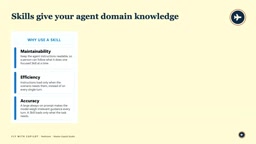
Skills provide domain knowledge to the agent. Their key value is efficiency — every conversation loads instructions into the context window, and the longer the instructions, the higher the cost and the less space is left for responses. Skills are only loaded when the orchestrator determines they're needed, reducing cost and improving accuracy. A skill is a skill.markdown file containing a title, a description (which determines when it gets invoked), and instructions. It can optionally include resource files and Python scripts packaged as a zip.
Four mistakes to avoid with skills:
- Vague descriptions — if a skill isn't triggering, the description is almost always the culprit
- Monolithic skills — an agent can hold roughly 50 skills; keep them narrow and focused
- Stuffing in facts — skills are guides, not knowledge sources; FAQs belong in Knowledge
- Unreviewed skills — treat externally sourced skills the way you'd treat sample code: review before use
Memory (currently in preview) is enabled via a toggle and can capture personalized information per agent and per user — such as a user's location or hybrid work schedule — providing context for scenarios like scheduling meetings. It's isolated and controlled; you cannot see another user's memories.
Sandbox gives agents precision. LLMs are fundamentally prediction engines — they're not great at heavy computation, file generation, or data parsing, but they're excellent at running Python/Bash. The Sandbox lets agents safely execute scripts, generate charts, and perform numerical calculations, producing accurate results rather than having the model "guess."
In the inventory analysis demo, an agent with only simple instructions and no skills or tools — given a CSV with hundreds of rows — used the out-of-the-box data analysis skill and Sandbox to automatically clean the data, flag date formatting issues, and generate a pivot dashboard with multiple worksheets: a summary, per-store breakdowns, a Top 50 aging SKU list, bucketing, and data quality reports.
The context window is the maximum amount of text a large language model can process in a single inference pass, measured in tokens. Everything sent to the model — system instructions, conversation history, retrieved knowledge, tool definitions — consumes this finite space. When the window is full, the model either truncates earlier content or refuses to process, directly impacting response quality and task completion. The number of input tokens also directly determines API call costs: the longer the instructions, the higher the cost per conversation. This is the core motivation behind the "load skills on demand" design — splitting large volumes of domain instructions into separate skill files that the orchestrator injects dynamically when needed, rather than loading everything into the context at the start of every conversation. This both reduces per-call token consumption and leaves more space for the model to handle the actual content of the current task.
Pre-Deployment Checklist
The presenter concluded with a checklist to run through before deploying a Copilot agent:
- Grounding: garbage in, garbage out — don't feed it chaotic files like "Final Version B2"
- Permissions: the agent can only answer questions about content it has permission to access
- Evaluation and testing: "works on my machine" doesn't count — do proper unit testing
- Owners and spending limits: set spend alerts and caps
Debugging order when things go wrong: tighten instructions first → fix naming and descriptions for tools and skills (poor naming causes them not to trigger) → remove overlapping items → split the agent appropriately, rather than piling everything into a single monolith.
For newcomers, the presenter recommended the official free Agent Academy, which offers a hands-on IT helpdesk starter course and a newly launched advanced course on multi-agent employee onboarding.
Related articles

Random Pruning of the DPO Computation Graph: 1.4x Training Speedup and Lower Peak Memory
DPO training too slow and memory-hungry? This paper proposes a random pruning framework for the DPO computation graph, sampling independently across position, sequence, and branch dimensions; branch pruning achieves a 1.426x step-time speedup and cuts training time by about 30%, with in-depth attribution of memory and time gains.

Why Does JEPA Underperform MLM in Longitudinal EHR Representation Learning?
New study compares JEPA and MLM for longitudinal EHR representation learning on MIMIC-IV: three JEPA variants train stably without collapse but underperform MLM; target size, not heterogeneity, drives prediction error.

Transfer Learning + Visible Light Communication: A New Approach to Energy-Efficient Indoor Positioning
A study proposes a transfer learning-based visible light communication indoor positioning method, achieving 47% accuracy improvement on the BOSCH factory dataset, 67.5% model efficiency under high noise, and introducing the ME composite metric for energy-efficient positioning in energy-constrained industrial IoT scenarios.