Copy Haste: Your Clipboard, Now Auto-Organized by Type

Copy Haste reimagines Mac clipboard management with six categories and local processing
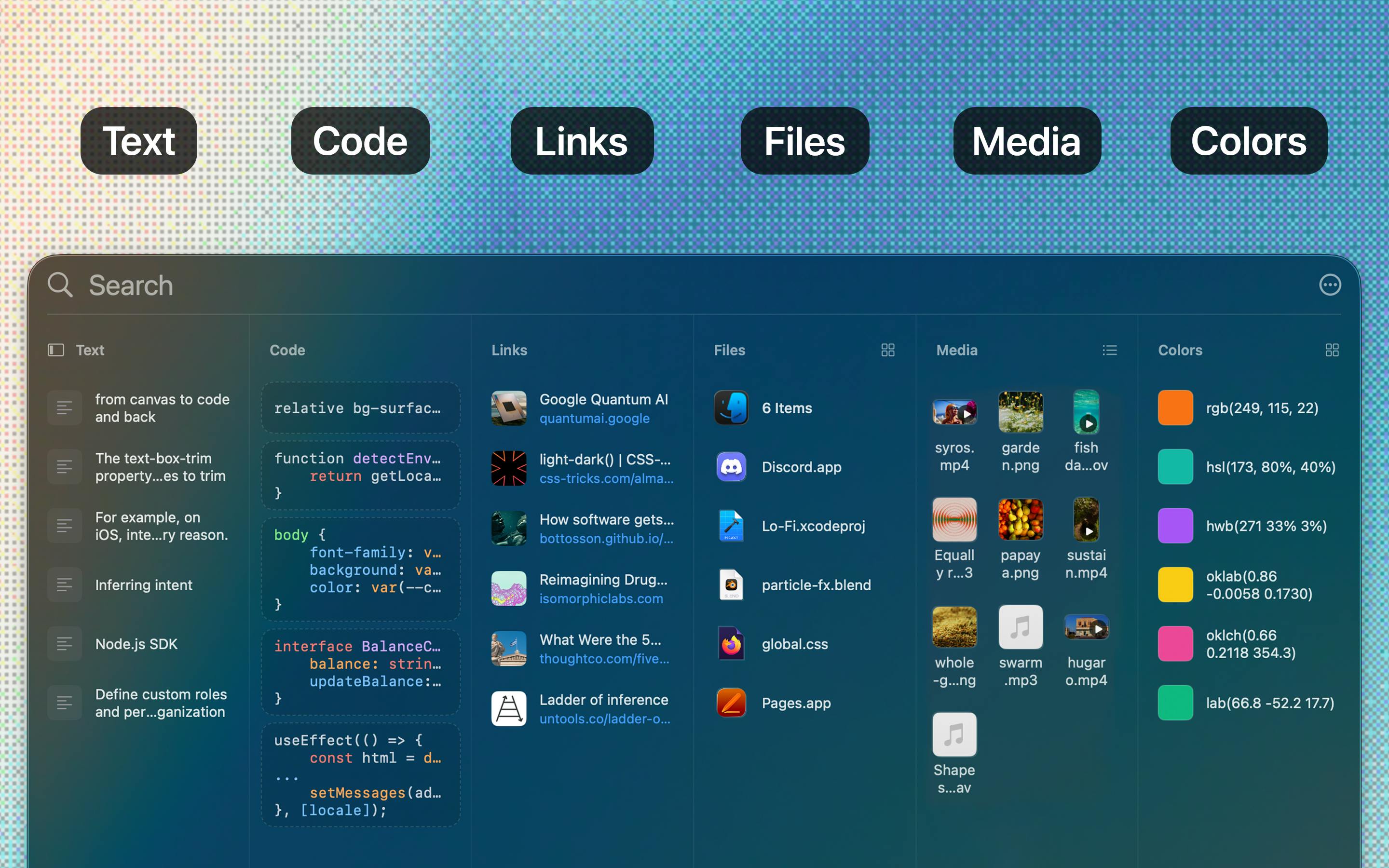
Copy Haste is a clipboard manager for macOS 26 that replaces the traditional single long list with categorized storage. It sorts copied content into six columns—Text, Code, Links, Files, Media, and Colors—each with differentiated processing: code gets on-device language detection and syntax highlighting, links have tracking parameters stripped, colors support 20+ formats, and files and media are kept separate. Privacy is the core selling point—history stays entirely local with no account and no password logging, while pinned items and settings can sync across Macs. It received 68 upvotes on Product Hunt at launch, but key details like history capacity, search, and shortcuts remain undisclosed.
From "Grab Bag" to "Categorized Storage": A New Approach to Clipboard Management
Most clipboard managers are essentially an endlessly growing running log—everything you've ever copied is crammed into a single list, and after a while, trying to find a link you copied half an hour ago means scrolling down line by line with your own eyes. Copy Haste, which just debuted on Product Hunt, tries a different approach: rather than making you "search" through history, it first sorts content by type, turning lookup from "digging" into "going straight there."
According to its Product Hunt page, Copy Haste stores everything users copy into six separate columns: Text, Code, Links, Files, Media, and Colors, with each type in its own column. This means when you're looking for a snippet of code, you don't have to dig it out of a pile of URLs and images—just open the Code column. The product received 68 upvotes at launch, ranking 13th on the day, and is categorized under Mac, Productivity, and Developer Tools.
Behind the Six Columns: Different "Value-Add Processing" for Different Content
Copy Haste's selling point isn't just "categorization" but differentiated handling for each type of content—something that isn't common among similar tools.
Code: On-Device Language Detection + Syntax Highlighting
Code that's copied in is automatically language-detected and syntax-highlighted. One detail: the company emphasizes that language detection is done on-device, not relying on the cloud. For developers who frequently copy code snippets, highlighted code blocks in history are far more readable than plain text.
Syntax highlighting depends on accurately identifying the code's programming language—the highlighter needs to know whether to color using Python's or JavaScript's keyword tables, comment symbols, and string rules. There are two common approaches to language detection: one is based on file extensions or manual user specification, and the other—when there's no extension information (which is exactly the clipboard scenario)—is inferring from content features, such as keyword density, bracket and indentation patterns, and language-specific syntax symbols via heuristic rules. Mainstream highlighting engines like highlight.js and Prism support hundreds of languages but usually require the caller to provide a language identifier first. "Detection done on-device" means this inference runs locally, which both avoids uploading code snippets that may contain trade secrets to the cloud and makes highlighting take effect instantly while offline.
Links: Automatically Stripping Tracking Parameters
When copying links, URLs often carry a large number of marketing tracking parameters. Copy Haste automatically removes these trackers, leaving a clean link. This detail is small, but it hits a real pain point when sharing links day to day.
Tracking parameters in URLs (such as utm_source, utm_medium, fbclid, gclid, etc.) are identifier fields automatically appended by marketing analytics tools as links spread, used to track click sources, channels, and ad performance. They're useless to the recipient but make links lengthy, and sometimes they leak the sharer's source information or are used for cross-site behavior tracking. There are mature technical approaches to stripping these parameters: the browser extension ClearURLs maintains a community-maintained ruleset that matches by domain and removes known tracking fields; some privacy tools use generic heuristic rules, such as deleting parameters starting with utm_. Copy Haste does this at the clipboard level, meaning links users paste out are clean by nature—no need for third-party extensions or manual editing.
Colors: Recognizing 20+ Color Formats
Design-related content is placed in a separate Colors column, recognizing more than 20 color formats. For designers and front-end developers, color values copied from design files, web pages, or chat logs often come in a mix of different formats, and unified recognition makes reuse much smoother.
The diversity of color formats is a common friction point in design–front-end collaboration. The same color may appear as HEX (#FF5733), RGB (rgb(255, 87, 51)), HSL (hsl(12, 100%, 60%)), RGBA/HSLA with transparency, CSS named colors (tomato), and so on. Design tools like Figma and Sketch often export hexadecimal-prefixed forms such as 0xFF5733, while iOS and Android each have their own representations like UIColor and ARGB. "Recognizing 20+ formats" means the tool can parse these variants and present them uniformly—or even convert between them (e.g., generating RGB values from HEX). For people who shuttle color values between design files, web source code, and chat logs, avoiding manual conversion and format correction is a genuine efficiency gain.
Files and Media Stored Separately
Files and media content are split into two separate columns, preventing images, audio/video, and documents from getting mixed together.
Privacy Is This Tool's Strongest Card
For a tool like a clipboard that "naturally comes into contact with sensitive information," privacy design deserves separate mention. Copy Haste's official description makes several clear promises: clipboard history never leaves your Mac, no account creation is required, and passwords are never recorded. Combined with the earlier point that code language detection is done locally, it's clear this tool takes a fully local approach overall.
This contrasts with many clipboard tools that rely on cloud sync. For users handling client code, internal documents, or account information, "data never leaves the device" is often the primary condition for adoption.
The reason clipboards are a hotspot for sensitive data is that they passively carry almost all of a user's copying behavior: temporary passwords, two-factor verification codes, private keys, API tokens, and fragments of client contracts can all appear in history. macOS's built-in clipboard management is extremely limited, which has spawned a large number of third-party tools—and many of them tout cloud sync, meaning this content gets uploaded to vendor servers. A fully local approach narrows the attack surface to the device itself, but it also means giving up conveniences like seamless cross-device sync and history migration when switching machines. At the system level, macOS provides the NSPasteboard interface, through which apps can read clipboard changes and set "confidential" markers to prevent certain recording behaviors—this forms the technical foundation for local clipboard tools.
Cross-Mac Sync and Pinning: Standard Features and Trade-offs of Productivity Tools
Copy Haste supports pinning frequently used items and syncing pinned content and settings to multiple Macs. There's an interesting design trade-off here: history itself never leaves the device, but pinned items and settings can sync across devices—essentially, only content the user actively chooses to "keep long-term" enters the sync scope, balancing convenience and privacy.
The product currently targets macOS 26 and is built by developer Marcel Pirosca. Judging by its positioning, it targets both general productivity users and developers: the former value clear categorization and link cleaning, while the latter value code highlighting and local processing.
A Bit of Sober Judgment
Categorized clipboard management isn't a brand-new concept, and Copy Haste's differentiation lies mainly in two points: first, it makes "column-by-type" a core interaction rather than a secondary filter; second, it does substantive processing for each content type (de-tracking, color recognition, highlighting). However, currently available public information doesn't disclose key details of clipboard tools such as history capacity limits, search capabilities, or the keyboard shortcut system—and these are exactly the parts that determine daily usage experience. The data of 68 upvotes and 2 comments in the early launch period also indicates it's still in an early exposure stage, and real reputation awaits verification from more users.
For Mac users fed up with "one long list," especially developers and designers who constantly switch between code, links, and color values every day, Copy Haste's approach is worth adding to your watchlist—but it's advisable to first confirm whether it's smooth enough for the few operations you use most before deciding whether to migrate.
One-line Summary
Copy Haste reimagines Mac clipboard management with six categories and local processing
Paragraph Summary
Copy Haste is a clipboard manager for macOS 26 that seeks to replace the traditional single long list with "categorized storage." It sorts copied content into six columns—Text, Code, Links, Files, Media, and Colors—and applies differentiated processing to each: code gets on-device language detection and syntax highlighting, links automatically have marketing tracking parameters stripped, colors support recognition of 20+ formats, and files and media are stored separately. Privacy is its core selling point—history stays entirely on the local Mac, no account is required, and passwords aren't recorded; pinned items and settings can sync across multiple Macs. At launch, the product received 68 upvotes on Product Hunt, ranking 13th on the day, but key details such as history capacity, search, and keyboard shortcuts haven't been disclosed, and real-world experience remains to be verified.
Related articles

The Gemini 4 Trio and 3.8 Flash: A Full Comparison of Positioning, Pricing, and Benchmarks
A comparison of Gemini 4 Neon, Carbon, Argon, and Gemini 3.8 Flash: positioning, context, API pricing, Artificial Analysis and Arena benchmark scores, and available entry points.
AI Coding Model Leaderboard: Opus 5.5 Crowned, Gemini Neon Stages a Comeback
Tech blogger Matthew Berman releases an AI coding model tier list: Claude Opus 5.5 holds S-tier, Gemini Neon surprises with A-tier, OpenAI Astra lands B-tier. How do open-source models like DeepSeek fare? We break down the scoring logic and practical takeaways.

New Jersey Joe Sandwich: Meat and Coleslaw on Triple-Decker Rye
New Jersey Sloppy Joe isn't a ground beef burger—it's triple-decker rye bread with meat, Swiss cheese, and coleslaw, plus Russian dressing. Learn the authentic Essex County method and family recipe.