Coze 3.0: From Beginner to Multi-Agent Collaboration — A Practical Guide
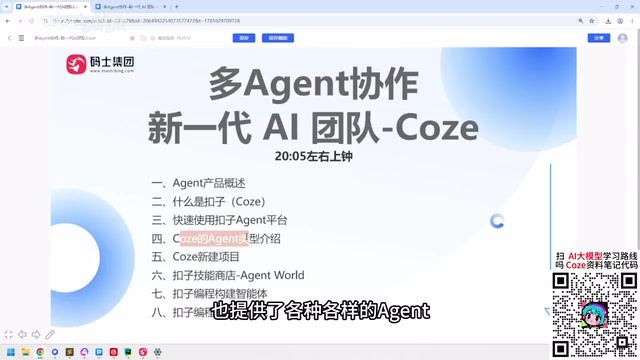
Coze 3.0 is upgrading from a chatbot tool into a comprehensive platform covering agents, workflows, and multi-agent projects.
The article outlines the three-layer classification of AI Agent products: developer-facing agent building platforms (Coze Studio, Dify, n8n), ready-to-use agent software (Claude Code, Codex, Cursor, Windsurf), and agent development frameworks (LangChain, LangGraph, Spring AI). ByteDance's Coze is built around Agent and Project, with multi-agent collaboration serving project management and supporting parallel multi-project advancement.
Title
Coze 3.0: From Beginner to Multi-Agent Collaboration — A Practical Guide
Meta Description
A tutorial on the new Coze 3.0: starting from the classification of AI Agent products, it explains the differences between building platforms like Coze Studio and Dify, and agent software like Claude Code, and breaks down Coze's core gameplay around multi-agent collaboration, the skill store, and project management — suitable for complete beginners.
Article Content
ByteDance's Coze platform, after multiple iterations, is evolving from a simple chatbot-building tool into a comprehensive agent platform covering intelligent agents, workflows, and automation projects. A Bilibili creator noted in a recent tutorial that the new Coze is increasingly approaching products like OpenCloud and Hermes in capability — it can do a lot, but it also consumes a fair number of credits. Subscription models are practically standard in the AI era.
AI Agent Product Categories: First, Figure Out Which Layer You're Playing In
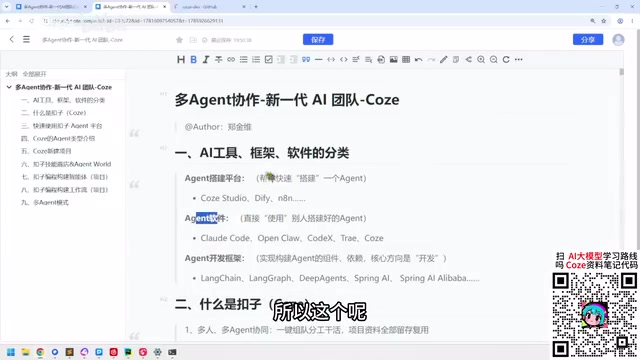
Before diving deep into Coze, it's worth clarifying the current product layering in the AI Agent space. The creator divides common tools on the market into three categories. Though there's no official standard, this helps people from different backgrounds find their footing.
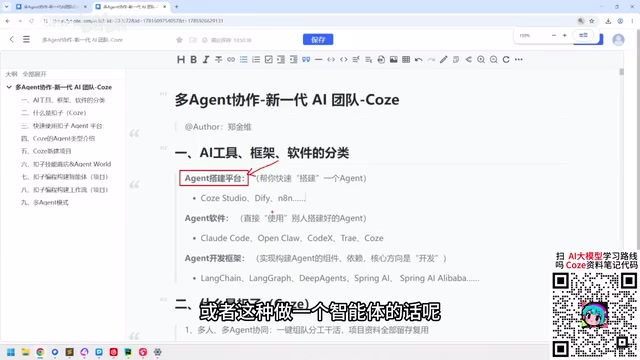
Agent Building Platforms: A Lightweight Testing Ground for Developers
The first category is agent-building platforms aimed at developers, with typical representatives including Coze Studio, Dify, and n8n. According to the Bilibili creator's analysis, if you're encountering intelligent agents for the first time at your company, you'll most likely start with a knowledge base — low cost, quick to pick up, and no need for a deep understanding of the AI technology ecosystem.
Coze Studio and Coze share the same origins — both are ByteDance products — but the former leans more toward developers. It's open-sourced on GitHub, and after downloading and installing it, you can build agents through drag-and-drop and simple operations. Dify and n8n fall into the same category. These tools suit developers for light experimentation; non-developers don't need to go deep.
A knowledge base is currently the most common starting point for enterprises implementing agents. Its principle is to slice, vectorize, and store unstructured materials such as internal documents, FAQs, and product manuals into a vector database. When a user asks a question, it first retrieves the most relevant fragments, then hands them to a large model to generate an answer — this is what's commonly called RAG (Retrieval-Augmented Generation). Compared to retraining a model, the knowledge base approach requires no labeled data and no GPU compute — you just upload documents and configure retrieval strategies, so it's low-cost and fast to show results. For most companies, the first stop for agent implementation tends to be knowledge base scenarios like customer service Q&A and internal policy lookups. Once those are working, they gradually connect tool calling, multi-step workflows, and other more complex orchestration capabilities.
Agent Software: Ready-to-Use Productivity Tools
The second category is agent software, including Claude Code, Codex, Cursor, Windsurf, and others. These tools are characterized by being "ready to use" — you tell them your requirements, and they complete specific coding or analysis work for you, with no need to understand how their internal agent architecture parses intent.
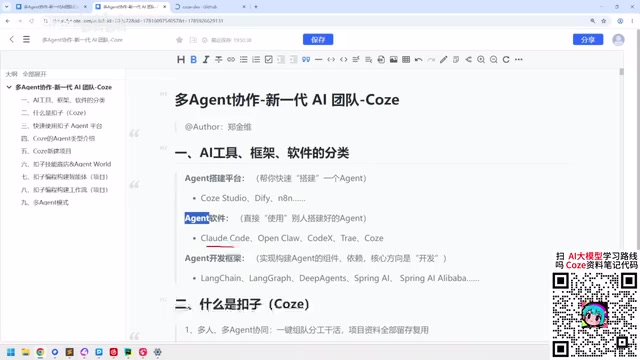
The creator demonstrated a scenario using Claude Code to analyze knowledge base building requirements: input the requirement, wait for feedback, communicate back and forth, and have the tool execute the coding. The entire process is accessible to both developers and non-developers — once tokens are set up, it's ready to work.
The Token mentioned here refers to the basic unit of measurement for how large models process text, roughly understood as word fragments: in Chinese, one character typically corresponds to one to two tokens. When calling tools like Claude Code and Cursor, the model bills based on the total tokens of input and output, so "setting up tokens" means both filling in the API key to complete authentication and acknowledging that costs will fluctuate with usage. The context window is also measured in tokens, and it determines how much code or documentation the model can "see" at once — which is why analyzing long files often requires chunking. Understanding tokens helps estimate usage costs and judge which tasks are suitable for agent software.
Agent Development Frameworks: The Domain of Pure Developers
The third category is agent development frameworks, aimed at IT developers. In the Python ecosystem, LangChain, LangGraph, and Deep Agency belong here, as do Spring AI and others in the Java ecosystem. Non-developers need not pay attention. However, the creator also mentioned that quite a few product managers are learning these frameworks. The overall learning cost is relatively low, which has led a large number of developers to flood into this track.
Multi-agent collaboration refers to having multiple agents, each with their own role, work together to complete a task. Common patterns include: a main control agent responsible for breaking down goals, then dispatching subtasks to specialized agents for retrieval, coding, review, and so on, and finally aggregating the results. Compared to a single agent, this architecture can modularize complex processes, making it easier to debug and replace components individually — but it also brings issues like context passing, state synchronization, and compounding costs. Frameworks like LangGraph provide graph-structured orchestration capabilities precisely for this. Coze's core idea of "multiple agents serving projects" is aligned with this: treat different projects as independent collaboration units, with multiple agents dividing work within a project and projects advancing in parallel.
Why Coze Is Worth Paying Attention To
Coze's core value lies in lowering the barrier to multi-agent collaboration. The platform is built around two major directions — "Agent" and "Project" — and the purpose of multi-agent collaboration is precisely to serve projects. You can create multiple projects to advance in parallel, similar to how a company runs Product A, Product B, and Product C simultaneously.
The new Coze has also seen notable changes in its skill store. The creator observed that Coze relies more on officially provided skills (such as the early Agent World) rather than depending entirely on community contributions. This strategy makes the platform's capabilities more controllable, but it also means developers need to keep up with the pace of official updates.
In terms of coding capability, Coze is also benchmarking against tools like Claude Code. Using it to build agents, workflows, and even write projects is becoming possible. The creator believes that what could originally be done with Claude Code, Coze can do too.
Getting Started Quickly
For users who want to try the new Coze, the creator suggests first distinguishing between free and paid agent types, then choosing an entry point based on your own needs. A large number of tutorials online are still based on the old version, and the new version's operations have changed, so you need to get familiar with them again.
Overall, Coze 3.0's positioning is becoming increasingly clear: it's a comprehensive platform covering agent building, workflow orchestration, and multi-agent project collaboration — serving both developers and opening its doors to non-developers. The trade-off is credit consumption and subscription fees — an almost unavoidable cost in the AI era.
For developers, Coze offers a low-learning-cost agent experimentation ground; for non-developers, it's an entry point for understanding the logic of agent collaboration. Whatever your role, figuring out the product categories and clarifying your own positioning matters more than blindly chasing tools.
One-line Summary
Coze 3.0 is upgrading from a chatbot tool into a comprehensive platform covering agents, workflows, and multi-agent projects.
Paragraph Summary
The article outlines the current three-layer classification of AI Agent products: developer-facing agent building platforms (Coze Studio, Dify, n8n), ready-to-use agent software (Claude Code, Codex, Cursor, Windsurf), and agent development frameworks for pure developers (LangChain, LangGraph, Spring AI). Against this backdrop, ByteDance's Coze, after multiple iterations, is built around the two major directions of Agent and Project, with multi-agent collaboration mainly serving project-based management and supporting parallel advancement of multiple projects. The new Coze's capabilities increasingly approach OpenCloud and Hermes, its skill store is primarily officially supplied, and its coding capability is benchmarked against Claude Code. For those who want to get started, first distinguishing between free and paid agent types and then clarifying your own positioning matters more than blindly chasing tools.
Related articles

Black Forager Alexis Nelson: From Foraging to Publishing, Happy Snacking, Don't Die
Black Forager Alexis Nikole Nelson visits Talks at Google, sharing her journey from childhood plant walks with her mother to publishing the cookbook Happy Snacking, Don't Die!, revealing the racial and land history behind foraging's rise and fall in America.

How to Present Your Ideas Effectively: Three Types of Revelation Talks
Revelation talks are the most direct way to convey ideas. This article breaks down three types — Wonder Walk, Dynamic Demo, and DreamScape — with classic examples from David Gayo, Michael Pritchard, and Sylvia Earle.

Modern Web Guidance: Letting AI Write Native Declarative Dialog Popovers
Google's Modern Web Guidance makes AI coding assistants prefer native declarative dialog capabilities over repetitive JavaScript event listeners, measurably cutting boilerplate code.