Coze 3.0 Practical Guide: Build AI Agents from Scratch — No Coding Required

Coze 3.0 beginner's guide: auto-build agents in one sentence or hand-craft full workflows for any industry.
This Coze 3.0 tutorial series on Bilibili is designed for non-technical professionals who want to turn AI into a results-delivering assistant, not just a chatbot. It covers two tracks: auto-build mode lets you describe your need in plain language to instantly generate agents, workflows, or skills; manual workflow construction targets complex scenarios in e-commerce, digital humans, content creation, education, finance, and legal domains. The course's deeper goal is to build transferable AI product thinking — learning to break down requirements and design processes in ways that outlast any single tool update.
Why Everyone Should Learn to Build AI Agents
The pace of AI tool development has left many people anxious about falling behind. New buzzwords and new platforms emerge daily, and knowing where to start feels overwhelming — a frustration shared by countless professionals.
This Coze AI agent tutorial series on Bilibili targets exactly that pain point: no programming knowledge required, no domain expertise needed — anyone in any role can follow along and get results. The goal isn't to treat AI as a simple chat window, but to turn it into a high-powered assistant that delivers finished outputs from a single command — you give the instruction, it hands you the product.
More importantly, this course goes beyond tool mechanics. It emphasizes building an AI product mindset and a structured methodology for applying AI. Learning how to break down requirements and design workflows has far more long-term value than memorizing where any particular button lives.
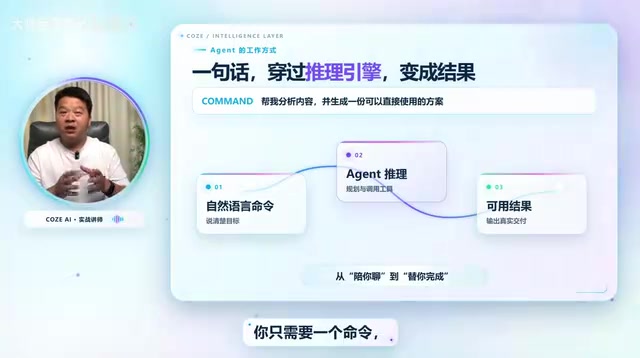
Auto-Build: Generate an Agent with One Sentence
One of Coze 3.0's standout features is support for both automatic and manual build modes. For beginners, auto-build has virtually no barrier to entry — just describe what you need in plain language and the platform generates the agent, workflow, or skill for you.
The tutorial demonstrates several representative scenarios:
Agent
Type "Build me an agent that automatically generates promotional images when I upload a product photo," and the system starts building immediately. Once it's ready, upload a product image, wait a moment, and the promotional image is produced.
Workflow
Type "Build me a workflow that automatically generates poetry learning cards when I input a poem's title," with the requirement that each card includes a mood-appropriate image and clean layout. Feed it a poem and a beautifully formatted learning card is generated automatically.
Skill
Same approach — for example, "Create a skill that generates a viral Xiaohongshu caption and cover image when I input a topic." Enter something like "parenting education" and both the written content and cover are produced instantly.
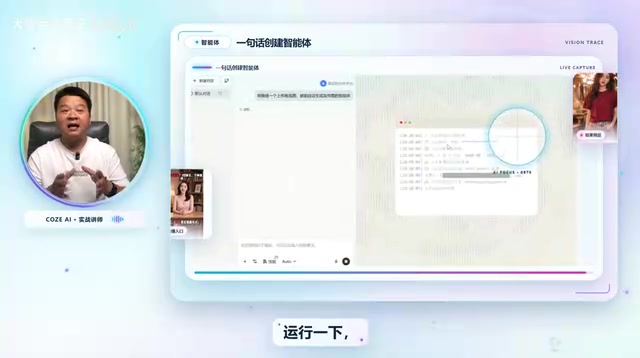
It's worth noting that the first draft generated this way isn't always perfect. The tutorial is upfront about this and explains later how to refine outputs to be more precise and better suited to real-world requirements. In short, auto-build is great for handling simple needs — but it's not the finish line.
An AI Agent is an AI system that can perceive inputs, autonomously plan steps, and invoke tools to accomplish a target task. Its core distinction from a standard chatbot is autonomous execution rather than passive response. Internally, an agent typically includes a large language model (LLM) as its "brain," a set of callable tools (such as search, image generation, or code execution) as its "hands and feet," along with memory and workflow orchestration mechanisms. Coze is ByteDance's no-code agent-building platform, allowing users to assemble these modules into independently runnable automation pipelines through a graphical interface — without writing a single line of code. Understanding this underlying logic helps you judge which types of tasks are well-suited for an agent and which steps still require human involvement.
Manual Build: Handling Complex and Enterprise-Level Scenarios
When requirements get more complex or you need to build enterprise-grade agents, auto-build falls short — and that's where manually constructing workflows comes in. This is also the primary focus of the rest of the course.
The curriculum dives deep into real-world deployment scenarios across multiple industries:
- Digital humans: Input a script, automatically generate a digital avatar broadcast short video
- Animated comics: Provide a brief description, generate an animated comic video
- E-commerce: Upload a clothing image to generate high-quality product promotion images — or even sales videos
- Content creation: Deconstruct the underlying logic behind viral short videos
- Education: Essay review assistants, idiom learning cards, and various tutoring tools
- Finance and legal: Intelligent agents and workflows for professional domains are also covered

This industry-scenario-anchored teaching approach is far more practical than walking through features in isolation. It lets learners map what they're studying directly to their own field and identify transferable workflow design patterns.
A Workflow, in the context of AI platforms, is an automated flowchart that chains multiple processing nodes together in logical sequence. Each node can be an LLM call, an external API request, a conditional logic branch, or an image/video generation step. The value of building workflows manually lies in controllability: you can precisely define how data is handled at each step, what happens on failure, and what format the final output takes. Compared to auto-generated black-box flows, manually built workflows are easier to debug and iterate, and far simpler to integrate with existing enterprise data systems or approval processes. That's exactly why they're indispensable in professional and enterprise contexts.
From Tools to Methodology: The Course's Real Value
Beyond the scenarios above, the course also covers Coze 3.0's local device and cloud device capabilities for building an all-scenario AI productivity assistant. The overall curriculum runs along two main tracks: Coze's latest 3.0 version and manual workflow construction — laying out a complete path from zero to functional for beginners.
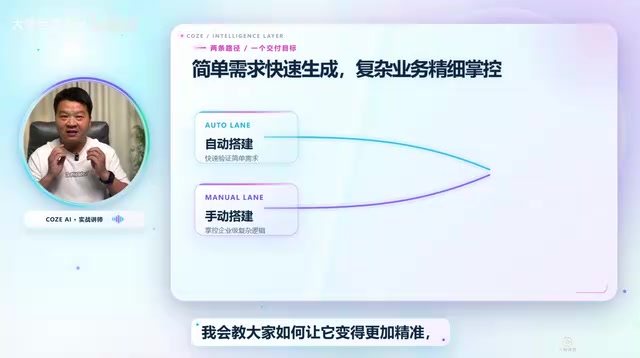
From design thinking and build techniques to hands-on practice and local deployment, this course ultimately lands on industry thinking and methodology. The core idea it conveys: start with Coze as your entry point, develop the ability to generalize across tools, and ultimately build AI tools tailored to your own industry — assembling your own "AI team."
For everyday users looking to get started with AI agents, this kind of step-by-step tutorial lowers the cost of experimentation. What actually determines outcomes, though, is whether you can internalize the demonstrated patterns and apply them to your own problems. Tools will keep evolving, but the underlying methods — breaking down requirements, designing processes — are universal. That's the part worth paying the most attention to when choosing how to learn.
Related articles

Amphibious Transforming Drone: Beyond 100x Power Savings, What Are the Real Needs?
Is the amphibious transforming drone just a gimmick? Starting from the 100x power difference of the M4 Morphobot, explore real application scenarios and thesis topic ideas, analyzing boundary conditions where pure drones and pure ground robots both fail.

Warhound Raises $200 Million: Genetically Engineered "War Dogs" Paired with Anduril Gear
Warhound raises $200M, backed by Ben Lamm and Palmer Luckey, to genetically engineer dogs for military and law enforcement use and equip them with Anduril gear. This article analyzes its technology direction, funding logic, and ethical controversy.

Claude API Comes to Google Cloud: IAM Integration and SDK Access Guide
Anthropic hosts the full Claude API on Google Cloud with IAM-controlled permissions and unified billing. This guide covers the Vertex AI and Anthropic-hosted entry points, IAM role configuration, and SDK access.