Coze Agent Platform Guide: Building AI Automation Workflows from Scratch

Coze lets non-technical users build AI agents and workflows with or without code, using natural language.
Coze is an AI agent-building platform that brings the barrier down to zero coding knowledge, supporting both auto-build and manual build paths. Auto-build, a flagship feature of Coze 3.0, lets users generate agents, workflows, or skills from a single natural language prompt — ideal for simple needs and rapid validation. Manual build targets complex enterprise scenarios across e-commerce, digital humans, education, and finance, offering precise logic control. The platform also introduces local and cloud device capabilities, evolving toward a full-scenario AI office assistant. The course's core value lies not just in tool operation, but in building a transferable AI product mindset and structured methodology.
AI tools are evolving so fast that many people feel overwhelmed — new buzzwords and platforms emerge constantly, and it's hard to know where to start. Coze is an AI agent-building platform designed for everyday users, lowering the barrier to near zero. No programming experience required, no need to be a domain expert — just a grasp of the basic logic is enough to get started. This article is based on a comprehensive Coze tutorial series on Bilibili, outlining the platform's core capabilities and how to approach building on it.
What Coze Can Do: From Chat Tool to Task Executor
Many people still think of AI as a "chat and Q&A" tool. But Coze's ambition is to turn AI into a powerful assistant that can complete complex tasks with a single command. As the tutorial's author puts it, once you've learned the platform, "you just give it one command, and it delivers results directly."
The key distinction here is this: a standard conversational AI outputs text suggestions, while an agent outputs a finished product. Whether it's video editing, AI comics, e-commerce product pages, or vertical domains like finance, accounting, or education — you can automate all of these by building the right agent.
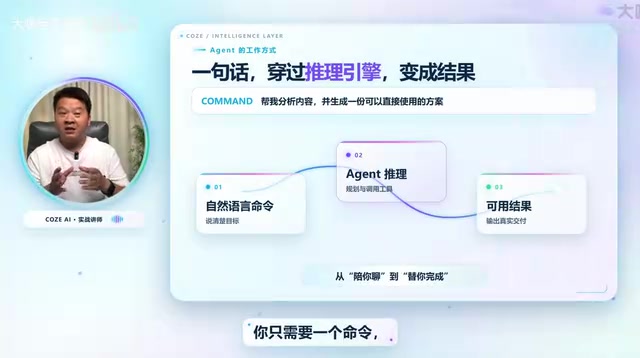
The core value this course emphasizes isn't just "tool instruction" — it's building an AI product mindset and a structured methodology for applying AI. In other words, what you learn isn't just how to operate Coze, but a thinking framework transferable to other AI tools.
What is an Agent? An agent is a core concept in AI — it refers to an AI system that can perceive its environment, autonomously plan steps, and execute a series of actions to achieve a goal. Unlike traditional chatbots that handle single-turn Q&A, agents can call external tools (such as search, image generation, or code execution), chain multiple steps together, and dynamically adjust their actions based on intermediate results. Coze packages this capability into a visual interface, letting users configure complete logic chains like "when condition X is met, execute operation Y and output result Z" — no coding required. Understanding this distinction is key to seeing how Coze differs from ordinary AI chat products: agents produce structured task outputs, while chat products produce text for human reference.
Two Ways to Build: Auto-Generation vs. Manual Construction
Coze currently supports two building paths — automatic and manual — suited to different levels of complexity.
Auto-Build: Generate an Agent from a Single Sentence
Auto-build is one of Coze 3.0's standout features — describe what you want in natural language, and the system generates an agent, workflow, or skill. The tutorial demonstrates several intuitive examples:
- Agent: Enter "Build me an agent that automatically generates promotional images when I upload a product photo," and the system completes the setup. Upload a product image and it produces a promotional graphic.
- Workflow: Enter "Build a workflow that takes a poem's name and automatically generates a study card for it," with requirements for contextually appropriate images and clean layout — and it produces a polished learning card in one click.
- Skill: Enter "Create a skill that takes a topic and automatically generates viral Xiaohongshu copy and a cover image." Input a parenting and education theme, and both the content and cover are generated automatically.

The author honestly notes that the first version generated from a single sentence "may not be perfect" and will need refinement to become more precise. That's a realistic assessment — auto-build is best for quick validation and simple needs; real-world deployment still requires human iteration.
Manual Build: For Complex and Enterprise-Grade Scenarios
When requirements go beyond simple tasks — such as building enterprise-grade agents — manual construction is the way to go. The tutorial goes deep into real-world use cases across multiple industries:
- Digital humans: Input a script and automatically generate a short-form talking-head video with a digital avatar.
- AI comics: Provide a brief description and generate a comic-style video clip.
- E-commerce: Upload product photos to generate high-quality promotional images, or even produce a product video from a still image.
- Education: Essay grading assistants, idiom flashcard generators, teaching support tools.
- Finance, accounting, and legal: Corresponding agents and workflows are all covered in the course.
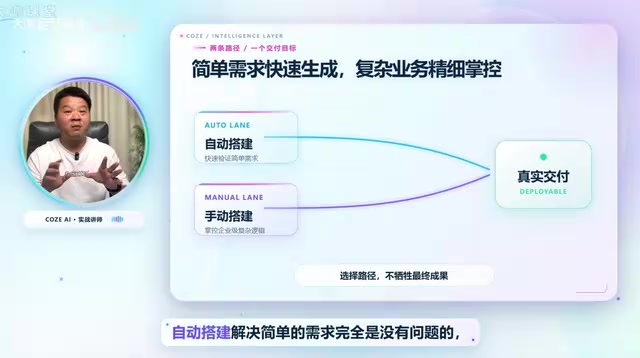
This list shows just how broad Coze's applicability is. The value of manual building lies in control — you can precisely define every step of the logic and handle edge cases and branching conditions that auto-generation can't reliably cover.
What is a Workflow? A workflow is another foundational concept in Coze — it refers to an automated process that chains multiple processing nodes together in sequence or conditional logic. Compared to a single agent, workflows are better suited for multi-step collaborative tasks, such as "first call an image recognition API to parse a product photo → then generate copy → finally format and output" — scenarios involving branching decisions and data passing. A "skill" in Coze is more like a reusable functional module that can be called by multiple workflows or agents. Understanding the hierarchy of agents, workflows, and skills is the foundation for grasping Coze's overall architecture: skills are atomic operations, workflows are process orchestration, and agents are the complete product form presented to end users.
Local Devices and Cloud Devices: Toward All-Scenario Office Work
Beyond agent building, the tutorial also covers Coze 3.0's local device and cloud device capabilities, with the goal of making Coze a "full-scenario AI office assistant." This means agents don't just run in the browser — they can connect to local environments and cloud resources, handling tasks that align more closely with real-world workflows.
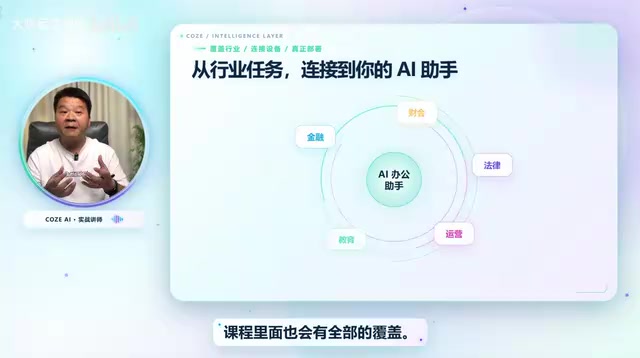
The introduction of local deployment is a noteworthy development. For enterprises and use cases sensitive to data security, running AI capabilities on local devices is often more attractive than a purely cloud-based solution.
Local vs. Cloud Deployment The distinction between local devices and cloud devices reflects two mainstream architectures for deploying AI applications. Cloud-based solutions place all computation and data processing on the service provider's servers — low maintenance cost and always accessible, but sensitive data must be uploaded to a third party. Local deployment runs models or key logic on the user's own devices or private servers, keeping data within the local network. This better suits industries with strict data compliance requirements, such as finance, healthcare, and law. Coze's introduction of local device capabilities signals that it is evolving from a pure SaaS tool into a platform supporting hybrid deployment — an important signal for teams looking to deeply integrate AI capabilities into internal enterprise systems.
Learning Path and Methodological Value
The main thread of the course runs along two axes: Coze 3.0 and manual workflow building, aiming to walk users through the complete journey of "AI from zero to one." The author repeatedly emphasizes that the course covers "not just technology, but industry mindset and methodology."
That's a worthwhile framing. Tools will iterate and may eventually be replaced, but the skills of structuring tasks, designing workflows, and configuring knowledge bases are transferable. Once you've learned how to "generalize from one example" on a single platform, you can adapt quickly when switching to other AI tools.
One caveat worth noting: while the "anyone can learn this" positioning lowers the psychological barrier, building a stable, production-ready agent still requires continuous debugging and a deep understanding of the underlying business logic. The tool is easy to pick up, but output quality depends on how well the user understands the use case.
Summary
Coze brings the barrier to building AI agents down to a level accessible even to non-programmers — through both auto-build and manual build paths. Auto-build is great for quickly generating simple applications; manual build is suited for complex, enterprise-grade scenarios. With the addition of local and cloud device capabilities, it's evolving from a single-purpose tool into a full-scenario AI office assistant.
For those looking to get started with AI applications, rather than feeling anxious about a flood of new concepts, the better move is to dive into one platform and actually run through the process of building an agent end to end. Developing a product mindset is the most solid foundation for keeping up with the rapid pace of AI change.
Related articles

AI Reverse-Engineers Monitor Firmware in 15 Minutes — Has the Hacking Barrier Been Flattened?
A security researcher used AI to reverse-engineer Dell monitor firmware in 15 minutes—entropy analysis, key extraction, MD5 verification—revealing encryption design flaws.

Mistral Voxtral 3: Real-Time Voice at 4 Cents per Minute, Challenging OpenAI
Mistral Voxtral 3 cuts real-time voice agent costs to 4 cents per minute, bundling three speech recognition models, a speech generation model, and a real-time voice toolkit, supporting 50+ languages and self-hosting. This article analyzes its pricing structure, sub-second response performance, and its strategic divergence from OpenAI and Gemini on data privacy versus out-of-the-box convenience.

WebMCP: Every Website as Its Own MCP Server, So AI Agents No Longer Rely on Screenshots
WebMCP lets websites expose tools via the document.modelcontext API, becoming directly callable MCP servers. This article explains its architecture, the Claude Code remote-debugging demo, Chrome's current support stage, and its impact on the agent ecosystem.