Coze Step-by-Step Practical Guide: Build AI Agent Workflows from Zero

Coze is the top domestic Agent platform for non-technical users to implement agents.
Based on a Bilibili tutorial framework, this article outlines Coze's positioning and learning path. It first categorizes Agent products into tool category (Coze, Dify, n8n), software category (Claude Code, Cursor), and framework category (LangChain, LangGraph, Spring AI), suggesting trying all three but prioritizing based on enterprise needs. It then covers Coze's core value: multi-platform access, three internal Agent types, Skill Store and plugins, knowledge base mounting, workflow orchestration, and the not-yet-open Agent World. Finally, it offers a learning path: zero-experience users should first complete the minimal loop of "create a Bot and attach a plugin," then move to workflows; those with a development background can start directly from Coze programming and workflow node logic. It also reminds readers to refer to official documentation and the actual platform interface.
AI agent platforms are shifting from "tech toys" to "productivity tools," and Coze is one of the most worthwhile options to get hands-on with in the domestic lineup. This article is based on the framework of a Bilibili hands-on tutorial, combined with publicly available platform information, to help you clarify Coze's positioning, usage path, and directions for advancement.
First, Get This Straight: Agent Products Fall into Three Categories—Which One Should You Learn?
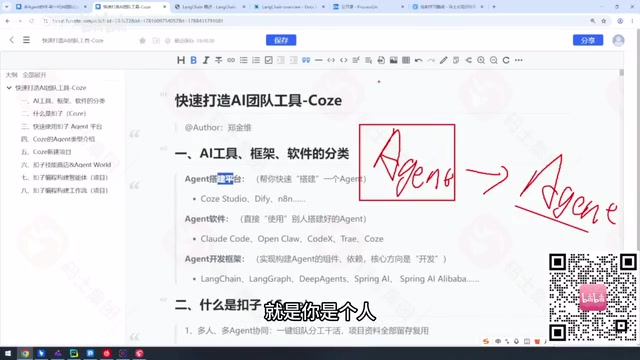
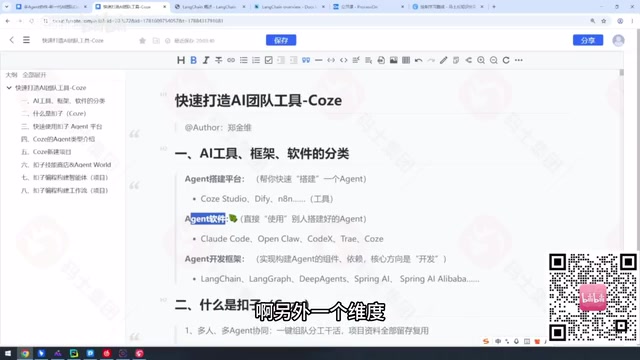
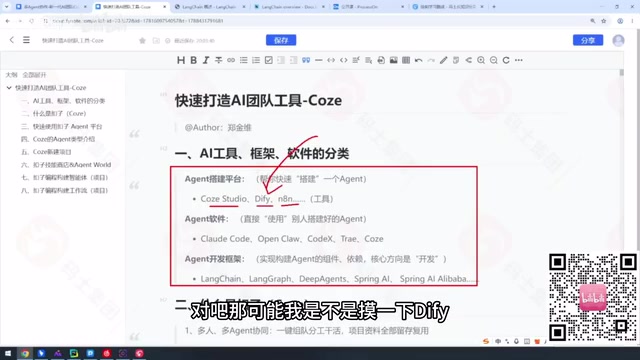
The original tutorial divides Agent-related products on the market into three dimensions. This classification is very helpful for beginners to build a cognitive map.
Tool category refers to "agents that help you build agents," represented by Coze Studio, Dify, and n8n. These products target people who don't code or want to quickly validate ideas—drag-and-drop configuration is enough to get an agent running.
Software category refers to Agent applications that directly do work for you, such as coding tools like Claude Code, Cursor, and Codex. Their barrier isn't installation—it's "how well you can articulate your requirements."
Development framework category targets developers: LangChain, LangGraph, Deep Agents, and Spring AI in the Java ecosystem all belong to this layer.

The tutorial author's view is straightforward: don't treat it as a multiple-choice question. You should touch tools, software, and frameworks alike—just with different priorities. Whatever your company uses, prioritize that; for anything the company won't reimburse, pick whatever feels most comfortable to you.
LangChain is a Python/JS framework open-sourced in 2022. Its core abstractions are Chain (chained calls), Agent (tool orchestration), and Memory (context management). It has become almost the "de facto standard" for LLM application development—the ecosystem is vast, but the abstraction layers are thick, so beginners can easily get lost. LangGraph was designed to address LangChain's shortcomings in complex workflows, modeling agent workflows as state graphs (StateGraph): nodes are functions or model calls, edges define transition conditions, and it naturally supports loops, branching, human intervention, and persistent state—making it better suited for multi-step workflows with backtracking needs. Spring AI brings similar capabilities into the Java ecosystem, offering modular interfaces such as ChatClient, Tool Calling, and Vector Store, with smooth integration into Spring Boot—suitable for teams with existing Java tech stacks. The three have different positioning: LangChain leans toward an all-in-one package, LangGraph toward workflow orchestration, and Spring AI toward enterprise integration. When choosing, base your decision on your team's language stack and workflow complexity.
What Problem Does Coze Actually Solve?
Coze's core value is enabling non-technical people to implement agent workflows. The official documentation positions it as an "AI Bot development platform," but its actual capabilities already cover the full chain from Bot creation, plugin invocation, and knowledge base mounting to workflow orchestration.
According to the tutorial, Coze offers web, mobile, and PC access. After registering, you can directly let existing Bots on the platform do work for you, and then decide whether to build your own after validating the results.
Agents inside Coze fall into three types—a design unique to the platform that doesn't fully correspond to concepts in external frameworks. Understanding the applicable scenarios for these three types is the foundation for subsequent projects.
Knowledge base mounting is the key capability in Coze that lets agents "understand your private materials." Under the hood is RAG (Retrieval-Augmented Generation): uploaded documents are split into chunks, vectorized, and stored in an index. When a user asks a question, the system first retrieves the most relevant chunks, then passes them along with the question to the LLM to generate an answer. Compared with stuffing materials directly into the prompt, RAG can break through context length limits, reduce hallucinations, and make answers traceable. In Coze, you only need to upload files and choose a chunking strategy and retrieval parameters—the platform automatically handles Embedding and recall. In practice, note: chunking documents too coarsely dilutes relevance, while chunking too finely loses context; also, update the knowledge base regularly to avoid the model answering based on outdated materials.
Skill Store, Agent World, and Coze Programming
What an agent can do depends on what skills it has attached. Coze's Skill Store offers a large number of ready-made plugins covering common needs such as search, data processing, and content generation. The tutorial points out that if the Skill Store can't meet your needs, you'll need to go through Coze programming for customization.
Worth mentioning is Agent World. According to the tutorial, this feature is not yet open to the public, possibly for security reasons. It's a direction worth keeping an eye on, but at this stage it shouldn't be a basis for choosing the platform.
Workflows are Coze's other main thread. Only by stringing multiple nodes together can an agent complete complex tasks with sequential dependencies—this is also how the "AI team" concept is implemented: different agents each play their part, orchestrated by workflows.
Workflows are Coze's mechanism for breaking complex tasks into orchestrated nodes. A workflow consists of a start node, several processing nodes, and an end node. Node types include LLM calls, plugins, knowledge base retrieval, code blocks, conditional branches, and loops. Data is passed between nodes as variables, and you can define inputs and outputs at each node to precisely control execution order and dependencies. Compared with single-turn conversational Bots, the value of workflows lies in determinism: multi-step tasks won't go off track due to the model "freelancing." For example, "first search industry news, then summarize, finally generate a daily report" can be chained into one workflow. During debugging, the platform provides per-node trial runs and variable inspection to help locate issues. Mastering workflows is the watershed between "being able to create a Bot" and "being able to deliver business results."
Suggested Learning Path
The eight dimensions given in the tutorial—concept classification, platform introduction, quick start, Agent types, project persona, Skill Store, Coze programming, and workflows—are themselves a reasonable learning order.
For zero-experience users, it's recommended to first get the minimal loop of "create a Bot and attach a plugin" running, then move on to workflow orchestration. For those with a development background, you can skip the interface-familiarization stage and start directly from Coze programming and workflow node logic.
One caveat: the original tutorial focuses mainly on concept organization and platform orientation, with limited detail on specific operation demos. When actually doing hands-on work, the official documentation and in-platform templates will be more reliable references. Coze iterates quickly, and feature entry points and naming may change—go by what you see when you open the platform.
Related articles

Microsoft AI Agent Breakthroughs: More Efficient, Better at Code and Weather Forecasting
Microsoft Research Focus Issue 97: ForkPilot cuts agent inference costs, Cabra reveals coding agents' code-understanding gap, Teletune learns workflows from logs, PBC improves extended forecasts, BioEMU-2 opens preview.

Prime Intellect Releases Prime Mega MoE: Trainable Fused MoE Kernel with 3.11x Forward Speedup
Prime Intellect releases Prime Mega MoE, adding backpropagation to DeepSeek's fused Mega MoE kernel for trainability. Up to 3.11x forward speedup and 34% faster Qwen3 MoE training steps in prime-rl.

Meta Quietly Launches AI Fashion App Style Sketch: Build a Virtual Wardrobe from Instagram Photos
Meta quietly launched Style Sketch, an AI fashion app that connects to Instagram to build a virtual wardrobe from shared photos, plus manual entry via camera, video, or gallery upload. This analysis covers its product logic, competitive landscape, and implications for AI app developers.