Create Viral Baby AI Videos with a Single Claude Prompt: A Fish Creative MCP Walkthrough

With Fish Creative MCP, one person can chat with Claude to produce images, video, and voice for viral baby short videos.
Using the TikTok account Jax and Benny as an example, the article breaks down the viral logic of the "baby + adult problems" format: contrast, relatability, repeatability, and vertical-video fit. It shows how Fish Creative MCP lets Claude handle image, video, and audio generation in one conversation, walking through connecting the server, brainstorming a series script, generating a first-frame image, image-to-video, and deadpan voice synthesis—plus tips on prompt specificity and feedback-driven iteration.
On TikTok, an account called Jax and Benny has over 700,000 followers and 9.5 million likes. The content is simple: two toddlers in streetwear handling adult problems—sitting in a waiting room, standing outside a building, staring out a car window, as if they have a mortgage to pay. The bio reads "Grown man problems," and below it: "How do I make these videos by myself?" This reveals a key trend: one person, with the right tools, can build a format that racks up millions of views.
Why does the "baby + adult problems" format go viral?
Breaking down this account's viral logic, four elements are essential:
- Contrast: A small face paired with a tired adult attitude creates a punchline in a second, no explanation needed.
- Relatability: Waiting in line, dealing with paperwork, getting bad news, running late—everyone has been through these situations.
- Repeatability: Same characters, same tone, a new situation each time. Viewers know what to expect and look forward to the next episode.
- Built for scrolling: Short, vertical video, perfectly suited to users' swiping habits.
The problem is, most people assume this kind of content requires a film crew or advanced animation skills. In reality, you can now do it all in a single conversation with Claude, using Fish Creative MCP to generate images, video, and voice in one go.
What is Fish Creative MCP? Giving Claude a pair of hands
Fish Creative is an AI platform that generates images, video, and audio. MCP (Model Context Protocol) is the protocol that connects AI assistants (like Claude, Cursor) to external applications. In the video's words, it's like giving Claude a pair of hands.
The traditional workflow is: write a prompt in one tab → copy → open an image tool → paste → download → open a video tool → upload → ... With Fish Creative MCP, you stay in a single conversation, describe what you need in natural language, and Claude calls Fish Creative to execute.
MCP (Model Context Protocol) is an open protocol proposed by Anthropic, designed to provide a standardized way for AI assistants to connect to external tools and data sources. Before this, for an AI assistant to call an external service, you typically had to develop a separate plugin or write custom code for each service—integration costs were high and hard to reuse. MCP defines a universal communication spec, so developers only need to implement an MCP server once, and it can be called by any AI client that supports the protocol (like Claude Desktop, Cursor, etc.). This is similar to how USB unified peripheral connections—MCP unifies how AI connects to external capabilities. For content creators, this means you don't need to understand underlying API details; you just add the server address in your client and log in, and Claude can directly operate image generation, video generation, audio synthesis, and other services—greatly lowering the barrier to multi-tool workflows.
Three steps to build the workflow: from connecting to testing
Connect the MCP server
- Register an account on Fish Audio (i.e., Fish Creative).
- Open Claude, go to Settings → Connectors, and click Add Custom Connector.
- Name it (e.g., Fish Audio), paste the server address:
https://api.phish.audio.mcp, click Add and complete login. No need to copy an API key.
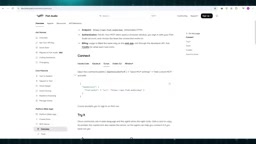
If you use Cursor, add the same address in MCP settings and log in on first use. Claude Code users add it via the terminal command claude mcp add --transport http phish-audio https://api.phish.audio/mcp, then enter /mcp to log in.
Verify the connection
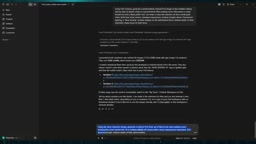
Start a new conversation and type "how many fish audio credits do i have left". If Claude shows your remaining credits, the connection is successful. Note that usage is deducted from your plan's credits, billed the same way as the web version. Before generating images and video, the agent will quote a price and ask for confirmation to avoid unexpected spending.
Hands-on: building the "Grown Man Problems" series
Step 1: Brainstorm the concept with Claude
Don't start by generating images. A good video starts with a good idea. Paste the following prompt into the same conversation (original in English, summarized here):
You are a viral short-form video creative director. I want to make a TikTok/Reels series called "Grown Man Problems," starring two original toddler characters, Max and Leo, wearing stylish streetwear, handling serious adult situations like tired adults. Give me 5 episode ideas, each including the scene, situation, a shot-by-shot outline for a 15-second video, and two lines of deadpan dialogue. Format is vertical 9:16.
After Claude gives 5 ideas, pick the "waiting room" one and use a follow-up prompt to refine it into a tight three-act script: Act 1 sitting in silence; Act 2 Max sighs and delivers a line; Act 3 Leo fires back a punchline and stares at the camera. Dialogue should be short, dry, and funny, like two exhausted adults.
Step 2: Confirm available models
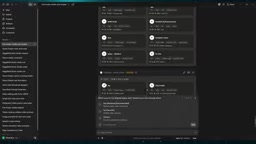
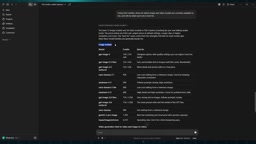
Before generating anything, ask Claude: "Using Phish Creative, show me which image and video models are currently available to me, and tell me what each one is best for." Claude will list the models and explain what each excels at. The video creator's advice: for realistic and consistent characters, choose the latest image model in the list; for video, choose a model that excels at short, realistic motion. Model lists change, so always go by what you see in your own account.
Text-to-image and image-to-video are two different but complementary generation technologies. Text-to-image models (like the Stable Diffusion series, DALL·E, etc.) synthesize images from scratch based on text prompts and excel at creating entirely new visuals; image-to-video models take a static image as the first frame, infer motion, lighting changes, and physical interactions in subsequent frames, and generate dynamic clips a few seconds long. The advantage of image-to-video is that it strictly preserves the character appearance, composition, and style of the input image, making it ideal for series content that requires character consistency. When choosing a model, you need to weigh trade-offs: high-quality models are usually slower and consume more credits; lightweight models are fast but may lack detail and natural motion. In addition, different models vary in their support for vertical aspect ratios and prompt length, so creators should choose flexibly based on actual needs (e.g., character realism, motion amplitude, budget).
Step 3: Generate the first-frame image
Character design is crucial. Paste a detailed prompt requesting a photorealistic vertical 9:16 image: two toddlers sitting side by side on plastic chairs in a government office, Max wearing a cream bucket hat and a black puffer vest, Leo in a navy knit set with a small gold chain, both with tired, serious expressions, staring blankly ahead, fluorescent lighting, a "Now serving number" display in the background, shallow depth of field, cinematic.
After Claude quotes a price, confirm, and the image is generated. Note how specific the prompt is—clothing, expression, lighting, background. The more detail, the more control, and the easier it is to keep characters consistent across episodes. Similarly, generate a facial close-up reaction shot for Max using the same character design.
Step 4: Image-to-video
In the same conversation, turn the generated image into a video:
Using the image we just created, generate a 9:16 video of about 8 seconds. Max slowly turns his head toward Leo and lets out a deep sigh, Leo keeps staring at the number display, then glances at his small watch. Fixed camera with a slight push-in, realistic skin and fabric movement, natural office ambience. Keep both characters identical to the image.
The key phrase is "keep both characters identical to the image," which keeps the model faithful to the established design. Likewise, animate the close-up image: Max slowly looks at the camera, raises one eyebrow, and gives a slight tired nod.
Step 5: Generate dialogue with Fish Audio
This is what makes the video work. Use Fish Audio to generate two voices for the scene: Max with a low, tired adult male voice, calm and deadpan; Leo with a slightly higher, dry adult voice. The lines are: Max says "40 minutes, and they still call it quick service." Leo replies "Tell me about it. I came here for one stamp." First have Claude show the available voice options, audition them, pick one, then generate the audio.
Half the humor comes from the voices: a calm, tired adult voice coming out of a toddler's face is exactly the magic of this format.
Text-to-speech (TTS) technology has evolved from concatenative synthesis and parametric synthesis to neural network synthesis. Modern TTS models can automatically infer intonation, stress, and pauses from text content, and support controlling timbre, emotion, and speaking rate through reference audio or style descriptions. Fish Audio's voice generation service lets users choose a timbre from a preset voice library or clone a specific voice from a short sample. For short-form video creation, the key is the "deadpan" performance—deliberately keeping a flat, monotone delivery to create contrast humor. When generating, pay attention to how colloquial the lines are, how punctuation affects pauses, and matching the audio sample rate to the video frame rate. It's usually best to audition several voice options before settling on a final timbre, and reuse the same voice in subsequent episodes to maintain character recognizability.
Iterate and expand: from one episode to a series
Import the clips into an editor, arrange them in order, lay down the voiceover, add a bit of office ambience, and the joke lands. The first result may not be perfect—that's normal. The real power of the MCP workflow is that you just tell Claude what to change. For example, if the head turn is too fast or the lighting is too bright, just say: "The video is close, but Max turns his head too fast and the lighting is too bright. Regenerate with a slower head turn, warmer and dimmer lighting, and a longer pause before Leo checks his watch. Tell me the cost before generating." You're not dragging sliders—you're giving notes like you would to a human editor.
Once you've finished one episode, the next one comes quickly. Because the characters are already defined, you just need to change the situation. Try: "Create a second episode with the same style and characters Max and Leo. This time the scene is in a car parked outside a courthouse. Then generate the first vertical 9:16 image, keeping the same clothing and expressions."
The end result: same characters, new situation, voices with real attitude—and all of it done through a single conversation with Claude. That's how you turn one idea into a full series—waiting room today, courthouse tomorrow, barbershop next week.
Key takeaways
- Format before tools: Contrast, relatability, repeatability, and vertical short-form content—these four are the foundation of a hit; tools are just the means.
- MCP lowers the cost of switching between tools: Generate images, video, and audio in a single conversation, with no copy-pasting or tab-switching.
- Prompt specificity determines control: The more detailed the clothing, expression, lighting, and background, the easier it is to maintain character consistency.
- Voice contributes half the humor: The mismatch between a deadpan adult voice and a toddler's appearance is the core source of humor.
- Feedback-driven iteration: Give revision notes in natural language like you're directing a human editor, rather than fiddling with parameter sliders.
One-line Summary
With Fish Creative MCP, one person can chat with Claude to produce images, video, and voice for viral baby short videos.
Paragraph Summary
The article uses the TikTok account Jax and Benny as an example to break down the viral logic of the "baby + adult problems" format: contrast, relatability, repeatability, and vertical-video fit. The author points out that this kind of content doesn't need a film crew—with Fish Creative MCP, Claude can call image, video, and audio generation capabilities in a single conversation. The article walks through a three-step workflow in detail: connect the MCP server and verify credits, use Claude to brainstorm the "Grown Man Problems" series script, then sequentially generate the first-frame image, image-to-video, and use Fish Audio to synthesize deadpan adult dialogue. Key tips include: make prompts specific about clothing, expression, and lighting; emphasize "keep characters identical to the image" during image-to-video; and iterate through natural-language feedback. Ultimately, once characters are defined, you just change the situation to quickly expand into a series.
Related articles

A 19-Year-Old's Rental Horror Story: Ceiling Collapse, Bug Infestation, and the Lessons It Taught Me
At 19, my first off-campus rental brought bug infestations, no heat, a collapsed ceiling, and a ruined laptop with no renter's insurance. Here are the hard-won lessons for first-time student renters.

Veda Nurse's Cranial Nerve Exam: Why ASMR Role-Play Is Going Viral
Bilibili creator Veda's cranial nerve exam ASMR video goes viral, blending humor and sensory triggers through nurse role-play. This article analyzes its unique appeal and the audience psychology behind ASMR role-play.

LG Cinebeam AI Review: 120-Inch Giant Screen + 3000 Lumens, a New Choice for the Living Room Theater
LG Cinebeam AI projector review: 3000 ANSI lumens, 4K, 100 inches from about 8 cm and 120 inches from about 18 cm. Built-in webOS, AI Concierge voice recommendations, AI Sound Pro 11.1.2 virtual surround, and Game Optimizer—positioned for fixed living room installation, complementing the portable Cinebeam S.