CS Student with 180K Rupee Budget: Laptop or Desktop? The Optimal Setup for AI/ML

For CS/AI-ML students on a budget, a powerful desktop plus a cheap portable laptop beats a single gaming laptop.
A 19-year-old Indian CS student with a 180K rupee budget faces the classic laptop vs. desktop dilemma for AI/ML studies. This article analyzes the trade-offs and recommends a desktop + thin laptop combo: the desktop handles heavy AI training with an NVIDIA GPU (12-16GB VRAM) and 32GB RAM, while a budget laptop covers classes, hackathons, and collaboration. This approach maximizes performance, expandability, and portability within budget.
A Real Dilemma from a 19-Year-Old College-Bound Student
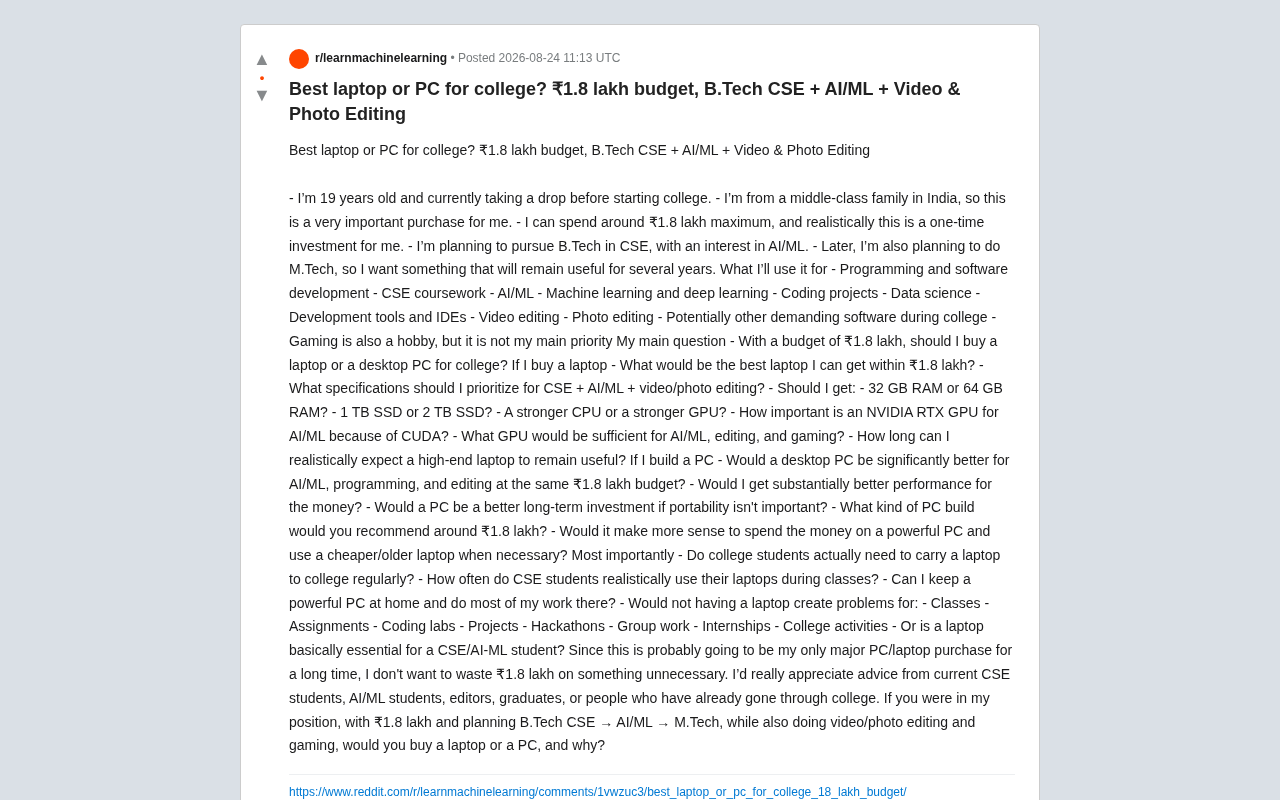
A 19-year-old student from a middle-class Indian family, preparing to enter university, posted a very specific purchasing dilemma on Reddit: with a budget of approximately 180,000 rupees (roughly $2,150 USD), he's about to pursue a B.Tech in Computer Science and Engineering (CSE), plans to specialize in AI/ML and eventually pursue an M.Tech, while also doing video editing, image processing, and casual gaming on the side.
B.Tech (Bachelor of Technology) is a four-year undergraduate degree in India's engineering education system, and CSE (Computer Science and Engineering) is its most popular specialization. Indian engineering education is regulated by AICTE (All India Council for Technical Education), with top institutions including the IIT system, NIT system, and BITS Pilani. M.Tech (Master of Technology) is the corresponding two-year master's degree, typically requiring admission through the GATE exam. In recent years, with India's AI industry rapidly growing—Bangalore is often called the "Silicon Valley of Asia"—the CSE + AI/ML combination has become one of the hottest career paths for middle-class Indian students.
His core anxiety is typical—this is a one-time major investment, and he likely won't be replacing his equipment for several years. For any tech student facing the same choice, this question is highly representative: within a limited budget, should you buy a high-performance laptop or build a desktop?
This article will analyze the three key questions he raised: device form factor selection, hardware configuration priorities, and whether CS students truly can't live without a laptop.
Laptop vs. Desktop: The Trade-off Between Value and Portability
At the Same Budget, Desktop Performance Dominates
This is a fundamental fact in the hardware world: at the same budget, desktops offer far better price-to-performance than laptops. If you spend 180,000 rupees on a desktop build, you can configure a CPU, GPU, and cooling system that vastly outperforms any laptop at the same price point.
Laptops make significant compromises in power limits, thermal management, and physical space to achieve portability. A mobile RTX GPU typically delivers only 60%-75% of its desktop counterpart's performance. This performance gap stems from hard physical constraints: the desktop RTX 4070 has a TDP (Thermal Design Power) of 200W, while laptop versions are typically limited to 80-115W, with some thin-and-light models dropping to just 60W. Power directly determines the clock frequencies a GPU can sustain—when cooling capacity is insufficient, chips trigger thermal throttling, and actual performance can drop to 50-60% of rated specifications. Additionally, laptop cooling modules typically feature only 2-3 heat pipes and small fans, while desktops can accommodate tower coolers or 240mm+ AIO liquid cooling solutions, offering 3-5x greater thermal capacity. This gap becomes especially pronounced during multi-hour AI model training sessions—laptops often begin throttling after 30 minutes of operation, while desktops can maintain stable full-load operation for days.
For tasks like AI/ML training that require sustained high-load operation, the desktop's thermal advantage translates to more stable performance delivery and longer hardware lifespan.
But Portability Is a Hard Requirement for CS Students
However, the original poster himself recognized the key contradiction: university life demands mobile computing. This is the crux of the debate.
For CS/AI-ML students, a laptop is practically a necessity for several reasons:
- Programming labs and practical sessions: Many courses require writing and debugging code on-site in labs or classrooms
- Hackathons: Nearly all programming competitions require you to bring your own device
- Group projects and collaboration: You need to discuss, demo, and modify code anytime, anywhere
- Internships and interviews: Technical internships and on-site interviews often require bringing your own laptop
The role of Hackathons in CS education deserves special mention. These events originated in the late 1990s open-source community and have since become a core component of the global CS education ecosystem. In India, MLH (Major League Hacking), Smart India Hackathon, and inter-college events hosted by various IITs/NITs attract hundreds of thousands of students annually. These events typically require participants to build a working software prototype from scratch within 24-48 hours, with judges evaluating on-site. For students, Hackathons are not just resume highlights but important channels for securing internships and building industry connections—many tech companies recruit directly at Hackathon venues. Participants must bring their own development equipment, making a reliable portable computer the basic threshold for participating in this ecosystem.
In other words, a desktop-only setup offers superior performance but cannot meet the mobility demands of university life.
The Compromise: Performance Desktop + Thin-and-Light Laptop
The approach the poster himself suggested is actually very wise—spend most of the budget on a powerful desktop for home/dorm to handle heavy workloads, and pair it with an inexpensive thin-and-light laptop for daily carry.
The logic behind this combination: AI/ML training, video rendering, and other performance-hungry tasks are handled on the desktop, while classroom notes, coding, research, and presentations are easily managed on a portable machine. With a budget of 180,000 rupees, you could even allocate 120,000-130,000 for the desktop + 50,000-60,000 for a thin-and-light laptop, delivering an overall experience superior to buying a single high-end gaming laptop.
Hardware Configuration Priorities for AI/ML
NVIDIA GPUs and CUDA: Practically a Hard Requirement
The poster asked "how important is an RTX GPU for AI/ML?" The answer is: extremely important—even decisive.
Mainstream deep learning frameworks (PyTorch, TensorFlow) have deep dependencies on NVIDIA's CUDA ecosystem. CUDA (Compute Unified Device Architecture) is NVIDIA's parallel computing platform and programming model, launched in 2006, which allows developers to leverage thousands of GPU cores for general-purpose computing. Deep learning's strong dependence on CUDA stems from both historical and technical factors: AlexNet's breakthrough performance in the 2012 ImageNet competition was based on CUDA-accelerated GPU training, and since then the entire deep learning community's toolchain—from cuDNN (Deep Neural Network acceleration library) to TensorRT (inference optimization engine)—has been built around the NVIDIA ecosystem. While AMD's ROCm and Intel's oneAPI are catching up, as of 2024, the vast majority of academic papers, open-source projects, and tutorials default to a CUDA environment, meaning students who choose AMD or Intel GPUs will waste significant time debugging compatibility issues.
While you can train models on a CPU, the speed difference can be tens of times slower. For students serious about AI/ML, a CUDA-capable NVIDIA GPU is essential.
Within the budget, prioritize VRAM (Video RAM) capacity:
- 8GB VRAM is the bare minimum, sufficient for small models and coursework
- 12GB or 16GB VRAM (such as RTX 4060 Ti 16GB or RTX 4070 tier) provides much more comfort for handling larger models and batch data
For AI/ML, VRAM capacity is often a bigger bottleneck than raw compute power—if the model or data can't fit into VRAM, even the most powerful cores are useless. To understand this, consider how VRAM is used during deep learning training: GPU memory must simultaneously hold model parameters, gradients, optimizer states, and activation values for the current batch. For a typical large language model, every 1 billion parameters requires approximately 4GB of VRAM in FP32 precision just to store the parameters themselves; with gradients and Adam optimizer states, total VRAM usage balloons to roughly 16-20GB. Even with mixed-precision training (FP16/BF16), VRAM demands remain substantial. When VRAM is insufficient, the system either throws an OOM (Out of Memory) error and crashes outright, or requires drastically reducing batch size, which severely impacts training efficiency and model convergence quality. This is why for AI/ML students, a GPU with 12GB or 16GB of VRAM is more practically meaningful than simply chasing higher CUDA core counts.
CPU, Memory, and Storage Recommendations
Regarding his three questions about "32GB or 64GB RAM," "1TB or 2TB SSD," and "strong CPU or strong GPU," here are the recommendations:
- Memory: 32GB is the sweet spot; start with 32GB minimum. Data science and multitasking development do consume RAM, but 64GB is overkill for most undergraduate-level tasks. The advantage of a desktop is that memory can be easily expanded later, so start with 32GB and add more when needed.
- Storage: Start with 1TB SSD, leave room for expansion. Video editing and datasets consume significant space; 2TB provides more breathing room, but desktops support adding drives later—no need to go all-in from day one.
- CPU vs. GPU: For AI/ML and gaming, prioritize GPU; for compilation and general development, the CPU can't be too weak either. Balanced configuration is key—a mid-to-high-end CPU (such as Ryzen 7 / Core i5-i7 tier) paired with the best GPU you can afford.
Real-World Lifespan of High-End Laptops
Regarding "how long will a high-end laptop last," the realistic answer is: expect the hardware to remain adequate for 3-5 years. Laptop memory and GPUs are essentially non-upgradeable, and thermal performance degrades with age. This is precisely why expandable, repairable desktops win in the "long-term investment" dimension.
A desktop's modular architecture means nearly every component can be independently upgraded: RAM can expand from 2 sticks to 4, a second or even third M.2 SSD can be added, and the GPU can be swapped for a next-generation product in 2-3 years—as long as the PSU has adequate wattage, the entire upgrade requires no other component changes. Consider the pace of AI/ML development: the mainstream RTX 3060 (12GB) of 2022 has been superseded by the RTX 4060 Ti (16GB) in 2024. Desktop users need only spend the cost of a single GPU to complete the upgrade, while laptop users face the prospect of replacing the entire machine. Over a 5-6 year usage period, a desktop can keep pace with technological progress through 2-3 partial upgrades, often at a lower total cost than purchasing two laptops.
Practical Advice for Students in Similar Situations
Considering everything, if your budget is fixed at 180,000 rupees and you're planning a long-term path from CSE → AI/ML → M.Tech, here's a decision framework:
Option 1 (Recommended for AI/ML-focused students): Primary desktop + inexpensive portable laptop. Equip the desktop with an NVIDIA GPU with ample VRAM, 32GB expandable RAM, and fast SSD; the portable laptop only needs to handle coding, attending classes, and presentations. This offers the best overall performance and flexibility.
Option 2 (Recommended for those who need frequent mobility): A single well-configured gaming/creator laptop. Sacrifice some price-to-performance ratio for the convenience of "one machine for everything"—suitable for students with inconvenient living arrangements, frequent travel, or high competition participation.
On "whether CS students must carry a laptop every day": Not every class requires one, but during lab sessions, project weeks, hackathons, and group collaboration, a portable device is a hard requirement. Therefore, the "no laptop at all, relying entirely on a desktop at home" approach carries high risk in a university setting and is not recommended.
Conclusion
This student's dilemma is fundamentally about the trade-off between performance, portability, and long-term value. There's no single correct answer, but the direction is clear: the AI/ML path requires an NVIDIA GPU with sufficient VRAM, desktops win on price-to-performance and expandability, yet university life demands a degree of mobility.
If I were in the same position, I would prioritize the "powerful desktop + lightweight laptop" combination—meeting the performance demands of deep learning and creative work while not being left stranded in classes, labs, and competitions. For a "once-in-many-years" major investment, this expandable approach that covers both ends is often the safest choice.
Related articles

Amphibious Transforming Drone: Beyond 100x Power Savings, What Are the Real Needs?
Is the amphibious transforming drone just a gimmick? Starting from the 100x power difference of the M4 Morphobot, explore real application scenarios and thesis topic ideas, analyzing boundary conditions where pure drones and pure ground robots both fail.

Warhound Raises $200 Million: Genetically Engineered "War Dogs" Paired with Anduril Gear
Warhound raises $200M, backed by Ben Lamm and Palmer Luckey, to genetically engineer dogs for military and law enforcement use and equip them with Anduril gear. This article analyzes its technology direction, funding logic, and ethical controversy.

Claude API Comes to Google Cloud: IAM Integration and SDK Access Guide
Anthropic hosts the full Claude API on Google Cloud with IAM-controlled permissions and unified billing. This guide covers the Vertex AI and Anthropic-hosted entry points, IAM role configuration, and SDK access.