CSS Trick: Image Dark Mode Adaptation Without Media Queries

CSS's light-dark() unifies theme switching in one line and now supports image resources and local color scheme locking.
The article explains how CSS's light-dark() color function replaces the traditional prefers-color-scheme media query to unify light and dark themes. Instead of rewriting media queries for every component change, light-dark() provides both values in a single declaration, with the browser selecting automatically based on the current color scheme—shorter and cleaner, extracting theme logic from layout. It highlights that light-dark() now supports image resources, allowing background images to switch with themes without JavaScript; the color-scheme property can lock local component colors, but text color inherits from body and must be explicitly declared within the locked container. Final migration advice: browser support is about 90%, the image scenario slightly lower—switch colors first, then images, with @supports fallback.
Say Goodbye to Media Queries: Handling Theme Switching with light-dark()
In the past, CSS developers handling light/dark mode were used to hardcoding two sets of styles together using the prefers-color-scheme media query. While workable, this meant rewriting the media query every time a component changed, resulting in high maintenance costs and numerous edge cases.
The CSS light-dark() color function changes this. It allows both light and dark values to be declared in a single property declaration, with the browser automatically selecting based on the currently active color scheme. Code that once had to be split into two media query blocks can now be compressed into one line.
According to practical experience shared by a YouTube tech channel, after uniformly replacing prefers-color-scheme with light-dark() in a project, the developer tools' simulation switching worked perfectly—backgrounds, text, and borders all followed the theme with no additional adaptation cost. This approach isn't just shorter to write; it extracts "theme" from layout logic and hands it over to the color function itself.
The prefers-color-scheme media query is a media feature provided by CSS that detects the user's color preference (light or dark) set at the operating system or browser level. Traditional theme switching implementations typically write two blocks: @media (prefers-color-scheme: light) { ... } and @media (prefers-color-scheme: dark) { ... }, declaring different values for the same set of properties in each. The problem with this approach is that every new component requiring theme adaptation means rewriting the media query, causing code volume to grow linearly with the number of components; moreover, media queries act on entire rule blocks, unable to make conditional value choices within a single declaration, entangling layout logic with color logic. light-dark() precisely pushes this "block-level condition" down to a "value-level condition," letting the color function itself handle theme selection.
Images Can Now Use light-dark() Too
What truly makes this update worth highlighting is that light-dark() has begun supporting image resources. Previously, when switching dark mode, background images were often the most awkward part: text colors changed, but images remained in their light version, creating a visually jarring effect. Wanting to swap images meant returning to the old media query route.
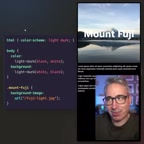
Now light-dark() can be used directly in background-image, mounting both light and dark images in a single declaration. When switching themes, the browser automatically replaces the image resources without any JavaScript or additional media queries.
This capability fills the last piece of the puzzle in theme switching experience. Images and text can finally work together under the same mechanism, making site-wide visual consistency easy to achieve.
background-image is a CSS property used to set background images for elements, and it can accept various image values such as URLs, gradients, and image sets (image-set()). Previously, to make background images switch with themes, one could only override the entire background-image declaration via media queries, or use image-set() with resolution conditions (but the latter targets DPI rather than color scheme). light-dark() can now be placed in the value position of background-image, meaning a single property declaration can carry two image resources, with the browser deciding which to load based on the current color-scheme. It's worth noting that the unselected image is typically not downloaded, so this mechanism brings convenience without significantly increasing bandwidth overhead.
Locking Local Color Schemes: Making Components "Not Follow" the Global Theme
light-dark() also brings a more subtle level of control: you can force an element to lock into a specific color scheme regardless of how the global theme changes.
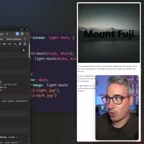
The method is to declare color-scheme: dark or color-scheme: light on the target selector. Thereafter, all light-dark() values within that area will follow the locked scheme. When testing with the entire site switched to light mode, this local area still displays the dark version, with stable results.
There's an easy pitfall here: text color inherits from body by default, so during global theme switching the text flips, but the interior of a locked container doesn't automatically sync.
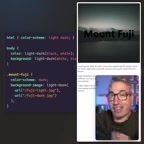
The solution is simple—explicitly declare text color within the locked container. This way, regardless of the outer theme, the internal color scheme is fully controllable.
According to the channel's view, forcing a dark theme lock may not be common in daily projects, since the easier approach is to just make a single dark style. But the real value of this mechanism lies in nested scenarios: some areas of a page need to follow the global theme while others need to remain independent, and color-scheme provides a clean isolation boundary.
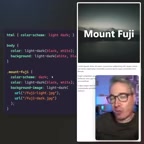
color-scheme is a CSS property that tells the browser which color scheme an element and its subtree should use to render native UI controls (such as scrollbars, form controls) and to resolve light-dark() and system color keywords (such as Canvas, ButtonText). Its values can be light, dark, normal, or written as light dark to indicate support for both, determined by user preference. In the context of light-dark(), color-scheme plays the role of "decision-maker": the effective color-scheme on an element determines whether all light-dark() functions inside it take light or dark values. Therefore, setting color-scheme: dark on a local container is equivalent to defining an independent color context for that area—regardless of how the global theme switches, its internal light-dark() will stably resolve to the dark branch, which is precisely the underlying mechanism for achieving nested theme isolation.
Browser Support and Deployment Advice
light-dark() currently has overall support approaching 90%, having reached "newly available" status across all three major browser engines—meaning it has entered all mainstream engines and is no longer an experimental feature.
However, support for the image scenario is somewhat weaker. The light-dark() for color values can be deployed first, while the light-dark() for image resources requires judgment based on the target users' browser distribution. If your project needs to cover older browsers, you can keep media queries as a fallback, or use @supports for capability detection.
A pragmatic migration path is: first switch color-related declarations to light-dark(), verifying no regressions in theme switching; then gradually switch background images and other resources over, while monitoring changes in browser support data.
@supports is a CSS conditional rule used to detect whether a browser supports a certain property or property-value pair, with the syntax @supports (property: value) { ... }. In theme switching fallback strategies, you can use @supports (background-image: light-dark(url(a), url(b))) to determine whether the current browser supports the image form of light-dark(): if supported, write the new syntax inside the block; if not, fall back to media queries or a single default image. Compared to directly relying on browser version detection, @supports is based on actual capability detection, covers various engine implementation differences more precisely, and makes it easier to safely remove fallback code as support gradually improves.
One-line Summary
CSS's light-dark() unifies theme switching in a single declaration and now supports image resources and local color scheme locking.
Paragraph Summary
The article explains how CSS's light-dark() color function replaces the traditional prefers-color-scheme media query to unify light and dark themes. Compared to rewriting media queries for every component change, light-dark() can provide both values in a single declaration, with the browser selecting automatically based on the current color scheme—shorter to write and extracting theme logic from layout. The article highlights that light-dark() now supports image resources, allowing background images to switch automatically with themes without JavaScript; meanwhile, the color-scheme property can lock local component colors, but note that text color inherits from body and must be explicitly declared within the locked container. Finally, it offers migration advice: browser support is about 90%, with slightly lower support for the image scenario, so switch colors first, then images, and pair with @supports for fallback.
Related articles

Amphibious Transforming Drone: Beyond 100x Power Savings, What Are the Real Needs?
Is the amphibious transforming drone just a gimmick? Starting from the 100x power difference of the M4 Morphobot, explore real application scenarios and thesis topic ideas, analyzing boundary conditions where pure drones and pure ground robots both fail.

Warhound Raises $200 Million: Genetically Engineered "War Dogs" Paired with Anduril Gear
Warhound raises $200M, backed by Ben Lamm and Palmer Luckey, to genetically engineer dogs for military and law enforcement use and equip them with Anduril gear. This article analyzes its technology direction, funding logic, and ethical controversy.

Claude API Comes to Google Cloud: IAM Integration and SDK Access Guide
Anthropic hosts the full Claude API on Google Cloud with IAM-controlled permissions and unified billing. This guide covers the Vertex AI and Anthropic-hosted entry points, IAM role configuration, and SDK access.