cTrader MCP Server: Control Your Trading Platform Directly with AI Agents

cTrader's MCP integration lets AI agents like ChatGPT and Claude control your trading platform through natural language.
Spotware has launched an MCP (Model Context Protocol) integration for cTrader, letting traders use AI tools like ChatGPT, Claude, and Gemini to operate the trading platform via natural language. Available as Local MCP (full-featured desktop client) and Remote MCP (account-bound web token), AI can handle account summaries, charting, trend analysis, order placement, and batch position closing — with built-in safety features including margin checks, trade confirmation dialogs, and strict account binding.
When a Trading Platform Meets AI Agents
At a recent webinar hosted by Spotware, Eleni from the Customer Success team demonstrated the real-world capabilities of the cTrader MCP Server (Model Context Protocol servers). The core value proposition is straightforward: traders can use their preferred AI assistant — whether ChatGPT, Claude Code, Cursor, Codex, or Gemini CLI — to directly interact with and execute actions on the cTrader trading platform.
In the past, AI could only answer questions, such as explaining what a technical indicator means. With an MCP connection, AI moves beyond mere explanation — it can genuinely help traders review accounts, analyze market data, control charts, create alerts, and even place trade requests. Users simply describe what they want in natural language, and the AI calls cTrader's tools to complete the entire workflow.
For experienced traders, this means streamlining complex operations. For beginners, there's no need to memorize every menu path — just "say" what you need. For brokers and prop firms, it's a differentiating selling point that boosts user engagement and feature discoverability.
How MCP Bridges AI and the Trading Platform
MCP can be thought of as a bridge between an AI agent and cTrader. Without this bridge, AI can only provide generic, generalized answers. With the connection established, AI gains access to authorized cTrader tools and can assist with real platform workflows.
A key point: AI does not get unrestricted access. After a trader connects their primary agent to the MCP server, the server provides controlled access to tools and data. What features are available depends on the connection method, permission settings, and the user's chosen controls. Once connected, AI can handle account information, market data, charts, indicators, trade history, and price alerts; with trading permissions enabled, it can also request selected trading operations.
The cTrader MCP Server consists of two main components:
Local MCP
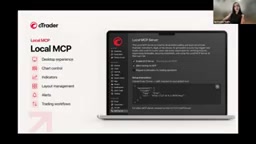
Local MCP connects an AI agent to the cTrader desktop client (Windows/Mac). Designed for desktop workflows, it offers the broadest range of interactions — charts, indicators, workspace layouts, alerts, and trading functionality. This is the approach used in the demonstration, providing the most intuitive, visual experience.
Remote MCP
Remote MCP provides account-specific connectivity via cTrader Web. It focuses on flexible access to account information, market data, and trading workflows, supporting use cases such as viewing positions, retrieving market data, and requesting trade actions. Each connection is bound to a specific trading account — an important security design choice.
In cTrader Web's settings, a dedicated Remote MCP section has been added, displaying the unique token for the current account. Switching accounts — or logging out and back in — regenerates the token even for the same account, ensuring that connections are strictly tied to the correct account.
MCP (Model Context Protocol) is a standardized protocol proposed and open-sourced by Anthropic in late 2024, designed to solve the "last mile" connectivity problem between large AI models and external tools and data sources. Before MCP, every tool vendor wanting to integrate with AI had to develop separate plugins for different AI models — a maintenance nightmare with zero interoperability. MCP's core idea is to define a unified client-server communication specification: AI models (clients) call "Tools" and "Resources" exposed by MCP servers through a standardized interface, while the server translates those calls into actual operations on specific applications. This allows a single MCP server to be called by different models like Claude, GPT-4o, and Gemini without requiring separate adaptations for each. For cTrader, the MCP server acts as a "translation layer": it wraps platform features (checking accounts, placing orders, modifying charts) into standard tools, and AI simply calls them via the protocol without needing to understand cTrader's underlying API details.
Live Demo: Trading Through Conversation
The desktop MCP settings offer three toggles: enable the MCP server, allow trading via MCP, and require confirmation for trade actions. By default, the first two are off and the third (trade confirmation) is on. In the demo, Eleni turned all three on.
Account summary was the first scenario. She typed "Give me an account summary for the past seven days," and the AI immediately analyzed the account, returning the number of winning and losing trades, the largest loss and corresponding position, trading costs for closed trades, and open positions, margin levels, and equity. Compared to manually reviewing logs and positions one by one, this saves significant time.
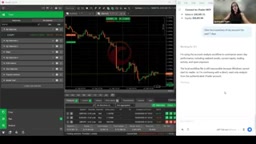
Next came chart control. Typing "Open a Gold H1 chart" caused the system to recognize and open the XAUUSD chart (XAUUSD works equally well). Adding indicators then only required a single sentence — no need to hunt through the platform's menus. This is especially helpful for beginners unfamiliar with indicators.
Trade Execution and Risk Controls
The order placement process demonstrated MCP's safety logic. When the input was "Buy XAUUSD 20 lots," the AI scanned the account and calculated the required margin. Since 20 lots represented an oversized position relative to the current balance — with required margin exceeding the account's capacity — the order was not executed. Instead, the AI explained the required margin amount.
The trader could then ask, "What's the maximum position size I can open?" and the AI would calculate the maximum lot size based on available margin. After switching to 0.05 lots and because trade confirmation was enabled, a confirmation dialog appeared. After confirming, the position was successfully established.
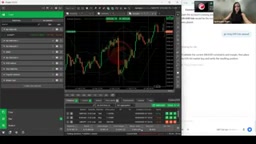
After opening the position, the AI noted the position ID and pointed out that no stop loss or take profit had been set. For beginners unfamiliar with these concepts, this serves as immediate, in-context feature guidance. A subsequent "add stop loss" command modified the position — also requiring a second confirmation.
The market trend analysis feature is worth highlighting. After entering "Give me the XAUUSD trend," the AI scanned official websites for information and delivered a "bullish intraday but short-term pullback" assessment with key price levels, along with cited sources (such as Fed statements) that users can click to verify. This traceable design helps beginners learn which authoritative channels they should be referencing.
Margin is a core risk concept in leveraged trading. When opening a position, the platform does not require payment of the full notional value; instead, it locks up a certain percentage of account funds as a "deposit" — this is the required margin. For gold (XAUUSD), for example, if a contract is worth $100,000 per lot with 100:1 leverage, opening 1 lot requires approximately $1,000 in margin. In the demo, the AI automatically blocked the "20 lots" request precisely because the required margin exceeded the account's net value — forcing this trade in a live account would risk a margin call. Stop Loss and Take Profit are two types of automatic order-closing instructions: a stop loss triggers when the price hits a preset loss threshold, capping the loss at a manageable level; a take profit triggers when the price reaches a target profit level, locking in gains. The AI proactively noting after order placement that neither had been set reflects MCP's built-in risk management guidance logic — rather than simply executing the user's literal instructions.
Batch Operations and Interface Management
MCP also supports more advanced batch instructions. Natural language requests like "Close all positions opened today" or "Close all losing positions" prompt the AI to first identify qualifying positions, then present individual confirmation dialogs for each, and report the entry price, exit price, and realized P&L after execution.
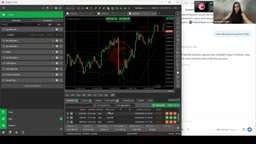
Beyond trading, layout management can also be handled through conversation. For example, "Hide all panels" will close windows like the trade watch, producing a cleaner chart view. Features not covered in the demo include setting price alerts and placing pending orders.
What This Means for the Trading Ecosystem
The cTrader MCP Server delivers value across the entire trading ecosystem:
- Brokers and prop firms: Gain a differentiated selling point, improve trader engagement and retention, and offer innovative experiences through AI tools their clients are already using.
- Experienced traders: Simplify complex workflows, accelerate market analysis, and manage trading activity more efficiently through natural language.
- Beginner traders: Lower the barrier to using the platform through conversational interaction, learning as they go.
Spotware encourages users to first test with a demo account to explore workflows relevant to their trading needs. Taken together, MCP is pushing "what AI can do" from question-and-answer into the realm of real operational execution — a defining pattern for how AI agents are being deployed in vertical industries today.
This article is based on content from a Spotware official webinar and represents a single-source summary. Actual platform features may vary.
Related articles

Automate Job Search with AI Agents and Residential Proxies for Precise Matching
Build an AI Agent with MCP and residential proxies to bypass recruitment site anti-scraping and geo-restrictions, scrape thousands of DevOps jobs, then have Claude score and rank each against your resume. Includes proxy comparison experiments, project structure, and cost analysis—filtering only, no auto-submission.

The AI Task Assistant That Knows When to Back Off: A Cure for Activation Struggles
One Small Step is an AI assistant for task initiation struggles, using agentic decisions for guilt-free reminders, timely retreat, and cross-platform task management. The developer shares real test results on 13 tasks and architectural trade-offs.

FastAPI: A High-Performance Python Framework and a Production-Ready API Development Powerhouse
FastAPI is a high-performance web framework based on Python type hints, supporting async and automatic OpenAPI docs. With over 100k GitHub stars, this article analyzes its core strengths, production readiness, and selection advice.