Cursor 1.0 BugBot Hands-On: Can AI Automated Code Review Actually Find Bugs?

Cursor 1.0 launches BugBot for automated bug detection and one-click fixes in GitHub PRs.
Cursor 1.0 introduces BugBot—an AI automated code review tool integrated into GitHub PR workflows. Through hands-on testing, the author demonstrates its configuration process and detection capabilities: BugBot found real bugs including JWT exception handling flaws and database cleanup race conditions in about 2 minutes, with support for one-click fixes in Cursor. Compared to traditional static analysis tools, BugBot uses LLMs to understand code semantics, though it still has limitations in understanding dynamic logic like environment variable conditional branches.
Cursor just released version 1.0, and one of its most eye-catching features is BugBot—an AI automated code review tool integrated into the GitHub Pull Request workflow. It automatically identifies potential bugs before code is merged, helping developers intercept issues before they reach production.
I ran a complete test of BugBot using a real PR. Here's my breakdown of the setup process, its actual detection capabilities, and the one-click fix experience.
AI Code Review Is Becoming Standard in Development Pipelines
A clear industry trend is taking shape: AI tools are deeply embedding themselves into every stage of the Software Development Life Cycle (SDLC)—from code writing and build pipelines to code review, AI participation is becoming increasingly common.
The SDLC encompasses the complete process from requirements analysis, design, coding, testing, deployment, to maintenance. Traditionally, code review has been done manually by senior developers—time-consuming and prone to oversight due to fatigue. In recent years, AI tools have gradually expanded from initial code completion (like GitHub Copilot) to automated test generation, security scanning, and code review within CI/CD pipelines. BugBot's emergence marks AI's official entry into the critical PR review stage. Unlike traditional static analysis tools (such as SonarQube and ESLint), it's based on large language models that can understand code semantics and business logic, rather than merely matching predefined rule patterns.
Cursor's BugBot is a product of this trend. It's no longer limited to code completion and assistance within the editor—instead, it directly interfaces with GitHub's source code management system and PR workflow, automatically executing code review tasks in the background. Currently BugBot primarily supports GitHub, with expansion to GitLab and other platforms expected in the future.
BugBot Configuration Walkthrough
Account Connection and Permission Authorization
The first step in configuring BugBot is logging into your Cursor.com account, navigating to the "Integrations" tab in the Settings page, and clicking "Connect GitHub Account." The system will guide you to select the GitHub organization or personal account where you want to install Cursor, and specify which repositories to grant access to.
A Pull Request (PR) is the core collaboration mechanism on GitHub. After developers complete code on a feature branch, they use a PR to request merging changes into the main branch. The PR workflow typically includes code diff display, team member review, CI automated checks (such as unit tests and lint checks), and the final merge operation. BugBot integrates into this workflow as a GitHub App, using GitHub's Checks API and PR comment system to submit review results. This integration approach means BugBot can leave comments on specific code lines in a PR just like a human reviewer, and developers can view issue reports without leaving the GitHub interface.
During authorization, BugBot will request the following permissions:
- Read permissions: Actions, checks, commit statuses, etc.
- Read/write permissions: Code discussions, Issues, Pull Requests, and workflows
If you have concerns about the scope of permissions, it's advisable to carefully evaluate before authorizing and select repositories as needed.
Key Settings: Spending Limits and Repository Activation
After completing GitHub integration, you must return to the BugBot option in Cursor Settings for additional configuration—this step is easy to overlook.
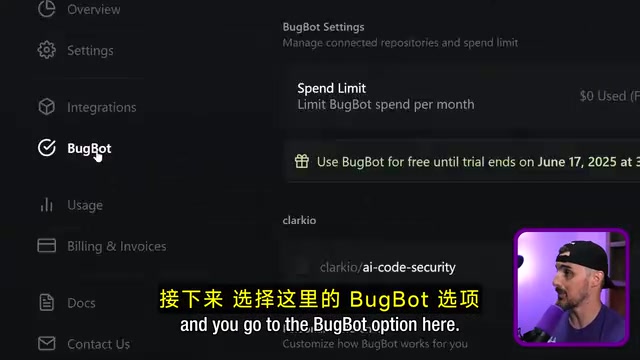
First, set a spending limit to prevent unexpected charges after the free trial period ends. BugBot offers a 7-day free trial, after which it uses the same pricing model as Cursor.
Second, for each authorized repository, you need to manually enable BugBot—it's disabled by default. You can also configure run policies according to your needs:
- Auto-run when a PR is opened + run when @mentioned
- Run only when manually triggered (helps control costs)
- Run only once per PR and ignore subsequent commits
- Hide comments when no bugs are found
Real-World Testing: What Can BugBot Find?
First Run: 3 Bugs Found in 2 Minutes
The PR I used for testing was one where code was automatically generated and submitted by Google Gemini (via Google Jules). After typing @BugBot Run in the PR comment section, BugBot responded with an eyes emoji, indicating it received the request.
About 2 minutes later, BugBot removed the emoji and delivered a detailed review report, finding 3 bugs:

Bug 1: Application Crash Due to JWT Signing Error
In the registration and login functions, errors thrown inside the JWT signing callback won't be caught by the outer try/catch, leading to unhandled exceptions and application crashes. Additionally, there's no error response returned to the client when JWT signing fails. This is a genuine production-level bug.
To understand the root cause, you need to know about JWT and Node.js asynchronous programming characteristics. JWT (JSON Web Token) is a widely used authentication mechanism in web applications, consisting of Header, Payload, and Signature. In the Node.js ecosystem, the jsonwebtoken library's jwt.sign() method supports an asynchronous callback pattern. The problem is that in JavaScript, exceptions thrown inside callback functions won't be caught by outer try/catch blocks—because the callback executes in a different call stack. This is a classic trap in Node.js async programming: synchronous error handling mechanisms (try/catch) cannot cross async boundaries. The correct approach is to handle errors directly inside the callback and return an HTTP response, or use util.promisify() to convert the callback to a Promise for use with async/await.
Bug 2: Race Condition in Database Cleanup
In the clearTables function, resolve() executes before the async database operations complete, causing the Promise to resolve prematurely. This means tests might start running before database cleanup is complete, producing false positive test results.
A race condition is a classic problem in concurrent programming where program behavior depends on the execution timing of multiple operations. In JavaScript, Promises are the core mechanism for handling async operations. When resolve() is called before async database operations (like DELETE statements) complete, the Promise immediately enters the fulfilled state, and subsequent .then() or await will continue executing while database operations are still running in the background. In testing scenarios, this means test cases might execute while old data hasn't been cleared yet, leading to unreliable test results. These issues are often hard to reproduce in local development environments because database operations usually complete quickly, but they surface in CI environments or under high load.
Bug 3: Unhandled JWT Signing Error
Similar to the first issue, the throw error statement inside an async function isn't properly caught by try/catch.
BugBot's report not only identified the problems but also included code snippets and contextual explanations, making it easy for developers to quickly locate the issues.
One-Click Fix Experience
After clicking the "Fix in Cursor" button in BugBot's report, Cursor automatically opens and navigates to the problematic file, highlights the relevant code lines, and launches an Agent-mode chat window.
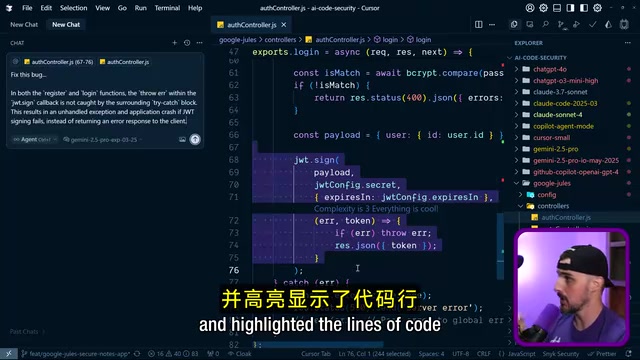
About a minute later, Cursor provided a fix: changing the original if (error) throw error to if (error) { console.error(...); res.status(500)... }. This fix not only resolves the crash but also avoids leaking detailed error information to the client from a security perspective—returning full error stacks to clients in production is a common security anti-pattern that attackers can exploit to understand internal system structure.
Notably, although we only clicked fix for one issue, Cursor simultaneously fixed the same problem in both the registration and login functions, eliminating the need for repetitive work.

Second Review After Pushing the Fix
After pushing the fixed code to the PR branch, BugBot automatically re-ran its review. This time it found 3 new issues:
- Cookie Parser Middleware Initialized Twice: Initialized twice, with the first instance missing the Secret parameter
Cookie Parser is middleware in Express.js used to parse Cookie headers in HTTP requests. When configured with a Secret parameter, it can also verify signed cookies to prevent client-side Cookie tampering. If the middleware is initialized twice and the first instance lacks a Secret, signed cookies won't be properly verified during the first middleware's request processing, potentially creating a security vulnerability—attackers could forge unsigned cookies to bypass verification. Express.js middleware executes sequentially in registration order, so the first Cookie Parser without a Secret processes the request first, overriding the parsing results of the subsequent correctly configured instance. This type of configuration-level bug is extremely easy to miss during code review because each line of code looks syntactically correct in isolation.
- Unused Security Configuration: CSRF protection configuration issues
- Premature Promise Resolution: The earlier database cleanup issue persists (because we hadn't fixed it yet)
Interestingly, BugBot appears to report a maximum of 3 bugs per run, possibly to avoid information overload. However, this also means PRs with many issues may require multiple rounds of fixes and reviews to fully pass.
BugBot's Limitations
In the CSRF configuration detection, BugBot didn't fully understand the conditional logic—the code uses the NODE_ENV environment variable to determine whether to enable CSRF protection (disabled in test environments, enabled in production). This type of environment-based conditional configuration increases the difficulty of static analysis, and BugBot still has room for improvement in understanding context-dependent dynamic logic.
Traditional static analysis tools (like ESLint, SonarQube, and Semgrep) detect code issues based on Abstract Syntax Tree (AST) parsing and predefined rules, excelling at finding syntax errors, style inconsistencies, and known anti-patterns. However, they have inherent limitations in understanding code intent and business logic. BugBot's LLM-based approach can understand code semantics—for example, recognizing that a JWT signing operation should have corresponding error handling. However, BugBot's false positive in the CSRF configuration detection also reveals the current boundaries of AI review: conditional branches based on environment variables (like process.env.NODE_ENV) require understanding of runtime context, which remains a challenge for tools that only analyze static code. In the future, hybrid approaches combining runtime information with static analysis may bridge this gap.
Summary and Reflections
Cursor BugBot demonstrated solid code review capabilities in real-world testing, particularly excelling at finding these types of issues:
- Unhandled exceptions and errors: Such as error escape in JWT signing callbacks
- Race conditions in async programming: Such as premature Promise resolution
- Security-related configuration issues: Such as error information leakage and duplicate middleware configuration
For AI-generated code, BugBot's value is especially prominent—it can catch potential issues before this code reaches production, forming an effective quality gate. As more code is generated by AI, automated code review tools like this will become an indispensable part of the development workflow. This echoes the "AI supervising AI" paradigm being discussed in the industry: as the volume of code generated by AI coding assistants (like Copilot and Gemini) grows rapidly, human review bandwidth becomes a bottleneck. Using another AI system to review AI-generated code, forming an automated quality loop, may be the necessary path for ensuring code quality at scale.
Of course, BugBot currently has some shortcomings: lack of progress feedback during execution, a maximum of 3 issues reported per run, and limited understanding of complex conditional logic. I look forward to the Cursor team continuing to refine these details in subsequent versions.
If you're using Cursor and your team collaboration relies on the GitHub PR workflow, BugBot is worth trying—the 7-day free trial is enough for you to evaluate whether it's suitable for your project.
Related articles
 Product Reviews
The Programmer's Desk Setup Guide: Building a Workspace That Feels Like Home
Discover how programmers build productive, comfortable workspaces. From multi-monitor setups to ergonomic design, explore the desk philosophy that drives focus and flow.
 Product Reviews
Qoder vs Cursor Real-World Comparison: Which $20/Month AI IDE Is Better?
Hands-on comparison of Qoder vs Cursor AI IDEs: Agent autonomy, human interaction count, and architecture decisions. Qoder needed only 2 interactions vs Cursor's 8.
 Product Reviews
Cursor Cloud Agent Demo: Eliminating Bottlenecks Across the Entire Software Development Lifecycle
Deep analysis of Cursor's Cloud Agent demo showing how cloud VMs, automated test artifacts, and a full-chain control plane systematically eliminate human bottlenecks across the software development lifecycle.