Cursor 3.3 Context Usage Analysis: A Complete Guide to Understanding and Optimization
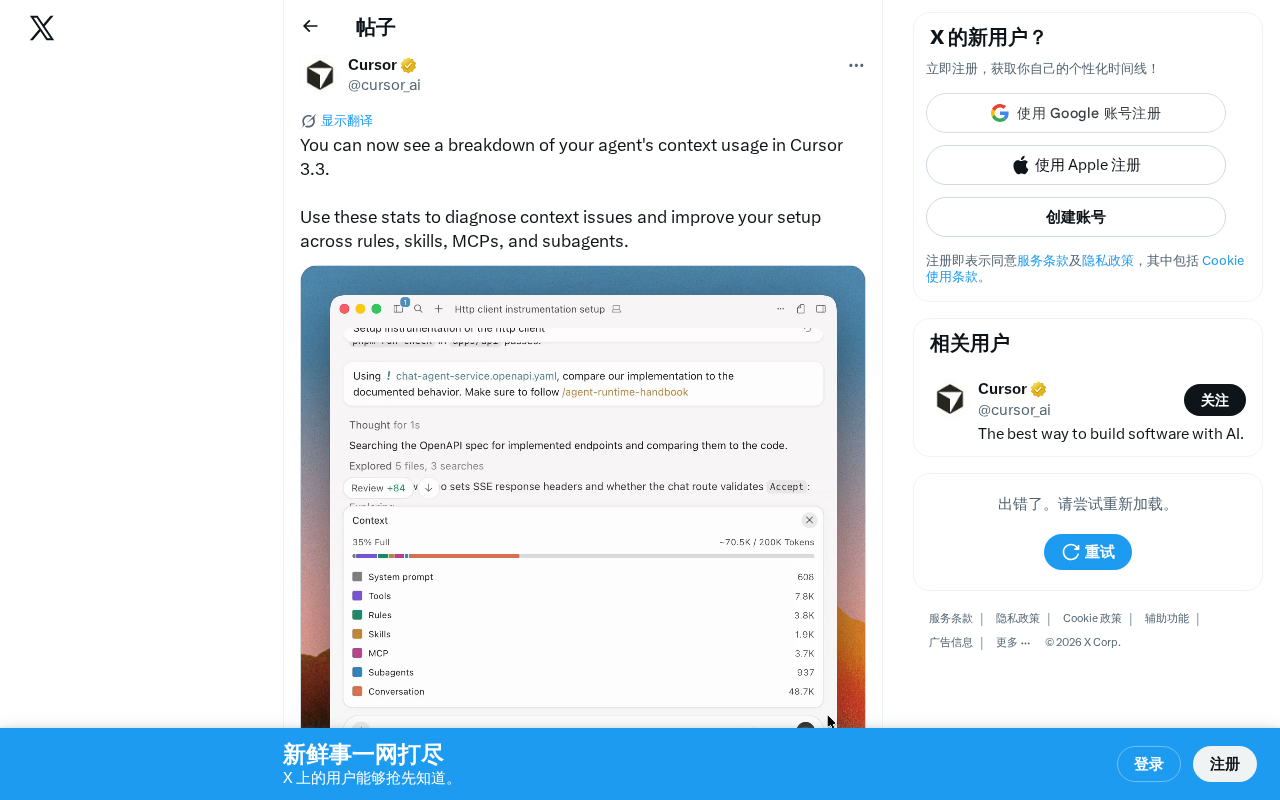
Cursor 3.3 adds context usage analysis to help developers optimize AI Agent efficiency
Cursor 3.3 introduces Agent Context Usage Analysis, visually displaying context consumption details for modules like Rules, Skills, MCP, and Subagents. Developers can use this to diagnose root causes of poor Agent performance (such as oversized rule files or excessive MCP connection overhead) and optimize context utilization through streamlining rules, configuring skills on demand, and managing MCP services—ultimately improving the AI programming experience.
Overview
Cursor 3.3 introduces a practical new feature—Agent Context Usage Breakdown. Developers can now visually inspect the context consumption details when the AI Agent executes tasks, precisely pinpoint context-related issues, and optimize their development configuration accordingly to improve AI programming efficiency.
What Is Cursor Context Usage Analysis
When using Cursor's Agent mode, the context window is the most critical finite resource. The context window represents the maximum number of tokens a large language model (LLM) can process in a single inference pass—tokens are the basic units the model uses to process text, with one English word typically corresponding to 1-2 tokens, and one Chinese character usually corresponding to 1-2 tokens. Taking current mainstream models as examples, Claude 3.5 Sonnet has a context window of 200K tokens, and GPT-4o has 128K tokens. While these numbers may seem large, in real-world Agent programming scenarios, system prompts, project rules, code file contents, tool descriptions, and conversation history can quickly fill up the window.
The Agent needs to load various types of information to process tasks: project Rules, Skills configurations, MCP server connections, and Subagent invocation data—all of which consume context space. When the context approaches its limit, the model may lose critical information from earlier in the conversation, manifesting as "forgetting" or "going off track"—this is academically known as the "lost in the middle" problem, where the model pays significantly less attention to information in the middle of the context compared to the beginning and end.
Before Cursor 3.3, developers had little visibility into how context resources were specifically allocated. When the Agent performed poorly or exhibited "forgetting" behavior, they could only guess based on experience which component was consuming too much context. The Context Usage Analysis feature was designed precisely to solve this pain point—it visualizes context consumption data, making every resource allocation clearly visible.
Core Features of Context Usage Analysis
Quickly Diagnose Context Bottlenecks
By viewing detailed context usage statistics, developers can rapidly identify the root cause of problems:
- Oversized Rules files: If your custom
.cursorrulesfile occupies a large portion of context space, it's a signal to streamline rule descriptions or split them into more targeted rule sets. - Excessive MCP connection overhead: MCP (Model Context Protocol) is an open protocol launched by Anthropic in late 2024, designed to standardize how AI models connect with external tools and data sources. It's similar to USB-C for the AI world—providing a unified standard that allows different tools and services to plug into AI systems in a consistent manner. Each MCP server needs to describe its available tools and usage methods to the model upon connection, and these descriptions themselves consume context space. If a developer has multiple MCP servers connected simultaneously, tool descriptions alone could consume thousands or even tens of thousands of tokens, severely squeezing out context space that should be used for code comprehension.
- Overly long Subagent call chains: Subagents are a task decomposition mechanism within Cursor's Agent mode. When the main Agent encounters complex tasks, it can break them down and delegate them to specialized subagents for processing, similar to the microservices pattern in software engineering. Each subagent has its own independent execution context and returns results to the main Agent upon completion. However, the subagent's invocation instructions, execution summaries, and return results all need to be retained in the main Agent's context, forming a call chain. When task hierarchies run deep or subagents return overly detailed information, this data can significantly squeeze the context space the main Agent needs for understanding the current task. Knowing their proportional consumption helps optimize task decomposition strategies.
Quantify Context Consumption by Module
This feature displays the context consumption of Rules, Skills, MCP, Subagents, and other modules separately, allowing developers to see at a glance which module is the biggest "context consumer" and make data-driven optimization decisions.
How to Use Usage Data to Optimize Development Configuration
With quantitative data as support, developers can make targeted adjustments to their Cursor configuration for more stable and efficient Agent performance:
- Streamline Rules files: Remove redundant rule descriptions and keep only the most critical instructions. Let the Agent use more context space for understanding code and executing tasks, rather than loading lengthy rule text. In practice, a carefully crafted 500-token rule file is often more effective than a verbose 3000-token one, because it reduces the noise information the model needs to process.
- Configure Skills appropriately: Adjust skill trigger conditions to prevent unnecessary skills from being auto-loaded, reducing wasteful context consumption. Skills are essentially predefined capability modules—each activated skill injects its description and usage instructions into the context, so activating on demand rather than loading everything is best practice.
- Manage MCP services on demand: Enable or disable MCP servers based on your current project's actual needs. Infrequently used tools can be temporarily turned off to free up context space for core functionality. For example, during pure frontend development, you can temporarily disable database-related MCP servers to save the context consumed by their tool descriptions.
- Optimize Subagent usage strategy: Only enable subagents when truly needed, avoiding excessive context fragmentation across multiple agents. For simple tasks, having the main Agent handle them directly is typically more efficient than delegating to subagents, as it eliminates the context overhead of task descriptions and result summaries.
Through these optimizations, developers can typically achieve significant improvements in Agent performance during long conversations, reducing instances of "forgetting" and "going off track."
Why Context Management Is Becoming Critical for AI Programming
As AI programming assistants continue to grow more capable, developers are increasingly relying on Agent mode. But the LLM's context window remains a finite resource, and how efficiently this resource is utilized directly determines the quality of the Agent's output.
This feature reflects the Cursor team's deep thinking on "Observability"—not just making AI more powerful, but enabling developers to understand and control AI behavior. The observability concept originates from the distributed systems domain, initially popularized by monitoring platforms like Datadog and New Relic, with the core philosophy of understanding internal system state through three pillars: logs, metrics, and traces. As AI Agent systems grow increasingly complex, platforms like LangSmith, Langfuse, and Helicone are already providing call tracing and cost analysis for LLM applications. Cursor embeds observability directly into the IDE, allowing developers to understand Agent resource consumption patterns without relying on external tools—representing an important trend in AI development tools evolving from "black-box usage" to "white-box understanding." This transparency is crucial for building developer trust in AI tools.
From an industry perspective, context management is becoming a core topic in AI-assisted development. The AI IDE market is currently in a phase of rapid evolution: Cursor is built on a VS Code fork, known for its deeply integrated AI Agent mode; Windsurf (formerly Codeium) also offers Agent programming capabilities, emphasizing smooth multi-file editing experiences; GitHub Copilot continues iterating its Agent features backed by a massive user base; JetBrains' Junie, Amazon's Q Developer, and others are also actively positioning themselves in this space. As model capabilities trend toward homogenization across products, competitive differentiation is shifting toward context management strategies, tool ecosystem integration, and developer experience optimization. Whoever can more efficiently utilize the limited context window can deliver a superior AI programming experience. Cursor 3.3's Context Usage Analysis provides developers with a data-driven optimization path, transforming the tuning process from blind trial-and-error into precise adjustments.
Summary
Cursor 3.3's Context Usage Analysis feature may seem like a minor update, but it actually opens a window for developers to understand the internal workings of the AI Agent. For developers who heavily use Cursor's Agent mode, this feature helps you configure your development environment more scientifically and achieve a more stable, higher-quality AI-assisted programming experience.
We recommend upgrading to Cursor 3.3 as soon as possible and spending some time analyzing your context usage distribution to identify optimization opportunities. Proper context management is a key step toward unlocking the full potential of your AI programming assistant.
Key Takeaways
- Cursor 3.3 introduces Agent Context Usage Analysis, showing context consumption across modules including Rules, Skills, MCP, and Subagents
- Developers can use this feature to diagnose root causes of poor Agent performance, such as oversized rule files or verbose MCP tool descriptions
- Based on quantitative data, developers can strategically streamline rules, optimize skill configurations, and manage MCP services to improve overall Agent performance
- Context management is becoming a core topic in AI-assisted development, and this feature represents Cursor's important exploration in AI observability
Related articles
 Tutorials
ChatGPT Plus Subscription Guide: Are GPT-5.5, image-2, and Codex Worth the Upgrade?
A detailed look at ChatGPT Plus features — GPT-5.5, image-2, and Codex — with a Plus vs Pro comparison and a complete step-by-step subscription guide for users outside the US.
 Tutorials
Harness AI Engineering in Practice: Using Claude Code to Master Enterprise-Level E-Commerce Development
Deep dive into Harness AI Engineering: master enterprise e-commerce development with Claude Code using the Rules, Skills, Wiki, and Changes framework.
 Tutorials
Cursor + Codex Dual-IDE Collaboration: A Practical Methodology for Open-Source Project Customization
A complete methodology for open-source project customization based on real-world experience, detailing the Cursor+Codex dual-IDE workflow, seven-stage process, MVP validation, and AI source code reading techniques.