Cursor Beginner's Guide: A Complete Comparison of AI Coding Tools

A comprehensive comparison of Cursor, Copilot, Windsurf, and more to help you pick the right AI coding tool.
AI programming replaces traditional hand-coding with natural language conversation, using large language models to dramatically compress development timelines. This article breaks down the key differences between today's leading tools: GitHub Copilot excels at completion but struggles with cross-file refactoring; Cursor offers the most complete multi-file collaboration experience at a higher price; Windsurf focuses on local execution and visual workflows but demands more hardware; and free tools like Trae and Tongyi Lingma cover core needs with less mature ecosystems. The key takeaway: no matter which tool you choose, your ability to communicate effectively with AI — the quality of your prompts — is the true driver of productivity.
What Is AI Programming
Traditional programming is a highly specialized craft. Developers need a solid technical foundation — mastery of at least one language (such as Python, Java, or C++) and a clear understanding of complex logic and algorithms — before they can precisely instruct a computer what to do, line by line. The process is rigorous, has a steep learning curve, and typically involves long development cycles.
With the rapid advancement of artificial intelligence, the way we write code is undergoing a fundamental shift. Today, almost every developer uses AI tools in some form — even without Cursor, people turn to DeepSeekAd, ChatGPT, or similar tools to ask questions, generate code, or find solutions. This kind of AI-assisted workflow has become remarkably mainstream.

At its core, AI programming means using natural language conversation — backed by powerful large language models and intelligent processing — to make AI a true development partner, not just a generator of isolated code snippets. The goal is clear: significantly compress project timelines that would traditionally take one to two weeks or even months. Ideally, a one-month project gets done in a week; a year-long project wraps up in three months.
How AI Programming Lowers the Barrier to Entry
The greatest value of this approach is enabling non-professional users to interact with large language models and quickly generate the code they need. It dramatically lowers the barrier to software development, bringing more people into the process.

That said, how much productivity you actually gain depends entirely on the quality of your communication with the AI. Knowing how to write effective prompts and how to make the AI accurately understand your intent is the key to using these tools well. Both beginners and experienced developers can leverage AI models to rapidly bring ideas to life — but that requires continuously refining how you collaborate with AI.
The quality of your prompt directly determines how usable the AI's output is. A high-quality prompt typically includes: a clear goal (what feature you want to build), relevant context (what language or framework you're using, what code already exists), output format requirements (a function, a class, or a complete file), and necessary constraints (which dependencies to avoid, which versions to support). The vaguer the instruction, the more likely the AI is to produce code that looks plausible but can't actually be used as-is. For non-professional users, learning how to clearly describe your requirements will boost real-world output efficiency far more quickly than memorizing any specific programming syntax.
A Side-by-Side Comparison of Popular AI Coding Tools
Beyond Cursor, there are several other tools worth knowing about — each with its own strengths and weaknesses.
GitHub Copilot
One of the earlier AI coding tools, available as an IDE plugin for VSCode and a wide range of other editors. Its core features are code completion and conversational chat, with support for modifying code and models including GPT-4 and Claude 3.5.
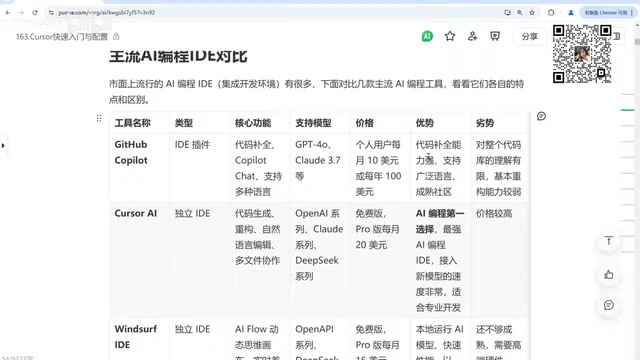
Its strengths include powerful code completion, broad language support, and a mature community backed by the GitHub open-source ecosystem, which gives it solid code comprehension. Its weaknesses are limited understanding of the overall codebase and relatively weak refactoring capabilities.
GitHub Copilot launched in 2021, powered by OpenAI's Codex model — one of the earliest commercial products to apply large language models to code completion. It runs as an IDE plugin and, once installed, predicts and suggests subsequent code in real time as you type, supporting inline "ghost text" completion as well as conversational modifications through a chat panel. Copilot can generate entire code blocks based on the current file's context, comments, or even function names, significantly reducing the need to write boilerplate code by hand. Its limited understanding of the full codebase stems from the fact that it only reads the currently open file and a small amount of adjacent context during inference — unlike Cursor, which can index an entire project directory. This makes Copilot comparatively weaker in scenarios involving cross-file refactoring and dependency tracing.
Cursor
Currently one of the top choices in the AI coding space. It performs well across code generation, refactoring, natural language editing, and multi-file collaboration, offering a well-rounded experience that even supports advanced features like MCP. Its main downside is the price.
Windsurf
A standalone IDE whose standout features are the AI Flow workflow and a dynamic thinking canvas, paired with real-time diff evaluation. It takes a local-first approach, running AI models locally for faster performance, with a web-centric design. Its capabilities are still maturing, and it has fairly high hardware requirements.
The "AI Flow workflow" in Windsurf is a programming paradigm that visualizes AI reasoning steps: your intent gets broken down into multiple sub-task nodes, with each node's execution status displayed in real time on a dynamic thinking canvas, making it easy to track and intervene. "Real-time diff evaluation" means that after every AI code change, the tool instantly shows a before-and-after comparison, letting you accept or reject changes block by block — similar to a Git diff interaction. The advantage of the local-first architecture is that your code never needs to be uploaded to the cloud, protecting privacy and reducing network latency. The tradeoff is that running models locally requires a dedicated GPU or high-performance CPU, making hardware requirements significantly higher than purely cloud-based solutions.
Trae and Domestic Chinese Tools
Trae recently released a new version that is reportedly quite impressive — highly capable, supporting natural language-to-code conversion with a low-code orientation, and backing models like Claude 3.5 and DeepSeek R1. It is currently free to use.
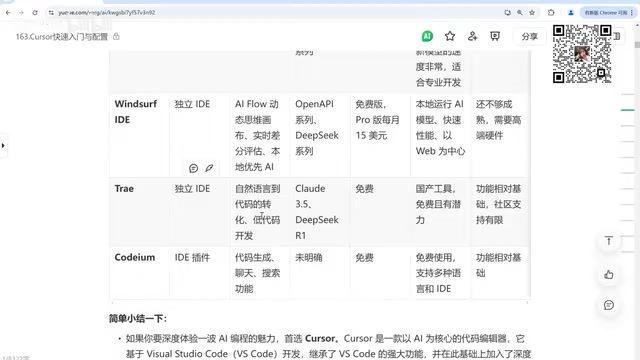
If cost is a concern, domestic Chinese AI coding tools like Tongyi Lingma are worth considering, as they are largely free. They cover core features like writing and modifying code, but are less polished overall and have more limited community support compared to paid alternatives. There are also IDE plugins like CodeGeeX, which support nearly all mainstream editors including VSCode, IDEA, and PyCharm.
How to Choose the Right Tool for You
You can evaluate your options along three dimensions: feature completeness (Cursor and Copilot lead here), cost (domestic tools and Trae are currently free), and usage model (standalone IDE vs. plugin).
If you want the most complete multi-file collaboration and refactoring experience and have the budget for it, Cursor is the strongest choice right now. If you only need core capabilities like code completion and conversational editing and want to keep costs down, free domestic tools are more than enough for everyday needs. If you prefer local execution and visual workflow management, Windsurf is worth trying.
Regardless of which tool you choose, the tool itself is just the starting point. What truly determines your productivity is how effectively you communicate with the AI model.
Related articles

Random Pruning of the DPO Computation Graph: 1.4x Training Speedup and Lower Peak Memory
DPO training too slow and memory-hungry? This paper proposes a random pruning framework for the DPO computation graph, sampling independently across position, sequence, and branch dimensions; branch pruning achieves a 1.426x step-time speedup and cuts training time by about 30%, with in-depth attribution of memory and time gains.

Why Does JEPA Underperform MLM in Longitudinal EHR Representation Learning?
New study compares JEPA and MLM for longitudinal EHR representation learning on MIMIC-IV: three JEPA variants train stably without collapse but underperform MLM; target size, not heterogeneity, drives prediction error.

Transfer Learning + Visible Light Communication: A New Approach to Energy-Efficient Indoor Positioning
A study proposes a transfer learning-based visible light communication indoor positioning method, achieving 47% accuracy improvement on the BOSCH factory dataset, 67.5% model efficiency under high noise, and introducing the ME composite metric for energy-efficient positioning in energy-constrained industrial IoT scenarios.