Cursor Beginner's Guide: Comparing Top AI Coding Tools & A Practical Learning Path

A comprehensive comparison of top AI coding tools with a practical Cursor learning roadmap.
This guide provides a full comparison of leading AI coding tools—Cursor, GitHub Copilot, Windsurf, Trae, and Tongyi Lingma—covering features, model support, and pricing. It also outlines a three-chapter Cursor learning path from basic configuration to advanced techniques like Cursor Rules and MCP, helping developers choose the right tool and maximize AI-assisted coding efficiency.
What Is AI Programming? A Revolutionary Shift in How We Code
In the traditional programming model, software development is a highly specialized task. Programmers need to master at least one programming language (such as Python, Java, or C++), have a clear understanding of complex logic and algorithms, and write precise lines of code to tell the computer how to execute tasks. This process is rigorous, has a high barrier to entry, and involves long development cycles.
With the rapid advancement of AI, the way we code is undergoing a fundamental transformation. Today, developers use AI tools to some extent in their work—even if they don't use Cursor, they rely on tools like DeepSeekAd, ChatGPT, or Doubao to ask questions and communicate, letting AI help generate code or provide solutions. This has become an extremely common part of the modern developer's daily workflow.

The core of AI programming lies in conversing with AI large language models through natural language, then leveraging the model's intelligence to complete development tasks. These Large Language Models (LLMs), built on the Transformer architecture, are pre-trained on billions of lines of open-source code from GitHub and massive natural language text corpora. Through this training, they learn code syntax, design patterns, and logical reasoning capabilities. When users describe requirements in natural language, the model maps them into code space and generates semantically appropriate program code. The larger the model's Context Window, the more complete its understanding of the overall project structure, and the more accurately the generated code fits actual needs. In the past, AI could only help you generate a simple code snippet, but now it can truly serve as a development assistant, helping solve problems and saving development time.
The Efficiency Leap Brought by AI Programming
Efficiency improvement is the most tangible value of AI programming. A project that used to take one or two weeks—or even one or two months—can now be completed much faster with AI tools. Developers can compress a month's work into a week, or a year's work into three months.
Of course, this productivity boost doesn't happen automatically. It depends on the developer's ability to communicate effectively with AI—how to write good prompts and how to help AI accurately understand requirements are the keys to efficiency. The core skill involved here is Prompt Engineering: carefully designing input prompts to guide AI models toward high-quality outputs. In AI programming scenarios, good prompts should include clear functional descriptions, tech stack constraints, input/output formats, boundary conditions, and code style requirements. For example, instead of saying "write a sorting function," it's better to say "implement a quicksort algorithm in Python that supports custom comparison functions, includes type annotations and a docstring"—the specificity of the prompt directly determines the accuracy and usability of AI-generated code. Through conversational interaction, even non-professional users can collaborate with AI models to quickly generate the code they need.

This paradigm dramatically lowers the barrier to programming, enabling more people to participate in software development. Whether you're a complete beginner or a developer with some experience, you can leverage AI's intelligent assistance to rapidly bring ideas to life and significantly boost development efficiency.
A Comprehensive Comparison of Leading AI Coding Tools
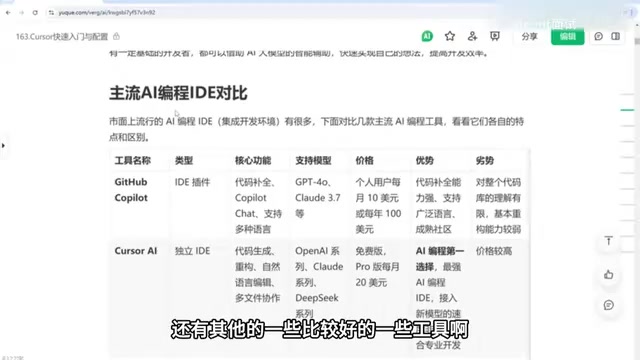
Beyond Cursor, there are several other AI coding tools worth knowing about. Below is a systematic comparison across dimensions including features, model support, and pricing.
GitHub Copilot: The Veteran Plugin with Outstanding Code Completion
Copilot was one of the earliest AI coding tools to appear, delivered as an IDE plugin that works with IntelliJ IDEA, VSCode, and many other editors. Its core features are code completion and chat, supporting models like GPT and Claude 3.5.
Copilot was initially based on OpenAI's Codex model (a code-specialized fine-tuned version of GPT-3), and has since gradually upgraded to a multi-model support architecture. Its unique advantage stems from the GitHub platform itself—with over 100 million public repositories spanning hundreds of programming languages of real-world project code, Copilot can reference massive amounts of real coding patterns when performing completions. On the technical level, it communicates with editors via the Language Server Protocol (LSP), obtaining the code context at the cursor position in real-time and sending it to cloud-based models for inference. As a result, it excels at code completion, supports a wide range of languages, and has a mature community. However, its weakness is limited understanding of entire codebases and weaker refactoring capabilities.
Cursor: The Top Choice in AI Programming
Cursor is currently one of the leading choices in the AI programming space, excelling at code generation, refactoring, natural language editing, and multi-file collaboration, with an overall excellent user experience.
What sets Cursor apart from traditional code completion tools is its project-level indexing system—it builds a semantic index of your entire codebase (similar to embedding-based retrieval in a vector database). When users initiate a conversation or editing request, the system automatically retrieves relevant files and function definitions as context for the large model, enabling true cross-file understanding and modification. It supports advanced features like MCP (Model Context Protocol), an open protocol released by Anthropic that allows AI models to connect to external data sources and tools. This means developers can seamlessly integrate databases, API documentation, project management tools, and other external resources into their AI workflow, greatly expanding the boundaries of AI programming applications. However, its subscription price is relatively expensive, which is a factor to weigh.
Windsurf: A Standalone IDE with Local-First Execution
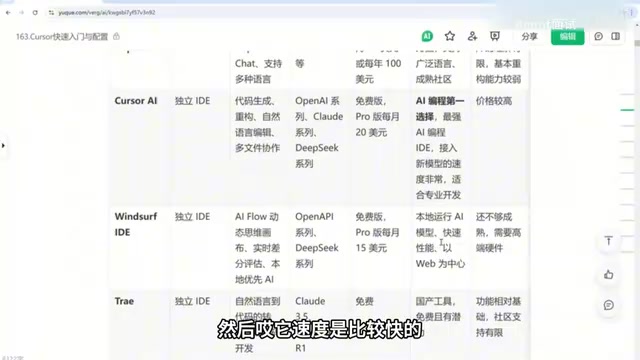
Windsurf is a standalone IDE whose core feature is the AI Flow workflow—a dynamic thinking canvas paired with real-time diff evaluation, using a local-first approach to running AI models.
The local-first strategy means AI model inference runs on the user's local hardware (primarily relying on GPU) rather than being sent to cloud servers. The advantages of this approach include: stronger data privacy (code never leaves your machine), lower response latency (no network round-trip), and offline availability—resulting in faster speeds. Real-time Diff Evaluation means that as AI generates code, the system displays a real-time comparison of before and after changes, allowing developers to quickly review and accept modifications. Windsurf is centered on web development, but its features are not yet fully mature, and because it needs to run quantized AI models locally, it has high hardware requirements for GPU memory and other specifications.
Trae, Tongyi Lingma, and Other Chinese Tools: Free Is Their Biggest Advantage
ByteDance's Trae recently released a new version with an excellent experience, high intelligence, the ability to perform code transformations via natural language, support for Claude 3.5, DeepSeek R1, and other models—all completely free to use.
Tongyi Lingma is also free and effective. For users concerned about costs, most Chinese AI coding tools are free. While community support may be limited and the surrounding ecosystem less polished than paid alternatives, core features like writing and modifying code are fully available.
Additionally, there's Codeium, an IDE plugin that supports virtually all mainstream IDEs including VSCode, IDEA, and PyCharm—ideal for users who don't want to switch their development environment.
Cursor Practical Tutorial: Three Progressive Chapters from Beginner to Advanced
This Cursor practical tutorial is organized into three progressive chapters, covering a complete learning path from zero-foundation to advanced application.
Chapter 1: Quick Start and Basic Configuration
Covers comparing Cursor with other AI coding tools, software installation and setup, interface configuration, model invocation and settings, basic coding methods, common commands, and the use of Chat and Composer features.
Chapter 2: Advanced Skills and Applications
Covers intelligent completion and code generation, integrated terminal command-line tools, the efficient @ mention feature and annotation methods, the use of Cursor Rules, and advanced conversation techniques and development approaches.
Cursor Rules is a project-level AI behavior configuration mechanism. Developers can create a rules file (such as .cursorrules) in the project root directory to define coding standards, tech stack preferences, naming conventions, architectural patterns, and more that AI should follow within that project. For example, you can specify "all React components should use functional components with TypeScript" or "API calls should uniformly use axios and include error handling." These rules are continuously injected as a System Prompt into every AI interaction, ensuring generated code always conforms to team standards. It's essentially a persistent programming style guide for AI—an important tool for maintaining code consistency in team collaboration.
Chapter 3: Hands-On Efficiency Scenarios
Covers configuration of commonly used efficiency features like YOLO mode, code completion, webpage generation, and keyboard shortcuts; extends into scenarios like literature reading, video topic selection, and outline writing; and includes more practical explorations combining DeepSeek + Cursor for research, data analysis visualization, rapid personal website development, and more.
How to Choose the Right AI Coding Tool for You
For beginners, the logic for choosing an AI coding tool is actually quite straightforward:
- For the best experience: If budget allows, Cursor is the top choice—comprehensive features, strong multi-file collaboration, and its project-level semantic indexing and MCP protocol support give it clear advantages in complex project development
- For cost control: Free Chinese tools like Trae and Tongyi Lingma can meet the vast majority of core coding and editing needs, offering excellent value for personal projects and learning purposes
- For those attached to their current IDE: Plugin-based options like Copilot and Codeium are better suited for a smooth transition without changing your development environment, especially for developers with established workflows
Regardless of which tool you choose, what truly determines efficiency is always your ability to communicate with AI. Learning to write good prompts and clearly express requirements is what allows these powerful AI coding tools to deliver maximum value. Prompt engineering is not a one-time skill but a capability that requires continuous iteration and optimization through practice—understanding model characteristics, mastering effective context organization, and learning to break complex tasks into executable steps are all essential competencies for efficient AI programming.
Key Takeaways
Related articles

Random Pruning of the DPO Computation Graph: 1.4x Training Speedup and Lower Peak Memory
DPO training too slow and memory-hungry? This paper proposes a random pruning framework for the DPO computation graph, sampling independently across position, sequence, and branch dimensions; branch pruning achieves a 1.426x step-time speedup and cuts training time by about 30%, with in-depth attribution of memory and time gains.

Why Does JEPA Underperform MLM in Longitudinal EHR Representation Learning?
New study compares JEPA and MLM for longitudinal EHR representation learning on MIMIC-IV: three JEPA variants train stably without collapse but underperform MLM; target size, not heterogeneity, drives prediction error.

Transfer Learning + Visible Light Communication: A New Approach to Energy-Efficient Indoor Positioning
A study proposes a transfer learning-based visible light communication indoor positioning method, achieving 47% accuracy improvement on the BOSCH factory dataset, 67.5% model efficiency under high noise, and introducing the ME composite metric for energy-efficient positioning in energy-constrained industrial IoT scenarios.