Cursor Deep Dive: A Senior Engineer's Guide to 10x Productivity in Practice

Cursor's 10x productivity comes from context, rules, and verification—not shortcut fluency.
The article compares Cursor's AI to an excellent new engineer who needs onboarding, arguing developers must supply codebase context. It breaks down the three interaction modes (Tab, Command K, Chat), stresses starting non-trivial tasks in plan mode before agent mode, and instills commit-before-run, test-before-accept discipline. Team-level rules, commands, and memory encode standards and workflows repo-wide; advanced workflows cover parallel agents, background agents' security trade-offs, and MCP/Context7.
Cursor Deep Dive: A Senior Engineer's Guide to 10x Productivity in Practice
A senior engineer shared his complete hands-on experience with Cursor on Bilibili. This is not a shortcut cheat sheet, but a full methodology spanning mindset models to team collaboration. The core argument is singular: Cursor's 10x productivity doesn't come from memorizing shortcuts—it comes from better context, clearer rules, and more careful verification.
He compares the AI inside Cursor to an excellent engineer who just joined the team—fluent in every language and framework, but completely unaware of your codebase conventions, legacy decisions, and folder structure. Your job is to quickly fill in that context.
Three Interaction Modes: How Tab, Command K, and Chat Divide the Work
The first lesson in understanding Cursor is grasping the boundaries of the three ways AI participates.
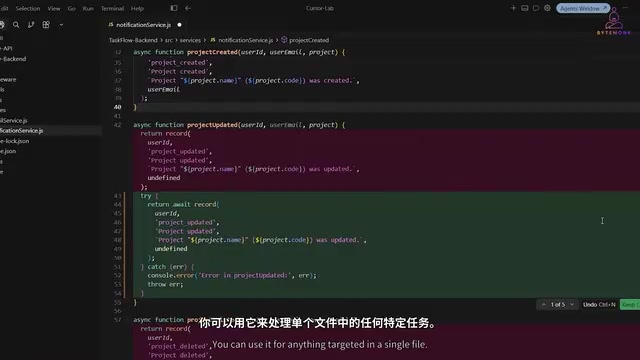
Tab is the evolution of autocomplete. Traditional editors predict the next character you'll type; Cursor predicts your next edit based on the task you're trying to accomplish, often completing an entire code block at once. It's always on, and after accepting a suggestion you can immediately press Tab again to predict the next logical change based on what you just accepted. Command K is targeted modification: select a block of code and issue an instruction in natural language—"convert this to async/await," "add type annotations to this class"—and Cursor produces a precise diff, green for additions, red for deletions, with everything else untouched. It works in the terminal too: type "show the last five commit messages" and it writes the shell command for you.
Chat is for multi-file reasoning. Its key differentiator is context awareness: answers are grounded in your entire codebase rather than generic knowledge. But there's an easily overlooked prerequisite—Cursor doesn't automatically know which part of the code is relevant to your question. You must proactively reference files, folders, terminal output, or even live web content using the @ symbol. The more precise your references, the higher the quality of the answer; stuffing in the entire codebase only adds noise.
Plan Mode and Agent Mode: The Dividing Line of Professional Usage
Most developers open Cursor, jump straight into agent mode, describe what they want, and let it run—only to get stuck in a correction loop: the agent does something reasonable but not quite right, you correct it and it drifts, you correct again, and soon you're pulling your hair out.
The solution is a two-phase workflow. Take adding a tagging feature to a task management project as an example: switch to plan mode and describe the requirement. Cursor writes no code at this stage; instead it generates an architecture overview, database schema changes, and a complete step-by-step checklist.
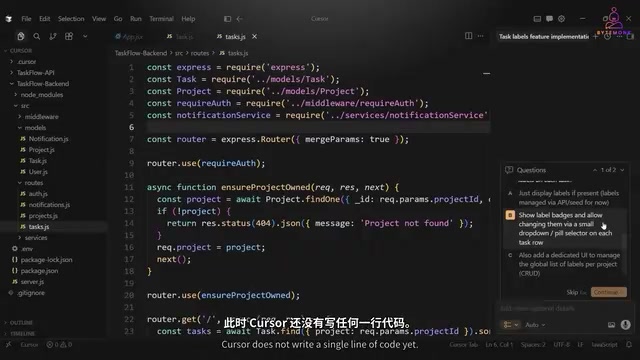
You can read through it, modify it, add or remove items—this plan belongs to you. Once confirmed, click Build and Cursor automatically switches to agent mode, executing each item on the checklist and checking them off as it goes.
There's a key detail here: code is written to actual files during execution—the moment the agent writes it, it exists on disk. So test before accepting everything: run the app, check the behavior, and accept only when it matches expectations. Another habit: commit your code before running the agent—if it touches 15 files and goes off the rails, you have a clean point to roll back to.
For anything beyond simple tasks, always start in plan mode. Vague instructions produce vague output; drafting an explicit plan upfront saves multiple correction loops. If you have a requirements document, bring it into plan mode with Add File and Cursor will base its plan directly on it.
Rules, Commands, and Memory: Amplifiers for Team Collaboration
Everything above serves a single developer, a single conversation, a single task. But working in a team raises a problem: the agent remembers nothing between conversations—every new chat starts from a blank slate. Rules, commands, and memory are the antidote.
Rules are persistent instructions that the agent reads automatically before every interaction. The fastest way to generate them: type generate in the chat box, and Cursor scans your existing codebase, patterns, libraries, and file structure, producing a rules file tailored to your project in about 30 seconds. The community resource Cursor Directory also offers battle-tested rule sets for stacks like Next.js, TypeScript, and Python that you can import and adjust. Rules can also be scoped by path—frontend and backend rules each govern their own domain; irrelevant rules add noise and degrade output quality.
Commands are reusable instructions saved as Markdown and triggered with a slash. For example, to add structured logging across multiple services, rather than rewriting a detailed prompt each time, write it once and save it as /addLogging, then point it at any file. The commands folder lives in the repo's .cursor directory; once committed to Git, any developer who pulls the repo automatically gets all the commands.
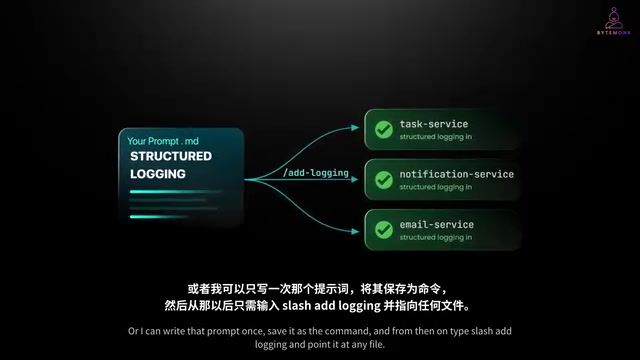
The essence of this mechanism: rules encode team standards, commands distill best workflows, and memory provides persistent context. Thirty minutes of setup at the start of a project benefits every subsequent interaction.
It's worth noting that rules files consume the context window on every interaction. The model can only handle a limited context length, and rules, command descriptions, @-referenced files, conversation history, and codebase retrieval results all share the same budget. The longer and broader your rules, the less room remains for the actual task—and irrelevant rules can steer the model toward the wrong clues. This is precisely why the original article emphasizes "scoping by path": let frontend and backend rules load only within frontend or backend files respectively, ensuring constraints apply without the pollution and dilution of loading everything. In practice, prune stale rules regularly, keep high-frequency, general constraints in always-on rules, and convert low-frequency procedures into on-demand commands.
Advanced Workflows: Parallel Agents, Background Agents, and MCP Integration
Parallel agents let you run multiple agents simultaneously, each working on a different task in its own Git worktree and branch. In the author's demo, three tasks—pagination, unit tests, and a bug fix—would have taken a whole afternoon sequentially; with three parallel agents, roughly an hour of unified review sufficed. The prerequisite is that tasks are truly independent—parallelizing dependent tasks leads to merge conflicts.
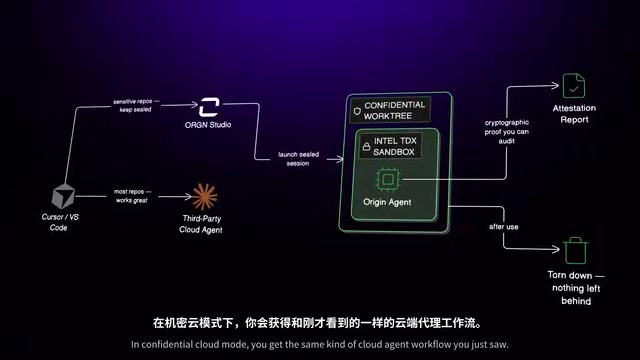
Background agents go further: they clone the repo in an isolated cloud environment, work on a separate branch, and produce a merge-ready PR complete with screenshots and logs, so you can close your laptop and wait for delivery. But the author offers a special warning: this means your code leaves your machine and is cloned to the cloud. In the banking and healthcare codebases he worked with at PayPal and CapitalOne, tools like this would be blocked by security teams from day one.
Bugbot connects to GitHub repositories, automatically reviews every PR, identifies potential issues, and comments directly with a "Fix in Cursor" link. At scale, human reviewers can focus on architecture and logic instead of catching missed null checks.
MCP (Model Context Protocol) turns Cursor from an editor into an interconnected development environment, with over 1,800 servers available today. The author recommends installing Context7 first—it provides up-to-date documentation for major frameworks, and combined with a rule like "always use Context7's API docs," it prevents the agent from generating outdated API code based on stale training data.
Git worktrees are Git's built-in lightweight branch isolation mechanism, allowing multiple working directories to be checked out simultaneously within the same repository, each bound to a different branch. Compared with copying the entire repo, worktrees share the underlying object store, making creation extremely cheap. Cursor's parallel agents are built on this mechanism: each agent has its own worktree and branch, so they edit files and run tests without interfering with each other. The trade-off is that they don't share uncommitted changes—which is the source of merge conflict risk: when two agents modify the same region of the same file, merging requires human arbitration. Understanding this lets you judge more accurately which tasks suit parallelism: the lower the overlap in file sets, the greater the parallel payoff.
MCP (Model Context Protocol) is a standardized protocol proposed and open-sourced by Anthropic to let AI applications connect to external tools and data sources in a unified way. It abstracts the "capability provider" as an MCP server exposing resources, prompt templates, and callable tools; the "capability consumer" (clients like Cursor) discovers and invokes these capabilities through the protocol, with no per-integration adaptation required. This solves the previous fragmentation where every editor and every model implemented its own plugin ecosystem. Context7 in the article is one such MCP server, dedicated to framework documentation retrieval; its value lies in bypassing the freshness limits of model training data, so generated code targets current API versions rather than deprecated patterns.
The Developer's New Role: Guiding and Reviewing
The methodology culminates in a role shift. Summarizing when the project was 80% complete, the author notes: the developer's job is no longer to write every line of code, but to provide the right context, set the right constraints, and verify the output—intent, context, constraints, verification, looping over and over. The agent executes; you guide and review.
The people who achieve 10x productivity aren't those most familiar with shortcuts, but those who provide better context, write better rules, build better commands, and use plan mode before letting the agent run. As models get stronger, the value of this skill only rises.
One last line worth remembering for every user: don't rely fully on autopilot—review what the agent writes and understand the changes before accepting them. No matter who or what writes the code, the code that ships to production is your responsibility.
One-line Summary
Cursor's 10x productivity stems from context, rules, and verification—not shortcut fluency.
Paragraph Summary
This article likens Cursor's AI to an excellent new engineer who needs onboarding, arguing that developers must proactively supply codebase context. It breaks down the boundaries of the three interaction modes (Tab autocomplete, Command K precise edits, Chat multi-file reasoning), stresses that non-trivial tasks must start in plan mode to generate an editable checklist before switching to agent mode, and instills verification discipline: commit code before running, test before accepting. At the team level, rules encode standards, commands distill workflows, and memory provides persistent context, with repo-level sharing getting new members productive immediately. Advanced workflows cover parallel agents (independent Git worktrees), background agents (watch the security boundary of code leaving your machine), and MCP integration (start with Context7 for the latest docs). The takeaway is a role shift: developers move from writing code to providing intent, context, and constraints and verifying output—and bear final responsibility for shipped code.
Related articles

Chain of Thought Isn't Just for AI: How Humans Can Use CoT to Improve Thinking Quality
Chain of Thought isn't just a prompt trick for large models. Starting from a Hacker News discussion, this article analyzes why CoT works for human thinking too, breaks down actionable ways to transfer it, and highlights the key differences between human CoT and machine CoT.
Cloudflare Teams Up with OpenAI: Closi…
Cloudflare Teams Up with OpenAI: Closing the Loop from Vulnerability Discovery to Defense with AI
Cloudflare uses OpenAI Daybreak to investigate security vulnerabilities and generate reviewable remediation plans, while developers use Codex to boost coding efficiency and quality.

Orca Multi-Agent Orchestration in Practice: A Guide to Parallel Collaboration with Claude and Codex
Orca is Stable AI's free open-source agent workbench supporting 34 agents like Claude Code and Codex in parallel. Learn its Git worktree isolation, multi-model orchestration, and mobile management.