Cursor in Action: Building a Student Management System from Scratch with AI

Cursor + Claude demo: conversation-driven development from tech selection to a running Python app.
This article introduces Cursor, the AI-powered code editor that builds on a VS Code-like interface with an AI chat panel supporting Agent, Ask, and Manual modes. Using a Python student management system as a hands-on example, it walks through tech stack consulting in Ask mode, automatic code generation in Agent mode, AI-driven dependency conflict resolution, and browser-based feature verification. The article also highlights two key boundaries of AI programming: AI delivers only what you explicitly request, and all generated code still depends on a properly configured local development environment.
What Is Cursor: A Code Editor for the AI Era
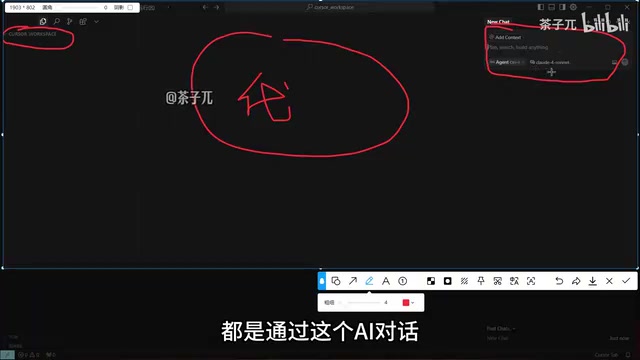
Cursor is one of the most talked-about AI programming tools available today. At its core, it's a code editor with deeply integrated AI capabilities, and its interface will feel immediately familiar to developers who use VS Code — project directory on the left, code editor in the center, with nearly identical interaction patterns. The real difference lies in the AI chat panel on the right, which is what gives Cursor a fundamentally different workflow compared to traditional editors.
In traditional development, everything in the left panel and center editor has to be created and written manually. In Cursor, most of that work can be handled through the AI chat panel on the right. Put simply: manage your conversation with the AI, and the code files get generated into your project directory automatically. This "conversation-driven development" model is reshaping how programmers work.
One thing to note: Cursor is a commercial product that requires registration before use. You'll need to sign up for an account, then open a folder as your workspace (for example, create a directory called cursor-workspace) before you can start collaborating with the AI.
Three Chat Modes: Understanding How Much AI Takes Over
Cursor offers three core chat modes, and understanding the difference between them is key to using the tool effectively. Each mode represents a different depth of AI involvement in the coding process.
Agent Mode: Let AI Take the Wheel
Agent mode is the most aggressive and most powerful of the three. In this mode, the AI actively handles the entire coding process — generating files, writing code, installing dependencies, and even automatically fixing errors. If your goal is to have AI build a complete project from scratch, Agent mode is the way to go.
Ask Mode: Targeted Q&A
Ask mode behaves more like a traditional AI assistant. It answers your specific questions but won't proactively create large numbers of files or take over your coding process. Use Ask mode when you want to consult on a technical approach, understand a concept, or get a recommendation.
Manual Mode: AI as a Reference Only
Manual mode puts full coding control back in the developer's hands, with AI providing only suggestive hints. This mode is suited for experienced developers who want to drive their own code and only need occasional AI assistance.

Model Selection: Why Claude Is the Recommended Choice
Cursor integrates multiple large language models — both premium paid models and free ones. For general Q&A, you can freely switch between them. But for serious code generation tasks, especially for projects heading toward production, the recommendation is to go with Claude (Claude Sonnet).
The reason is straightforward: Claude is currently one of the strongest models for coding. Compared to the value of a production-ready project, the cost of model API calls is negligible. This is a widely shared view among professional developers — when it comes to code generation, model quality directly determines output efficiency and code reliability.
Claude is a large language model series developed by Anthropic. The mainstream versions include Claude 3.5 Sonnet and Claude 3 Opus. Across multiple coding benchmarks, Claude Sonnet stands out for code generation accuracy, long-context understanding, and instruction following — particularly when it comes to handling multi-file project structures and complex dependency reasoning. GPT-4o tends to be more balanced for general conversation, but in scenarios that require precise, runnable code generation, the developer community widely reports that Claude has a higher "first-pass rate" — meaning the generated code can often run directly without significant modification. This is why Cursor recommends Claude as the default for code generation tasks: for production-grade projects, reducing the number of debugging iterations is worth more than saving on model call costs.
Hands-On Demo: From Requirements to a Running App
To showcase Cursor's real-world capabilities, here's a complete walkthrough of building a Python-based student management system — from the perspective of a complete beginner.
Step 1: Use Ask Mode for Tech Stack Consultation
Start in Ask mode and ask the AI: "I want to build a student management system in Python — what tech stack would you recommend?" Claude quickly provides recommendations and, given the "small project" context, suggests a lightweight framework like Flask. This step essentially turns the AI into an architecture consultant.
Step 2: Switch to Agent Mode for Automatic Code Generation
Once the technical approach is decided, switch to Agent mode and let the AI generate the code directly. The AI starts by planning the project structure, then builds out directories and files through a series of commands. One particularly useful feature here is "Auto Run" — you can configure whether the AI should automatically execute each command, or ask for your confirmation each time. If you're comfortable handing over full control, enabling Auto Run lets the entire process proceed without any manual intervention.
Newly generated files and directories appear highlighted in yellow or red, prompting you to confirm whether to save them. You can approve them one by one, or wait until everything is generated and save them all at once.

Flask is one of the most popular lightweight web frameworks in the Python ecosystem, often described as a "micro-framework" — it provides only the core functionality like routing and request handling, with everything else (databases, authentication, etc.) added via extension libraries as needed. Compared to full-stack frameworks like Django, Flask has a gentler learning curve and a more flexible project structure, making it an excellent fit for small projects and prototyping. When AI recommends Flask for a small student management system, the underlying logic is "avoid over-engineering" — use the lightest tool that gets the job done, rather than pulling in a complex enterprise-grade framework. Flask apps run by default on local port 5000, i.e., 127.0.0.1:5000, which is why that's the access address shown in the demo.
Step 3: AI Automatically Fixes Errors and Manages Dependencies
During the actual run, Cursor demonstrates one of its most impressive capabilities: automatic error resolution. When dependency version compatibility issues arise, the AI automatically detects them and reinstalls the appropriate versions.
This is more valuable than it might seem: a version conflict that an experienced developer might spend 30 minutes tracking down could take a less familiar developer two hours to resolve — or never find at all. The AI identifies and fixes the issue almost instantly. This is where AI coding tools genuinely save time in real-world development.
Step 4: Launch the App and Verify Functionality
Once code generation is complete, the AI automatically initializes the database and starts the Flask application, with the service running at 127.0.0.1:5000. Copy the address into a browser and you'll see the generated login interface. After logging in with the default credentials, the core CRUD features of the student management system — adding students, editing information, deleting records — all work as expected.

Understanding the Limits of AI Programming
During the demo, some features like grade records returned not found errors. This is because those features were part of the "to be implemented" scope. From the very beginning, the AI clearly outlined which features were implemented and which were planned but not yet built. This demo only fully implemented the core "add student" feature; the rest were scaffolded but not completed.
This reveals an important truth about AI programming: AI isn't magic — it delivers what you ask for. If you want all features fully implemented, simply specify the complete requirements in your conversation and give the AI time to work through them — it might take 30 minutes to an hour. The reason the demo didn't implement everything was purely to keep the demonstration concise.
Don't Overlook the Environment: AI Still Depends on Infrastructure
One final point that beginners often miss is the importance of the runtime environment. All dependency installations and Flask service startup happen on top of a local Python environment. No matter how good the code Cursor generates is, it can only run in a properly configured environment.
So if you want to replicate something similar, make sure the appropriate runtime environment is installed locally. For example, if the project uses MySQL instead of SQLite, you'll need to install MySQL yourself. AI can write your code, install dependencies, and fix bugs — but the underlying development environment still needs to be set up by the developer.
Python's package management ecosystem relies on the pip tool and virtual environment mechanisms (virtualenv / venv). "Dependency version compatibility issues" typically occur when different libraries require conflicting versions of the same underlying package — for example, library A requires requests>=2.28 while library B locks to requests==2.25, causing installation failures or runtime errors. Cursor's Agent mode can automatically detect such conflicts and attempt to re-resolve the dependency tree, essentially by reading pip's error output, having the AI analyze it, and regenerating the install commands. However, this capability assumes that Python and pip are already installed locally. If the base environment is missing, none of the generated install commands can be executed.
Conclusion
The Cursor + Claude combination represents a mature paradigm for AI-assisted programming today: using natural language conversation to drive a complete workflow — from tech stack selection and code generation to error fixing and app deployment. For experienced developers, it dramatically compresses the time needed to build prototypes and debug issues. For beginners, it lowers the barrier to building a complete application from scratch.
But as the demo makes clear, AI coding tools are not a magic wand that delivers a finished product from a single sentence. They require clear requirements, the right model selection, and a basic understanding of the runtime environment. Getting the most out of these tools is, at its core, about learning a new kind of skill: how to collaborate effectively with AI.
Related articles

Qwen 3.8 Beats Opus at Coding—But Can Your Mac Run It?
Open-source Qwen 3.8 beats Opus 4.6 at coding at just 18GB, but how much Mac memory do you need? 24GB crashes; 32GB is the sweet spot. Full config guide inside.

Claude Code + Agent: Building a Fully Automated AI Testing Loop
Bilibili course breakdown: how test developers can use Claude Code terminal-based Agents to build a fully automated AI testing loop. Compares permission boundaries of terminal vs. device Agents, explains why enterprise projects choose Claude Code over Open Claude-type tools, and outlines the Node.js environment setup and DeepSeek model integration path.

Working with AI Agents Requires Nerves of Steel
The more autonomous AI agents become, the heavier the user's psychological burden. Drawing from a Hacker News discussion, this article analyzes black-box anxiety, behavior drift, and monitoring fatigue in agent collaboration, and offers practical approaches like sandbox isolation, permission control, and task granularity management to reduce cognitive load.