Cursor Tutorial: Building a Python Student Management System from Scratch with AI
A hands-on guide to building a Python student management system from scratch using Cursor AI and Claude.
This tutorial walks through Cursor AI editor's three conversation modes—Agent, Ask, and Manual—and demonstrates how to build a complete Python student management system from scratch using Claude models. It covers tech stack recommendations, automatic code generation, dependency troubleshooting, and project deployment, while clarifying the capability boundaries of AI programming tools.
What Is the Cursor AI Code Editor
Cursor is an AI code editor that has rapidly gained popularity in the developer community. Its core value lies in deeply integrating large language models into the coding workflow, enabling developers to handle the entire process—from file generation and code writing to error fixing and project execution—through natural language conversations.
The large language models (LLMs) mentioned here are artificial intelligence models built on the Transformer architecture and trained on massive amounts of text data, capable of understanding and generating both natural language and code. Traditional code editors typically limit their intelligent assistance to syntax highlighting, auto-completion, and static analysis. Integrating an LLM into an editor means the AI can understand a developer's natural language intent, perform cross-file semantic reasoning, and generate complete functional modules. This integration approach differs from GitHub Copilot's inline completions—Cursor adopts a conversational interaction paradigm, more akin to embedding a programming-capable AI assistant directly into the development environment.
In terms of product design, Cursor looks remarkably similar to the VS Code that developers know well—project directory on the left, code display area in the center. This similarity is no coincidence: Cursor is actually a fork of VS Code's open-source codebase (Code - OSS), not a simple plugin extension. VS Code, developed by Microsoft using the Electron framework, is inherently highly extensible. The Cursor team chose to fork the VS Code codebase rather than build a plugin because plugin API permission limitations couldn't meet the requirements for deep AI integration—features like directly manipulating the file system, intercepting terminal output for error analysis, and implementing multi-file coordinated edits at the editor level all require modifications to the editor's core. This is also why Cursor users can seamlessly migrate their VS Code themes, keyboard shortcuts, and most extensions.
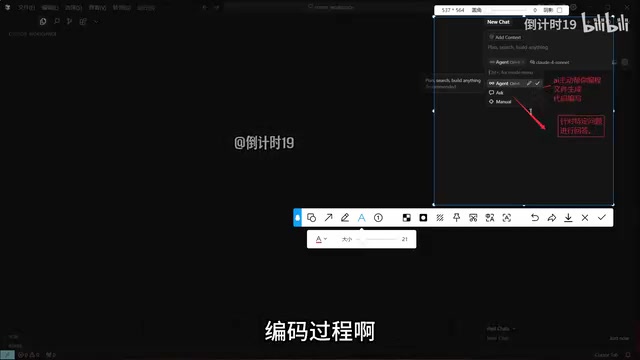
The real differentiator is the AI conversation panel on the right side. Mastering this panel is essentially mastering Cursor, because the vast majority of content in the left-side directory is automatically generated through AI conversations.
One important note: Cursor requires account registration before use. This is the first hurdle, though the registration process itself is straightforward.
Cursor's Three Conversation Modes Explained: Agent, Ask, and Manual
Before getting hands-on, understanding Cursor's three conversation modes is crucial—they determine what role the AI plays in your coding process.
Agent Mode: Let AI Take Over Coding
Agent mode is the most aggressive and most powerful mode. In this mode, the AI proactively handles file generation and code writing for you. You simply describe your requirements, and the AI takes care of everything else—creating directories, writing code, installing dependencies, and running services. If your goal is to have the AI directly produce a runnable project, choose Agent mode.
Behind the scenes, Agent mode employs an AI Agent (intelligent agent) architecture, which is a cutting-edge paradigm in AI applications. Unlike traditional single-turn Q&A, an Agent possesses three core capabilities: Planning, Tool Use, and Memory. In Cursor's Agent mode, the AI first breaks down user requirements into multiple subtasks, then sequentially invokes tools like file creation, code writing, and terminal command execution to complete them, dynamically adjusting its strategy based on feedback (such as error messages) during execution. This "think-act-observe" loop mechanism enables the AI to autonomously complete end-to-end project construction much like a junior developer would.
Ask Mode: Targeted Technical Q&A
Ask mode is more restrained. It only answers the specific questions you raise and won't proactively create numerous files or take over your coding workflow. When you just want to consult on technical solutions or understand a concept without having the AI make unauthorized changes to your project, Ask is the better choice.
Manual Mode: Developer in Full Control
Manual mode hands coding control entirely back to the developer, with the AI only providing reference suggestions. This is suited for experienced developers who want to control every line of code and treat the AI purely as an advisory resource.
Simple summary: Use Agent when you want AI to write code directly, Ask when you want to ask questions, and Manual when you want to stay in control.
Model Selection: Why Claude Is Recommended for Code Generation
In the model selection area of the conversation panel, Cursor offers multiple large models, including both free and premium paid options.
For projects intended for real production use, the recommendation is clear: prioritize Claude models. Claude is a large language model series developed by Anthropic, and its leading position in code generation has been validated across multiple authoritative benchmarks. In evaluations such as SWE-bench (a benchmark assessing AI's ability to autonomously fix real GitHub Issues) and HumanEval (a code generation correctness test), Claude 3.5 Sonnet and Claude 4 series models consistently rank among the top. Claude's advantages are evident in several areas: its longer context window (supporting up to 200K tokens) enables it to understand the complete codebase of large projects; its excellent instruction-following capability ensures generated code adheres to specific framework and specification requirements; and Anthropic's meticulous handling of code data during training gives the model outstanding performance in understanding complex dependency relationships and API usage. By comparison, models like GPT-4o excel in general conversation but fall slightly behind in code generation accuracy and consistency.
The rationale is that Claude currently delivers the best performance in code generation, and relative to a project destined for actual production, the API call costs are virtually negligible.
Here's a practical rule of thumb: if you're just using Ask mode for Q&A, feel free to switch between various models; but whenever actual code generation is involved, prioritize Claude series models to ensure output quality.
Hands-On Demo: Building a Python Student Management System from Scratch with Cursor
Now comes the part that best demonstrates Cursor's value—building a student management system from scratch, from a complete beginner's perspective.
Step 1: Use Ask Mode to Have AI Recommend a Tech Stack
First, use Ask mode to ask: "I want to develop a student management system using Python. Help me recommend a tech stack." Claude immediately provided framework suggestions. After clarifying that this is a small-scale project, the AI quickly generated a tailored technical solution.
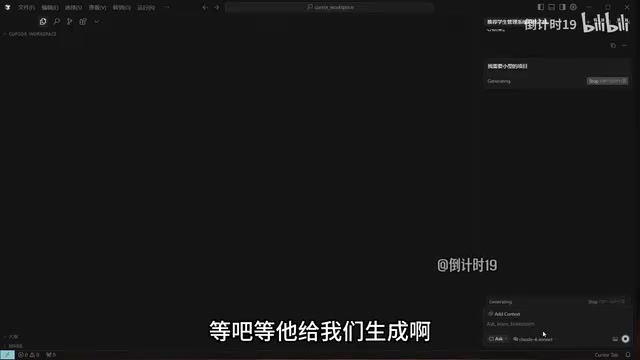
It's worth explaining the concept of a "tech stack" here. A tech stack refers to the complete set of technology components needed to build a software project, typically including layers such as programming language, web framework, database, frontend technology, and deployment tools. For small Python web projects, AI typically recommends a combination of Flask or FastAPI as the backend framework, SQLite as the database, and Jinja2 as the template engine. The rationale behind these choices: Flask is the most lightweight web framework in the Python ecosystem, with a gentle learning curve and suitability for small applications; SQLite is an embedded database that requires no additional service processes, stores data as a single file, and greatly simplifies development and deployment; and Jinja2 is Flask's built-in template engine for conveniently rendering HTML pages. If the project scales up to a medium or large application, the AI might instead recommend Django (a more full-featured framework), PostgreSQL (a relational database supporting high concurrency), and a frontend-backend separated architecture.
The significance of this step is that even if you have no idea which framework or database to use, the AI can provide sensible architectural recommendations based on your project's scale.
Step 2: Switch to Agent Mode for Automatic Code Generation
Once the tech stack is decided, switch to Agent mode and let the AI start writing code. Cursor first plans the project structure, then builds it step by step through a series of commands. Several mechanisms during this process are worth noting:
- Auto-run: Cursor offers an option for whether commands execute automatically. With auto-run enabled, the AI automatically retries commands after errors without asking you each time, achieving truly hands-off operation.
- Change confirmation: Newly generated files are highlighted in yellow/red, asking whether you want to save them. You can approve them one by one or wait until everything is generated and save all at once.
Step 3: AI Automatically Fixes Dependency and Compatibility Issues
The most impressive aspect of the code generation process is the AI's automatic error-fixing capability. When version compatibility issues arose during dependency installation, Cursor directly identified the problem and reinstalled compatible versions.
Dependency management is one of the most common and frustrating problems in software development, particularly prominent in the Python ecosystem. Python packages are installed via the pip tool from the PyPI (Python Package Index) repository, and each package may depend on specific version ranges of other packages. When multiple packages have conflicting version requirements for the same dependency, you encounter so-called "Dependency Hell." For example, Package A requires numpy>=1.20 but <2.0, while Package B requires numpy>=2.0—the two cannot coexist. The traditional solution requires developers to manually consult compatibility matrices and adjust version numbers one by one, a time-consuming process that demands experience. Cursor's Agent mode can parse error messages from terminal output, identify the root cause of version conflicts, and automatically attempt to install compatible versions, compressing what could be hours of troubleshooting into just a few seconds.
This kind of compatibility issue might take an experienced developer half an hour to resolve, and an inexperienced one might not figure it out even after two hours—yet the AI pinpointed and solved it instantly. This is the substantive productivity boost that AI programming tools deliver.
Step 4: Launch and Feature Verification
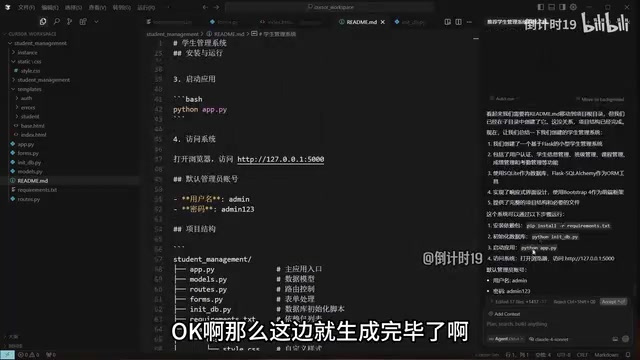
After the project was complete, the AI generated a startup script, documentation, and initialized the database. The service ultimately started at 127.0.0.1:5000. After copying the address into a browser, a student management system with login functionality appeared on screen.
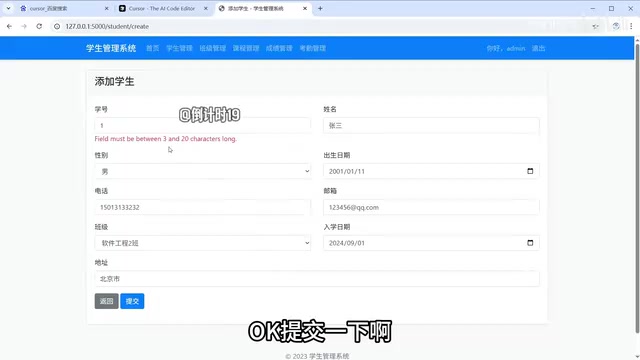
After logging into the system, basic functions like adding students, modifying information, and deleting records all worked properly. The demo also exposed a real-world scenario: a NotFound error appeared when trying to add grades.
The Capability Boundaries of AI Programming Tools
The error above isn't a bug—it's because that feature hasn't been implemented yet. The AI clearly stated from the beginning which features were implemented and which were pending. In the demo, only the core student management module was implemented; other features were deferred due to time constraints.
This reveals an important boundary of AI programming tools: they only complete what you explicitly request. To fill in all the features, you just need to describe the complete requirements to the AI and wait for it to implement them one by one—though this might require thirty minutes to an hour of generation time.
There's also an easily overlooked prerequisite: the entire demo was conducted in a pre-configured Python environment. If you want to reproduce it, you must first install the corresponding runtime environment and database. In particular, if you choose MySQL instead of SQLite, you'll need to install the MySQL environment yourself.
Although both SQLite and MySQL are relational databases, their architectural philosophies are fundamentally different. SQLite is an embedded database that links to the application as a library, stores data in a single local file, requires no independent database service process, and is ideal for development testing, mobile applications, and small web projects. MySQL is a client-server architecture database management system that requires independent installation and running of a database service, supports multi-user concurrent access, transaction processing, master-slave replication, and other enterprise-grade features, making it suitable for medium to large production environments. In a Cursor-generated project, choosing SQLite means zero-configuration operation, while switching to MySQL requires additional steps like installing MySQL Server, creating databases and users, and configuring connection parameters—environmental preparation work that falls outside the scope of AI code generation capabilities.
AI can write code, but you still need to prepare the underlying runtime environment yourself.
Summary: How to Properly Use Cursor to Boost Development Efficiency
Cursor combined with Claude models can genuinely lower the barrier to programming significantly. From recommending tech stacks, generating complete projects, and automatically fixing errors to launching and running services, AI covers the vast majority of steps in the development process. For programming beginners, it's a powerful tool for quickly turning ideas into runnable products; for experienced developers, it's an assistant that significantly boosts efficiency.
However, it's important to maintain a clear understanding: AI only does what you explicitly ask for, runtime environments still need to be configured by yourself, and complex features require step-by-step guidance. Treating Cursor as a powerful collaborative partner rather than a fully automated black box is the key to truly unlocking its value.
Related articles

JetBrains Open-Sources ThinkRail: A Visual AI Coding Workbench
JetBrains' open-source ThinkRail embeds an AI coding assistant into a visual dev environment with isolated workspaces, side-by-side chat and code diffs, and requirements docs alongside code.

JetBrains Open-Sources ThinkRail: A Hands-On Review of the Pi-Based Agentic IDE
ThinkRail is an open-source agentic IDE from a JetBrains Innovation Hub collaboration, built on Pi with spec-driven development and parallel multi-branch workspaces.

Anthropic IPO Revealed: The Truth Behind the $80 Billion Loss and a Trillion-Dollar Valuation
Breaking down Anthropic's IPO filing: of the $80.7B six-month loss, about $72B comes from convertible note fair-value changes, not cash outflow; revenue grew about 14x in a year, valuation may reach $2T, but founders and a trust retain control, with about $417B in compute commitments.